


 为了提高编辑器的安全性,文章详细介绍了如何在ueditor.config.js中设置XSS过滤白名单,特别是增加了对img,source,embed和iframe标签的属性过滤,如src,width,height等,同时修改ueditor.all.min.js以支持embed并注释掉不必要的部分,确保内容加载和播放的安全性。
首先在ueditor.config.js文件里增加xss过滤白名单:
img: ['src', 'alt', 'title', 'width', 'height', 'id', '_src', '_url','loadingclass', 'class', 'data-latex'],
source: ['src', 'type'],
embed: ['type', 'class', 'pluginspage', 'src', 'width', 'height', 'align', 'style', 'wmode', 'play','autoplay','loop', 'menu', 'allowscriptaccess', 'allowfullscreen', 'controls', 'preload'],
iframe: ['src', 'class', 'height', 'width', 'max-width', 'max-height', 'align', 'frameborder', 'allowfullscreen']
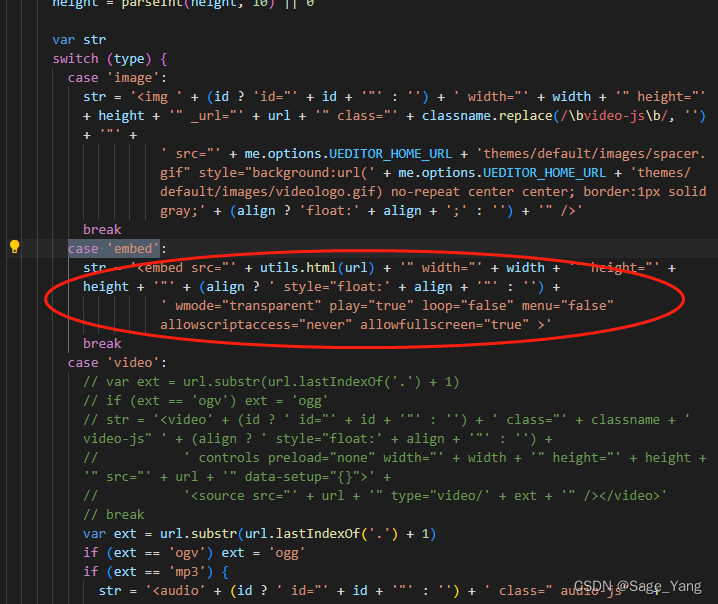
修改ueditor.all.min.js的中image改成embed
再注释删掉
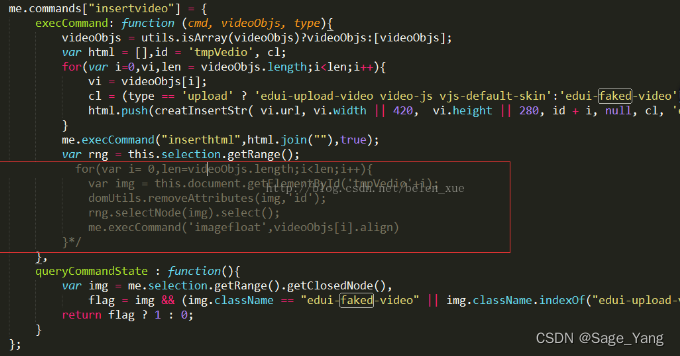
再修改成下面的位置





 扫一扫
扫一扫


 1243
1243


 到【灌水乐园】发言



