



 该博客聚焦于Android开发中Service相关内容。介绍了创建Service的步骤,包括定义类继承Service、重写onBind方法、在清单文件注册。还阐述了Service的生命周期,涵盖启动和绑定两种方式下各阶段方法的调用顺序。
服务(Service)
介绍
	Service,服务,是四大组件之一, 和Activity 非常相似,
	 一般运行在后台, 没有用户界面, 可执行的程序例如
	 后台下载、后台播放音乐、后台操作数据库等等
	Service : 后台运行, 没有界面
	service在后台运行,不用与用户进行交互。即使应用退出,服务也不会停止。
    当应用进程被杀死时,服务便会停止
创建service
1, 定义一个类, 继承Service
2, 重写父类的方法, onBind() — 必须重写的方法
3, 在清单文件中, 注册Service
service生命周期
启动方式:onCreate() — onStartCommand() — onDestroy()
绑定方式:onCreate() – onBind() — onUnbind() — onDestroy()
清单文件
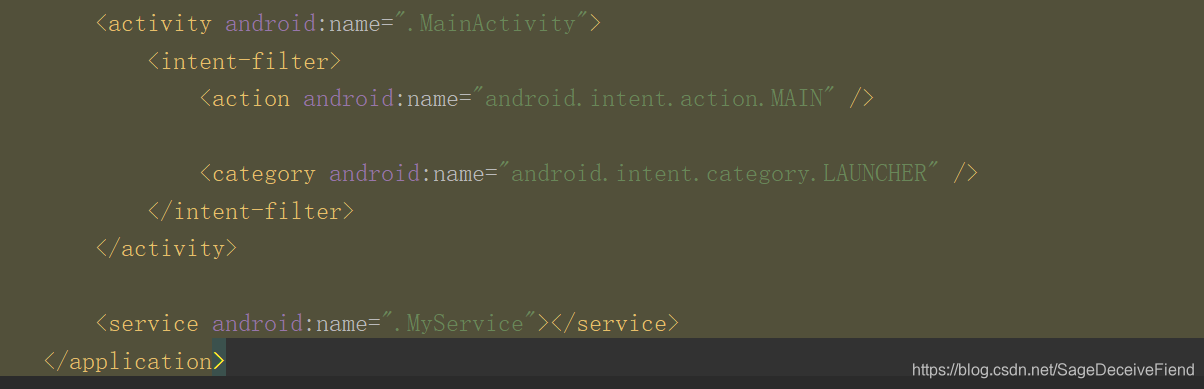
MyService类
import android.app.Service;
import android.content.Intent;
import android.graphics.Bitmap;
import android.os.Binder;
import android.os.IBinder;
import java.util.concurrent.ExecutionException;

public class MyService extends Service {
    String str = "http://www.qubaobei.com/ios/cf/dish_list.php?stage_id=1&limit=10&page=1";


    @Override
    public IBinder onBind(Intent intent) {
        // TODO: Return the communication channel to the service.
        return new MyBiner();
    }

    public Bitmap getHttpjson() {

        try {
            Bitmap bitmap = new MyAsyncTask().execute("http://www.qubaobei.com/ios/cf/uploadfile/132/9/8289.jpg").get();
            return bitmap;
        } catch (ExecutionException e) {
            e.printStackTrace();
        } catch (InterruptedException e) {
            e.printStackTrace();
        }
        return null;
    }

    class MyBiner extends Binder {
        public MyService getserver() {

            return MyService.this;
        }
    }
}
Activity类
import android.app.Service;
import android.content.ComponentName;
import android.content.Intent;
import android.content.ServiceConnection;
import android.os.IBinder;
import android.support.v7.app.AppCompatActivity;
import android.os.Bundle;
import android.view.View;
import android.widget.ImageView;

public class MainActivity extends AppCompatActivity {
    Intent intent;

    MyService myService;
    ServiceConnection connection=new ServiceConnection() {
        @Override
        public void onServiceConnected(ComponentName name, IBinder service) {
            myService=((MyService.MyBiner)service).getserver();
        }

        @Override
        public void onServiceDisconnected(ComponentName name) {

        }
    };
    @Override
    protected void onCreate(Bundle savedInstanceState) {
        super.onCreate(savedInstanceState);
        setContentView(R.layout.activity_main);

      intent = new Intent(this, MyService.class);
        bindService(intent,connection, Service.BIND_AUTO_CREATE);
    }

    public void dianji(View view) {
        ImageView imageView=findViewById(R.id.img);

        imageView.setImageBitmap(myService.getHttpjson());
    }

    @Override
    protected void onDestroy() {
        super.onDestroy();
        unbindService(connection);
    }





 扫一扫
扫一扫


 被折叠的 条评论
为什么被折叠?
被折叠的 条评论
为什么被折叠?
 到【灌水乐园】发言





