


前言:因为一个项目需要 前端需要实现在内网并且是国产的银河麒麟系统的机器上实现摄像头实时播放,踩了许多坑,这里总结一下
首先关于直播流格式 分为h264 和 h265,h265相较于h264更加安全,但是市面很多播放器需要额外转码或者根本不支持h265(例如:flv.js)
先说结论:可以使用的是jessibuca.js 官网http://jessibuca.monibuca.com/api.html
我尝试了很多播放器 西瓜播放器、bili播放器、livePlayer等 本地和测试都可以播放 但是一但部署到正式麒麟银河系统之后统统不行 (原因是浏览器版本问题 内网的浏览器版本太低)
第一步
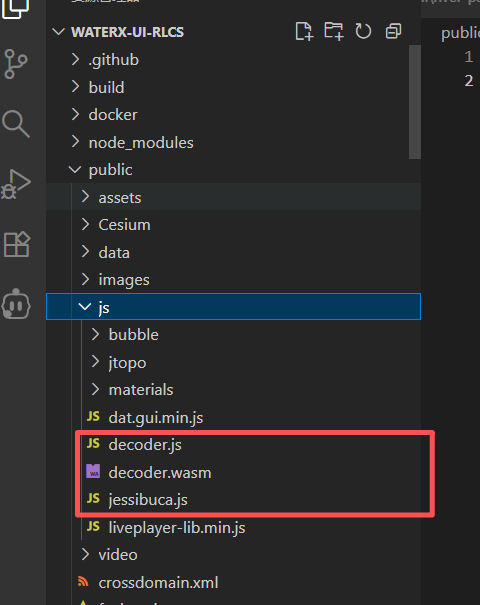
先去官网下载你对应的 jessibuca demo 咱们需要里面的 decoder.js decoder.wasm jessibuca.js
放到public下
第二步
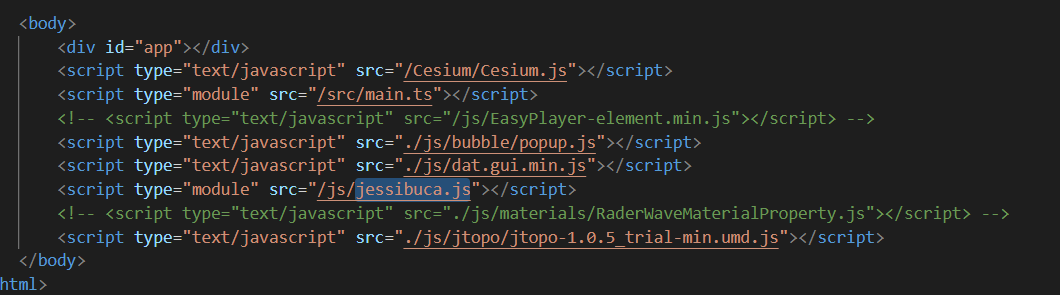
在入口文件 index.html 引入 jessibuca.js
第三步 封装视频组件
注意:decoder:'/waterx-rlcs/js/decoder.js', 必须对应你项目打包之后的路径 不然正式环境会报错
<template>
  <div class="video-bounce relative">
    <div class="video" ref="vBox"></div>
    <div v-if="fail === true" class="error-box absolute flex flex-col items-center justify-center">
      <div class="text">播放失败</div>
    </div>
  </div>
</template>

<script setup>
import { ref, watch, onMounted, onUnmounted, defineProps, defineEmits } from "vue"; // 新增:导入 defineProps/defineEmits

// ========== 核心改动1:定义 Props(替换 Vuex 的 store.name/store.url) ==========
const props = defineProps({
  // FLV 流地址(对应原 store.url)
  url: {
    type: String,
    required: true // 流地址为必填项
  }
});

// ========== 核心改动2:定义 emit 事件(替换原 store.vHide() 的关闭逻辑) ==========
// 父组件可通过 @hide-video 监听关闭事件,自行处理隐藏逻辑
const emit = defineEmits(['hide-video']);

// 原有状态变量保留
const play = ref(true);
const fail = ref(false);
const vBox = ref(null);
const jessibuca = ref(null);

// 初始化播放器(替换:使用 props.url 而非 store.url)
const initPlayer = () => {
  // 销毁旧实例(防止重复创建)
  if (jessibuca.value) {
    jessibuca.value.destroy();
  }

  jessibuca.value = new window.Jessibuca({
    container: vBox.value,
    videoBuffer: 0, // 缓存时长
    isResize: false,
    decoder:'/waterx-rlcs/js/decoder.js',
    useWCS: false,
    useMSE: true,
    text: '',
    loadingText: '',
    debug: false,
    supportDblclickFullscreen: true,
    showBandwidth: false, // 显示网速
    operateBtns: {
      fullscreen: false,
      screenshot: false,
      play: false,
      audio: false,
    },
    forceNoOffscreen: true,
    isNotMute: true,
    timeout: 10,
  });

  // 视频播放:使用 Props 传入的 url
  jessibuca.value.play(props.url);

  // 当解析出视频信息时回调
  jessibuca.value.on('videoInfo', () => {
    play.value = false;
    fail.value = false;
  });

  // 触发播放失败事件
  jessibuca.value.on('error', () => {
    play.value = false;
    fail.value = true;
  });
};

// 销毁播放器(原有逻辑保留)
const destroyPlayer = () => {
  if (jessibuca.value) {
    jessibuca.value.destroy();
    jessibuca.value = null;
  }
};

// 生命周期(原有逻辑保留)
onMounted(() => {
  initPlayer();
});

onUnmounted(() => {
  destroyPlayer();
});

// ========== 核心改动3:关闭视频逻辑(替换原 store.vHide()) ==========
const hideVideo = () => {
  // 向父组件发送关闭事件,由父组件处理隐藏逻辑
  emit('hide-video');
};

// ========== 核心改动4:监听 Props 的 url 变化(替换监听 store.url) ==========
watch(
  () => props.url, // 监听 Props 中的 url 变化
  (newUrl, oldUrl) => {
    if (newUrl !== oldUrl && newUrl) {
      play.value = true;
      fail.value = false;
      initPlayer(); // 重新初始化播放器
    }
  },
  { immediate: false } // 仅当 url 主动变化时触发,初始化由 onMounted 处理
);

// 全屏逻辑(原有逻辑保留)
const requestFull = () => {
  if (vBox.value) {
    vBox.value.requestFullscreen().catch(err => {
      console.warn('全屏失败:', err);
    });
  }
};
</script>

<style lang="scss" scoped>
.video-bounce {
  position: fixed;
  left: 0;
  right: 0;
  top: 0;
  bottom: 0;
  margin: auto;
  width: 100%;
  height: 100%;
  z-index: 999;
  position: relative;


  .close {
    width: 34px;
    height: 34px;
    position: absolute;
    right: 44px;
    top: 14px;
    cursor: pointer;
  }

  .video {
    width: 100%;
    height: 100%;
    margin: auto;
    margin-top: 10px;
  }

  .loading {
    width: 100px;
    height: 100px;
    left: 0;
    right: 0;
    bottom: 0;
    top: -20px;
    margin: auto;
    animation: play 2s linear infinite;
  }

  @keyframes play {
    from {
      transform: rotate(0);
    }

    to {
      transform: rotate(360deg);
    }
  }

  .error-box {
    left: 0;
    right: 0;
    bottom: 0;
    top: -30px;
    margin: auto;
    width: 200px;
    height: 200px;

    img {
      width: 100px;
      height: 100px;
    }
  }

  .enlarge {
    width: 50px;
    height: 50px;
    position: absolute;
    right: 110px;
    top: 7px;
    cursor: pointer;
  }

  :deep(.jessibuca-loading) {
    display: none !important;
  }
}
</style>
第四步:父组件使用
<div style="height: 350px;">
<VideoPlay :autoPlay="true" ref="playerRef" :url="url" class="player-wapper h-[24vh]" />
</div>





 扫一扫
扫一扫


 6293
6293

 被折叠的 条评论
为什么被折叠?
被折叠的 条评论
为什么被折叠?
 到【灌水乐园】发言





