六、Spring Security认证和授权-实现自定义短信验证码登陆功能

本文介绍了如何在Spring Security中实现自定义的短信验证码登录功能,包括短信验证码的生成、发送、存储和验证流程,以及自定义拦截器实现登录认证。通过短信验证码登录,增强了用户认证的安全性。

一、图片验证码验证流程回顾

上期已经实现了图片验证码的功能,我们来回顾一下大概流程:
1、 客户端生成一个唯一标识,然后发起图片验证码请求,请求路径中携带这个唯一标识,例如:http://localhost:8066/auth/code/image/039988e0-1994-11eb-8a54-abdddf75aa45
2、 服务端接收到获取验证码请求,读取请求路径中的唯一标识(例如:039988e0-1994-11eb-8a54-abdddf75aa45);生成4位随机数作为验证码,合成验证码图片(创建验证码);使用Redis存储验证码,唯一标识为key,验证码为value(存储验证码);将验证码图片返回给客户端(发送验证码);
3、 用户填写登录信息和验证码信息,提交登录表单,携带唯一标识。
4、 服务端拦截器拦截登录请求,获取唯一标识;读取Redis中的数据与用户输入的验证码比较,相同则放行,不同则抛出异常,用户登录失败;
5、 验证码校验通过后进入Spring Security拦截器,执行表单登录认证流程。

二、短信验证码实现与原理分析
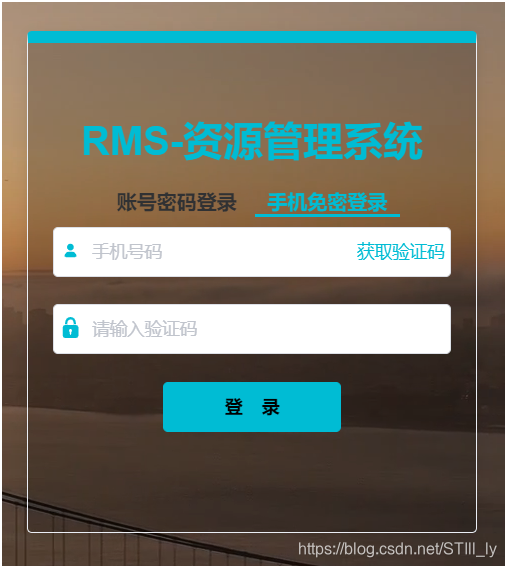
在这里插入图片描述
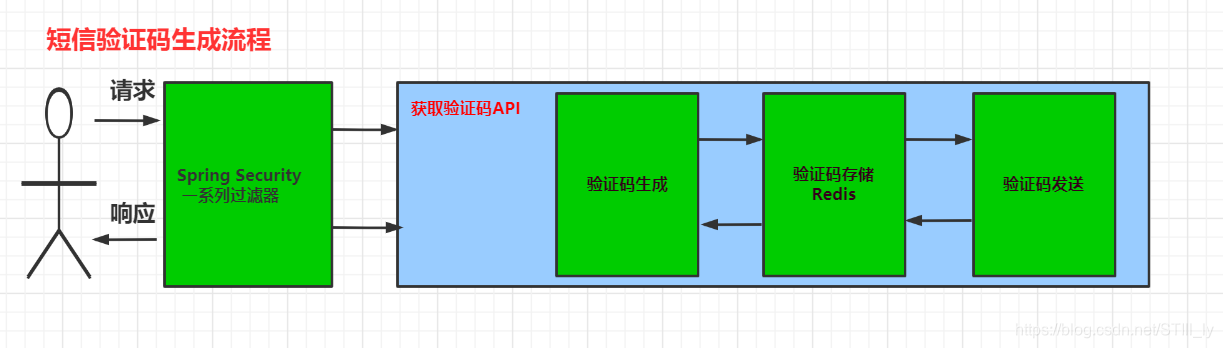
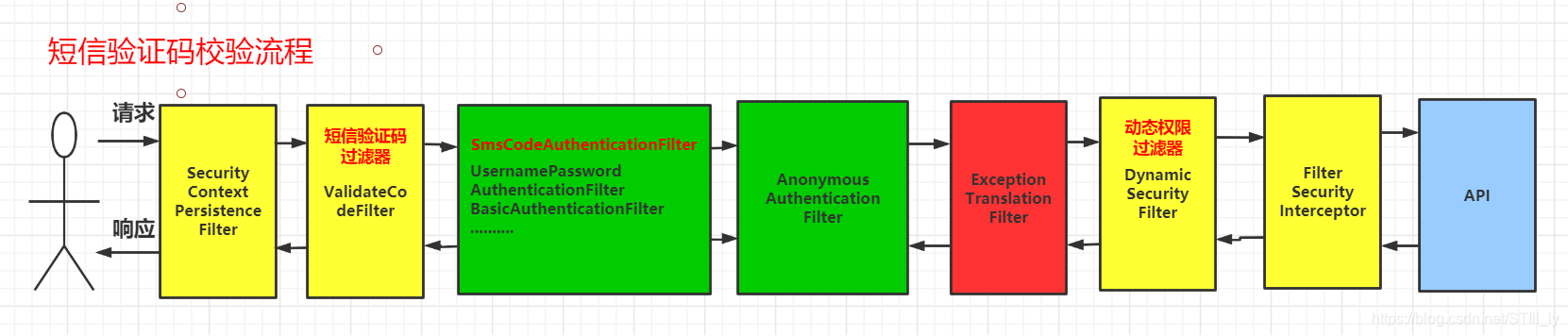
今天我们要实现短信登录功能,大概流程和图片验证码类似:
在这里插入图片描述
在这里插入图片描述

1、 客户端生成一个唯一标识,用户输入手机号码,然后发起获取短信验证码请求,请求路径中携带

实现自定义短信验证码登录,可以按照以下步骤进行: 1. 添加依赖 在项目中添加 Spring Security Spring Security SMS 模块的依赖。 ``` <dependency> <groupId>org.springframework.security</groupId> <artifactId>spring-security-core</artifactId> <version>5.2.2.RELEASE</version> </dependency> <dependency> <groupId>com.github.lanceshohara</groupId> <artifactId>spring-security-sms</artifactId> <version>1.0.2</version> </dependency> ``` 2. 配置 Spring SecuritySpring Security 配置文件中添加配置,包括短信验证码登录相关的配置。 ``` @Configuration @EnableWebSecurity public class SecurityConfig extends WebSecurityConfigurerAdapter { @Autowired private UserDetailsService userDetailsService; @Autowired private SmsCodeAuthenticationSecurityConfig smsCodeAuthenticationSecurityConfig; @Override protected void configure(HttpSecurity http) throws Exception { http .authorizeRequests() .antMatchers("/login/sms").permitAll() .anyRequest().authenticated() .and() .apply(smsCodeAuthenticationSecurityConfig) .and() .formLogin() .loginPage("/login") .loginProcessingUrl("/login/form") .usernameParameter("username") .passwordParameter("password") .defaultSuccessUrl("/") .permitAll() .and() .logout() .logoutUrl("/logout") .logoutSuccessUrl("/") .permitAll(); } @Override protected void configure(AuthenticationManagerBuilder auth) throws Exception { auth.userDetailsService(userDetailsService); } @Bean public PasswordEncoder passwordEncoder() { return new BCryptPasswordEncoder(); } } ``` 其中,`SmsCodeAuthenticationSecurityConfig` 是短信验证码登录的相关配置类,需要单独实现。 3. 实现短信验证码登录相关配置 实现 `SmsCodeAuthenticationSecurityConfig` 配置类,其中包括一个短信验证码过滤器一个短信验证码认证提供者。 ``` @Configuration public class SmsCodeAuthenticationSecurityConfig extends SecurityConfigurerAdapter<DefaultSecurityFilterChain, HttpSecurity> { @Autowired private UserDetailsService userDetailsService; @Autowired private SmsCodeAuthenticationSuccessHandler smsCodeAuthenticationSuccessHandler; @Autowired private SmsCodeAuthenticationFailureHandler smsCodeAuthenticationFailureHandler; @Override public void configure(HttpSecurity http) throws Exception { SmsCodeAuthenticationFilter smsCodeAuthenticationFilter = new SmsCodeAuthenticationFilter(); smsCodeAuthenticationFilter.setAuthenticationManager(http.getSharedObject(AuthenticationManager.class)); smsCodeAuthenticationFilter.setAuthenticationSuccessHandler(smsCodeAuthenticationSuccessHandler); smsCodeAuthenticationFilter.setAuthenticationFailureHandler(smsCodeAuthenticationFailureHandler); SmsCodeAuthenticationProvider smsCodeAuthenticationProvider = new SmsCodeAuthenticationProvider(); smsCodeAuthenticationProvider.setUserDetailsService(userDetailsService); http.authenticationProvider(smsCodeAuthenticationProvider) .addFilterAfter(smsCodeAuthenticationFilter, UsernamePasswordAuthenticationFilter.class); } } ``` 其中,`SmsCodeAuthenticationFilter` 是短信验证码过滤器,需要单独实现。`SmsCodeAuthenticationSuccessHandler` `SmsCodeAuthenticationFailureHandler` 分别是短信验证码认证成功失败的处理器,也需要单独实现。 4. 实现短信验证码过滤器 实现 `SmsCodeAuthenticationFilter` 过滤器,重写 `attemptAuthentication` 方法,来处理短信验证码认证请求。 ``` public class SmsCodeAuthenticationFilter extends AbstractAuthenticationProcessingFilter { public static final String SPRING_SECURITY_FORM_MOBILE_KEY = "mobile"; public static final String SPRING_SECURITY_FORM_CODE_KEY = "code"; private String mobileParameter = SPRING_SECURITY_FORM_MOBILE_KEY; private String codeParameter = SPRING_SECURITY_FORM_CODE_KEY; private boolean postOnly = true; public SmsCodeAuthenticationFilter() { super(new AntPathRequestMatcher("/login/sms", "POST")); } @Override public Authentication attemptAuthentication(HttpServletRequest request, HttpServletResponse response) throws AuthenticationException, IOException, ServletException { if (postOnly && !request.getMethod().equals("POST")) { throw new AuthenticationServiceException("Authentication method not supported: " + request.getMethod()); } String mobile = obtainMobile(request); String code = obtainCode(request); if (mobile == null) { mobile = ""; } if (code == null) { code = ""; } mobile = mobile.trim(); SmsCodeAuthenticationToken authRequest = new SmsCodeAuthenticationToken(mobile, code); setDetails(request, authRequest); return this.getAuthenticationManager().authenticate(authRequest); } protected String obtainMobile(HttpServletRequest request) { return request.getParameter(mobileParameter); } protected String obtainCode(HttpServletRequest request) { return request.getParameter(codeParameter); } protected void setDetails(HttpServletRequest request, SmsCodeAuthenticationToken authRequest) { authRequest.setDetails(authenticationDetailsSource.buildDetails(request)); } public void setMobileParameter(String mobileParameter) { this.mobileParameter = mobileParameter; } public void setCodeParameter(String codeParameter) { this.codeParameter = codeParameter; } public void setPostOnly(boolean postOnly) { this.postOnly = postOnly; } public final String getMobileParameter() { return mobileParameter; } public final String getCodeParameter() { return codeParameter; } } ``` 其中,`SmsCodeAuthenticationToken` 是短信验证码认证的 token 类型,需要单独实现。 5. 实现短信验证码认证提供者 实现 `SmsCodeAuthenticationProvider` 提供者,重写 `authenticate` 方法,来进行短信验证码认证。 ``` public class SmsCodeAuthenticationProvider implements AuthenticationProvider { private UserDetailsService userDetailsService; @Override public Authentication authenticate(Authentication authentication) throws AuthenticationException { SmsCodeAuthenticationToken authenticationToken = (SmsCodeAuthenticationToken) authentication; UserDetails userDetails = userDetailsService.loadUserByUsername((String) authenticationToken.getPrincipal()); SmsCodeAuthenticationToken authenticationResult = new SmsCodeAuthenticationToken(userDetails.getUsername(), userDetails.getPassword(), userDetails.getAuthorities()); authenticationResult.setDetails(authenticationToken.getDetails()); return authenticationResult; } @Override public boolean supports(Class<?> authentication) { return SmsCodeAuthenticationToken.class.isAssignableFrom(authentication); } public UserDetailsService getUserDetailsService() { return userDetailsService; } public void setUserDetailsService(UserDetailsService userDetailsService) { this.userDetailsService = userDetailsService; } } ``` 6. 实现短信验证码认证成功失败的处理器 实现 `SmsCodeAuthenticationSuccessHandler` `SmsCodeAuthenticationFailureHandler` 处理器,来处理短信验证码认证成功失败的情况。 ``` public class SmsCodeAuthenticationSuccessHandler extends SavedRequestAwareAuthenticationSuccessHandler { @Override public void onAuthenticationSuccess(HttpServletRequest request, HttpServletResponse response, Authentication authentication) throws ServletException, IOException { super.onAuthenticationSuccess(request, response, authentication); } } ``` ``` public class SmsCodeAuthenticationFailureHandler extends SimpleUrlAuthenticationFailureHandler { @Override public void onAuthenticationFailure(HttpServletRequest request, HttpServletResponse response, AuthenticationException exception) throws IOException, ServletException { super.onAuthenticationFailure(request, response, exception); } } ``` 7. 编写控制器 编写控制器,处理短信验证码登录的请求。 ``` @Controller public class LoginController { private final static String SMS_LOGIN_PAGE = "sms-login"; @RequestMapping("/login/sms") public String smsLogin() { return SMS_LOGIN_PAGE; } @RequestMapping(value = "/login/sms", method = RequestMethod.POST) public void smsLogin(HttpServletRequest request, HttpServletResponse response) throws IOException, ServletException { String mobile = request.getParameter("mobile"); String code = request.getParameter("code"); SmsCodeAuthenticationToken token = new SmsCodeAuthenticationToken(mobile, code); AuthenticationManager authenticationManager = new ProviderManager(Collections.singletonList(new SmsCodeAuthenticationProvider())); Authentication authentication = authenticationManager.authenticate(token); SecurityContextHolder.getContext().setAuthentication(authentication); request.getRequestDispatcher("/").forward(request, response); } } ``` 其中,`SmsCodeAuthenticationToken` 是短信验证码认证的 token 类型,需要单独实现。 以上就是实现自定义短信验证码登录的步骤。
评论 1
成就一亿技术人!
拼手气红包6.0元
还能输入1000个字符
 
红包 添加红包
表情包 插入表情
 条评论被折叠 查看
添加红包

请填写红包祝福语或标题

红包个数最小为10个

红包金额最低5元

当前余额3.43前往充值 >
需支付:10.00
成就一亿技术人!
领取后你会自动成为博主和红包主的粉丝 规则
hope_wisdom
发出的红包
实付
使用余额支付
点击重新获取
扫码支付
钱包余额 0

抵扣说明:

1.余额是钱包充值的虚拟货币,按照1:1的比例进行支付金额的抵扣。
2.余额无法直接购买下载,可以购买VIP、付费专栏及课程。

余额充值