



1. 插入文档
// 单条插入
db.getCollection('blog').insertOne({'type': 'mongodb'})
// 批量 插入
db.getCollection('blog').insertMany([{'type': 'elasticsearch'}, {'type': 'clickhouse'}])
db.getCollection('blog').insertMany([{'type': 'elasticsearch'}, {'type': 'clickhouse'}])
2. 删除文档
// 查询插入的文档
db.getCollection('blog').find({})
结果为:
| _id | type |
|---|---|
| 62b6659b24530000f8005953 | elasticsearch |
| 62b6659b24530000f8005954 | clickhouse |
| 62b66751e94c000047004d72 | elasticsearch |
| 62b66751e94c000047004d73 | clickhouse |
| 62b6675ce94c000047004d74 | elasticsearch |
| 62b6675ce94c000047004d75 | clickhouse |
| 62b6675ce94c000047004d76 | mongodb |
// 删除一条记录
db.getCollection('blog').deleteOne({'_id': ObjectId('62b6659b24530000f8005953')})
// 删除多条记录
db.getCollection('blog').deleteMany({'type': 'clickhouse'})
3. 删除集合
# 删除集合中所有文档
db.getCollection('blog').deleteMany({})
# 直接删除集合
db.getCollection('blog').drop()
4. 更新文档
// 先插入文档
db.getCollection('users').insertMany([{'name': 'shenjian', 'age': 26}, {'name': 'shenjian', 'age': 28}, {'name': 'shenjian', 'age': 29}])
// 替换文档会替换文档整体结构
db.getCollection('users').replaceOne({'_id': ObjectId('62b66a1ae94c000047004d83')}, {'name': 'shenjian', 'age': 18})
// $set更新age email字段,其他字段不变
db.getCollection('users').update({'_id': ObjectId('62b66a1ae94c000047004d83')}, {$set: {'age': 26, 'email': []}})
// $set批量更新age字段,设置multi: true即可,默认更新单条
db.getCollection('users').update({'name': 'shenjian'}, {$set: {'age': 26}}, {multi: true})
// $inc自增自减,age加1
db.getCollection('users').update({'_id': ObjectId('62b66a1ae94c000047004d83')}, {$inc: {'age': 1}})
// 数组运算符$push添加元素
db.getCollection('users').updateOne({'_id': ObjectId('62b66a1ae94c000047004d83')}, {$push: {'comments': {'name': 'liutao', 'content': 'great'}}})
// 在$push时一次添加多个元素采用$each
db.getCollection('users').updateOne({'_id': ObjectId('62b66a1ae94c000047004d83')}, {$push: {'comments': {$each: [{'name': 'liuyan', 'content': 'great'}, {'name': 'liuyifei', 'content':'good'}]}}})
// 修改数组指定下标的好感度
db.getCollection('users').updateOne({'_id': ObjectId('62b66a1ae94c000047004d83')}, {$inc: {'comments.0.like': 100}})
// 修改数组指定用户的好感度,$为定位运算符,查询文档匹配的数据元素并更新
db.getCollection('users').updateOne({'comments.name': 'liuyifei'}, {$inc: {'comments.$.like': 100}})
// 使用数组过滤器进行更新
db.getCollection('users').updateOne({'_id': ObjectId('62b66a1ae94c000047004d83')}, {$set: {'comments.$[elem].status': 0}}, {arrayFilters: [{'elem.like': 100}]})
// 采用$addToSet避免数组中重复插入,执行多次该语句,邮箱也保持唯一
db.getCollection('users').updateOne({'_id': ObjectId('62b66a1ae94c000047004d83')}, {$addToSet: {'email': '1515345281@qq.com'}})
// 删除数组中指定内容
db.getCollection('users').updateOne({'_id': ObjectId('62b66a1ae94c000047004d83')}, {$pull: {'comments': {'name': 'liuyifei', 'content':'good'}}})
// 从数组队尾删除,若为-1则从队头删除
db.getCollection('users').updateOne({'_id': ObjectId('62b66a1ae94c000047004d83')}, {$pop: {'comments': 1}})
// $upset不存在则插入,存在则更新
db.getCollection('users').update({'name': 'shenjian'}, {$set: {'age': 27}}, {upsert: true})
// 在创建文档是设置字段值,后续不允许修改
db.getCollection('users').update({'name': 'china'}, {$setOnInsert: {'c_date': new Date()}}, {upsert: true})
// 查询并返回结果findOneAndUpdate
db.getCollection('users').findOneAndUpdate({'name': 'china'}, {$set: {'m_date': new Date()}})
// 查询并返回新结果findOneAndUpdate
db.getCollection('users').findOneAndUpdate({'name': 'china'}, {$set: {'m_date': new Date()}}, {returnNewDocument: 1})
5. 查询
5.1 find简介
// 查询所有文档
db.users.find({})
// 查询指定条件文档
db.users.find({'name': 'shenjian'})
// 查询指定字段,1查询键 0剔除键
db.users.find({'name': 'shenjian'}, {'name': 1, '_id': 0})
5.2 查询条件
// 范围查询$gte大于等于
db.users.find({'age': {$gte: 27, $lt: 50}})
// 等于$eq 不等于$ne
db.users.find({'age': {$ne: 27}})
// in查询 $in $nin
db.users.find({'name': {$in: ['shenjian', 'domi']}})
// 求余查询 取对26取余数为1的值,入age=27
db.users.find({'age': {$mod: [26, 1]}})
db.users.find({'age': {$not:  {$mod: [26, 1]}}})
5.3 特定类型查询
// 查询age为null或者不存在该字段的文档
db.users.find({'age': null})
// 仅查询存在字段age且值为null的文档
db.users.find({'age': {$eq: null, $exists: true}})
// 正则表达式
db.users.find({'name': {$regex: /shen*/}})
5.4 查询数组
db.food.insertMany([{'_id': 1, 'fruit': ['apple', 'banana', 'peach']},
{'_id': 2, 'fruit': ['apple', 'kumquat', 'orange']},
{'_id': 3, 'fruit': ['cherry', 'banana', 'apple']}])
// $all查询数组中同时包含apple、banana的文档
db.food.find({'fruit': {$all: ['apple', 'banana']}})
// 查询指定数组长度的文档
db.food.find({'fruit': {$size: 3}})
// 查询数组中前2条评论
db.users.find({}, {'comments': {$slice: 2}})
// 返回匹配的一个文档
db.users.find({'comments.name': 'liuyifei'}, {'comments.$': 1})
// 查询数组中指定条件的文档
db.users.find({'comments': {$elemMatch: {'name': 'liuyifei', 'like': 100}}})
// 限制返回数量
db.users.find({}).limit(1)
// 跳过文档
db.users.find({}).skip(1)
// 排序
db.users.find({}).sort({'age': 1})
// 或查询
db.seaweed.find({
    "cat": "district",
    "city": "上海",
    "region": "静安",
    "status": 0,
    $or: [
        { "name": { $eq: "场中小区" }},
        { "alias": { $elemMatch: { $eq: "场中路2107弄"}}}
    ]
})
6. 批量更新
6.1 python版
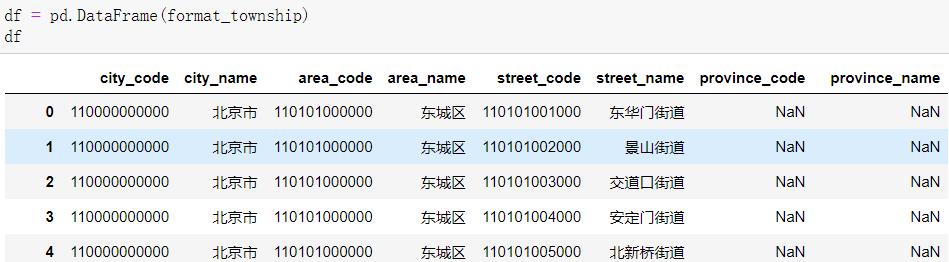
在实际的工作中,难免批量更新的数量极大,pymongo提供了便捷的客户端供使用
假设读者对pandas比较熟悉,下图为事先准备好的dataframe
import pandas as pd
from pymongo import MongoClient
from bson.codec_options import CodecOptions
from retry import retry
import pytz
from pymongo import UpdateOne


class MongoDbClient:
    def __init__(self, uri):
        self.mongoClient = MongoClient(uri)

    @retry(tries=3, delay=5)
    def get_collection(self, db, collection):
        return self.mongoClient.get_database(db).get_collection(collection) \
            .with_options(codec_options=CodecOptions(tz_aware=True, tzinfo=pytz.timezone('Asia/Shanghai')))

// 获取mongo客户端
MONGO_CLIENT = MongoDbClient("mongodb://username:password@127.0.0.1:27017/?connectTimeoutMS=60000"
                                  "&socketTimeoutMS=10000000")
// 获取具体的集合连接
township_mca_conn = MONGO_CLIENT.get_collection('study', 'township_mca')

actions = list()
count = 0
// UpdateOne更新, upsert=True表示文档不存在则进行插入
for index, item in df.iterrows():
    action = UpdateOne({'city_name': item['city_name'], 'area_name': item['area_name'], 'street_name': item['street_name']}, \
                             {'$set': {'city_code': item['city_code'], 'city_name': item['city_name'], 'area_code': item['area_code'], 'area_name': item['area_name'], \
                   'street_code': item['street_code'], 'street_name': item['street_name'], 'alias': []}}, upsert=True)
    actions.append(action)
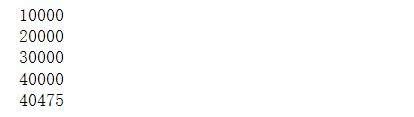
    if len(actions) == 10000:
        // 每10000批次进行批量插入
        township_mca_conn.bulk_write(actions)
        count += 10000
        print(count)
        actions.clear()
if len(actions) > 0:
    township_mca_conn.bulk_write(actions)
    count += len(actions)
    print(count)
    actions.clear()
6.2 Groovy版
Groovy作为脚本,比Java在数据处理中具有更高的灵活性
// 获取mongo连接略
....
	def count = 0
	for(Township town : townships) {
            Document updateBson = new Document()
            Document update = new Document()
            update.put("city", town.city)
            update.put("region", town.region)
            update.put("name", town.name)
            update.put("status", 1)
            updateBson.append('$set', update)

            Bson filterBson = Filters.eq("_id", new ObjectId(town.id))
            UpdateOptions updateOptions = new UpdateOptions();
            updateOptions.upsert(true)
            UpdateOneModel updateOneModel = new UpdateOneModel(filterBson, updateBson, updateOptions);
            writeModelList.add(updateOneModel)
            if (writeModelList.size() == 5000) {
                townshipConn.bulkWrite(writeModelList)
                count += 5000
                println(count)
                writeModelList.clear()
            }
        }
        if (writeModelList.size() > 0) {
            townshipConn.bulkWrite(writeModelList)
            writeModelList.clear()
        }
欢迎关注公众号算法小生或沈健的技术博客shenjian.online






 扫一扫
扫一扫


 255
255

 被折叠的 条评论
为什么被折叠?
被折叠的 条评论
为什么被折叠?
 到【灌水乐园】发言





