


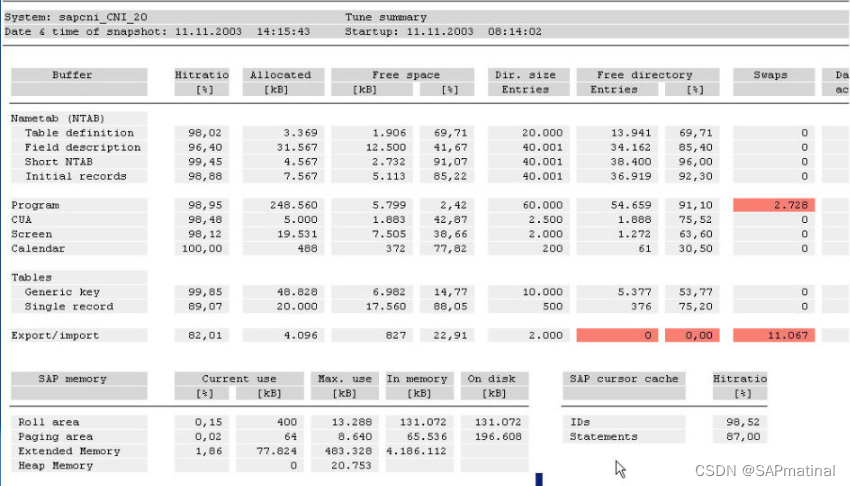
问:在st02中看到,Program和Export/Import的Swap出现红的了,这个是什么原因啊,是不是对系统的性能有影响啊,是否应该调整一些参数啊。要怎么调整呢?
复1:双击红色的部分就可以看到相应的参数修改提示啦~不过曾经有人告诉过我,只要Hitratio的数字是99点多,Swap是红色也没有什么关系,我也不知
道这样的说法是不是正确的,请各位高手指正!
复2:不是很正确:现在看起来Export/import的Buffer设置是偏小了,因为看起来系统启动了6个小时,Export/import的SWAP总数就超过1W了,远高于SAP推荐的警戒值1000/day
建议观察一段时间,如果的确是平均SWAP超过1000/day的话,还是调高一下Export/import buffer比较好。
复3:跟你说这话的人还是有点片面,我不敢苟同这种观点。
我刚做的一个项目,客户情况比较夸张,buffer参数完全没有调整,保持着安装完成的初始状态,整个系统SWAP情况极其严重,特别是Program buffer的SWAP平均超过100,000/day!但你看
Hitratior的话,可能觉得还好,也有97.8%。实际上呢,系统的Free物理内存还有超过600M,这种情况完全属于资源分配不合理;实际运用中他们在执行一些比较大的程序是,速度特别慢:因
为执行的过程中在拼命的SWAP,本来内存里能处理的东西被搞到SWAP里折腾,能不慢吗?
我认为只要有SWAP,你都应进行评估,要尽可能发挥系统最大的潜力。有一家公司的系统我特佩服,<31H的老系统了,用了n多年了(我刚做SAP的时候他们生产系统就已经运行了有1、2年
了),业务量也是巨大的(家用电器生产厂,PP、SD、FI、MM都在用),并发用户也是很多的,可是performance也是不错的,你看人家的SWAP,几乎总是为0(我是一次也没看到过在他们生产系统有SWAP),赞!
再罗嗦一句,Hitratior低也不能代表系统的Buffer没配好,比如说系统刚系统的一段时间里,你会看到Hitratior可能很低,这个很正常,以Program buffer为例:程序系统第一次启动后总归是不在Buffer里的,运行一次后才会在Buffer里,这也就是为什么系统刚启动的时候,SAP用起来好像比平时要慢对Buffer的评价,最好是长期观察、分析,这样的结果更有说服力。
复4:SWAP的单位一律为 “次”。 to:Aming,你们的Export/Import确实小了,10个小时下来都超过7W了,看看物理内存还空吧,如果空可以调一调看。
复5:hehe 这是德式数字你大概用SAP*看的,换个用户,把用户的default里面的数字表现方式改一下。另外关于SWAP的问题要分开来看,如果你只有一台应用服务器(例如CI+DB或者CI&DB),尤其是你们上了多个模块后,各种Buffer会很快的上涨,ABAP尤其如此,而且你会觉得是个无底洞,这是如果要追求好的performance,需要增加DI。另外建议你看看SAP library里关于Memory management的文档,里面描述SAP内存管理的模式,懂了模式才可以掌握如何调整它。
回复:
Good discuss but I still would like to ask Mr. Performance answer this kind of
question. Not because I do not know he need making money from this kind of task. I
do not recommend Jr. basis doing any performance tuning task before you understand
whole system technical architechture.
You should start from following oss note if you have no idea about Performance
optimums via memory mangement. It's really depends on the OS and DB and R3 release.
--------------------------------------------------------------------
OSS NOTE: 103747
Performance in 4.0/4.5/4.6: Parameter recommendations:
Performance in 4.0/4.5/4.6: Parameter recommendations Help
SAP Note Number Note Language DEENJA Display Versions 4950515253
Print SSCR Download
Text Header Data Release Correction Instructions Support Packages >>
Symptom
You want to set R/3 Memory Management. Only an optimum setting of the R/3 Memory
Management ensures error-free operation of the R/3 System and satisfactory system
performance.
After upgrading to R/3 Release 4.0, you notice long response times in the R/3 System.
Last changes:
03/11/1999: New recommendations for abap/heap_area_dia
11/23/1998: Release for customer (ts)
11/13/1998: Additions for AS/400 (rh)
11/17/1998: Revision prior to release for customers (ts)
11/18/1998: AS/400: Implementation of Note 126210 (rh)
01/28/2000: Note 192658: Parameters for SAP BW
02/02/2000: abap/heap_area... and Shared Memory Limit on SINIX
09/03/2000: Released for 4.6A/B
08/28/2000: AS/400: Including recommendations for Rel. 4.6 (rh)
10/26/2000: AS/400: New recommendations for em/initial_size_MB (<=4.5B)
03/06/2001: Shared Memory Management for S/390 Application Server
05/17/2001: Note on em/global_area_MB (-> Note 329021)
11/07/2001: Remove AS/400-specific notes (rh)
02/07/2002: Linux 2.4: Note 386605 for MM
Additional key words
Memory Management, EarlyWatch, GoingLive, Basis course BC315 "Workload Analysis",
Release 4.0
Cause and preconditions
This note is a collection of individual notes on Memory Management for Release 4.0.
The recommendations are intended as initial settings (that is, generally) before or
immediately after a release upgrade. After production start individual parameters
may have to be corrected and the actual requirements adapted.
This note is NOT valid for the IBM iSeries (AS/400) platform. The additional
features of this platform are described in other notes (see item 7 Additional notes).
In Note 192658 you can find additional recommendations for BW Systems.
Solution
***********************************************************************
* Support by TCC Services *
***********************************************************************
In order to ensure good performance after the upgrade, we recommend that you make
use of the TCC services, for example within the
 最低0.47元/天 解锁文章






 扫一扫
扫一扫


 1020
1020

 被折叠的 条评论
为什么被折叠?
被折叠的 条评论
为什么被折叠?
 到【灌水乐园】发言





