<template>
<div class="content">
<div class="breadcrumd header">
<BreadcrumbHeader>
<template #breadcrumb>
<el-breadcrumb-item v-if="!isEdit">
{{ $t('新增') }}
</el-breadcrumb-item>
<el-breadcrumb-item v-else>
{{ $t('编辑') }}
</el-breadcrumb-item>
</template>
<template #expand>
<div class="btn">
<el-button v-preventReClick @click="back">
{{ $t('Back') }}
</el-button>
<el-button v-preventReClick type="primary" @click="sure">
{{ $t('确定') }}
</el-button>
</div>
</template>
</BreadcrumbHeader>
</div>
<div class="context">
<MyCard
:title="
productCategory === 'opticalModule' ? $t('光模块组基础信息') : $t('产品模型基础信息')
"
>
<FormModel
ref="formModel"
:type="type"
:isEdit="isEdit"
:isClassify="true"
:needTitle="false"
:engineerProduct="true"
></FormModel>
</MyCard>
<MyCard :title="$t('配置列表')" class="list">
<el-row>
<el-col :span="8">
<el-input
v-if="isEdit && productCategory !== 'opticalModule'"
v-model.trim="condition"
clearable
class="config_input"
:placeholder="$t('搜索')"
@keyup.enter="enterSearch"
@clear="enterSearch"
>
<template #suffix>
<el-icon><Search /></el-icon>
</template>
</el-input>
</el-col>
<el-col :offset="12" :span="4" class="btn_col">
<el-button type="primary" style="margin-bottom: 12px" @click="addconfigData">
{{ $t('新增配置') }}
</el-button>
</el-col>
</el-row>
<DynamicTable
ref="configTable"
type="Virtual_Engineer_Product_Config"
:needIndex="true"
:tableData="configData"
:needExpand="true"
:needShowImg="['istatus']"
:imgAddress="imgAddress"
:formatDiction="['istatus', 'source']"
:dictionTypes="['Virtual_Engineer_Product_Config']"
:dynamicField="['config_name']"
:dynamicSlotName="['action']"
:toggleRow="expandChange"
>
<template #action="props">
<span
v-if="props.row.source_data === 'manual' || props.row.source === 'custom'"
class="action_btn"
@click="deleteConfigData(props.row)"
>
{{ $t('删除') }}
</span>
</template>
<template #expand="props">
<DynamicTable
ref="productTable"
:type="
productCategory === 'opticalModule'
? 'Virtual_Engineer_Optical_Module_Product_List'
: 'Virtual_Engineer_Product_List'
"
:needIndex="true"
:tableData="supplyData"
:parentData="props.row"
:needShowImg="['istatus']"
:imgAddress="imgAddress"
:formatDiction="['istatus', 'release_status']"
:dictionTypes="[
productCategory === 'opticalModule'
? 'Virtual_Engineer_Optical_Module_Product_List'
: 'Virtual_Engineer_Product_List',
]"
:dynamicField="['supply_product', 'count']"
:dynamicSlotName="['action']"
@productChange="productChange"
>
<template #action="scoped">
<span
v-if="parantData.source_data === 'manual' || parantData.source === 'custom'"
class="action_btn"
@click="deleteProductData(scoped.row)"
>
{{ $t('删除') }}
</span>
</template>
</DynamicTable>
<el-row v-if="showProductAdd" type="flex" justify="center" class="add_btn">
<el-col :span="24">
<div @click="addProductData">
<el-icon><Plus /></el-icon>
<span>{{ $t('新增产品') }}</span>
</div>
</el-col>
</el-row>
</template>
</DynamicTable>
</MyCard>
</div>
</div>
</template>
<script>
import BreadcrumbHeader from '@/components/BreadcrumbHeader';
import MyCard from '../components/MyCard.vue';
import DynamicTable from './engineerComponent/dynamicTable.vue';
import FormModel from './engineerComponent/normalForm.vue';
import {
getEngineerProductConfigAPI,
saveProductMappingConfigAPI,
saveOpticalModuleProductInfoAPI,
} from '@/apis/ptp.js';
import { Plus, Search } from '@element-plus/icons-vue';
import { each } from 'lodash';
import pinia from '@/store/pinia';
import { useProductMgmtStore } from '@/store/modules/productMgmt';
export default {
components: {
BreadcrumbHeader,
MyCard,
FormModel,
DynamicTable,
Plus,
Search,
},
setup() {
const productStore = useProductMgmtStore(pinia);
return {
productStore,
};
},
data() {
return {
type: '',
isEdit: true,
configData: [],
condition: '',
supplyData: [],
engineerProduct: '',
productCategory: '',
parantData: {},
showProductAdd: true,
imgAddress: {
'istatus': {
Y: new URL('../images/Status/completed.png', import.meta.url).href,
N: new URL('../images/Status/offline.png', import.meta.url).href,
},
},
};
},
created() {
this.isEdit = this.$route.query.id ? true : false;
this.type = this.$route.query.type;
this.productCategory = this.$route.query.productCategory;
if (this.isEdit) {
this.engineerProduct = this.$route.query.engineerProduct;
this.getConfigTableData();
}
this.productStore.setResetPage(false);
},
methods: {
enterSearch() {
this.getConfigTableData();
},
addconfigData() {
let index = this.$refs.configTable.dynamicIndex;
this.configData.push({
dynamicIndex: index + 1,
source: 'custom',
'source_data': 'manual',
version: 1,
istatus: 'Y',
});
},
getConfigTableData() {
let { engineerProduct, condition } = this;
let params = {
engineerProduct,
condition,
};
getEngineerProductConfigAPI({ params })
.then(res => {
if (res.success) {
this.configData = res.data;
}
})
.catch(() => {
// catch空值
});
},
deleteConfigData(row) {
this.$confirm(this.$t('确认删除'), this.$t('提示'), {
confirmButtonText: this.$t('确定'),
cancelButtonText: this.$t('取消'),
type: 'warning',
})
.then(() => {
let tableData = this.configData.filter(v => v.dynamicIndex !== row.dynamicIndex);
this.configData = tableData;
})
.catch(() => {
// catch空值
});
},
deleteProductData(row) {
for (let i = 0; i < this.supplyData.length; i++) {
if (this.supplyData[i].dynamicIndex === row.dynamicIndex) {
this.supplyData.splice(i, 1);
return;
}
}
},
productChange(key, row) {
each(this.supplyData, v => {
if (key.value === v.supply_product && v.dynamicIndex !== row.dynamicIndex) {
this.$message.error(this.applyLang('供应产品名称重复', 'Duplicate supply product name.'));
row['supply_product'] = '';
return;
}
if (v.dynamicIndex === row.dynamicIndex) {
v.istatus = key.status;
v.comments = key.comments;
v['release_status'] = key.releaseStatus;
}
});
},
expandChange(row) {
this.parantData = row;
if ((row.source_data && row.source_data === 'manual') || row.source === 'custom') {
this.showProductAdd = true;
} else {
this.showProductAdd = false;
}
if (row.mapping_product_list) {
this.supplyData = row.mapping_product_list;
} else {
row['mapping_product_list'] = [];
this.supplyData = row.mapping_product_list;
}
},
addProductData() {
if (this.productCategory === 'Server' && this.supplyData.length >= 1) {
this.$message.warning(
this.applyLang(
'机型组只能配置一个产品',
'Only one product can be configured for a model group.',
),
);
return;
}
let index = this.$refs.productTable.dynamicIndex;
this.supplyData.push({
dynamicIndex: index + 1,
});
},
back() {
let pathList = this.$route.path.split('/');
let path = pathList.slice(0, pathList.length - 1).join('/');
this.$router.push(path);
},
isRepeat() {
let result = true;
const newArr = this.configData.map(item => item.config_name);
each(newArr, (val, index) => {
if (val && newArr.indexOf(val) !== index) {
this.$message.error(
this.applyLang(
`序号${index + 1}配置名称重复`,
`No. ${index + 1}: Duplicate configuration name.`,
),
);
result = false;
}
});
return result;
},
verifyConfig() {
let result = true;
let flag = true;
const tableData = this.configData.filter(v => v.source === 'custom');
if (!this.isRepeat()) {
return (result = false);
}
// eslint-disable-next-line consistent-return
each(tableData, val => {
if (!val.config_name) {
this.$message.error(
this.applyLang(
`序号${val.dynamicIndex + 1}配置名称为空`,
`No. ${val.dynamicIndex + 1} Configuration name is empty.`,
),
);
return (result = false);
} else {
if (val.mapping_product_list) {
if (!flag) {
return (result = false);
}
each(val.mapping_product_list, v => {
if (!v.supply_product || !v.count) {
this.$message.error(
this.applyLang(
`序号${val.dynamicIndex + 1}产品配置有误`,
`No. ${val.dynamicIndex + 1} Product Configuration Error`,
),
);
result = false;
flag = false;
}
});
} else {
this.$message.error(
this.applyLang(
`序号${val.dynamicIndex + 1}配置产品列表为空`,
`No. ${val.dynamicIndex + 1} The product list is empty.`,
),
);
return (result = false);
}
return (result = false);
}
});
return result;
},
assembleData() {
let dataList = [];
const tableData = this.configData.filter(v => v.source === 'custom');
each(tableData, val => {
let mappingList = {};
if (val.id) {
mappingList.id = val.id;
}
mappingList['config_name'] = val.config_name;
if (val.mapping_product_list) {
let productList = [];
each(val.mapping_product_list, key => {
productList.push({
count: key.count,
'supply_product': key.supply_product,
});
});
mappingList['mapping_product_list'] = productList;
}
dataList.push(mappingList);
});
return dataList;
},
saveOpticalModuleProductInfoSure() {
Promise.resolve(this.$refs.formModel?.reloadData())
.then(data => {
if (data) {
let result = this.verifyConfig(); // 校验配置列表
if (result) {
this.saveOpticalModuleProductInfo();
}
}
})
.catch(() => {
// catch空值
});
},
isSureSave(cb) {
this.$confirm(this.$t('是否保存'), this.$t('提示'), {
confirmButtonText: this.$t('确定'),
cancelButtonText: this.$t('取消'),
type: 'warning',
})
.then(() => {
if (cb) {
cb();
}
})
.catch(() => {
// catch空值
});
},
saveOpticalModuleProductInfo() {
this.isSureSave(() => {
const baseInfo = this.$refs.formModel?.getFormData();
const params = {
...baseInfo,
'config_detail': this.assembleData(),
};
if (!this.isEdit) {
delete params.id;
}
saveOpticalModuleProductInfoAPI(params)
.then(res => {
if (res.success) {
this.productStore.setResetPage(true);
this.$message.success(this.$t('保存成功'));
this.back();
}
})
.catch(resData => {
this.$message.error(resData.message);
});
});
},
sure() {
if (this.productCategory === 'opticalModule') {
this.saveOpticalModuleProductInfoSure();
return;
}
let result = this.verifyConfig(); // 校验配置列表
if (result) {
let data = this.assembleData();
this.isSureSave(() => {
const params = {
engineer_product: this.engineerProduct,
mapping_config_list: data,
};
saveProductMappingConfigAPI(params)
.then(res => {
if (res.success) {
this.productStore.setResetPage(true);
this.$message.success(this.$t('保存成功'));
this.back();
}
})
.catch(resData => {
this.$message.error(resData.message);
});
});
}
},
},
};
</script>
<style lang="less" scoped>
.content {
padding-bottom: 30px;
}
.header {
margin-bottom: 20px;
height: 40px;
background-color: #fff;
}
.context {
margin: 0 20px 20px;
.list {
margin-top: 12px;
}
}
.action_btn {
color: #526ecc;
&:hover {
cursor: pointer;
font-weight: bold;
}
&:active {
font-weight: normal;
color: #adb0b8;
}
}
.config_input {
margin-bottom: 12px;
input {
height: 28px;
}
}
.add_btn {
margin-top: 7px;
margin-bottom: 12px;
.el-col {
text-align: center;
background-color: #eef0f5;
height: 40px;
line-height: 40px;
color: #526ecc;
span {
margin-left: 10px;
&:hover,
&:active {
font-weight: bold;
}
}
&:hover {
cursor: pointer;
}
}
}
.btn_col {
text-align: right;
display: flex;
justify-content: flex-end;
}
</style>
点击确定按钮有的情景下不生效


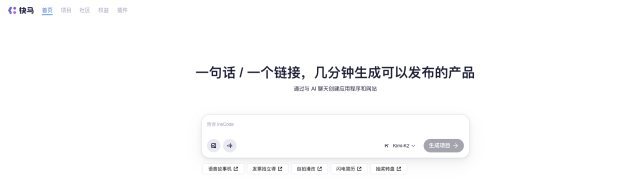
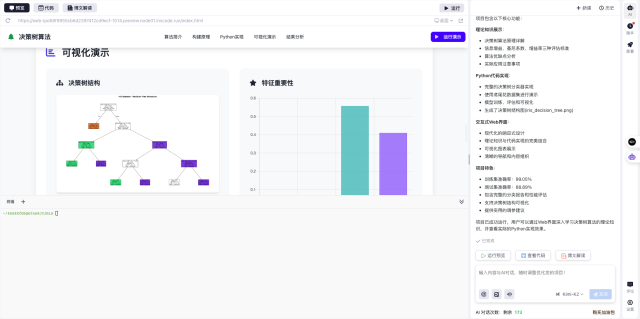 最方便的是,平台支持一键导出任何版本的代码片段,大大提高了开发效率。对于需要长期运行的演示项目,还可以使用一键部署功能快速上线分享。
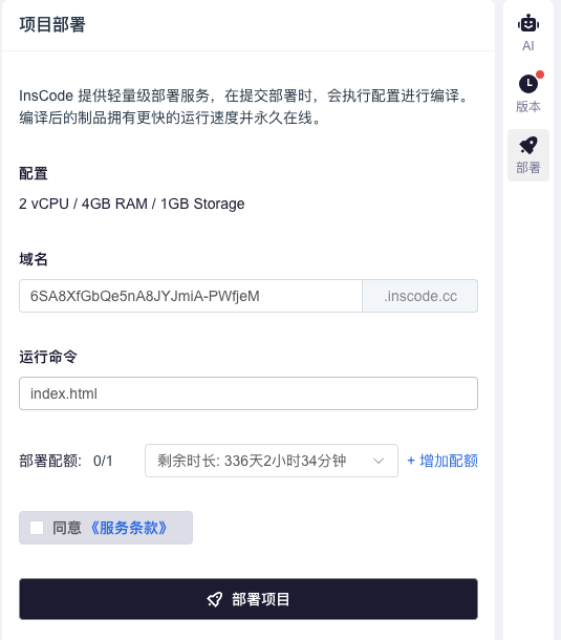 我实际使用下来发现,从原型设计到代码生成再到部署上线,整个过程非常流畅,特别适合快速验证技术方案。





 扫一扫
扫一扫


 200
200

 被折叠的 条评论
为什么被折叠?
被折叠的 条评论
为什么被折叠?
 到【灌水乐园】发言





