



 本文介绍了Python模块和包的基础概念,包括模块定义、包的结构以及如何创建、导入和使用模块。通过实例展示了如何实现功能模块化,如顾客与餐厅类的封装,以及如何通过`from`语句灵活引用模块内容。
这是机器未来的第19篇文章

《Python零基础快速入门系列》快速导航:
- 【Python零基础快速入门系列 | 01】 人工智能序章:开发环境搭建Anaconda+VsCode+JupyterNotebook(零基础启动)
- 【Python零基础快速入门系列 | 02】一文快速掌握Python基础语法
- 【Python零基础快速入门系列 | 03】AI数据容器底层核心之Python列表
- 【Python零基础快速入门系列 | 04】为什么内存中最多只有一个“Love“?一文读懂Python内存存储机制
- 【Python零基础快速入门系列 | 05】Python只读数据容器:列表List的兄弟,元组tuple
- 【Python零基础快速入门系列 | 06】字符串、列表、元组原来是一伙的?快看序列Sequence
- 【Python零基础快速入门系列 | 07】成双成对之Python数据容器字典
- 【Python零基础快速入门系列 | 08】无序、不重复、元素只读,Python数据容器之集合
- 【Python零基础快速入门系列 | 09】高级程序员绝世心法——模块化之函数封装
- 【Python零基础快速入门系列 | 10】类的设计哲学:自然法则的具现
- 【Python零基础快速入门系列 | 11】函数、类、模块和包如何构建四级模块化体系
- 【Python零基础快速入门系列 | 12】程序员为什么自嘲面向Bug编程?
- 【Python零基础快速入门系列 | 13】面对海量数据,如何优雅地加载数据?请看迭代器与生成器
- 【Python零基础快速入门系列 | 14】深度学习如何保存训练好的模型,请看数据持久化之文件操作(1)
- 【Python零基础快速入门系列 | 14】深度学习如何保存训练好的模型,请看数据持久化之文件操作(2)
- 【Python零基础快速入门系列 | 15】常用标准库os、sys、logging快速掌握
1. 概述
前面已经学习过函数和类了,今天我们继续学习模块化的另外2种封装方式:模块和包。函数、类、模块和包构成了模块化四级封装体系。
2. 什么是模块?什么是包?
模块其实就是python源代码文件,以.py后缀结尾,而包就是文件夹,其内包含.py源代码和__init__.py文件。他们的层级结构如下:
├─package
│  ├─module1.py
│  │  ├─class1
│  │  │  ├─function1
│  │  │  └─function2
│  │  ├─class2
│  │  │  ├─function11
│  │  │  └─function12
│  ├─module2.py
│  └─__init__.py
└─package2
    ├─module21.py
    │  └─class21
    │      └─function21
    └─__init__.py
- 功能高度相关或类似的函数封装在一个类中;
- 一个或多个功能高度相关或类似的类存放到同一个源代码文件中
- 一个或多个相关的源代码存放在包(文件夹)中
以上就构成了模块化的四级封装体系。
以python三剑客matplotlib绘图库为例来看看是不是这样在多层封装体系,我们先来写一段代码:
# 引入pylot模块
from matplotlib import pyplot as plt

# 引入numpy
import numpy as np


X = np.linspace(start=-5, stop=5, num=50)
y = X**2 + 6

plt.plot(X, y)
plt.show()
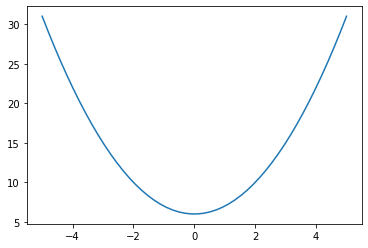
要实现绘制曲线的功能,需要使用到matplotlib包pyplot模块下的plot和show函数,我们先来看一下他在文件中的组织形式:
-
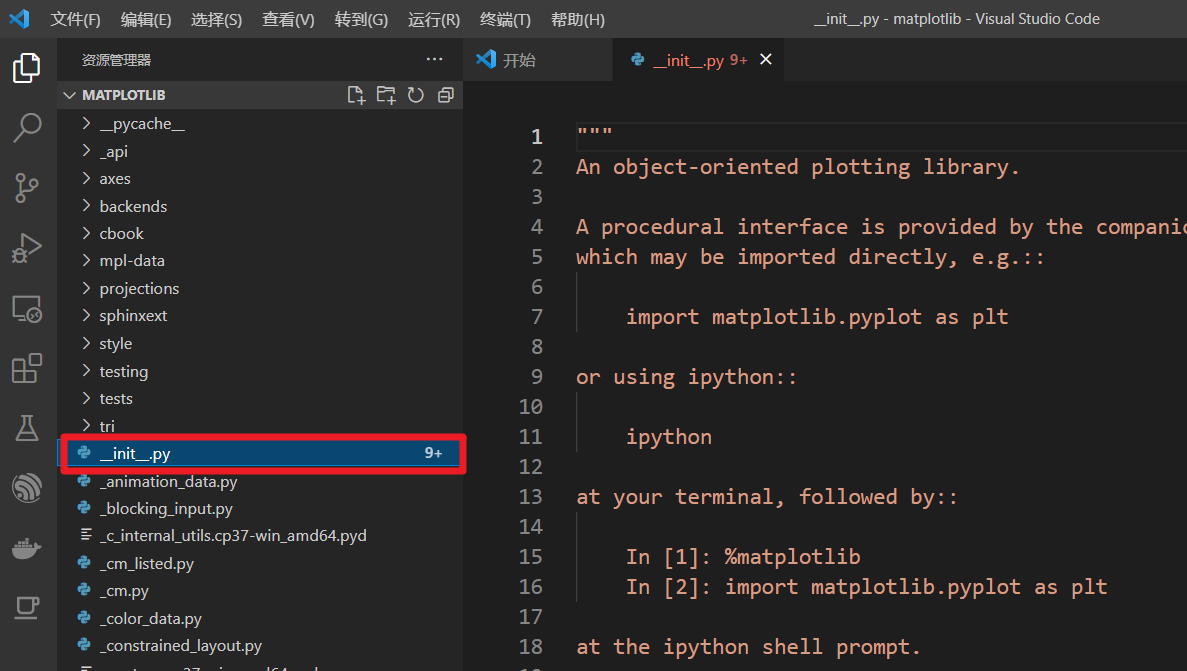
matplotlib是一个文件夹,是python中的一个包,它应该包含一个__init__.py文件,如图所示:
-
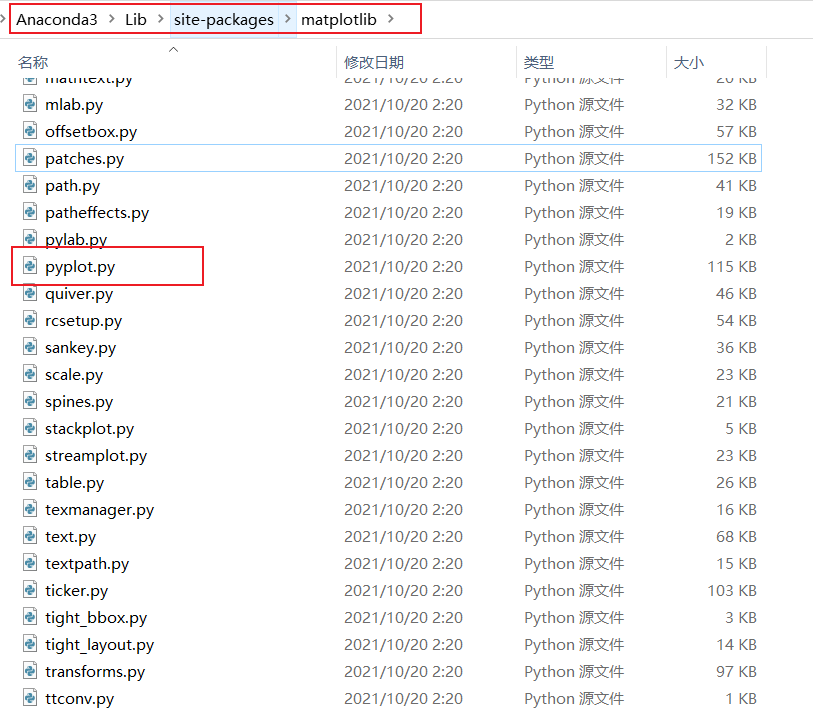
pyplot是一个模块,在文件系统中在体现是一个文件,我们找到它
-
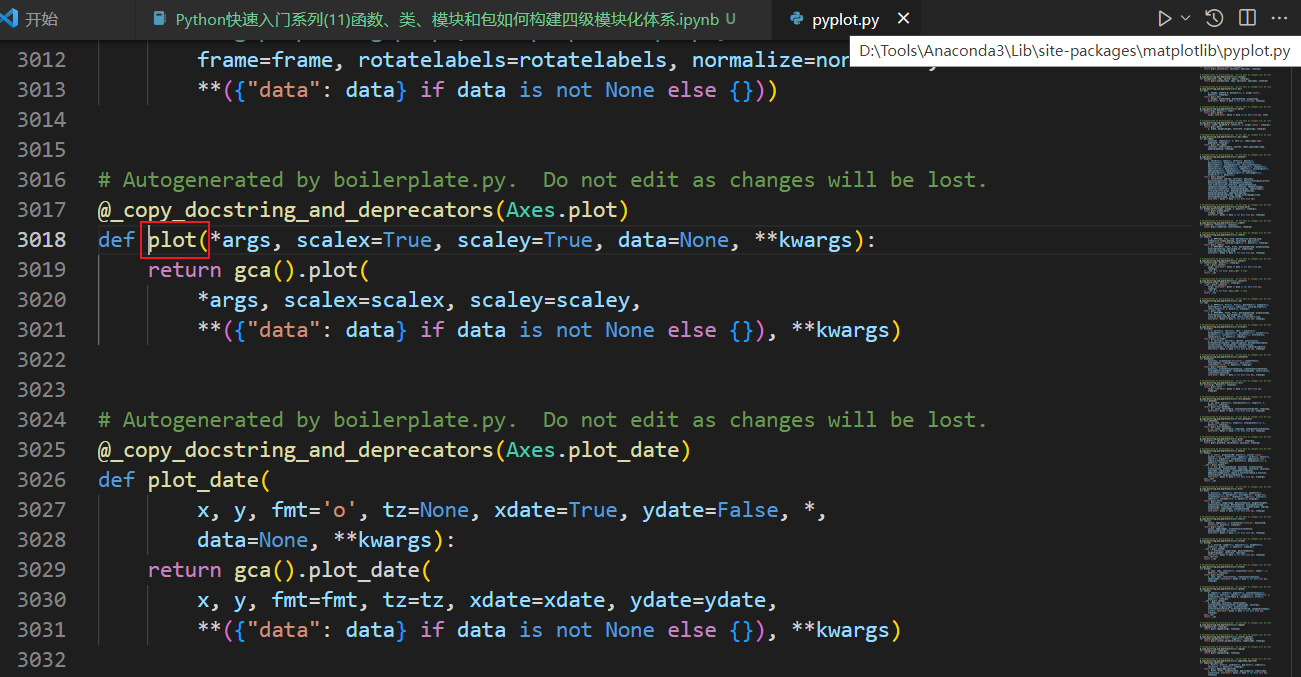
plt.plot(X, y)中的plot函数是pyplot模块中在一个函数,看它在不在?
小技巧:在vscode环境下,将鼠标放在函数名上,按住CTRL键可以直接跳转到函数定义在位置。
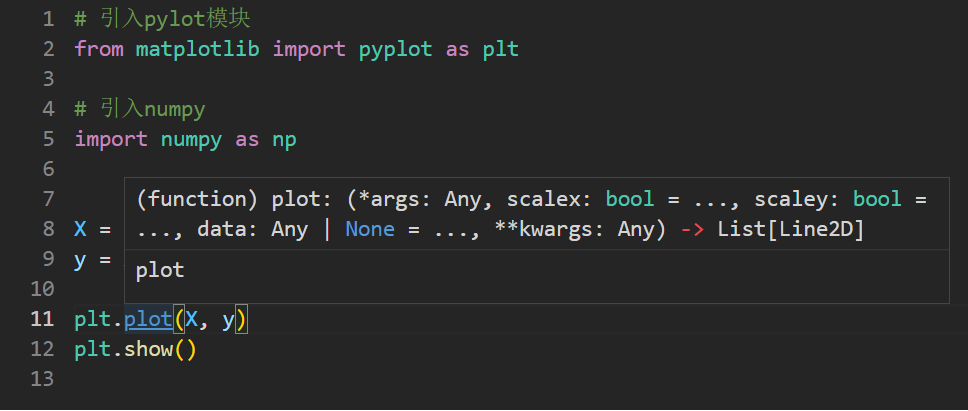
跳转后,发现了plot函数在身影,的确在pyplot模块文件中。
3. 实现一个自定义功能模块库
我们实现一个功能的模块化封装:
- 定义功能模块库
- 首先创建一个包
- 在包里创建一个__init__.py文件,并按照规则填充它
- 创建一个模块.py文件
- 在模块文件中创建类class
- 在类中实现方法
- 调用功能模块库
- 引用相关的模块或模块中的类、函数、变量
- 调用
以上篇文章中在吃饭例子为例
【Python零基础入门笔记 | 10】类的设计哲学:自然法则的具现, 将它划分如下:
Project
|-- restaurant_industry   # 餐馆
    |-- __init__.py     # 包初始化文件,更改后缀
    |-- restaurant.py
    |-- customer.py     # 食客
|-- main.py # 主程序
3.1 定义功能模块
创建文件夹restaurant_industry和__init__.py, 那么__init__.py到底要写什么,以及有什么用呢?
功能:
_init_.py用来标识当前文件夹为Python包(Python3.2以后版本无需__init__.py也可以)
用法:
-
_init_.py可以为空,仅告诉解释器当前文件夹为Python包即可
-
做一些预加载工作
执行
import package时,package文件夹下的__init__.py会自动执行,基于加载包时自动加载特性,init.py还可以用来做一些预加载工作,例如模块的导入等
3.1.1 用法一:标识包
下面举例进行说明,创建如下的文件结构,内容及代码如下:
Project
|-- restaurant_industry   # 餐馆
    |-- __init__.py     # 包初始化文件,更改后缀
    |-- restaurant.py
    |-- customer.py     # 食客
|--package2
    |--__init__.py
|-- main.py # 主程序
# restaurant_industry/__init__.py
print("restaurant_industry __init__.py load!")
# package2/__init__.py
print("package2 __init__.py load!")
# main.py

import restaurant_industry
import package2

# 打印文件中加载了哪些内容,dir()函数输入为空时,表明是当前文件
print(dir())
restaurant_industry __init__.py load!
package2 __init__.py load!
['__annotations__', '__builtins__', '__cached__', '__doc__', '__file__', '__loader__', '__name__', '__package__', '__spec__', 'package2', 'restaurant_industry']
可以看到在dir()的输出中restaurant_industry和package2这两个文件夹已经被识别为包了,可以通过import引入,在引用时就自动执行了包下的_init_.py文件。
Python3.2以后版本无需_init_.py也可以识别为包,测试一下:将_init_.py后缀修改为.pyi,再次执行
Project
|-- restaurant_industry   # 餐馆
    |-- __init__.pyi     # 包初始化文件,更改后缀
    |-- restaurant.py
    |-- customer.py     # 食客
|--package2
    |--__init__.pyi
|-- main.py # 主程序
# main.py

import restaurant_industry
import package2

# 打印文件中加载了哪些内容,dir()函数输入为空时,表明是当前文件
print(dir())
['__annotations__', '__builtins__', '__cached__', '__doc__', '__file__', '__loader__', '__name__', '__package__', '__spec__', 'package2', 'restaurant_industry']
发现没有报错,可以执行,dir()的输出中同样包含了package2和restaurant_industry,但是不再打印_init_.py中的打印信息了。说明Python3.2以后版本无需_init_.py也可以识别为包了。
3.1.2 用法二:预加载相关的模块
在_init_.py中可以使用一个特殊变量__all__来配合from module import *预加载模糊引入的模块。
# restaurant_industry/__init__.py

#模糊引入时,指定加载的模块,如果不指定则不加载任何模块或模块中的内容,测试Python版本3.7.0
__all__ = ['restaurant']

print("restaurant_industry __init__.py load!")
# main.py
from restaurant_industry import *
import package2

print(dir())
运行python main.py的输出结果为
restaurant_industry __init__.py load!
package2 __init__.py load!
['__annotations__', '__builtins__', '__cached__', '__doc__', '__file__', '__loader__', '__name__', '__package__', '__spec__', 'package2', 'restaurant']
可以看到restaurant模块被引用成功了,customer未引用,在代码中可以直接调用restaurant模块中的函数、类、变量了,而不需要import restaurant。
注意:__all__变量配合from module import *代码使用时才生效
3.2 调用功能模块库
引用模块有以下几种形式
3.2.1 引用模块
# 方式一:直接引用模块名
import module
# 方式二:通过包名.模块名引用
import package.module
# 方式三:通过from [package] import [module]引用,等价方式二
from package import module
不可以引用包,会提示模块无相关属性,类似这样
AttributeError: module 'restaurant_industry' has no attribute 'Restaurant'
3.2.2 引用模块中的变量、类或函数
语法:
from [module] import [class1, class2, func1, varable1,...]
详解:
- module可以直接是模块名,也可以是package.module,支持多级关系
- class1, class2, func1, varable1,…, 为模块内的内容(类、函数、变量),可以为一项,也可以为多项
- from后面只可以接模块,不可以接单独的包,必须定位到模块
3.2.3 实例演示
现在,根据上一篇博文中的吃饭例子,我们将相关代码分别封装到customer和restaurant模块中,代码如下:
# 文件位置:Project\restaurant_industry\customer.py
class Customer:
    """客人
    """
    def __init__(self, order_id):
        self.order_id = order_id
        self.amount = 0

    def order(self, restaurant, dish_id):
        restaurant.order(self.order_id, dish_id)

# 用于演示函数引用
def func1():
    print("客人对餐品很满意,五星点赞!")

# 用于演示变量引用
customer_list = ['c', 'u', 's', 't', 'o', 'm', 'e', 'r']
# 文件位置:Project\restaurant_industry\restaurant.py
class Dish:
    """
    菜品
    """
    def __init__(self, id, name, price):
        self.id = id
        self.name = name
        self.price = price

class Restaurant:
    """
    菜单
    """
    def __init__(self):
        self.menu = []
        self.ordered_menu = {}

    def add(self, id, name, price):
        """添加新菜品
        """
        self.menu.append(Dish(id, name, price))

    def display_menu(self):
        """展示菜谱
        """
        for item in self.menu:
            print(f"{item.id}\t{item.name}\t\t{item.price}")

    def order(self, order_id, dish_id):
        # ord = {item for item in self.ordered_menu.keys if item == order_id}
        ord = self.ordered_menu.get(order_id, [])
        if ord:     #  不为空,说明订单已经产生
            ord.append(dish_id)
        else:       # 为空,说明是新订单
            self.ordered_menu[order_id] = list([dish_id])

    def check(self, order_id):
        amount = 0
        # self.ordered_menu[order_id]直接获得客户的已选菜单,然后用列表推导式获得结算价格
        checklist = [dish.price for dish in self.menu if dish.id in self.ordered_menu[order_id]]
        for x in checklist:
            amount += x

        return amount
# main.py

# 从模块customer.py中引用Customer类
from restaurant_industry.customer import Customer
# 直接引用restaurant,并使用as将restaurant_industry.restaurant定义别名为restaurant,避免每次调用时都要加上restaurant_industry.restaurant.前缀,用as定义别名后,可以直接使用rest.前缀即可。
import restaurant_industry.restaurant as rest

# 模块customer.py中引用func1函数,customer_list变量
from restaurant_industry.customer import func1, customer_list

print(dir())

# 因为仅引用了restaurant模块,因此需要使用【模块.类】的访问方式
restaurant = rest.Restaurant()

# 添加新菜品
restaurant.add(1, "青椒肉丝", 22)
restaurant.add(2, "皮蛋豆腐", 16)
restaurant.add(3, "新疆大盘鸡", 89)
restaurant.add(4, "虎皮青椒", 22)

# 展示菜单
restaurant.display_menu()

# 客人c1点餐
# 因为已经从模块customer.py中引用了Customer类,因此无需使用【模块.类】的访问方式
c1 = Customer(order_id = 1)
c1.order(restaurant=restaurant, dish_id = 1)     # c1点了青椒肉丝
c1.order(restaurant=restaurant, dish_id = 2)     # c1点了皮蛋豆腐

# 客人c2点餐
c2 = Customer(order_id = 2)
c2.order(restaurant=restaurant, dish_id = 2)     # c2点了皮蛋豆腐
c2.order(restaurant=restaurant, dish_id = 3)     # c2点了新疆大盘鸡

# 客人c1结账
c1.amount = restaurant.check(c1.order_id)
# 客人c2结账
c2.amount = restaurant.check(c2.order_id)

print(f"客人c1消费了{c1.amount}元")
print(f"客人c2消费了{c2.amount}元")

# 因为已经从模块customer.py中引用了func1函数,因此无需使用【模块.函数】的访问方式
func1()
restaurant_industry __init__.py load!
# dir()的输出
['Customer', '__annotations__', '__builtins__', '__cached__', '__doc__', '__file__', '__loader__', '__name__', '__package__', '__spec__', 'customer_list', 'func1', 'rest']
1       青椒肉丝                22
2       皮蛋豆腐                16
3       新疆大盘鸡              89
4       虎皮青椒                22
客人c1消费了38元
客人c2消费了105元
客人对餐品很满意,五星点赞!
从代码可以了解到以下知识点:
- 从代码dir()的输出中可以看到,customer_list, func1, rest,这三项已经被引用到文件中来了,rest是restaurant_industry.restaurant的别名,可以看到都引用成功了。
- 如果已经将类引用到文件中,那么在文件中可以直接使用类名,而无需使用模块前缀了。
- 如果没有将模块中的类、变量、函数引用到文件中,那么需要添加模块前缀才能使用,就像restaurant = rest.Restaurant()
- 如果已经将模块中的类、变量、函数引用到文件中,因此使用时无需使用【模块.类】的访问方式,就像c1 = Customer(order_id = 1)、func1()等
4. 总结
到这里,自定义一个功能模块库的例子就讲解完毕了,通过定义包、模块、类、方法四级体系,搭建了完整的模块化封装体系。模块化也讲了好几期了,今天为模块化画上了一个圆满的句号。模块化的优势就不多说了,使用过程中自然就有体会了。
《Python零基础快速入门系列》快速导航:
- 【Python零基础入门笔记 | 01】 人工智能序章:开发环境搭建Anaconda+VsCode+JupyterNotebook(零基础启动)
- 【Python零基础入门笔记 | 02】一文快速掌握Python基础语法
- 【Python零基础入门笔记 | 03】AI数据容器底层核心之Python列表
- 【Python零基础入门笔记 | 04】为什么内存中最多只有一个“Love“?一文读懂Python内存存储机制
- 【Python零基础入门笔记 | 05】Python只读数据容器:列表List的兄弟,元组tuple
- 【Python零基础入门笔记 | 06】字符串、列表、元组原来是一伙的?快看序列Sequence
- 【Python零基础入门笔记 | 07】成双成对之Python数据容器字典
- 【Python零基础入门笔记 | 08】无序、不重复、元素只读,Python数据容器之集合
- 【Python零基础入门笔记 | 09】高级程序员绝世心法——模块化之函数封装
- 【Python零基础入门笔记 | 10】类的设计哲学:自然法则的具现







 扫一扫
扫一扫


 684
684


 到【灌水乐园】发言



