



 本文详细介绍了如何在Spring Boot项目中集成Redis缓存,包括pom文件依赖添加、配置文件设置、工具类创建及Service层实现,展示了如何利用Redis提高查询效率。
- pom文件中添加依赖
<dependency>
    <groupId>org.springframework.boot</groupId>
    <artifactId>spring-boot-starter-data-redis</artifactId>
</dependency>
- 写入关于redis的配置文件(application.yml)
spring:
  redis:
    open: true #是否开启redis缓存 true开启 false关闭
    database: 0 # Redis数据库索引(默认为0)
    host: 127.0.0.1 #本机ip
    port: 6379 #redis端口号
    password: 123456 #密码 默认为空
    timeout: 6000ms #连接超时时长(毫秒)
    jedis:
      pool:
        max-active: 1000 #连接池最大连接数(使用负值表示没有限制)
        max-wait: -1ms #连接池最大阻塞等待时间(使用负值表示没有限制)
        max-idle: 10 #连接池最大的空闲连接
        min-idle: 5  #连接池最小的空闲连接
- 在config文件夹下创建一个RedisConfig工具类
package com.mbyte.easy.config;


import org.springframework.context.annotation.Bean;
import org.springframework.context.annotation.Configuration;
import org.springframework.data.redis.connection.RedisConnectionFactory;
import org.springframework.data.redis.core.RedisTemplate;
import org.springframework.data.redis.serializer.GenericJackson2JsonRedisSerializer;
import org.springframework.data.redis.serializer.RedisSerializer;
import org.springframework.data.redis.serializer.StringRedisSerializer;

@Configuration
public class RedisConfig {
    @Bean
    public RedisTemplate<String, Object> redisTemplate(RedisConnectionFactory redisConnectionFactory) {
        // 配置redisTemplate
        RedisTemplate<String, Object> redisTemplate = new RedisTemplate<String, Object>();
        redisTemplate.setConnectionFactory(redisConnectionFactory);
        RedisSerializer stringSerializer = new StringRedisSerializer();
        redisTemplate.setKeySerializer(stringSerializer); // key序列化
        redisTemplate.setValueSerializer(new GenericJackson2JsonRedisSerializer()); // value序列化
        redisTemplate.setHashKeySerializer(stringSerializer); // Hash key序列化
        redisTemplate.setHashValueSerializer(new GenericJackson2JsonRedisSerializer()); // Hash value序列化
        redisTemplate.afterPropertiesSet();
        return redisTemplate;

    }
}
- 创建service层
public interface RedisService {
    void setObj(String key, Object obj, long timeout);

    Object getObj(String key);
}
- 创建实现层
package com.mbyte.easy.common.service.Impl;

import com.mbyte.easy.common.service.RedisService;
import org.springframework.data.redis.core.RedisTemplate;
import org.springframework.data.redis.core.ValueOperations;
import org.springframework.stereotype.Service;

import javax.annotation.Resource;
import java.io.Serializable;
import java.util.concurrent.TimeUnit;

@Service("redisService")
public class RedisServiceImpl implements RedisService {
    @Resource
    private RedisTemplate redisTemplate;
    @Override
    public void setObj(final String key, Object obj, long timeout) {
        ValueOperations<Serializable, Object> operations = redisTemplate.opsForValue();
        operations.set(key, obj, timeout, TimeUnit.SECONDS);
    }
    @Override
    public Object getObj(final String key) {
        Object o = redisTemplate.opsForValue().get(key);
        return o;
    }


}
- 我的这个例子是在一个查询的方法中用redis作为缓存
- 在使用时,需要先注入
@Autowired private RedisService redisService; - 调用redisService中读写方法
 @RequestMapping
    public String index(Model model,@RequestParam(value = "pageNo", required = false, defaultValue = "1") Integer pageNo,@RequestParam(value = "pageSize", required = false, defaultValue = "20") Integer pageSize, PersonInformation personInformation) {
        Page<PersonInformation> page = new Page<PersonInformation>(pageNo, pageSize);
        QueryWrapper<PersonInformation> queryWrapper = new QueryWrapper<PersonInformation>();
        if(!ObjectUtils.isEmpty(personInformation.getName())) {
            queryWrapper = queryWrapper.like("name",personInformation.getName());
         }
        if(!ObjectUtils.isEmpty(personInformation.getGender())) {
            queryWrapper = queryWrapper.like("gender",personInformation.getGender());
         }
        if(!ObjectUtils.isEmpty(personInformation.getAge())) {
            queryWrapper = queryWrapper.like("age",personInformation.getAge());
         }
        if(!ObjectUtils.isEmpty(personInformation.getIdNumber())) {
            queryWrapper = queryWrapper.like("id_number",personInformation.getIdNumber());
         }
        if(!ObjectUtils.isEmpty(personInformation.getPhoneNumber())) {
            queryWrapper = queryWrapper.like("phone_number",personInformation.getPhoneNumber());
         }
        if(!ObjectUtils.isEmpty(personInformation.getEmail())) {
            queryWrapper = queryWrapper.like("email",personInformation.getEmail());
         }
        if(!ObjectUtils.isEmpty(personInformation.getHomeAddress())) {
            queryWrapper = queryWrapper.like("home_address",personInformation.getHomeAddress());
         }
        if(!ObjectUtils.isEmpty(personInformation.getMaritalStatus())) {
            queryWrapper = queryWrapper.like("marital_status",personInformation.getMaritalStatus());
         }
        if(!ObjectUtils.isEmpty(personInformation.getOccupation())) {
            queryWrapper = queryWrapper.like("occupation",personInformation.getOccupation());
         }
        if(!ObjectUtils.isEmpty(personInformation.getSupplement())) {
            queryWrapper = queryWrapper.like("supplement",personInformation.getSupplement());
         }
        //开始使用redis作为缓存
        IPage<PersonInformation> pageInfo = (IPage<PersonInformation>)redisService.getObj("myTest1"+page.toString());
        if (pageInfo==null){
            pageInfo = personInformationService.page(page, queryWrapper);
            //写入redis中,key为myTest1
            redisService.setObj("myTest1"+page.toString(),pageInfo,10000);
        }
        model.addAttribute("searchInfo", personInformation);
        model.addAttribute("pageInfo", new PageInfo(pageInfo));
        return prefix+"list";
    }
此时需要将BaseEntity实现Serializable接口,使其可序列化,如果实体类中有时间类型的字段,也必须将时间进行序列化与反序列化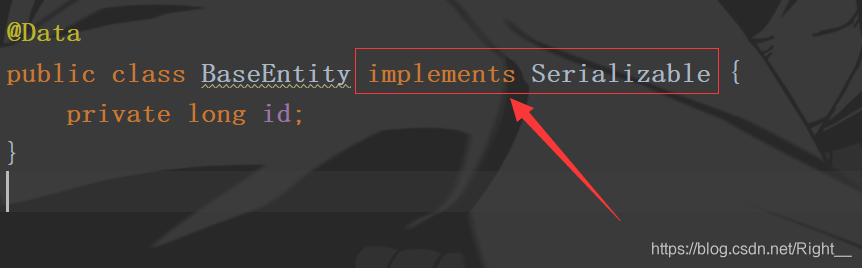
    /**
     * 时间序列化
     */
    @JsonSerialize(using = LocalDateSerializer.class)
    /**
     * 时间反序列化
     */
    @JsonDeserialize(using = LocalDateDeserializer.class)
    @TableField(exist=false)
    private LocalDateTime createTime;
- 运行程序就可以在redis中看到key为myTest1的一条数据
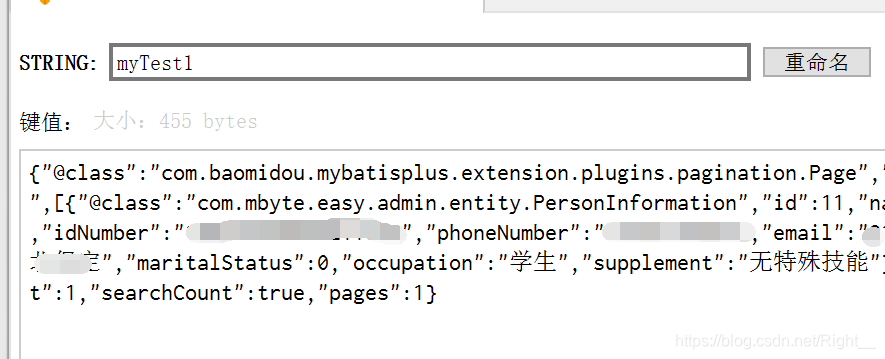
以上就是Java中redis与SpringBoot的简单结合,希望对你有所帮助.





 扫一扫
扫一扫


 20万+
20万+

 被折叠的 条评论
为什么被折叠?
被折叠的 条评论
为什么被折叠?
 到【灌水乐园】发言





