





工程化部署:Stable Diffusion 3.5 FP8 从 Docker 到 Kubernetes 的完整落地指南
摘要
在AI模型从研究走向生产的过程中,工程化部署是决定成败的关键环节。
本文将深入探讨Stable Diffusion 3.5 FP8从单机容器化到大规模Kubernetes集群部署的完整解决方案,涵盖Python/Java混合技术栈、TensorRT加速优化、监控运维体系等核心内容,提供一套可落地的企业级部署框架。
1. 容器化部署:从单机到可复现
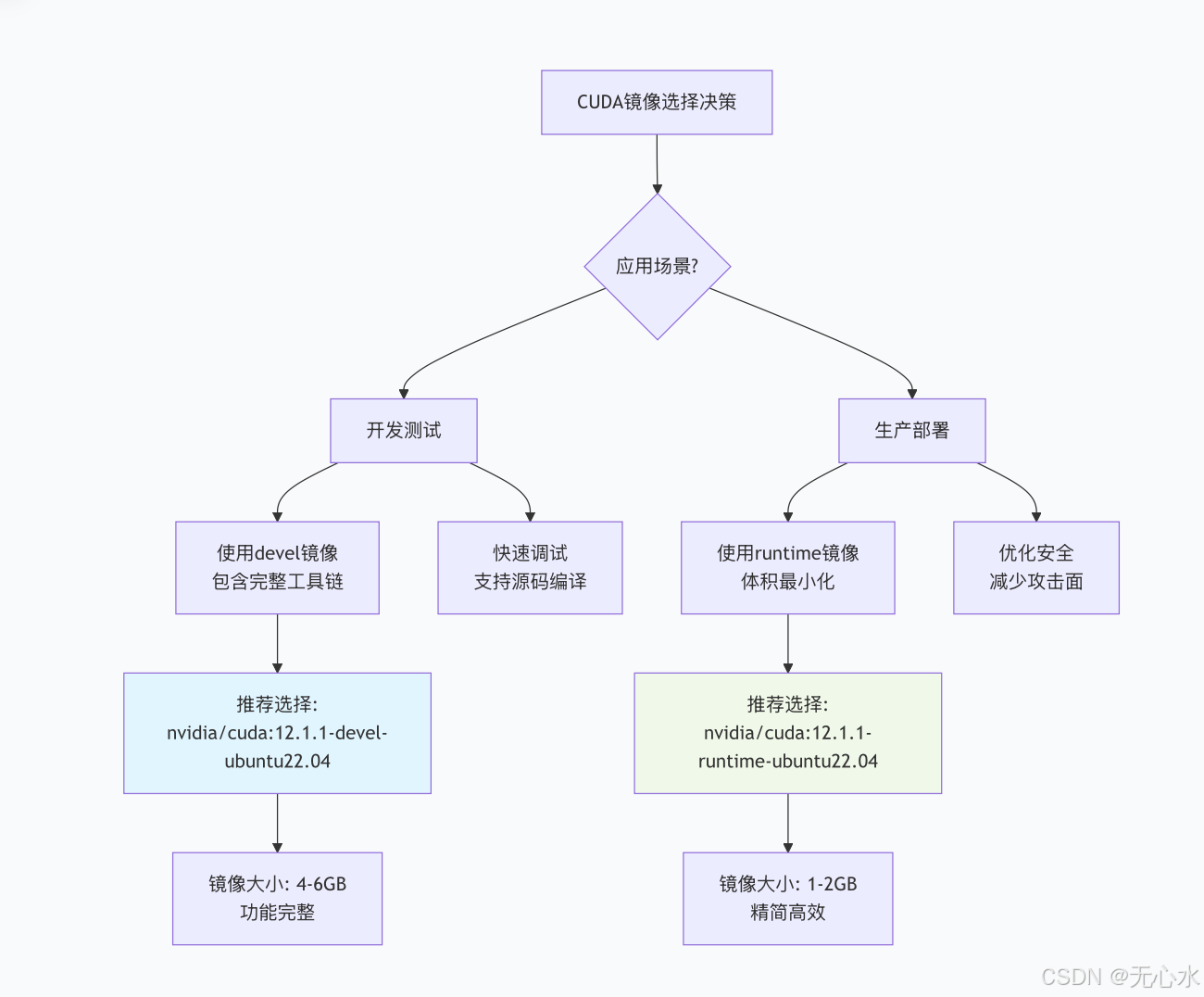
1.1 NVIDIA CUDA基础镜像选择策略
选择合适的CUDA基础镜像是AI模型部署的第一步。对于Stable Diffusion 3.5 FP8,我们需要考虑以下因素:
1.2 完整Dockerfile实现(Python+Java混合架构)
# 多阶段构建,优化镜像层
# 阶段1:基础CUDA环境
FROM nvidia/cuda:12.1.1-devel-ubuntu22.04 AS base

# 安装系统依赖
RUN apt-get update && apt-get install -y \
    python3.10 \
    python3-pip \
    openjdk-17-jdk \
    maven \
    git \
    wget \
    libgl1-mesa-glx \
    libglib2.0-0 \
    && rm -rf /var/lib/apt/lists/*

# 设置工作目录
WORKDIR /app

# 阶段2:Python依赖安装
FROM base AS python-deps
COPY requirements.txt .

# 安装PyTorch及相关库
RUN pip3 install --no-cache-dir \
    torch==2.1.0+cu121 \
    torchvision==0.16.0+cu121 \
    --index-url https://download.pytorch.org/whl/cu121

# 安装Stable Diffusion相关库
RUN pip3 install --no-cache-dir \
    diffusers==0.24.0 \
    transformers==4.35.0 \
    accelerate==0.25.0 \
    xformers==0.0.23 \
    safetensors==0.4.1 \
    opencv-python==4.8.1.78 \
    Pillow==10.1.0 \
    scipy==1.11.4

# 阶段3:Java服务构建
FROM base AS java-builder
COPY pom.xml .
COPY src ./src

# Maven构建
RUN mvn clean package -DskipTests

# 阶段4:模型文件集成(单独层便于缓存)
FROM python-deps AS model-layer
ARG MODEL_VERSION=stable-diffusion-3.5-fp8

# 从模型仓库下载或复制模型
RUN mkdir -p /app/models
COPY models/${MODEL_VERSION} /app/models/

# 验证模型完整性
RUN python3 -c "
import torch
from diffusers import StableDiffusionPipeline
print('验证模型加载...')
pipe = StableDiffusionPipeline.from_pretrained(
    '/app/models/${MODEL_VERSION}',
    torch_dtype=torch.float16
)
print(f'模型验证成功: {pipe}')
"

# 阶段5:最终镜像组装
FROM nvidia/cuda:12.1.1-runtime-ubuntu22.04 AS runtime

# 安装最小化运行时依赖
RUN apt-get update && apt-get install -y \
    python3.10 \
    openjdk-17-jre-headless \
    libgl1-mesa-glx \
    && rm -rf /var/lib/apt/lists/*

WORKDIR /app

# 复制Python环境
COPY --from=python-deps /usr/local/lib/python3.10/dist-packages /usr/local/lib/python3.10/dist-packages
COPY --from=python-deps /usr/local/bin /usr/local/bin

# 复制模型文件
COPY --from=model-layer /app/models /app/models

# 复制Java服务
COPY --from=java-builder /app/target/sd-api-service-1.0.0.jar /app/
COPY --from=java-builder /app/src/main/resources /app/config/

# 复制Python FastAPI服务
COPY python-service /app/python-service/
COPY configs /app/configs/

# 设置环境变量
ENV PYTHONPATH=/app/python-service
ENV MODEL_PATH=/app/models/stable-diffusion-3.5-fp8
ENV JAVA_OPTS="-Xms2g -Xmx4g -XX:MaxMetaspaceSize=512m"
ENV NVIDIA_VISIBLE_DEVICES=all
ENV CUDA_VISIBLE_DEVICES=0

# 暴露端口
EXPOSE 8080 8000

# 健康检查
HEALTHCHECK --interval=30s --timeout=10s --start-period=5s --retries=3 \
    CMD curl -f http://localhost:8080/actuator/health || exit 1

# 启动脚本(同时启动Python和Java服务)
COPY entrypoint.sh /app/
RUN chmod +x /app/entrypoint.sh

ENTRYPOINT ["/app/entrypoint.sh"]
1.3 启动脚本与预热优化
#!/bin/bash
# entrypoint.sh

set -e

echo "正在启动Stable Diffusion 3.5 FP8服务..."

# 模型预热函数
preheat_model() {
    echo "开始预热模型..."
    local PYTHON_SCRIPT=/app/python-service/preheat.py

    # 预热主模型
    python3 $PYTHON_SCRIPT --model-path $MODEL_PATH --warmup-steps 3

    # 预热LoRA适配器(如果有)
    if [ -d "/app/models/lora-adapters" ]; then
        for adapter in /app/models/lora-adapters/*; do
            echo "预热适配器: $(basename $adapter)"
            python3 $PYTHON_SCRIPT --model-path $MODEL_PATH \
                   --lora-path $adapter --warmup-steps 2
        done
    fi

    echo "模型预热完成"
}

# Java服务启动函数
start_java_service() {
    echo "启动Java API服务..."
    java $JAVA_OPTS \
        -Dspring.profiles.active=production \
        -Dmodel.path=$MODEL_PATH \
        -jar /app/sd-api-service-1.0.0.jar &

    JAVA_PID=$!
    echo "Java服务启动,PID: $JAVA_PID"
}

# Python服务启动函数
start_python_service() {
    echo "启动Python推理服务..."
    cd /app/python-service
    uvicorn main:app \
        --host 0.0.0.0 \
        --port 8000 \
        --workers 1 \
        --log-level info \
        --access-log &

    PYTHON_PID=$!
    echo "Python服务启动,PID: $PYTHON_PID"
}

# 信号处理
cleanup() {
    echo "接收到终止信号,优雅关闭服务..."
    kill -TERM $JAVA_PID 2>/dev/null
    kill -TERM $PYTHON_PID 2>/dev/null
    wait $JAVA_PID $PYTHON_PID
    echo "服务已关闭"
}
trap cleanup TERM INT

# 主执行流程
preheat_model
start_java_service
start_python_service

# 等待服务运行
wait
预热脚本实现:
# preheat.py
import torch
import time
from diffusers import StableDiffusionPipeline
import argparse

def preheat_model(model_path, lora_path=None, warmup_steps=3):
    """预热模型,填充GPU缓存"""

    print(f"加载模型: {model_path}")

    # 加载管道
    pipe = StableDiffusionPipeline.from_pretrained(
        model_path,
        torch_dtype=torch.float16,
        safety_checker=None,
        requires_safety_checker=False
    ).to("cuda")

    # 加载LoRA适配器
    if lora_path:
        print(f"加载LoRA适配器: {lora_path}")
        pipe.load_lora_weights(lora_path)

    # 预热循环
    prompt = "a beautiful landscape"
    negative_prompt = ""

    for i in range(warmup_steps):
        print(f"预热步骤 {i+1}/{warmup_steps}")

        start_time = time.time()

        # 生成测试图像
        with torch.cuda.amp.autocast():
            image = pipe(
                prompt=prompt,
                negative_prompt=negative_prompt,
                num_inference_steps=5,
                guidance_scale=7.5,
                height=512,
                width=512
            ).images[0]

        elapsed = time.time() - start_time
        print(f"步骤完成,耗时: {elapsed:.2f}s")

        # 清理缓存
        torch.cuda.empty_cache()

    print("模型预热完成")
    return pipe

if __name__ == "__main__":
    parser = argparse.ArgumentParser()
    parser.add_argument("--model-path", required=True)
    parser.add_argument("--lora-path")
    parser.add_argument("--warmup-steps", type=int, default=3)

    args = parser.parse_args()
    preheat_model(args.model_path, args.lora_path, args.warmup_steps)
2. TensorRT加速:部署端性能翻倍技巧
2.1 PyTorch模型转TensorRT引擎
# convert_to_tensorrt.py
import torch
import tensorrt as trt
import os
from diffusers import StableDiffusionPipeline
from polygraphy.backend.trt import CreateConfig, EngineFromNetwork, NetworkFromOnnxPath, SaveEngine
from polygraphy.backend.onnx import OnnxFromPath

class SD35FP8ToTensorRTConverter:
    def __init__(self, model_path, output_dir="./trt_engines"):
        self.model_path = model_path
        self.output_dir = output_dir
        self.logger = trt.Logger(trt.Logger.INFO)

        os.makedirs(output_dir, exist_ok=True)

    def export_to_onnx(self, onnx_path):
        """将PyTorch模型导出为ONNX格式"""
        print("导出ONNX模型...")

        # 加载原始模型
        pipe = StableDiffusionPipeline.from_pretrained(
            self.model_path,
            torch_dtype=torch.float16
        )
        pipe.to("cuda")

        # 准备示例输入
        batch_size = 1
        latent_channels = 4
        latent_height = 64  # 512/8
        latent_width = 64

        # UNet输入
        sample = torch.randn(
            batch_size, latent_channels, latent_height, latent_width,
            device="cuda", dtype=torch.float16
        )
        timestep = torch.tensor([50], device="cuda", dtype=torch.int64)
        encoder_hidden_states = torch.randn(
            batch_size, 77, 768, device="cuda", dtype=torch.float16
        )

        # 导出UNet
        torch.onnx.export(
            pipe.unet,
            (sample, timestep, encoder_hidden_states),
            onnx_path,
            export_params=True,
            opset_version=17,
            do_constant_folding=True,
            input_names=["sample", "timestep", "encoder_hidden_states"],
            output_names=["noise_pred"],
            dynamic_axes={
                "sample": {0: "batch_size"},
                "encoder_hidden_states": {0: "batch_size"}
            }
        )

        print(f"ONNX模型已导出到: {onnx_path}")
        return onnx_path

    def build_trt_engine(self, onnx_path, fp8_mode=True):
        """构建TensorRT引擎"""
        print("构建TensorRT引擎...")

        # 创建构建器
        builder = trt.Builder(self.logger)
        network = builder.create_network(1 << int(trt.NetworkDefinitionCreationFlag.EXPLICIT_BATCH))
        parser = trt.OnnxParser(network, self.logger)

        # 解析ONNX
        with open(onnx_path, "rb") as f:
            if not parser.parse(f.read()):
                for error in range(parser.num_errors):
                    print(parser.get_error(error))
                raise RuntimeError("ONNX解析失败")

        # 配置优化参数
        config = builder.create_builder_config()
        config.set_memory_pool_limit(trt.MemoryPoolType.WORKSPACE, 1 << 30)  # 1GB

        # 启用FP8精度
        if fp8_mode and builder.platform_has_fast_fp8:
            print("启用FP8精度模式")
            config.set_flag(trt.BuilderFlag.FP8)
            config.set_flag(trt.BuilderFlag.PREFER_PRECISION_CONSTRAINTS)

        # 设置优化配置
        profile = builder.create_optimization_profile()

        # 动态形状配置
        profile.set_shape(
            "sample",
            min=(1, 4, 32, 32),   # 最小分辨率
            opt=(2, 4, 64, 64),   # 优化分辨率
            max=(4, 4, 96, 96)    # 最大分辨率
        )

        profile.set_shape(
            "encoder_hidden_states",
            min=(1, 77, 768),
            opt=(2, 77, 768),
            max=(4, 77, 768)
        )

        config.add_optimization_profile(profile)

        # 构建引擎
        engine_path = os.path.join(self.output_dir, "sd35_fp8.engine")
        serialized_engine = builder.build_serialized_network(network, config)

        with open(engine_path, "wb") as f:
            f.write(serialized_engine)

        print(f"TensorRT引擎已保存到: {engine_path}")
        return engine_path

    def validate_engine(self, engine_path):
        """验证引擎功能"""
        print("验证TensorRT引擎...")

        runtime = trt.Runtime(self.logger)
        with open(engine_path, "rb") as f:
            engine = runtime.deserialize_cuda_engine(f.read())

        # 创建执行上下文
        context = engine.create_execution_context()

        # 测试推理
        import numpy as np

        # 准备输入
        batch_size = 1
        sample_shape = (batch_size, 4, 64, 64)
        encoder_shape = (batch_size, 77, 768)

        # 分配内存
        inputs, outputs, bindings = [], [], []
        stream = torch.cuda.Stream()

        for binding in engine:
            size = trt.volume(engine.get_binding_shape(binding))
            dtype = trt.nptype(engine.get_binding_dtype(binding))

            # 分配页锁定内存
            mem = torch.cuda.alloc_pinned_memory(size * dtype().itemsize)
            arr = np.frombuffer(mem, dtype=dtype)

            if engine.binding_is_input(binding):
                inputs.append(arr)
            else:
                outputs.append(arr)

            bindings.append(int(arr.ctypes.data))

        print("引擎验证成功")
        return engine, context, bindings, inputs, outputs, stream

# 使用示例
if __name__ == "__main__":
    converter = SD35FP8ToTensorRTConverter(
        model_path="/app/models/stable-diffusion-3.5-fp8",
        output_dir="/app/trt_engines"
    )

    # 导出ONNX
    onnx_path = os.path.join(converter.output_dir, "sd35_fp8.onnx")
    converter.export_to_onnx(onnx_path)

    # 构建TensorRT引擎
    engine_path = converter.build_trt_engine(onnx_path, fp8_mode=True)

    # 验证
    converter.validate_engine(engine_path)
2.2 TensorRT引擎的Java JNI集成
// TensorRTEngine.java
package com.sd.deployment.tensorrt;
import java.nio.ByteBuffer;
import java.nio.FloatBuffer;
public class TensorRTEngine {
static {
System.loadLibrary("tensorrt_jni");
}
// Native方法声明
private native long initEngine(String enginePath);
private native void destroyEngine(long enginePtr);
private native float[] infer(
long enginePtr,
float[] sample,
int timestep,
float[] encoderStates
);
private long enginePtr;
private boolean initialized = false;
public TensorRTEngine(String enginePath) {
this.enginePtr = initEngine(enginePath);
if (this.enginePtr != 0) {
this.initialized = true;
System.out.println("TensorRT引擎初始化成功");
} else {
throw new RuntimeException("TensorRT引擎初始化失败");
}
}
public float[] inference(
float[] latentNoise,
int timestep,
float[] textEmbeddings
) {
if (!initialized) {
throw new IllegalStateException("引擎未初始化");
}
return infer(enginePtr, latentNoise, timestep, textEmbeddings);
}
public void close() {
if (initialized) {
destroyEngine(enginePtr);
enginePtr = 0;
initialized = false;
System.out.println("TensorRT引擎已释放");
}
}
@Override
protected void finalize() throws Throwable {
try {
close();
} finally {
super.finalize();
}
}
}
// JNI实现(C++部分)
// tensorrt_jni.cpp
#include <jni.h>
#include <iostream>
#include <memory>
#include <vector>
#include <NvInfer.h>
#include <cuda_runtime_api.h>
using namespace nvinfer1;
class TRTLogger : public ILogger {
void log(Severity severity, const char* msg) override {
if (severity <= Severity::kWARNING) {
std::cout << "TensorRT: " << msg << std::endl;
}
}
};
class TensorRTEngineWrapper {
private:
TRTLogger logger;
IRuntime* runtime;
ICudaEngine* engine;
IExecutionContext* context;
public:
TensorRTEngineWrapper(const std::string& enginePath) {
// 加载引擎文件
std::ifstream engineFile(enginePath, std::ios::binary);
if (!engineFile) {
throw std::runtime_error("无法打开引擎文件");
}
engineFile.seekg(0, std::ios::end);
size_t size = engineFile.tellg();
engineFile.seekg(0, std::ios::beg);
std::vector<char> engineData(size);
engineFile.read(engineData.data(), size);
// 创建运行时和引擎
runtime = createInferRuntime(logger);
engine = runtime->deserializeCudaEngine(engineData.data(), size);
context = engine->createExecutionContext();
if (!engine || !context) {
throw std::runtime_error("TensorRT引擎创建失败");
}
}
~TensorRTEngineWrapper() {
if (context) context->destroy();
if (engine) engine->destroy();
if (runtime) runtime->destroy();
}
std::vector<float> inference(
const std::vector<float>& sample,
int timestep,
const std::vector<float>& encoderStates
) {
// 准备输入输出缓冲区
void* buffers[3];
// 分配GPU内存
float *d_sample, *d_encoder, *d_output;
size_t sample_size = sample.size() * sizeof(float);
size_t encoder_size = encoderStates.size() * sizeof(float);
cudaMalloc(&d_sample, sample_size);
cudaMalloc(&d_encoder, encoder_size);
cudaMalloc(&d_output, sample_size); // 输出大小与sample相同
// 复制数据到GPU
cudaMemcpy(d_sample, sample.data(), sample_size, cudaMemcpyHostToDevice);
cudaMemcpy(d_encoder, encoderStates.data(), encoder_size, cudaMemcpyHostToDevice);
// 设置绑定
int sample_idx = engine->getBindingIndex("sample");
int timestep_idx = engine->getBindingIndex("timestep");
int encoder_idx = engine->getBindingIndex("encoder_hidden_states");
int output_idx = engine->getBindingIndex("noise_pred");
buffers[sample_idx] = d_sample;
buffers[timestep_idx] = ×tep;
buffers[encoder_idx] = d_encoder;
buffers[output_idx] = d_output;
// 执行推理
context->executeV2(buffers);
// 获取结果
std::vector<float> output(sample.size());
cudaMemcpy(output.data(), d_output, sample_size, cudaMemcpyDeviceToHost);
// 清理
cudaFree(d_sample);
cudaFree(d_encoder);
cudaFree(d_output);
return output;
}
};
// JNI函数实现
extern "C" {
JNIEXPORT jlong JNICALL
Java_com_sd_deployment_tensorrt_TensorRTEngine_initEngine(
JNIEnv* env, jobject obj, jstring enginePath
) {
const char* path = env->GetStringUTFChars(enginePath, nullptr);
try {
auto* wrapper = new TensorRTEngineWrapper(path);
env->ReleaseStringUTFChars(enginePath, path);
return reinterpret_cast<jlong>(wrapper);
} catch (const std::exception& e) {
env->ReleaseStringUTFChars(enginePath, path);
env->ThrowNew(env->FindClass("java/lang/RuntimeException"), e.what());
return 0;
}
}
JNIEXPORT void JNICALL
Java_com_sd_deployment_tensorrt_TensorRTEngine_destroyEngine(
JNIEnv* env, jobject obj, jlong ptr
) {
auto* wrapper = reinterpret_cast<TensorRTEngineWrapper*>(ptr);
delete wrapper;
}
JNIEXPORT jfloatArray JNICALL
Java_com_sd_deployment_tensorrt_TensorRTEngine_infer(
JNIEnv* env, jobject obj, jlong ptr,
jfloatArray sample, jint timestep, jfloatArray encoderStates
) {
auto* wrapper = reinterpret_cast<TensorRTEngineWrapper*>(ptr);
// 转换Java数组到C++向量
jsize sample_len = env->GetArrayLength(sample);
jsize encoder_len = env->GetArrayLength(encoderStates);
jfloat* sample_data = env->GetFloatArrayElements(sample, nullptr);
jfloat* encoder_data = env->GetFloatArrayElements(encoderStates, nullptr);
std::vector<float> sample_vec(sample_data, sample_data + sample_len);
std::vector<float> encoder_vec(encoder_data, encoder_data + encoder_len);
// 执行推理
auto result = wrapper->inference(sample_vec, timestep, encoder_vec);
// 释放资源
env->ReleaseFloatArrayElements(sample, sample_data, JNI_ABORT);
env->ReleaseFloatArrayElements(encoderStates, encoder_data, JNI_ABORT);
// 返回结果
jfloatArray result_array = env->NewFloatArray(result.size());
env->SetFloatArrayRegion(result_array, 0, result.size(), result.data());
return result_array;
}
}
3. Kubernetes集群部署:企业级方案
3.1 完整的Kubernetes部署清单
# stable-diffusion-deployment.yaml
apiVersion: v1
kind: Namespace
metadata:
  name: ai-inference
---
# GPU节点选择器
apiVersion: v1
kind: ConfigMap
metadata:
  name: sd-gpu-config
  namespace: ai-inference
data:
  cuda-version: "12.1.1"
  model-path: "/app/models/stable-diffusion-3.5-fp8"
  trt-engine-path: "/app/trt_engines/sd35_fp8.engine"
---
# 持久化存储声明(用于缓存模型)
apiVersion: v1
kind: PersistentVolumeClaim
metadata:
  name: sd-model-pvc
  namespace: ai-inference
spec:
  accessModes:
    - ReadWriteMany
  storageClassName: fast-ssd
  resources:
    requests:
      storage: 50Gi
---
# 模型预热Job(首次部署时运行)
apiVersion: batch/v1
kind: Job
metadata:
  name: sd-model-warmup
  namespace: ai-inference
spec:
  template:
    spec:
      containers:
      - name: warmup
        image: sd-3.5-fp8:latest
        imagePullPolicy: IfNotPresent
        command: ["python3", "/app/python-service/preheat.py"]
        args: ["--model-path", "/app/models/stable-diffusion-3.5-fp8"]
        env:
        - name: CUDA_VISIBLE_DEVICES
          value: "0"
        resources:
          limits:
            nvidia.com/gpu: 1
          requests:
            nvidia.com/gpu: 1
        volumeMounts:
        - name: model-storage
          mountPath: /app/models
      restartPolicy: Never
      volumes:
      - name: model-storage
        persistentVolumeClaim:
          claimName: sd-model-pvc
  backoffLimit: 1
---
# 主部署:Stable Diffusion推理服务
apiVersion: apps/v1
kind: Deployment
metadata:
  name: stable-diffusion-deployment
  namespace: ai-inference
  labels:
    app: stable-diffusion
    component: inference
spec:
  replicas: 2  # 根据GPU数量调整
  selector:
    matchLabels:
      app: stable-diffusion
      component: inference
  strategy:
    type: RollingUpdate
    rollingUpdate:
      maxSurge: 1
      maxUnavailable: 0
  template:
    metadata:
      labels:
        app: stable-diffusion
        component: inference
      annotations:
        prometheus.io/scrape: "true"
        prometheus.io/port: "8080"
        prometheus.io/path: "/actuator/prometheus"
    spec:
      # 节点选择器:选择有GPU的节点
      nodeSelector:
        accelerator: nvidia-gpu

      # 优先级类
      priorityClassName: high-priority

      # 亲和性配置
      affinity:
        podAntiAffinity:
          preferredDuringSchedulingIgnoredDuringExecution:
          - weight: 100
            podAffinityTerm:
              labelSelector:
                matchExpressions:
                - key: app
                  operator: In
                  values:
                  - stable-diffusion
              topologyKey: kubernetes.io/hostname

      containers:
      - name: sd-inference
        image: registry.example.com/sd-3.5-fp8:v1.0.0
        imagePullPolicy: Always
        ports:
        - containerPort: 8080
          name: http
          protocol: TCP
        - containerPort: 8000
          name: fastapi
          protocol: TCP

        # 环境变量
        env:
        - name: MODEL_PATH
          valueFrom:
            configMapKeyRef:
              name: sd-gpu-config
              key: model-path
        - name: CUDA_VISIBLE_DEVICES
          value: "0"
        - name: NVIDIA_VISIBLE_DEVICES
          value: "all"
        - name: TF_FORCE_GPU_ALLOW_GROWTH
          value: "true"

        # 资源限制
        resources:
          limits:
            cpu: "4"
            memory: "16Gi"
            nvidia.com/gpu: 1
            ephemeral-storage: "10Gi"
          requests:
            cpu: "2"
            memory: "8Gi"
            nvidia.com/gpu: 1
            ephemeral-storage: "5Gi"

        # 生命周期钩子
        lifecycle:
          postStart:
            exec:
              command: ["/bin/sh", "-c", "python3 /app/python-service/preheat.py"]
          preStop:
            exec:
              command: ["/bin/sh", "-c", "sleep 30"]

        # 就绪和存活探针
        readinessProbe:
          httpGet:
            path: /actuator/health/readiness
            port: 8080
          initialDelaySeconds: 60
          periodSeconds: 10
          failureThreshold: 3

        livenessProbe:
          httpGet:
            path: /actuator/health/liveness
            port: 8080
          initialDelaySeconds: 90
          periodSeconds: 15
          failureThreshold: 3

        # 卷挂载
        volumeMounts:
        - name: model-storage
          mountPath: /app/models
        - name: trt-engine
          mountPath: /app/trt_engines
        - name: cache-volume
          mountPath: /tmp
        - name: shared-memory
          mountPath: /dev/shm

        # 安全上下文
        securityContext:
          capabilities:
            add: ["SYS_ADMIN"]
          privileged: false
          readOnlyRootFilesystem: false

      # 卷定义
      volumes:
      - name: model-storage
        persistentVolumeClaim:
          claimName: sd-model-pvc
      - name: trt-engine
        hostPath:
          path: /opt/trt-engines
          type: DirectoryOrCreate
      - name: cache-volume
        emptyDir: {}
      - name: shared-memory
        emptyDir:
          medium: Memory
          sizeLimit: 8Gi

      # 重启策略
      restartPolicy: Always
---
# 水平Pod自动伸缩器
apiVersion: autoscaling/v2
kind: HorizontalPodAutoscaler
metadata:
  name: sd-inference-hpa
  namespace: ai-inference
spec:
  scaleTargetRef:
    apiVersion: apps/v1
    kind: Deployment
    name: stable-diffusion-deployment
  minReplicas: 1
  maxReplicas: 10
  metrics:
  - type: Resource
    resource:
      name: nvidia.com/gpu
      target:
        type: Utilization
        averageUtilization: 70
  - type: Pods
    pods:
      metric:
        name: inference_latency_p99
      target:
        type: AverageValue
        averageValue: 500ms
  behavior:
    scaleUp:
      stabilizationWindowSeconds: 60
      policies:
      - type: Percent
        value: 100
        periodSeconds: 60
    scaleDown:
      stabilizationWindowSeconds: 300
      policies:
      - type: Percent
        value: 50
        periodSeconds: 60
---
# 服务暴露(LoadBalancer)
apiVersion: v1
kind: Service
metadata:
  name: stable-diffusion-service
  namespace: ai-inference
  annotations:
    service.beta.kubernetes.io/aws-load-balancer-type: "nlb"
    service.beta.kubernetes.io/aws-load-balancer-internal: "false"
    prometheus.io/scrape: "true"
spec:
  selector:
    app: stable-diffusion
    component: inference
  ports:
  - name: http
    port: 80
    targetPort: 8080
    protocol: TCP
  - name: fastapi
    port: 8000
    targetPort: 8000
    protocol: TCP
  type: LoadBalancer
  loadBalancerSourceRanges:
  - 0.0.0.0/0  # 生产环境应限制IP范围
---
# Ingress路由配置
apiVersion: networking.k8s.io/v1
kind: Ingress
metadata:
  name: sd-ingress
  namespace: ai-inference
  annotations:
    kubernetes.io/ingress.class: "nginx"
    nginx.ingress.kubernetes.io/ssl-redirect: "true"
    nginx.ingress.kubernetes.io/backend-protocol: "HTTP"
    nginx.ingress.kubernetes.io/proxy-body-size: "50m"
    nginx.ingress.kubernetes.io/proxy-connect-timeout: "60"
    nginx.ingress.kubernetes.io/proxy-read-timeout: "300"
spec:
  tls:
  - hosts:
    - sd-api.example.com
    secretName: sd-tls-secret
  rules:
  - host: sd-api.example.com
    http:
      paths:
      - path: /
        pathType: Prefix
        backend:
          service:
            name: stable-diffusion-service
            port:
              number: 80
      - path: /v2/
        pathType: Prefix
        backend:
          service:
            name: stable-diffusion-service
            port:
              number: 8000
3.2 GPU节点标签和污点配置
# gpu-node-config.yaml
apiVersion: v1
kind: Node
metadata:
  name: gpu-node-1
  labels:
    accelerator: nvidia-gpu
    gpu-type: a100
    gpu-memory: "40Gi"
    zone: us-west-2a
  annotations:
    nvidia.com/gpu.count: "4"
    nvidia.com/gpu.product: "NVIDIA-A100-SXM4-40GB"
spec:
  taints:
  - key: "nvidia.com/gpu"
    value: "present"
    effect: "NoSchedule"
---
# 容忍性配置(在Pod Spec中)
tolerations:
- key: "nvidia.com/gpu"
  operator: "Equal"
  value: "present"
  effect: "NoSchedule"
- key: "critical-addons-only"
  operator: "Exists"
3.3 NVIDIA Device Plugin配置
# nvidia-device-plugin.yaml
apiVersion: apps/v1
kind: DaemonSet
metadata:
  name: nvidia-device-plugin-daemonset
  namespace: kube-system
spec:
  selector:
    matchLabels:
      name: nvidia-device-plugin-ds
  updateStrategy:
    type: RollingUpdate
    rollingUpdate:
      maxUnavailable: 1
  template:
    metadata:
      labels:
        name: nvidia-device-plugin-ds
    spec:
      priorityClassName: "system-node-critical"
      tolerations:
      - key: nvidia.com/gpu
        operator: Exists
        effect: NoSchedule
      nodeSelector:
        accelerator: nvidia-gpu
      containers:
      - image: nvcr.io/nvidia/k8s-device-plugin:v0.14.1
        name: nvidia-device-plugin-ctr
        securityContext:
          allowPrivilegeEscalation: false
          capabilities:
            drop: ["ALL"]
        volumeMounts:
        - name: device-plugin
          mountPath: /var/lib/kubelet/device-plugins
      volumes:
      - name: device-plugin
        hostPath:
          path: /var/lib/kubelet/device-plugins
4. 监控与运维体系
4.1 Prometheus监控指标配置
# prometheus-monitoring.yaml
apiVersion: monitoring.coreos.com/v1
kind: ServiceMonitor
metadata:
  name: stable-diffusion-monitor
  namespace: monitoring
  labels:
    release: prometheus-stack
spec:
  selector:
    matchLabels:
      app: stable-diffusion
  namespaceSelector:
    matchNames:
    - ai-inference
  endpoints:
  - port: http
    interval: 30s
    scrapeTimeout: 25s
    path: /actuator/prometheus
    metricRelabelings:
    - sourceLabels: [__name__]
      regex: '(gpu|inference|memory).*'
      action: keep
  - port: fastapi
    interval: 30s
    path: /metrics
自定义监控指标实现:
# metrics_collector.py
import time
import psutil
import torch
import prometheus_client as prom
from prometheus_client import Gauge, Histogram, Counter

class SDMetricsCollector:
    def __init__(self):
        # GPU指标
        self.gpu_utilization = Gauge(
            'sd_gpu_utilization_percent',
            'GPU利用率百分比',
            ['gpu_id']
        )

        self.gpu_memory_used = Gauge(
            'sd_gpu_memory_used_bytes',
            'GPU显存使用量',
            ['gpu_id']
        )

        self.gpu_memory_total = Gauge(
            'sd_gpu_memory_total_bytes',
            'GPU显存总量',
            ['gpu_id']
        )

        self.gpu_temperature = Gauge(
            'sd_gpu_temperature_celsius',
            'GPU温度',
            ['gpu_id']
        )

        # 推理指标
        self.inference_latency = Histogram(
            'sd_inference_latency_seconds',
            '推理延迟',
            ['model_name', 'resolution'],
            buckets=[0.1, 0.5, 1.0, 2.0, 5.0, 10.0, 30.0]
        )

        self.inference_requests = Counter(
            'sd_inference_requests_total',
            '推理请求总数',
            ['model_name', 'status']
        )

        self.inference_queue_size = Gauge(
            'sd_inference_queue_size',
            '推理队列大小'
        )

        # 系统指标
        self.cpu_usage = Gauge(
            'sd_cpu_usage_percent',
            'CPU使用率'
        )

        self.memory_usage = Gauge(
            'sd_memory_usage_bytes',
            '内存使用量'
        )

        self.disk_io = Counter(
            'sd_disk_io_bytes_total',
            '磁盘IO总量',
            ['direction']
        )

        # 业务指标
        self.images_generated = Counter(
            'sd_images_generated_total',
            '生成图像总数',
            ['model_version', 'style']
        )

        self.prompt_length = Histogram(
            'sd_prompt_length_chars',
            '提示词长度分布',
            buckets=[10, 50, 100, 200, 500, 1000]
        )

    def update_gpu_metrics(self):
        """更新GPU指标"""
        if torch.cuda.is_available():
            for i in range(torch.cuda.device_count()):
                gpu_id = f'cuda:{i}'

                # GPU利用率
                util = torch.cuda.utilization(i)
                self.gpu_utilization.labels(gpu_id=gpu_id).set(util)

                # 显存使用
                mem_alloc = torch.cuda.memory_allocated(i)
                mem_reserved = torch.cuda.memory_reserved(i)
                mem_total = torch.cuda.get_device_properties(i).total_memory

                self.gpu_memory_used.labels(gpu_id=gpu_id).set(mem_alloc)
                self.gpu_memory_total.labels(gpu_id=gpu_id).set(mem_total)

                # GPU温度(需要nvidia-smi)
                try:
                    import subprocess
                    result = subprocess.run(
                        ['nvidia-smi', '--query-gpu=temperature.gpu', '--format=csv,noheader,nounits'],
                        capture_output=True, text=True
                    )
                    if result.returncode == 0:
                        temp = float(result.stdout.strip().split('\n')[i])
                        self.gpu_temperature.labels(gpu_id=gpu_id).set(temp)
                except:
                    pass

    def record_inference(self, model_name, resolution, latency, status='success'):
        """记录推理指标"""
        self.inference_latency.labels(
            model_name=model_name,
            resolution=resolution
        ).observe(latency)

        self.inference_requests.labels(
            model_name=model_name,
            status=status
        ).inc()

    def update_system_metrics(self):
        """更新系统指标"""
        # CPU使用率
        cpu_percent = psutil.cpu_percent(interval=1)
        self.cpu_usage.set(cpu_percent)

        # 内存使用
        memory = psutil.virtual_memory()
        self.memory_usage.set(memory.used)

    def start_metrics_server(self, port=8001):
        """启动指标服务器"""
        prom.start_http_server(port)
        print(f"指标服务器启动在端口 {port}")

        # 定期更新指标
        import threading
        def update_metrics():
            while True:
                self.update_gpu_metrics()
                self.update_system_metrics()
                time.sleep(10)

        thread = threading.Thread(target=update_metrics, daemon=True)
        thread.start()
4.2 ELK日志收集配置
# filebeat-config.yaml
apiVersion: v1
kind: ConfigMap
metadata:
  name: filebeat-config
  namespace: logging
data:
  filebeat.yml: |
    filebeat.inputs:
    - type: container
      paths:
        - /var/log/containers/*sd-inference*.log
      processors:
      - add_kubernetes_metadata:
          host: ${NODE_NAME}
          matchers:
          - logs_path:
              logs_path: "/var/log/containers/"

    output.logstash:
      hosts: ["logstash.logging.svc.cluster.local:5044"]

    logging.level: info
---
# logstash-pipeline.conf
input {
  beats {
    port => 5044
  }
}

filter {
  # 解析JSON日志
  if [message] =~ /^{.*}$/ {
    json {
      source => "message"
    }
  }

  # 提取关键字段
  grok {
    match => { "message" => "\[%{TIMESTAMP_ISO8601:timestamp}\] %{LOGLEVEL:loglevel} %{GREEDYDATA:msg}" }
  }

  # 添加推理相关标签
  if [msg] =~ /inference|generate|prompt/ {
    mutate {
      add_tag => ["inference"]
    }

    # 提取推理指标
    grok {
      match => { "msg" => "inference time: %{NUMBER:inference_time}ms" }
    }

    # 提取提示词(脱敏)
    if [msg] =~ /prompt:.*/ {
      mutate {
        gsub => ["msg", "prompt: .*", "prompt: [REDACTED]"]
      }
    }
  }

  # GPU相关日志
  if [msg] =~ /gpu|memory|cuda/ {
    mutate {
      add_tag => ["gpu"]
    }
  }
}

output {
  # 生产环境输出到Elasticsearch
  elasticsearch {
    hosts => ["elasticsearch.logging.svc.cluster.local:9200"]
    index => "sd-logs-%{+YYYY.MM.dd}"
    user => "${ELASTICSEARCH_USERNAME}"
    password => "${ELASTICSEARCH_PASSWORD}"
  }

  # 开发环境同时输出到控制台
  stdout {
    codec => rubydebug
  }
}
4.3 基于GPU负载的自动扩缩容
# gpu-autoscaler.py
import json
import time
import requests
from kubernetes import client, config
from prometheus_api_client import PrometheusConnect

class GPUScaler:
    def __init__(self, namespace="ai-inference", deployment="stable-diffusion-deployment"):
        # 加载Kubernetes配置
        config.load_incluster_config()
        self.api = client.AppsV1Api()
        self.core_api = client.CoreV1Api()

        self.namespace = namespace
        self.deployment = deployment

        # Prometheus连接
        self.prom = PrometheusConnect(url="http://prometheus.monitoring.svc.cluster.local:9090")

        # 扩缩容参数
        self.scale_up_threshold = 70  # GPU利用率超过70%时扩容
        self.scale_down_threshold = 30  # GPU利用率低于30%时缩容
        self.max_replicas = 10
        self.min_replicas = 1
        self.cooldown_period = 300  # 冷却时间(秒)
        self.last_scale_time = 0

    def get_gpu_utilization(self):
        """获取所有Pod的GPU利用率"""
        query = 'avg(avg_over_time(sd_gpu_utilization_percent[5m])) by (pod)'

        try:
            result = self.prom.custom_query(query)
            utilizations = {}

            for item in result:
                pod = item['metric'].get('pod', '')
                value = float(item['value'][1])
                utilizations[pod] = value

            return utilizations
        except Exception as e:
            print(f"获取GPU利用率失败: {e}")
            return {}

    def get_pending_requests(self):
        """获取待处理的推理请求数"""
        query = 'sd_inference_queue_size'

        try:
            result = self.prom.custom_query(query)
            if result:
                return float(result[0]['value'][1])
        except:
            pass

        return 0

    def get_current_replicas(self):
        """获取当前副本数"""
        deployment = self.api.read_namespaced_deployment(
            name=self.deployment,
            namespace=self.namespace
        )
        return deployment.spec.replicas

    def scale_deployment(self, replicas):
        """扩缩容部署"""
        if replicas < self.min_replicas:
            replicas = self.min_replicas
        if replicas > self.max_replicas:
            replicas = self.max_replicas

        current_replicas = self.get_current_replicas()

        # 检查冷却时间
        current_time = time.time()
        if current_time - self.last_scale_time < self.cooldown_period:
            print(f"冷却时间中,跳过扩缩容")
            return

        if replicas != current_replicas:
            print(f"正在调整副本数: {current_replicas} -> {replicas}")

            # 更新部署
            patch = {
                'spec': {
                    'replicas': replicas
                }
            }

            try:
                self.api.patch_namespaced_deployment(
                    name=self.deployment,
                    namespace=self.namespace,
                    body=patch
                )

                self.last_scale_time = current_time
                print(f"成功调整副本数为: {replicas}")

                # 记录扩缩容事件
                self.record_scale_event(replicas, current_replicas)

            except Exception as e:
                print(f"扩缩容失败: {e}")

    def record_scale_event(self, new_replicas, old_replicas):
        """记录扩缩容事件"""
        event = client.CoreV1Event(
            metadata=client.V1ObjectMeta(
                generate_name=f"{self.deployment}-scale-"
            ),
            involved_object=client.V1ObjectReference(
                api_version="apps/v1",
                kind="Deployment",
                name=self.deployment,
                namespace=self.namespace,
                uid=self.api.read_namespaced_deployment(
                    name=self.deployment,
                    namespace=self.namespace
                ).metadata.uid
            ),
            reason="Scaled",
            message=f"Scaled deployment from {old_replicas} to {new_replicas} replicas based on GPU utilization",
            first_timestamp=datetime.now(timezone.utc),
            last_timestamp=datetime.now(timezone.utc),
            count=1,
            type="Normal",
            source=client.V1EventSource(component="gpu-autoscaler")
        )

        try:
            self.core_api.create_namespaced_event(
                namespace=self.namespace,
                body=event
            )
        except:
            pass

    def evaluate_scaling(self):
        """评估是否需要扩缩容"""
        # 获取GPU利用率
        utilizations = self.get_gpu_utilization()
        if not utilizations:
            print("无法获取GPU利用率数据")
            return

        avg_utilization = sum(utilizations.values()) / len(utilizations)
        pending_requests = self.get_pending_requests()
        current_replicas = self.get_current_replicas()

        print(f"当前状态: 副本数={current_replicas}, GPU利用率={avg_utilization:.1f}%, 待处理请求={pending_requests}")

        # 扩容条件
        if avg_utilization > self.scale_up_threshold and current_replicas < self.max_replicas:
            # 基于负载计算需要的副本数
            needed_replicas = min(
                current_replicas * 2,
                current_replicas + int(pending_requests / 10) + 1,
                self.max_replicas
            )
            self.scale_deployment(needed_replicas)

        # 缩容条件
        elif avg_utilization < self.scale_down_threshold and current_replicas > self.min_replicas:
            # 可以安全缩容
            new_replicas = max(current_replicas - 1, self.min_replicas)

            # 确保有足够的副本处理待处理请求
            if pending_requests < 5:  # 几乎没有待处理请求
                self.scale_deployment(new_replicas)

    def run(self, interval=30):
        """运行自动扩缩容器"""
        print("GPU自动扩缩容器启动")
        print(f"配置: 扩容阈值={self.scale_up_threshold}%, 缩容阈值={self.scale_down_threshold}%")
        print(f"副本范围: {self.min_replicas} - {self.max_replicas}")

        while True:
            try:
                self.evaluate_scaling()
            except Exception as e:
                print(f"扩缩容评估失败: {e}")

            time.sleep(interval)

# 运行自动扩缩容器
if __name__ == "__main__":
    scaler = GPUScaler()
    scaler.run()
5. 部署案例:小流量测试→全量上线流程
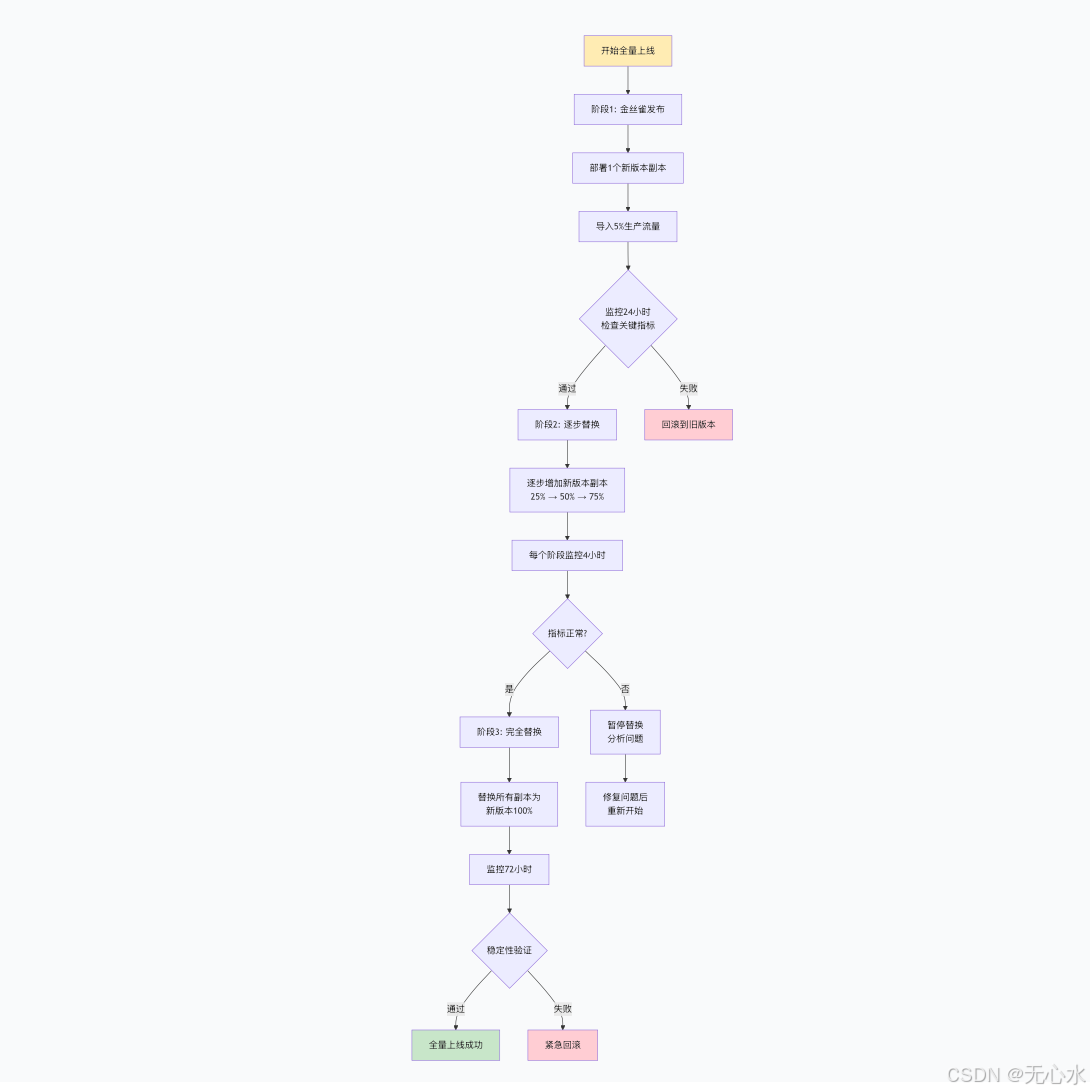
5.1 小流量测试阶段(金丝雀发布)
# canary-deployment.yaml
apiVersion: apps/v1
kind: Deployment
metadata:
  name: sd-canary-deployment
  namespace: ai-inference
spec:
  replicas: 1  # 仅部署1个副本用于测试
  selector:
    matchLabels:
      app: stable-diffusion
      track: canary
  template:
    metadata:
      labels:
        app: stable-diffusion
        track: canary
    spec:
      containers:
      - name: sd-canary
        image: registry.example.com/sd-3.5-fp8:v1.1.0-canary
        # 环境变量:启用详细日志和性能追踪
        env:
        - name: LOG_LEVEL
          value: "DEBUG"
        - name: ENABLE_TRACING
          value: "true"
        - name: REQUEST_LIMIT
          value: "10"  # 限制请求量

        # 资源限制更宽松,便于观察
        resources:
          limits:
            nvidia.com/gpu: 1
            memory: "32Gi"
          requests:
            nvidia.com/gpu: 1
            memory: "16Gi"
---
# 服务路由配置(Istio)
apiVersion: networking.istio.io/v1beta1
kind: VirtualService
metadata:
  name: sd-virtual-service
  namespace: ai-inference
spec:
  hosts:
  - sd-api.example.com
  http:
  - match:
    - headers:
        x-canary-test:
          exact: "true"
    route:
    - destination:
        host: sd-canary-service
        port:
          number: 80
      weight: 100
  - route:
    - destination:
        host: stable-diffusion-service
        port:
          number: 80
      weight: 95
    - destination:
        host: sd-canary-service
        port:
          number: 80
      weight: 5  # 5%的流量导向金丝雀版本
5.2 全量上线检查清单
# rollout_checklist.py
import requests
import json
import time
from datetime import datetime

class RolloutValidator:
    def __init__(self, base_url="http://sd-api.example.com"):
        self.base_url = base_url
        self.results = {}

    def check_health(self):
        """检查服务健康状态"""
        try:
            response = requests.get(f"{self.base_url}/actuator/health", timeout=10)
            if response.status_code == 200:
                data = response.json()
                status = data.get("status", "UNKNOWN")
                self.results['health'] = status == "UP"
                return status == "UP"
        except Exception as e:
            print(f"健康检查失败: {e}")
            self.results['health'] = False
            return False

    def check_latency(self, num_requests=10):
        """检查推理延迟"""
        latencies = []

        test_prompts = [
            "a beautiful sunset over mountains",
            "a cat sitting on a windowsill",
            "futuristic cityscape at night"
        ]

        for i in range(num_requests):
            prompt = test_prompts[i % len(test_prompts)]

            start_time = time.time()
            try:
                response = requests.post(
                    f"{self.base_url}/api/v1/generate",
                    json={"prompt": prompt, "steps": 20},
                    timeout=60
                )
                elapsed = time.time() - start_time

                if response.status_code == 200:
                    latencies.append(elapsed)
                else:
                    print(f"请求失败: {response.status_code}")
            except Exception as e:
                print(f"请求异常: {e}")

        if latencies:
            avg_latency = sum(latencies) / len(latencies)
            p95_latency = sorted(latencies)[int(len(latencies) * 0.95)]

            self.results['avg_latency'] = avg_latency
            self.results['p95_latency'] = p95_latency
            self.results['latency_check'] = p95_latency < 5.0  # P95延迟小于5秒

            print(f"平均延迟: {avg_latency:.2f}s, P95延迟: {p95_latency:.2f}s")
            return self.results['latency_check']
        else:
            self.results['latency_check'] = False
            return False

    def check_concurrency(self, concurrent_users=5):
        """检查并发处理能力"""
        import threading

        results = []
        errors = []

        def make_request(user_id):
            try:
                response = requests.post(
                    f"{self.base_url}/api/v1/generate",
                    json={
                        "prompt": f"test image for user {user_id}",
                        "steps": 15,
                        "width": 512,
                        "height": 512
                    },
                    timeout=30
                )
                results.append({
                    "user": user_id,
                    "success": response.status_code == 200,
                    "latency": response.elapsed.total_seconds()
                })
            except Exception as e:
                errors.append(f"用户{user_id}: {e}")

        threads = []
        for i in range(concurrent_users):
            thread = threading.Thread(target=make_request, args=(i,))
            threads.append(thread)
            thread.start()

        for thread in threads:
            thread.join()

        success_rate = sum(1 for r in results if r['success']) / len(results) if results else 0
        self.results['concurrency_success_rate'] = success_rate
        self.results['concurrency_check'] = success_rate > 0.9  # 成功率大于90%

        print(f"并发测试成功率: {success_rate:.1%}")
        if errors:
            print(f"错误信息: {errors}")

        return self.results['concurrency_check']

    def check_gpu_utilization(self, duration=60):
        """检查GPU利用率"""
        print(f"监控GPU利用率 {duration}秒...")

        utilizations = []
        start_time = time.time()

        while time.time() - start_time < duration:
            try:
                # 通过Prometheus查询GPU利用率
                prom_url = "http://prometheus.monitoring.svc.cluster.local:9090"
                query = 'avg(sd_gpu_utilization_percent)'

                response = requests.get(
                    f"{prom_url}/api/v1/query",
                    params={"query": query},
                    timeout=5
                )

                if response.status_code == 200:
                    data = response.json()
                    if data['data']['result']:
                        value = float(data['data']['result'][0]['value'][1])
                        utilizations.append(value)
            except Exception as e:
                print(f"获取GPU利用率失败: {e}")

            time.sleep(5)

        if utilizations:
            avg_utilization = sum(utilizations) / len(utilizations)
            self.results['avg_gpu_utilization'] = avg_utilization
            self.results['gpu_check'] = 20 < avg_utilization < 80  # 利用率在合理范围内

            print(f"平均GPU利用率: {avg_utilization:.1f}%")
            return self.results['gpu_check']
        else:
            self.results['gpu_check'] = False
            return False

    def run_full_check(self):
        """运行完整检查"""
        print("=" * 50)
        print(f"全量上线检查 - {datetime.now()}")
        print("=" * 50)

        checks = [
            ("健康检查", self.check_health),
            ("延迟检查", self.check_latency),
            ("并发检查", self.check_concurrency),
            ("GPU检查", self.check_gpu_utilization)
        ]

        all_passed = True
        for check_name, check_func in checks:
            print(f"\n执行 {check_name}...")
            try:
                passed = check_func()
                status = "✓ 通过" if passed else "✗ 失败"
                print(f"{check_name}: {status}")
                all_passed = all_passed and passed
            except Exception as e:
                print(f"{check_name}: ✗ 异常 - {e}")
                all_passed = False

        print("\n" + "=" * 50)
        print(f"检查结果: {'全部通过' if all_passed else '存在失败'}")
        print(f"详细结果: {json.dumps(self.results, indent=2)}")

        return all_passed

# 执行检查
if __name__ == "__main__":
    validator = RolloutValidator()
    if validator.run_full_check():
        print("检查通过,可以全量上线!")
        exit(0)
    else:
        print("检查失败,需要修复问题后再上线。")
        exit(1)
5.3 全量上线执行流程
6. 不同规模场景的部署方案选型
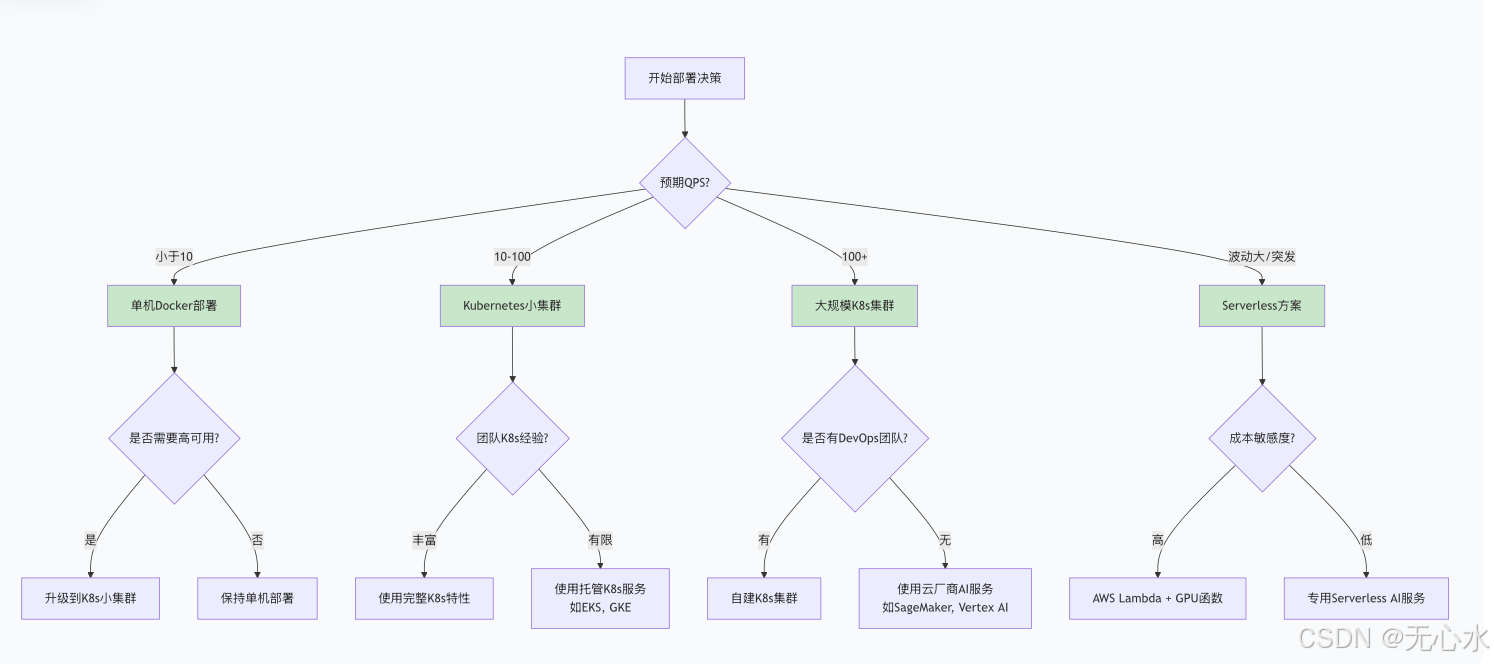
6.1 部署方案对比矩阵
| 维度 | 单机Docker部署 | Kubernetes小集群 | 大规模K8s集群 | Serverless函数 |
|---|---|---|---|---|
| 适用场景 | 开发测试、小规模POC | 中小型企业、团队内部 | 大型企业、SaaS服务 | 突发流量、边缘计算 |
| GPU资源 | 单GPU或CPU | 2-8个GPU节点 | 数十至数百GPU | GPU函数实例 |
| 成本估算 | 最低 | 中等 | 较高 | 按使用量计费 |
| 部署复杂度 | 简单 | 中等 | 复杂 | 简单 |
| 可扩展性 | 差 | 良好 | 优秀 | 优秀 |
| 运维负担 | 低 | 中等 | 高 | 低 |
| 典型配置 | 1x A10/A100 | 4x A100节点 | 10+ A100/H100节点 | AWS Lambda + GPU |
| 适用模型 | SD 3.5 FP8 | SD 3.5 FP8 + 微调 | 多版本模型并行 | 轻量化SD模型 |
6.2 推荐方案
方案1:开发测试环境
# 单节点Docker Compose配置
version: '3.8'
services:
  sd-inference:
    image: sd-3.5-fp8:latest
    deploy:
      resources:
        reservations:
          devices:
            - driver: nvidia
              count: 1
              capabilities: [gpu]
    ports:
      - "8080:8080"
    volumes:
      - ./models:/app/models
      - ./cache:/root/.cache
    environment:
      - CUDA_VISIBLE_DEVICES=0
    command: ["python3", "/app/python-service/main.py"]
方案2:中小企业生产环境
# Kubernetes轻量级配置
apiVersion: apps/v1
kind: Deployment
spec:
  replicas: 2  # 两个副本提供高可用
  template:
    spec:
      containers:
      - name: sd-inference
        image: sd-3.5-fp8:production
        resources:
          limits:
            nvidia.com/gpu: 1
            memory: "16Gi"
          requests:
            nvidia.com/gpu: 1
            memory: "8Gi"
---
apiVersion: v1
kind: Service
spec:
  type: NodePort
方案3:大规模企业级部署
# 完整的K8s部署方案(如前文3.1节)
# 包括:
# 1. 多副本部署 + HPA
# 2. 负载均衡 + Ingress
# 3. 监控 + 日志收集
# 4. 持久化存储
# 5. 网络策略 + 安全配置
方案4:Serverless部署(AWS SageMaker示例)
# sagemaker_deployment.py
import sagemaker
from sagemaker.pytorch import PyTorchModel
from sagemaker.predictor import Predictor

class StableDiffusionEndpoint:
    def __init__(self, model_path, role_arn):
        self.model_path = model_path
        self.role_arn = role_arn

    def create_endpoint(self, instance_type="ml.g5.2xlarge"):
        """创建SageMaker端点"""

        # 创建模型
        model = PyTorchModel(
            entry_point='inference.py',
            source_dir='src',
            model_data=self.model_path,
            role=self.role_arn,
            framework_version='2.0.0',
            py_version='py310',
            image_uri='763104351884.dkr.ecr.us-east-1.amazonaws.com/pytorch-inference:2.0.0-gpu-py310-cu118-ubuntu20.04-sagemaker'
        )

        # 部署端点
        predictor = model.deploy(
            initial_instance_count=1,
            instance_type=instance_type,
            endpoint_name='stable-diffusion-3.5-fp8',
            wait=True
        )

        return predictor

    def update_endpoint(self, new_model_path):
        """更新端点模型"""
        # 创建新配置
        new_model = PyTorchModel(
            entry_point='inference.py',
            source_dir='src',
            model_data=new_model_path,
            role=self.role_arn,
            framework_version='2.0.0',
            py_version='py310'
        )

        # 创建新端点配置
        new_endpoint_config_name = f'sd-config-{int(time.time())}'
        new_model.create(
            name=new_endpoint_config_name,
            instance_type='ml.g5.2xlarge',
            initial_instance_count=1
        )

        # 更新端点
        sagemaker_client = boto3.client('sagemaker')
        sagemaker_client.update_endpoint(
            EndpointName='stable-diffusion-3.5-fp8',
            EndpointConfigName=new_endpoint_config_name
        )
6.3 决策树:如何选择部署方案
7. 总结与最佳实践
通过本文的详细探讨,我们可以总结出Stable Diffusion 3.5 FP8工程化部署的核心要点:
7.1 关键成功因素
- 镜像优化:多阶段构建、合理分层、最小化体积
- 性能调优:TensorRT加速、预热机制、批处理优化
- 资源管理:GPU调度、内存限制、自动扩缩容
- 监控体系:全方位指标收集、智能告警、日志分析
- 部署策略:渐进式发布、金丝雀测试、快速回滚
7.2 避坑指南
- 避免在单个Pod中运行多个GPU密集型应用
- 不要将模型文件放在容器镜像内层(影响构建速度)
- 确保GPU驱动版本与CUDA版本兼容
- 测试不同批处理大小对性能的影响
- 监控显存泄漏和GPU内存碎片化
7.3 未来展望
随着AI模型部署技术的不断发展,未来趋势包括:
- 无服务器GPU计算的进一步成熟
- 混合精度推理的自动化优化
- 边缘AI部署的轻量化方案
- 多模型编排与智能路由
- 绿色计算与能效优化
Stable Diffusion 3.5 FP8的部署不仅仅是一个技术任务,更是一个系统工程。通过合理的架构设计、完善的运维体系和持续的优化迭代,才能确保AI模型在生产环境中稳定、高效地运行,真正发挥其商业价值。






 扫一扫
扫一扫


 632
632

 被折叠的 条评论
为什么被折叠?
被折叠的 条评论
为什么被折叠?
 到【灌水乐园】发言





