



背景介绍
在浏览器上可以通过生成指纹信息来进行反爬虫或进行用户追踪。之前我们提到的有canvas指纹,除此外还有音频指纹。音频指纹的思路和canvas指纹类型。在不同浏览器不同机器上通过音频api产生的声音信息会有略微的差异。因此可以通过这些api来获取我们需要的数据生成指纹。
音频指纹实现
下面的代码是[1]一个通过音频API产生声音的例子。
// 创建音频上下文
var audioCtx = new AudioContext();
// 创建音调控制对象
var oscillator = audioCtx.createOscillator();
// 创建音量控制对象
var gainNode = audioCtx.createGain();
// 音调音量关联
oscillator.connect(gainNode);
// 音量和设备关联
gainNode.connect(audioCtx.destination);
// 音调类型指定为正弦波
oscillator.type = 'sine';
// 设置音调频率
oscillator.frequency.value = 196.00;
// 先把当前音量设为0
gainNode.gain.setValueAtTime(0, audioCtx.currentTime);
// 0.01秒时间内音量从刚刚的0变成1,线性变化
gainNode.gain.linearRampToValueAtTime(1, audioCtx.currentTime + 0.01);
// 声音走起
oscillator.start(audioCtx.currentTime);
// 1秒时间内音量从刚刚的1变成0.001,指数变化
gainNode.gain.exponentialRampToValueAtTime(0.001, audioCtx.currentTime + 1);
// 1秒后停止声音
oscillator.stop(audioCtx.currentTime + 1);
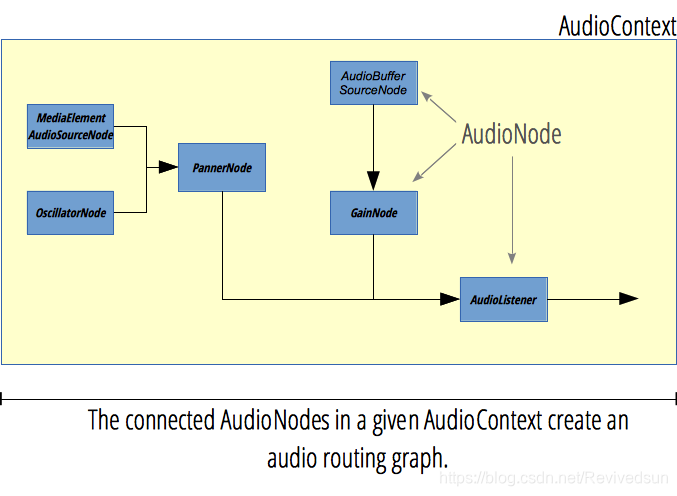
由于我们的重点并不是如何学习使用音频API,因此简略介绍其工作原理。其工作原理简述为创建一组具有相关功能的结点,随后将这些结点连接在一起,最后通过输出设备播放或输出到缓冲区。这些相关结点包括音频波形结点、音频音量调节结点、压缩结点等。大致结构如下图[2]所示:
但在实现音频指纹时显然不会去播放一段声音,而是将产生的结果输出输出到AudioBuffer或通过AnalyserNode来获取音频数据,最终通过计算结果产生一个数值表示指纹。下图介绍的原理分别是通过AudioContext和OfflineAudioContext来完成。
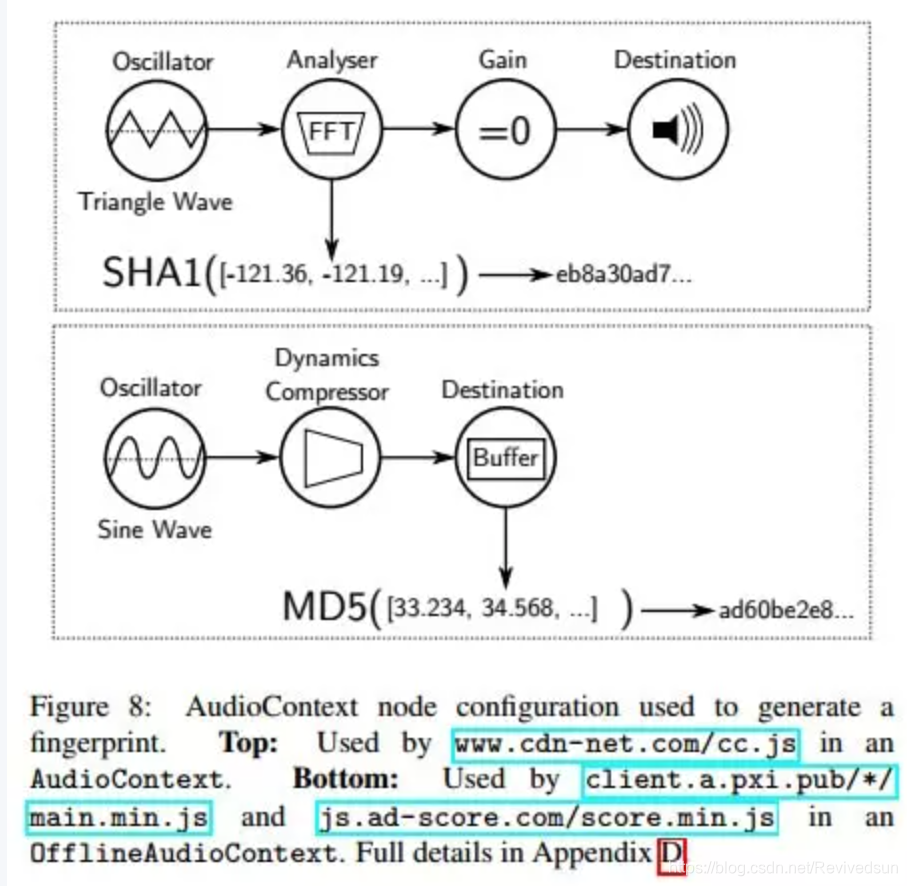
根据如上的工作原理,下面这段摘自fingerprint2项目的音频指纹生成就很容易理解了。 这里通过OfflineAudioContext实现,调用startRendering方法生成音频数据,生成完毕后oncomplete回调中会拿到数据,最终计算生成我们要的指纹。
var each = function(obj, iterator) {
    if (Array.prototype.forEach && obj.forEach === Array.prototype.forEach) {
        obj.forEach(iterator)
    } else if (obj.length === +obj.length) {
        for (var i = 0, l = obj.length; i < l; i++) {
            iterator(obj[i], i, obj)
        }
    } else {
        for (var key in obj) {
            if (obj.hasOwnProperty(key)) {
                iterator(obj[key], key, obj)
            }
        }
    }
}

var AudioContext = window.OfflineAudioContext || window.webkitOfflineAudioContext

    var context = new AudioContext(1, 44100, 44100)

    var oscillator = context.createOscillator()
    oscillator.type = 'triangle'
    oscillator.frequency.setValueAtTime(10000, context.currentTime)

    var compressor = context.createDynamicsCompressor()
    each([
      ['threshold', -50],
      ['knee', 40],
      ['ratio', 12],
      ['reduction', -20],
      ['attack', 0],
      ['release', 0.25]
    ], function (item) {
      if (compressor[item[0]] !== undefined && typeof compressor[item[0]].setValueAtTime === 'function') {
        compressor[item[0]].setValueAtTime(item[1], context.currentTime)
      }
    })

    oscillator.connect(compressor)
    compressor.connect(context.destination)
    oscillator.start(0)
    context.startRendering()

    var audioTimeoutId = setTimeout(function () {
      console.warn('Audio fingerprint timed out. Please report bug at https://github.com/Valve/fingerprintjs2 with your user agent: "' + navigator.userAgent + '".')
      context.oncomplete = function () { }
      context = null
      return done('audioTimeout')
    }, 100)

    context.oncomplete = function (event) {
      var fingerprint
      try {
        clearTimeout(audioTimeoutId)
        fingerprint = event.renderedBuffer.getChannelData(0)
          .slice(4500, 5000)
          .reduce(function (acc, val) { return acc + Math.abs(val) }, 0)
          .toString()
        oscillator.disconnect()
        compressor.disconnect()
      } catch (error) {
        console.log(error)
        return
      }
      console.log(fingerprint)
    }
因此是通过AudioBuffer的getChannelData是最终获取数据的方法,因此改变其生成也很容易。
参考
[1]html5-web-audio-api.https://www.zhangxinxu.com/wordpress/2017/06/html5-web-audio-api-js-ux-voice/
[2]AudioNode,https://developer.mozilla.org/zh-[3]OfflineAudioContext,CN/docs/Web/API/AudioNode#Browser_compatibility
https://developer.mozilla.org/en-US/docs/Web/API/OfflineAudioContext
[4]fingerprint2,https://github.com/Valve/fingerprintjs2/blob/master/fingerprint2.js#L360
[5].OpenWPM_1_million_site_tracking_measurement,http://randomwalker.info/publications/OpenWPM_1_million_site_tracking_measurement.pdf
[6]getChannelData,https://developer.mozilla.org/en-US/docs/Web/API/AudioBuffer/getChannelData
[7]https://webtap.princeton.edu/
[8]audio-fingerprinting,https://github.com/rickmacgillis/audio-fingerprint/blob/master/audio-fingerprinting.js





 扫一扫
扫一扫


 946
946

 被折叠的 条评论
为什么被折叠?
被折叠的 条评论
为什么被折叠?
 到【灌水乐园】发言





