


 本文通过Spring的观察者模式实现请假流程的上报和审核事件,演示如何通过监听器扩展功能而无需改动原有代码。涉及事件类、事件信息类和事件监听器的实例配置。
之前在项目中用到了spring的观察者模式,在此简单记录回顾一下。
假定有这么一个请假流程,主要分为两个事件,当事人提交请假 + 领导审核。每个事件下都会对应多个处理逻辑,如审核事件,需要处理请假单,需要记录日志,需要归档等一系列操作,可能后续还需要加入更多的处理逻辑,为了便于扩展,我们可使用观察者模式,每次需要扩充新功能,只需要添加新的监听器即可,不需要对原先的代码进行修改。接下来就使用观察者模式来简单模拟一下这两个事件。
1、maven依赖
使用Spring Initializr创建一个springboot项目,并添加web依赖和lombok依赖,方便测试与简化代码。
<dependencies>
    <dependency>
        <groupId>org.springframework.boot</groupId>
        <artifactId>spring-boot-starter-web</artifactId>
    </dependency>
    <dependency>
        <groupId>org.projectlombok</groupId>
        <artifactId>lombok</artifactId>
        <scope>provided</scope>
    </dependency>
</dependencies>
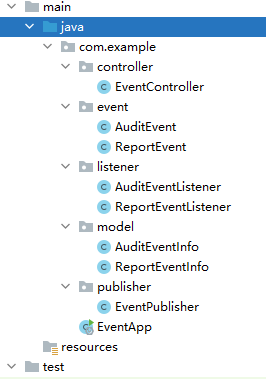
示例中,将整个流程看成一个整体,细分为上报和审核事件。示例的结构如下所示。
2、事件信息类
通常发布任务的时候,会附带一些重要信息,拿当前请假审核流程来说,请假事件必然会涉及到请假时间、请假原因、请假人姓名等信息,审核事件则会有审核结果、审核意见等信息。这些信息在任务发布后,会被任务对应的监听器获取到,监听器通常会根据这些信息做一些处理,如记录日志等。
由于是模拟,所以下面的两个类中,省略了很多字段。
@Data
public class ReportEventInfo implements Serializable {
    /**
     * 原因
     */
    private String reason;
}
@Data
public class AuditEventInfo implements Serializable {
    /**
     * 审核结果
     */
    private String auditResult;
}
3、事件类
public class ReportEvent extends ApplicationEvent implements Serializable {
    public ReportEvent(AuditEventInfo eventInfo) {
        super(eventInfo);
    }
}
public class AuditEvent extends ApplicationEvent implements Serializable {
    public AuditEvent(ReportEventInfo eventInfo) {
        super(eventInfo);
    }
}
4、事件监听器
- 上报事件监听器
@Slf4j
@Component
public class ReportEventListener implements ApplicationListener<ReportEvent> {
    @Override
    public void onApplicationEvent(ReportEvent event) {
        Object source = event.getSource();
        ReportEventInfo info = (ReportEventInfo) source;
        log.info(">>> com.example.listener.ReportEventListener.onApplicationEvent...{}", info.getReason());
    }
}
- 审核事件监听器
@Slf4j
@Component
public class AuditEventListener implements ApplicationListener<AuditEvent> {
    @Override
    public void onApplicationEvent(AuditEvent event) {
        Object source = event.getSource();
        AuditEventInfo info = (AuditEventInfo) source;
        log.info(">>> com.example.listener.AuditEventListener.onApplicationEvent...{}", info.getAuditResult());
    }
}
通常还会有流程日志记录监听器等等,一个事件大多是对应多个监听者的,这里就简单的只为每个事件写了一个监听器。
5、通用事件发布器
事件发布使用的是ApplicationEventPublisher接口的publishEvent方法,而我们常用的ApplicationContext接口继承了ApplicationEventPublisher接口,这里我们便使用它来进行事件发布。publishEvent方法接受的入参可以是ApplicationEvent,也可以是对ApplicationEvent包装过的PayloadApplicationEvent。
@Component
public class EventPublisher implements ApplicationContextAware {

    private static ApplicationContext context;

    @Override
    public void setApplicationContext(ApplicationContext applicationContext) throws BeansException {
        context = applicationContext;
    }
    public static void publish(ApplicationEvent event) {
        context.publishEvent(event);
    }
}
6、测试
@RestController
public class EventController {

    @GetMapping("report")
    public String report(@RequestParam("reason") String reason) {
        ReportEventInfo info = new ReportEventInfo();
        info.setReason(reason);
        // 发布上报事件
        EventPublisher.publish(new ReportEvent(info));
        return "report success!";
    }

    @GetMapping("audit")
    public String audit(@RequestParam("result") String result) {
        AuditEventInfo info = new AuditEventInfo();
        info.setAuditResult(result);
        // 发布审核事件
        EventPublisher.publish(new AuditEvent(info));
        return "audit success!";
    }

}
对上述两个接口进行请求后,相应的事件监听器中会打印相应的日志。
7、结语
在实际的开发中,通常一个事件会对应多个监听器,多个监听器之间通常会存在先后关系,这时候可以使用@Order注解(或实现Ordered接口)指定优先级,如@Order(1)、@Order(2),值越小优先级越高。





 扫一扫
扫一扫


 857
857

 被折叠的 条评论
为什么被折叠?
被折叠的 条评论
为什么被折叠?
 到【灌水乐园】发言





