



 本文深入讲解SpringMVC框架的基础知识,包括MVC结构、视图解析器配置、请求参数绑定、中文乱码解决方案、自定义类型转换器实现及常用注解应用,通过实例演示如何构建RESTful风格的Web应用。
主要学习了springMVC的入门知识,对MVC 的结构认识更加清晰,
相比于Spring,mvc更加结构化,各层分工明确。
主要学习了:
1.视图解析器的配置
2.请求绑定参数,结合项目来看,主要是传入实体类
3。拦截器解决中文乱码
4.自定义类型转换器,实现Conserver接口;并重写conserver方法,注意Conserver接口别导错包,并需要对泛型进行明确定义,本例中是String转Date;
5.常用的几个注解
@RequestMapping @PathVariable
@RequestParam @RequestBody
6.简单了解了restful风格
web.xml配置
<!DOCTYPE web-app PUBLIC
 "-//Sun Microsystems, Inc.//DTD Web Application 2.3//EN"
 "http://java.sun.com/dtd/web-app_2_3.dtd" >
<web-app>
  <display-name>Archetype Created Web Application</display-name>
<!--  前端控制器 -->
  <servlet>
    <servlet-name>dispatcherServlet</servlet-name>
    <servlet-class>org.springframework.web.servlet.DispatcherServlet</servlet-class>
    <init-param>
      <param-name>contextConfigLocation</param-name>
      <param-value>classpath:Config.xml</param-value>
    </init-param>
    <load-on-startup>1</load-on-startup>
  </servlet>
  <servlet-mapping>
    <servlet-name>dispatcherServlet</servlet-name>
    <url-pattern>/</url-pattern>
  </servlet-mapping>

<!--  解决中文乱码问题,拦截所有请求,并设置其编码方式utf-8-->
  <filter>
    <filter-name>characterEncodingFilter</filter-name>
    <filter-class>org.springframework.web.filter.CharacterEncodingFilter</filter-class>
    <init-param>
      <param-name>encoding</param-name>
      <param-value>utf-8</param-value>
    </init-param>
  </filter>
  <filter-mapping>
    <filter-name>characterEncodingFilter</filter-name>
    <url-pattern>/*</url-pattern>
  </filter-mapping>
</web-app>
Config.xml:Spring 配置文件
<?xml version="1.0" encoding="UTF-8"?>
<beans xmlns="http://www.springframework.org/schema/beans"
       xmlns:mvc="http://www.springframework.org/schema/mvc"
       xmlns:context="http://www.springframework.org/schema/context"
       xmlns:xsi="http://www.w3.org/2001/XMLSchema-instance"
       xsi:schemaLocation="
        http://www.springframework.org/schema/beans
        http://www.springframework.org/schema/beans/spring-beans.xsd
        http://www.springframework.org/schema/mvc
        http://www.springframework.org/schema/mvc/spring-mvc.xsd
        http://www.springframework.org/schema/context
        http://www.springframework.org/schema/context/spring-context.xsd">

<!--    注解扫描-->
    <context:component-scan base-package="cn.itcast"/>

<!--    开启视图解析器:prefix:页面路径  suffix:文件后缀名-->
    <bean id="internalResourceViewResolver" class="org.springframework.web.servlet.view.InternalResourceViewResolver">
        <property name="prefix" value="/WEB-INF/pages/"></property>
        <property name="suffix" value=".jsp"/>
    </bean>


<!--    配置自定义类型转换器    -->
    <bean id="conversionService" class="org.springframework.context.support.ConversionServiceFactoryBean">
        <property name="converters">
            <set>
                <bean class="cn.itcast.Utils.ConverterTest"/>
            </set>
        </property>
    </bean>

<!--    Springmvc注解扫描-->
<!--    开启对自定义的类型转换器的支持;没有设置则不用开启-->
    <mvc:annotation-driven  conversion-service="conversionService"/>
</beans>
Controller
package cn.itcast.controller;

import cn.itcast.Domain.UserDo;
import org.springframework.stereotype.Controller;
import org.springframework.web.bind.annotation.PathVariable;
import org.springframework.web.bind.annotation.RequestMapping;
import org.springframework.web.bind.annotation.RequestMethod;
import org.springframework.web.bind.annotation.RequestParam;

@Controller
@RequestMapping("/springmvc")
public class HelloController {

//    f返回值为success,则去视图解析器中去拼字符串,找到success.jsp
    @RequestMapping(path="/hello",method= RequestMethod.GET)
    public  String Hello(){
        System.out.println("Hello");
        return "success";
    }
    //理解restful风格,method不同,能够通过同一个path,找到不同的方法
//    同样,有参和无参也能区分相同path相同method的方法
    @RequestMapping(path="/hello",method= RequestMethod.POST)
    public  String Hello2(){
        System.out.println("Hello");
        return "success";
    }
//    restful风格的一种形式,利用@PathVariable注解,能够获得path中的id值
    @RequestMapping(path="/hello/{id}",method = RequestMethod.GET)
    public  String Hello3(@PathVariable(name = "id") String id){
        System.out.println("Hello");
        System.out.println("查找"+id+"对应信息");
        return "success";
    }

//    RequestParam注解默认情况下能限制必须传入userDO值,否则报错
//    不加这个注解,则会对userDo赋予空值。不会报错
//    项目中检测参数输入
    @RequestMapping(path="/test")
    public  String test(@RequestParam UserDo userDo){
        System.out.println(userDo);
        return "success";
    }
}
Converter:自定义类型转换器实现类
package cn.itcast.Utils;

import org.springframework.core.convert.converter.Converter;

import java.text.DateFormat;
import java.text.SimpleDateFormat;
import java.util.Date;
//"yyyy-MM-dd" String 类型数据转date

public class ConverterTest implements Converter<String , Date> {
    @Override
    public Date convert(String s) {
        if(s==null){
            throw new RuntimeException();
        }
        DateFormat dt =new SimpleDateFormat("yyyy-MM-dd");
        try{
          return  dt.parse(s);
        }catch(Exception e){
            throw new RuntimeException();
        }
    }
}
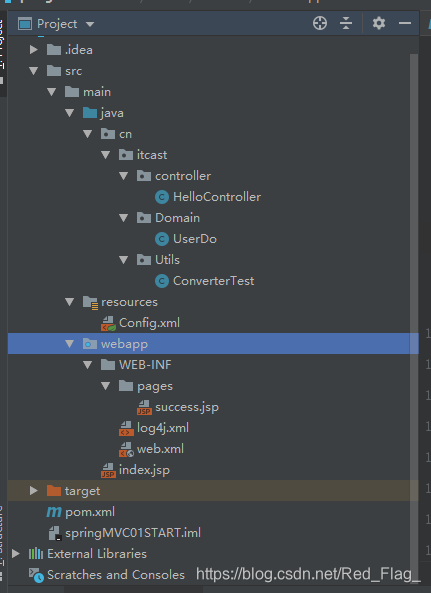
附图为程序结构:





 扫一扫
扫一扫


 被折叠的 条评论
为什么被折叠?
被折叠的 条评论
为什么被折叠?
 到【灌水乐园】发言





