


今天是2021年12月29日,西安封城第七天
今天的内容如下
Preserving Your App’s UI Across Launches
At appropriate times, UIKit preserves the state of your app’s views and view controllers to an encrypted file on disk. When your app is terminated and relaunched later, UIKit reconstructs your views and view controllers from the preserved data. The preservation and restoration processes are initiated automatically, but you must also do some specific work to support those processes:
- Enable support for state preservation and restoration.
- Assign restoration identifiers to the view controllers that you want
to preserve. - Recreate view controllers, as needed, at restoration time.
- Encode and decode the custom data that you need to restore your view controller to its previous state.
If you define your interface entirely in storyboards, UIKit knows how to recreate your view controllers, and does so automatically. If you do not use storyboards, or if you want more control over the creation and initialization of your view controllers, you can create them yourself.
系统在运存不够的情况下会清理后台应用,所以建议用户不要做把应用挂到后台后台还能给你保存状态的白日梦了,建议多花点钱上pro max,这样白日梦就能稍微成真了
当然UIKit也不是啥用都没有,他会在合适的时间将View和VC状态保存到一个磁盘上的编码文件里头去,再次打开时会重建View和VC,整个过程自动完成,但你得劳烦配置一下它!
- 开启支持保存和重载选项
- 给每个需要保存状态的VC配一个重载标识符
- 在重载时重载需要的VC
- 编解码重载VC时需要的数据
如果用SB,UIKit会自动重建VC,如果你像我一样不用SB,那你需要自己弄
You opt-in to state preservation and restoration by implementing your app delegate’s application(:shouldSaveApplicationState:) and application(:shouldRestoreApplicationState:) methods. Both methods return a Boolean value indicating whether the associated process should occur, and in most cases you simply return true. However, you can return false at times when restoring your app’s interface might not be appropriate.
When UIKit calls your application(:shouldSaveApplicationState:) method, you can save data in addition to returning true. You might save data that you intend to use during the restoration process.
可以通过实现app代理的application(:shouldSaveApplicationState:) 和 application(_:shouldRestoreApplicationState:) 方法状态保存和重载机制
这俩方法决定了相关过程是否发生,正常情况下返回true,也可以在适当情况下让他返回false
可以在application(_:shouldSaveApplicationState:)方法中对数据进行存储以便于后期重载VC时使用
For example, Listing 1 shows an example that saves the app’s current version number. At restoration time, the application(_:shouldRestoreApplicationState:) method checks the version number in the archive and prevents restoration from occurring if it does not match the expected version.
//Listing 1 Declaring support for state preservation and restoration
func application(_ application: UIApplication,
            shouldSaveApplicationState coder: NSCoder) -> Bool {
   // Save the current app version to the archive.
   coder.encode(11.0, forKey: "MyAppVersion")

   // Always save state information.
   return true
}

func application(_ application: UIApplication,
            shouldRestoreApplicationState coder: NSCoder) -> Bool {
   // Restore the state only if the app version matches.
   let version = coder.decodeFloat(forKey: "MyAppVersion")
   if version == 11.0 {
      return true
   }

   // Do not restore from old data.
   return false
}
If you prevent restoration from occurring, you can still configure your app’s interface manually in the application(_:didFinishLaunchingWithOptions:) method of your app delegate.
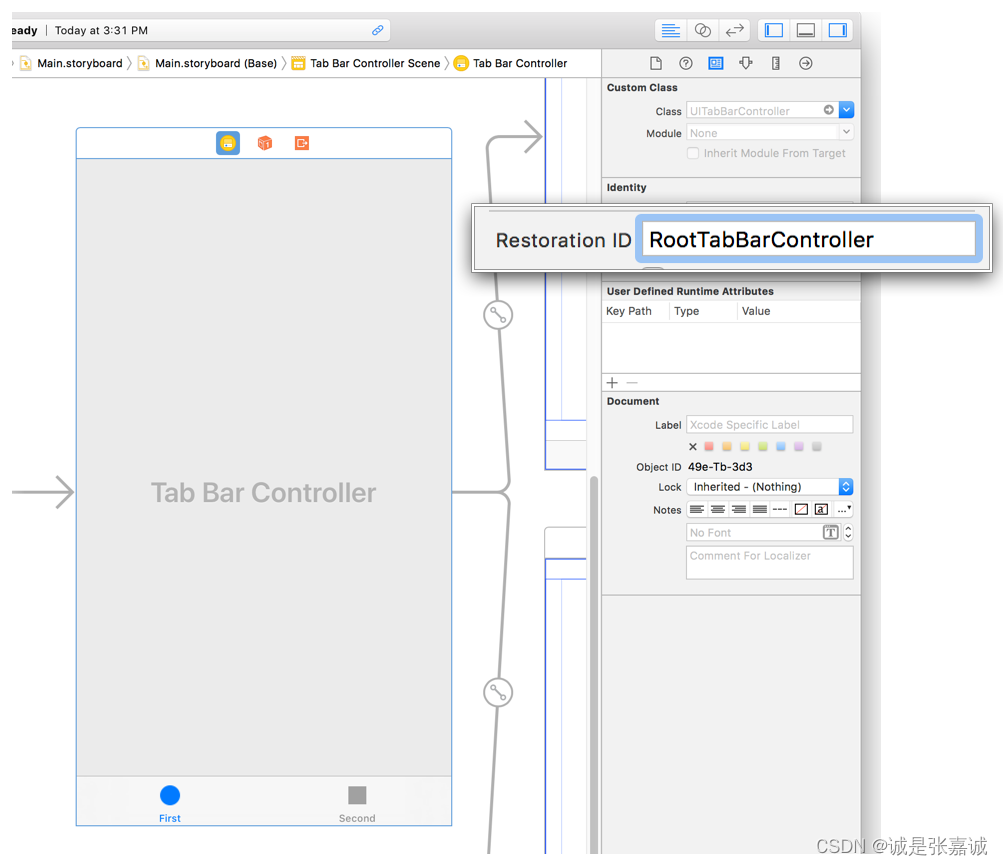
The name of the view controller class is usually a suitable restoration identifier, but you may use any string. Add that string to the view controller in your storyboard file or assign it to the view controller’s restorationIdentifier property at runtime.
At preservation time, UIKit attempts to preserve the root view controllers of your app’s windows. For each root view controller with a restoration identifier, UIKit asks that view controller to encode its custom data in an archive. A container view controller can encode references to its child view controllers as part of its custom data. If it does, and if those view controllers also have restoration identifiers, UIKit attempts to preserve the child view controllers and their contents. This process continues recursively, following the connections from one view controller to the next until all of them are saved or ignored.
You are not required to assign a restoration identifier to every view controller. In fact, there are times when you might not want to preserve all of your view controllers. For example, if your app displays a temporary login screen, you might not want that screen preserved. Instead, you would want to determine at restoration time whether to display it. In that case, you would not assign a restoration identifier to the view controller for your login screen.
重载标识符一般就是VC的名字,但你可以用其他任何字符
我不用SB,所以就只能在运行时把重载标识符赋值到restorationIdentifier属性里去
保存时,UIKit会尝试 保存window的根视图,对于每个拥有重载标识符的根视图,UIKit都会让他们把自己的数据存档,容器类VC可以将自己的引用编码到子VC中作为子VC的数据的一部分。
不需要给每个VC都赋重载标识符,按需分配
Encode and Decode Custom Information for Your App
During the preservation process, UIKit calls the encodeRestorableState(with:) method of each preserved view and view controller. Use this method to preserve the information that you need to return the view or view controller to its current state.
- Do save details about the visual state of views and controls.
- Do save references to child view controllers that you also want to
preserve. - Do save information that can be discarded without affecting the
user’s data - Do not include data that is already in your app’s persistent
storage.Instead, include an identifier that you can use to locate that data later.
State preservation is not a substitute for saving your app’s data to disk. UIKit can discard state preservation data at its discretion, allowing your app to return to its default state. Use the preservation process to store information about the state of your app’s user interface, such as the currently selected row of a table. Do not use it to store the data contained in that table.
保存状态时,UIKit会调用每个被保存的View或VC的 encodeRestorableState(with:)方法,用来保存重载时需要的信息
- 储存视觉状态的细节,比如滚动视图滚到哪那种
- 储存它所有需要重载的子VC
- 储存可以在不影响用户数据的情况下丢弃的信息
- 不要存那些已经在内存里的东西,给他一个标记之后能取出来就行
别想着拿它存app数据,存一存界面信息就行了
Listing 2 shows an example of a view controller with text fields for gathering a first and last name. If one of the text fields contains an unsaved value, the method saves the unsaved value and an identifier for which text field contains that value. In this case, the unsaved value is not part of the app’s persistent data; it is a temporary value that can be discarded if needed.
//Listing 2 Encoding the state of a view controller
override func encodeRestorableState(with coder: NSCoder) {
   super.encodeRestorableState(with: coder)

   // Save the user ID so that we can load that user later.
   coder.encode(userID, forKey: "UserID")

   // Write out any temporary data if editing is in progress.
   if firstNameField!.isFirstResponder {
      coder.encode(firstNameField?.text, forKey: "EditedText")
      coder.encode(Int32(1), forKey: "EditField")
   }
   else if lastNameField!.isFirstResponder {
      coder.encode(lastNameField?.text, forKey: "EditedText")
      coder.encode(Int32(2), forKey: "EditField")
   }
   else {
      // No editing was in progress.
      coder.encode(Int32(0), forKey: "EditField")
   }
}
Create View Controllers When Asked
If preserved state information is available when your app is launched, the system attempts to restore your app’s interface using the preserved data.
- UIKit calls your app delegate’s
application(_:shouldRestoreApplicationState:)
method to determine if restoration should proceed. - UIKit uses your app’s storyboards to recreate your view controllers.
- UIKit calls each view controller’s
decodeRestorableState(with:)
method to restore its state information.
UIKit loads both the view controller and its views from your storyboard initially. After those objects have been loaded and initialized, UIKit begins restoring their state information. Use your decodeRestorableState(with:) methods to return your view controller to its previous state.
如果app启动时保存的状态可用的话那么系统会尝试重载app的界面信息
- 调用代理的application(_:shouldRestoreApplicationState:)方法决定重载是否进行
- 用SB重建VC
- 调用decodeRestorableState(with:)解码状态信息
Listing 3 shows the method for decoding the state that was encoded in Listing 2. This method restores the view controller’s data from the preserved user ID. If a text field was being edited, this method also restores the in-progress value and makes the corresponding text field the first responder, which displays the keyboard for that text field.
//Listing 3 Decoding the
override func decodeRestorableState(with coder: NSCoder) {
   super.decodeRestorableState(with: coder)

   // Restore the first name and last name from the user ID
   let identifier = coder.decodeObject(forKey: "UserID") as! String
   setUserID(identifier: identifier)

   // Restore an in-progress values that was not saved
   let activeField = coder.decodeInteger(forKey: "EditField")
   let editedText = coder.decodeObject(forKey: "EditedText") as!
                         String?

   switch activeField {
      case 1:
         firstNameField?.text = editedText
         firstNameField?.becomeFirstResponder()
         break

      case 2:
         lastNameField?.text = editedText
         lastNameField?.becomeFirstResponder()
         break

     default:
         break  // Do nothing.
  }
}
Defining your view controllers in storyboards is the easiest way to manage state restoration, but it is not the only way.
Managing Your App’s Life Cycle
app的状态决定了他能干啥,正在运行的进程就可以获取系统资源,后台进程就只能做一些最必要的工作,所以app状态转换时你需要随时适配它的行为
When your app’s state changes, UIKit notifies you by calling methods of the appropriate delegate object:
- In iOS 13 and later, use UISceneDelegate objects to respond to
life-cycle events in a scene-based app. - In iOS 12 and earlier, use the UIApplicationDelegate object to
respond to life-cycle events.
Note
If you enable scene support in your app, iOS always uses your scene delegates in iOS 13 and later. In iOS 12 and earlier, the system uses your app delegate.
当app状态改变时,UIKit会通过调用合适代理对象的方法去通知你
iOS13之后用UISceneDelegate 方法响应生命周期时间,iOS12之前用 UIApplicationDelegate
If your app supports scenes, UIKit delivers separate life-cycle events for each. A scene represents one instance of your app’s UI running on a device. The user can create multiple scenes for each app, and show and hide them separately. Because each scene has its own life cycle, each can be in a different state of execution. For example, one scene might be in the foreground while others are in the background or are suspended.
如果app支持窗口,那么他们之间是独立的,一个窗口就代表了在设备上运行的一个appUI的实例,窗口之间互不干扰并各有状态,支持窗口是个可选的设置,在info.plist里配置一下UIApplicationSceneManifest 键
Important
Scene support is an opt-in feature. To enable basic support, add the UIApplicationSceneManifest key to your app’s Info.plist file as described in Specifying the Scenes Your App Supports.
The following figure shows the state transitions for scenes. When the user or system requests a new scene for your app, UIKit creates it and puts it in the unattached state. User-requested scenes move quickly to the foreground, where they appear onscreen. A system-requested scene typically moves to the background so that it can process an event. For example, the system might launch the scene in the background to process a location event. When the user dismisses your app’s UI, UIKit moves the associated scene to the background state and eventually to the suspended state. UIKit can disconnect a background or suspended scene at any time to reclaim its resources, returning that scene to the unattached state.
An illustration showing the state transitions for a scene-based app. Scenes start in the unattached state and move to the foreground-active or background state. The foreground-inactive state acts as a transition state.
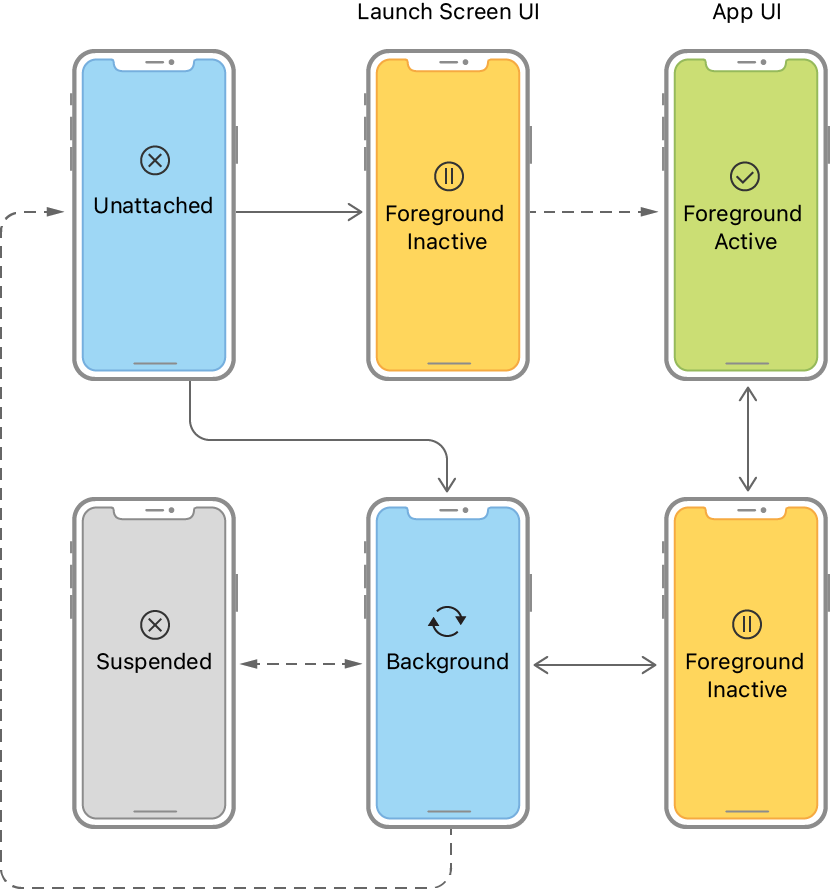
Use scene transitions to perform the following tasks:
When UIKit connects a scene to your app, configure your scene’s initial UI and load the data your scene needs.
When transitioning to the foreground-active state, configure your UI and prepare to interact with the user. See Preparing Your UI to Run in the Foreground.
Upon leaving the foreground-active state, save data and quiet your app’s behavior. See Preparing Your UI to Run in the Background.
Upon entering the background state, finish crucial tasks, free up as much memory as possible, and prepare for your app snapshot. See Preparing Your UI to Run in the Background.
At scene disconnection, clean up any shared resources associated with the scene.
In addition to scene-related events, you must also respond to the launch of your app using your UIApplicationDelegate object. For information about what to do at app launch, see Responding to the Launch of Your App.
Respond to App-Based Life-Cycle Events
In iOS 12 and earlier, and in apps that don’t support scenes, UIKit delivers all life-cycle events to the UIApplicationDelegate object. The app delegate manages all of your app’s windows, including those displayed on separate screens. As a result, app state transitions affect your app’s entire UI, including content on external displays.
The following figure shows the state transitions involving the app delegate object. After launch, the system puts the app in the inactive or background state, depending on whether the UI is about to appear onscreen. When launching to the foreground, the system transitions the app to the active state automatically. After that, the state fluctuates between active and background until the app terminates.
An illustration showing the state transitions for an app without scenes. The app launches into the active or background state. An app transitions through the inactive state.
Use app transitions to perform the following tasks:
At launch, initialize your app’s data structures and UI. See Responding to the Launch of Your App.
At activation, finish configuring your UI and prepare to interact with the user. See Preparing Your UI to Run in the Foreground.
Upon deactivation, save data and quiet your app’s behavior. See Preparing Your UI to Run in the Background.
Upon entering the background state, finish crucial tasks, free up as much memory as possible, and prepare for your app snapshot. See Preparing Your UI to Run in the Background.
At termination, stop all work immediately and release any shared resources. See applicationWillTerminate(😃.
Respond to Other Significant Events
In addition to handling life-cycle events, apps must also be prepared to handle the events listed in the following table. Use your UIApplicationDelegate object to handle most of these events. In some cases, you may also be able to handle them using notifications, allowing you to respond from other parts of your app.
Memory warnings
Received when your app’s memory usage is too high. Reduce the amount of memory your app uses; see Responding to Memory Warnings.
Protected data becomes available/unavailable
Received when the user locks or unlocks their device. See applicationProtectedDataDidBecomeAvailable(😃 and applicationProtectedDataWillBecomeUnavailable(😃.
Handoff tasks
Received when an NSUserActivity object needs to be processed. See application(:didUpdate:).
Time changes
Received for several different time changes, such as when the phone carrier sends a time update. See applicationSignificantTimeChange(😃.
Open URLs
Received when your app needs to open a resource. See application(:open:options:).

 410


 扫一扫


 被折叠的 条评论
为什么被折叠?
 到【灌水乐园】发言


