



1.打开终端,编辑/etc/lightdm/lightdm.conf
vim /etc/lightdm/lightdm.conf
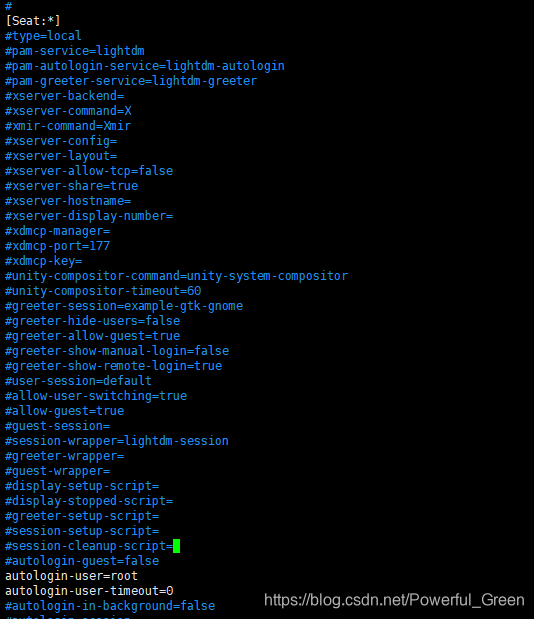
2.找到 [Seat] 那一行,在其 下面 添加如下内容
autologin-user=root
autologin-user-timeout=0
(注意,一定要找对地方,否则会失败)
3.保存
:wq
4.重启检查效果
reboot
 本文介绍如何在Linux系统中配置自动登录功能,通过编辑lightdm配置文件实现root用户的自动登录,适用于系统管理员快速登录需求。
1.打开终端,编辑/etc/lightdm/lightdm.conf
vim /etc/lightdm/lightdm.conf
2.找到 [Seat] 那一行,在其 下面 添加如下内容
autologin-user=root
autologin-user-timeout=0
(注意,一定要找对地方,否则会失败)
3.保存
:wq
4.重启检查效果
reboot

 被折叠的 条评论
为什么被折叠?
被折叠的 条评论
为什么被折叠?
 到【灌水乐园】发言








 扫一扫
扫一扫


 2644
2644


