

rotated text in reportlabs

本文介绍如何使用ReportLab库在PDF中实现文本旋转效果,并提供了一个简单的示例代码,展示了如何通过saveState、translate、rotate等方法来绘制带有旋转文本的图表。

if you want to make a great chart like the one below in reportlab, you need rotated text.it isn't very complicated - its just a bit hard to find som examples on the net.

the canvas in reportlab has a saveState and a restoreState method, and supports rotate and translate similarto openGL or processing. see the code example below who it is done.
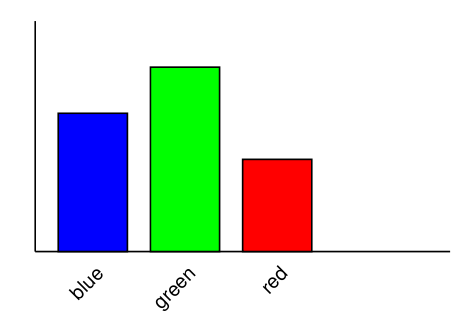
chart with rotated lables

from reportlab.pdfgen import canvas

from reportlab.lib.units import cm

c = canvas.Canvas("rotate.pdf")

c.line( 2*cm, 21*cm, 2*cm, 16*cm)
c.line( 2*cm, 16*cm, 11*cm, 16*cm )

c.setFillColorRGB( 0, 0, 1 )
c.rect( 2.5*cm, 16*cm, 1.5*cm, 3*cm, fill = 1 )
c.setFillColorRGB( 0, 1, 0 )
c.rect( 4.5*cm, 16*cm, 1.5*cm, 4*cm, fill = 1 )
c.setFillColorRGB( 1, 0, 0 )
c.rect( 6.5*cm, 16*cm, 1.5*cm, 2*cm, fill = 1 )

c.setFillColorRGB( 0, 0, 0 )

i=0
for str in ["blue", "green", "red"]:
    c.saveState()
    c.translate( (i + 3.5) * cm, 15.5 * cm )
    c.rotate( 45 )
    c.drawRightString( 0, 0, str )
    c.restoreState()
    i += 2

c.showPage()
c.save()


引自:http://www.local-guru.net/blog/2009/4/9/rotated-text-in-reportlabs


### Rotated ROI Align in Object Detection and Image Processing In the context of object detection and image processing, rotated region-of-interest (ROI) alignment plays a crucial role when dealing with objects that are not aligned to the axis. Traditional methods like Fast R-CNN use standard ROIs which assume bounding boxes are upright rectangles. However, this assumption can lead to suboptimal performance on datasets where objects have arbitrary orientations. To address these limitations, researchers introduced **Rotated ROI Align**, an extension of the original ROI Align operation designed specifically for handling arbitrarily oriented proposals. This method allows more accurate feature extraction from regions defined by quadrilaterals rather than just rectangular areas[^1]. The key difference between regular ROI Align and its rotated counterpart lies in how features within each proposal box get sampled during forward propagation: - For conventional ROI Align, bilinear interpolation is applied over four grid points inside every bin. - In contrast, Rotated ROI Align applies adaptive sampling grids based on both position and orientation information associated with each proposed region. This approach ensures better spatial correspondence between input images and extracted features while maintaining computational efficiency through pooling operations tailored towards non-axis-aligned shapes. #### Implementation Details Implementing Rotated ROI Align involves several steps including defining appropriate data structures for storing rotation parameters alongside coordinates as well as modifying existing frameworks such as Faster R-CNN or Mask R-CNN to accommodate angled detections effectively. Below shows Python code snippet demonstrating part of what might be involved in implementing custom layers supporting rotated RoI alignments using PyTorch framework: ```python import torch.nn.functional as F from torchvision.ops import roi_align def rotated_roi_align(features, rois, output_size=(7, 7), spatial_scale=1./16., angle=None): """ Apply rotated ROI align operator Args: features (Tensor): Feature maps obtained after backbone network rois (list[tuple]): List containing tuples representing individual ROIs Each tuple consists of five elements: batch index, center_x, center_y, width, height followed optionally by `angle` parameter specifying degree of rotation ... Returns: Tensor: Aligned feature map corresponding to given set of ROIs """ if isinstance(rois[0], tuple) and len(rois[0]) >= 5: # Extract angles if provided along with other attributes per ROI _, cx, cy, w, h = zip(*rois) # Convert list into tensor format expected by underlying C++ implementation rois_tensor = torch.tensor([*zip(cx, cy, w, h)], dtype=torch.float32).to(device=features.device) # Perform actual transformation considering specified rotations transformed_features = transform_rotated_rois( features=features, rois=rois_tensor, angles=[r[-1] for r in rois], out_height=output_size[0], out_width=output_size[1], spatial_scale=spatial_scale ) return transformed_features else: raise ValueError("Invalid structure detected among supplied ROIs.") ```
评论
添加红包

请填写红包祝福语或标题

红包个数最小为10个

红包金额最低5元

当前余额3.43前往充值 >
需支付:10.00
成就一亿技术人!
领取后你会自动成为博主和红包主的粉丝 规则
hope_wisdom
发出的红包
实付
使用余额支付
点击重新获取
扫码支付
钱包余额 0

抵扣说明:

1.余额是钱包充值的虚拟货币,按照1:1的比例进行支付金额的抵扣。
2.余额无法直接购买下载,可以购买VIP、付费专栏及课程。

余额充值


