


如何实现微信双开。以下是几种常见的方法:
方法一:使用Python实现微信双开
如果您想用Python脚本实现微信双开,可以尝试以下代码:
import os
import subprocess

def open_multiple_wechat():
    # 微信安装路径,请根据实际情况修改
    wechat_path = r"C:\Program Files\Tencent\WeChat\WeChat.exe"

    # 检查路径是否存在
    if not os.path.exists(wechat_path):
        print("未找到微信程序,请检查安装路径")
        return

    # 启动第一个微信实例
    subprocess.Popen(wechat_path)
    print("已启动第一个微信实例")

    # 使用命令行参数启动第二个微信实例
    subprocess.Popen([wechat_path, "/multi"])
    print("已启动第二个微信实例")

if __name__ == "__main__":
    open_multiple_wechat()
加入多开吧
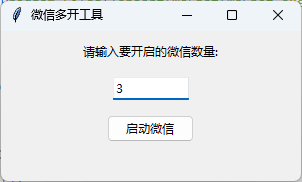
import os
import subprocess
import tkinter as tk
from tkinter import ttk
from tkinter.messagebox impor 最低0.47元/天 解锁文章






 扫一扫
扫一扫


 1万+
1万+

 被折叠的 条评论
为什么被折叠?
被折叠的 条评论
为什么被折叠?
 到【灌水乐园】发言





