



- 在这里先给大家说一下的本篇博客产生的背景:老师在课堂提出了下列相关的要求,让我们力利用Spring MVC进行文件上传:
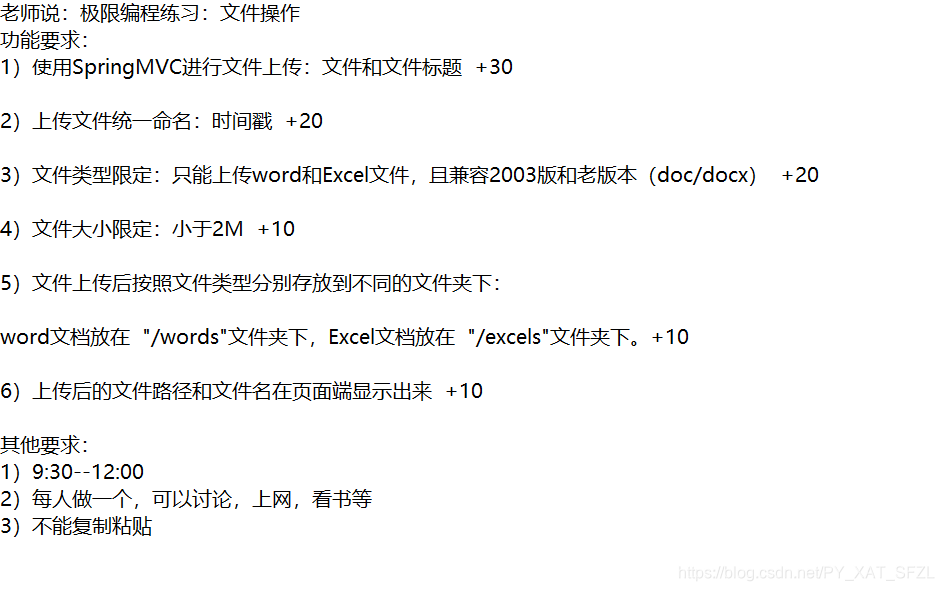
2.首先呢,实现了单纯的文件上传功能,然后再根据要求向里面添加要求:
1 >首先创建一个项目,引入jar包和web.xml配置好Spring config.xml文件
2 >创建一个JSP页面,这个页面用于实现表单上传文件。
3 >编写controller层代码用于接收文件的相关操作。
jsp页面如下:
<%@ page language="java" contentType="text/html; charset=UTF-8"
    pageEncoding="UTF-8"%>
<!DOCTYPE html>
<html>
<head>
<meta charset="UTF-8">
<title>上传页面</title>

<script type="text/javascript">

function check() {

var name = document.getElementById("name").value;
var file = document.getElementById("file").value;
if(name==""){
	alert("填写上传人!!");
	return false;
}
if(file.length==0||file==""){
		alert("文件不能为空!");
		return false;
	}

	return true;
}


</script>
</head>
<body>
	<form action="${pageContext.request.contextPath }/upfile" enctype="multipart/form-data"
	method="post" onsubmit="return check()">
	上传人: <input id="name" type="text" name="name" /> <br>

          选择文件: <input id="file" type="file"  name="upfile" multiple="multiple" /> <br>

    <input type="submit" value= "上传" /> <br>


	</form>


</body>
</html>
在这里还犯了一个错误,就是那个脚本的花括号少了一个,表单的标签没有写到中,我说怎么点提交的时候一直没有反应,但是当时没有来得及看
2 > controller层代码:
package cn.edu.pdsu.controller;

import java.io.File;
import java.io.IOException;
import java.text.SimpleDateFormat;
import java.util.Date;
import java.util.List;
import java.util.UUID;
import javax.servlet.http.HttpServletRequest;
import org.springframework.stereotype.Controller;
import org.springframework.ui.Model;
import org.springframework.web.bind.annotation.RequestMapping;
import org.springframework.web.bind.annotation.RequestParam;
import org.springframework.web.multipart.MultipartFile;

@Controller
public class FileupController {

	@RequestMapping("/upfile")
	public String fileup(@RequestParam("name") String name,
	@RequestParam("upfile")List<MultipartFile> upfile,
	HttpServletRequest req ,Model model
	) throws IllegalStateException, IOException {

		Date date = new Date();

		date.getTime(); //时间戳

		SimpleDateFormat  sdf = new SimpleDateFormat("yyyy-MM-dd HH:mm:ss");
		SimpleDateFormat  sdf2 = new SimpleDateFormat("yyyy年MM月dd日HH时mm分ss");
		String  sdftime = sdf.format(date);
		String  sdftime2 = sdf2.format(date);

		model.addAttribute("filename", sdftime);

		System.out.println(sdftime);
		System.out.println(sdftime2);

		if(!upfile.isEmpty()&&upfile.size()>0) {

			for (MultipartFile file : upfile) {

				String originalFilename = file.getOriginalFilename();
				//后缀名
				String sname = originalFilename.substring(originalFilename.lastIndexOf("."));
                      System.out.println(sname);

                      if(sname.equals(".xlsx")==false&&
                    		  sname.equals(".doc")==false&&sname.equals(".docx")==false
                    		  &&sname.equals(".xls")==false&&name.equals(".csv")==false){

                    	  model.addAttribute("error","不符合格式要求");
                    	  return "err";
                      }

			String path;
			//判断words文件
			System.out.println(file.getContentType());

			//docx  doc
		if(file.getContentType().equals("application/vnd.openxmlformats-officedocument.wordprocessingml.document")
				||file.getContentType().equals("application/msword")){
			     path =  "D:\\words" + "\\";
			//判断excels xls xlsx
		}else if(file.getContentType().equals("application/vnd.ms-excel")// application/x-excel
				||file.getContentType().equals("application/vnd.openxmlformats-officedocument.spreadsheetml.sheet")){
	        path = "D:\\excels" + "\\";
	        //其它文件
	    }else {
	          path = "D:\\files" + "\\";
	    }

				File filepath = new File(path);

				if(!filepath.exists()) {
					filepath.mkdirs();
				}

				String newname = name+UUID.randomUUID()+ "_ "+sdftime2+sname;

				System.out.println(path+newname);

				model.addAttribute("filepath", path+newname);

			//	D:\words\2c3bc7d6-58db-4146-b706-13a341fc7854_ 2021-04-22 19:42:17.docx (文件名、目录名或卷标语法不正确。)

				file.transferTo(new File(path+newname));
			}
			return "succ";
		}
		else {
			return "err";
		}
	}


}
说明: 文件大小的控制配置在spring config文件中:
<beans xmlns="http://www.springframework.org/schema/beans"
  xmlns:xsi="http://www.w3.org/2001/XMLSchema-instance"
  xmlns:mvc="http://www.springframework.org/schema/mvc"
  xmlns:context="http://www.springframework.org/schema/context"
  xmlns:tx="http://www.springframework.org/schema/tx"
  xsi:schemaLocation="http://www.springframework.org/schema/beans
  http://www.springframework.org/schema/beans/spring-beans-4.3.xsd
  http://www.springframework.org/schema/mvc
  http://www.springframework.org/schema/mvc/spring-mvc-4.3.xsd
  http://www.springframework.org/schema/context
  http://www.springframework.org/schema/context/spring-context-4.3.xsd ">
	<!-- 配置包扫描器,扫描@Controller注解的类 -->
	<context:component-scan base-package="cn.edu.pdsu" />
	<!-- 加载注解驱动 -->
<!-- 	<mvc:annotation-driven /> -->
<!-- 	配置视图解析器 -->
	<bean class=
    "org.springframework.web.servlet.view.InternalResourceViewResolver">
		<property name="prefix" value="/" />
		<property name="suffix" value=".jsp" />
	</bean>

<bean id="multipartResolver" class="org.springframework.web.multipart.commons.CommonsMultipartResolver" >
<property name="defaultEncoding" value="UTF-8"></property>
<property name="maxUploadSize" value="2097152" />
<!-- <property name="maxUploadSize" value="1024" /> -->

</bean>

<!-- 1.在文件上传解析时发现异常,此时还没有进入到Controller方法中 -->
<bean id="exceptionResolver" class= "org.springframework.web.servlet.handler.SimpleMappingExceptionResolver">
    <property name="exceptionMappings">
        <props>
        <!-- 遇到MaxUploadSizeExceededException异常时,跳转到error.jsp页面  -->
        <prop key= "org.springframework.web.multipart.MaxUploadSizeExceededException">/err</prop>
        </props>
    </property>
</bean>
    <!-- 如果有多个拦截器,则按照顺序进行配置 -->
<!--   <mvc:interceptor> -->
<!--         /**表示所有URL和子URL路径 -->
<!--         <mvc:mapping path="/**" /> -->
<!--         配置自定义的文件上传类型限制拦截器 -->
<!--         <bean class="com.itheima.interceptor.FileTypeInterceptor" /> -->
<!--     </mvc:interceptor> -->

</beans>
补充: 相关jar包如下:
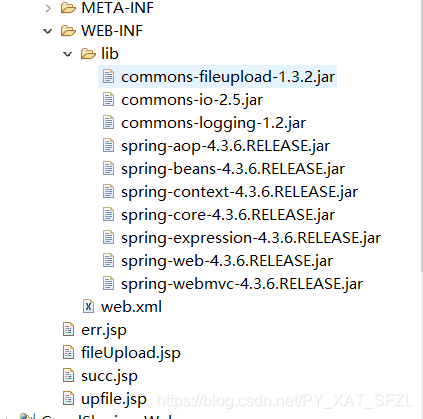
web.xml 配置 :
<?xml version="1.0" encoding="UTF-8"?>
<web-app xmlns:xsi="http://www.w3.org/2001/XMLSchema-instance" xmlns="http://xmlns.jcp.org/xml/ns/javaee" xsi:schemaLocation="http://xmlns.jcp.org/xml/ns/javaee http://xmlns.jcp.org/xml/ns/javaee/web-app_3_1.xsd" version="3.1">
  <display-name>system2.0</display-name>
<!--   监听器 -->
<!--   	<context-param> -->
<!-- 		<param-name>contextConfigLocation</param-name> -->
<!-- 		<param-value>classpath:applicationContext.xml</param-value> -->
<!-- 	</context-param> -->
<!-- 	<listener> -->
<!-- 		<listener-class> -->
<!-- 		     org.springframework.web.context.ContextLoaderListener -->
<!-- 		</listener-class> -->
<!-- 	</listener> -->

  <!--    配置前端控制器 ,加载spring.xml配置文件  -->
  <servlet>
  <servlet-name>homework</servlet-name>
  <servlet-class>org.springframework.web.servlet.DispatcherServlet</servlet-class>
  <init-param>
  <param-name>contextConfigLocation</param-name>
  <param-value>classpath:springmvc-config.xml</param-value>
  </init-param>
  <load-on-startup>1</load-on-startup>
  </servlet>
  <servlet-mapping>
  <servlet-name>homework</servlet-name>
  <url-pattern>/</url-pattern>
  </servlet-mapping>


  <filter>
<!--   ????? -->
  <filter-name>encoding</filter-name>
  <filter-class>org.springframework.web.filter.CharacterEncodingFilter</filter-class>
  <init-param>
  <param-name>encoding</param-name>
  <param-value>UTF-8</param-value>
  </init-param>
  </filter>

  <filter-mapping>
  <filter-name>encoding</filter-name>
  <url-pattern>/*</url-pattern>
  </filter-mapping>


<!--   <welcome-file-list> -->
<!--     <welcome-file>login.jsp</welcome-file> -->
<!--   </welcome-file-list> -->
</web-app>
在最后给大家说一点特别狗血的一点,就是下面的这个问题:
创建文件时不能用冒号命名,当时我看代码的形式已经把时间戳转换成了String类型,我感觉直接拼接在后面就可以。结果给老师演示的时候出现了500(java.io.FileNotFoundException: D:\words\2c3bc7d6-58db-4146-b706-13a341fc7854_ 2021-04-22 19:42:17.docx (文件名、目录名或卷标语法不正确。)。老师还说从网上直接考下来,硬生生的运行是不行的,尴尬的要死。我这个问题找了好久,最后终于找到了这句话了。换了一下定义的时间格式果然成功了,太坑了狗血。







 扫一扫
扫一扫


 367
367

 被折叠的 条评论
为什么被折叠?
被折叠的 条评论
为什么被折叠?
 到【灌水乐园】发言





