


一、安装Node.js,配置node、npm环境变量(自行查询)
二、VS Code(推荐安装插件):
-
Chinese (Simplified) (简体中文) Language Pack for Visual Studio Code
-
Vue (Official)
-
Vue VSCode Snippets
-
Tailwind CSS IntelliSense
-
Vite
-
GitHub Copilot
-
Auto Rename Tag
-
ESLint
-
Prettier
-
Auto Import / Path Intellisense(可选)
三、在你存放工程的目录打开CMD
先检查以下你的npm源是否是国内的,否则可能下载很慢,建议用腾讯源
:: 检查 npm源
npm config get registry

:: 设置 npm源
npm config set registry https://registry.npmmirror.com/
四、创建 Vue3 + Vite 项目
- 1.初始化
:: 构建项目tailwind4test
npm init vue@latest tailwind4test- 2. 选择要包含的功能


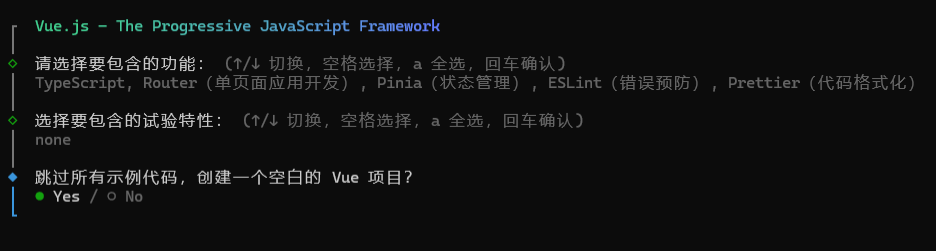
- 3.进入项目目录并安装依赖,我这里的tailwindcss为4.1.17版本
:: 进入项目目录
cd tailwind4test

:: 安装最新 Tailwind + daisyUI + Vite 插件
npm install -D tailwindcss@latest @tailwindcss/vite@latest daisyui@latest
- 4. .vscode/settings.json 文件配置:
{
  "explorer.fileNesting.enabled": true,
  "explorer.fileNesting.patterns": {
    "tsconfig.json": "tsconfig.*.json, env.d.ts",
    "vite.config.*": "jsconfig*, vitest.config.*, cypress.config.*, playwright.config.*",
    "package.json": "package-lock.json, pnpm*, .yarnrc*, yarn*, .eslint*, eslint*, .oxlint*, oxlint*, .prettier*, prettier*, .editorconfig"
  },
  "editor.codeActionsOnSave": {
    "source.fixAll": "explicit"
  },
  "editor.formatOnSave": true,
  "[vue]": {
    "editor.defaultFormatter": "Vue.volar"
  }
}- 5.src\assets\main.css 文件配置(没有生成就自己创建一个):
在ailwind4中已经抛弃tailwind.config.js,所以无需再次创建tailwind.config.js
/*
旧方式
@tailwind base;
@tailwind components;
@tailwind utilities;
*/

/* 新方式 */
@import "tailwindcss";

@plugin "daisyui" {
  themes: corporate --default, dark --prefersdark, light, cupcake, bumblebee, emerald, corporate, synthwave, retro, cyberpunk, valentine, halloween, garden, forest, aqua, lofi, pastel, fantasy, wireframe, black, luxury, dracula, cmyk, autumn, business, acid, lemonade, night, coffee, winter, dim, nord, sunset;
  logs: false;
}

@plugin "daisyui/theme" {
  name: "mytheme";
  default: false;
  prefersdark: false;
  color-scheme: light;
  --color-base-100: oklch(98% 0.02 240);
  --color-base-200: oklch(95% 0.03 240);
  --color-base-300: oklch(92% 0.04 240);
  --color-base-content: oklch(20% 0.05 240);
  --color-primary: oklch(55% 0.30 240);
  --color-primary-content: oklch(98% 0.01 240);
  --color-secondary: oklch(70% 0.25 200);
  --color-secondary-content: oklch(98% 0.01 200);
  --color-accent: oklch(65% 0.25 160);
  --color-accent-content: oklch(98% 0.01 160);
  --color-neutral: oklch(50% 0.05 240);
  --color-neutral-content: oklch(98% 0.01 240);
  --color-info: oklch(70% 0.2 220);
  --color-info-content: oklch(98% 0.01 220);
  --color-success: oklch(65% 0.25 140);
  --color-success-content: oklch(98% 0.01 140);
  --color-warning: oklch(80% 0.25 80);
  --color-warning-content: oklch(20% 0.05 80);
  --color-error: oklch(65% 0.30 30);
  --color-error-content: oklch(98% 0.01 30);
  --radius-selector: 1rem;
  --radius-field: 0.25rem;
  --radius-box: 0.5rem;
  --size-selector: 0.25rem;
  --size-field: 0.25rem;
  --border: 1px;
  --depth: 1;
  --noise: 0;
}6.src/main.ts文件配置:
import { createApp } from 'vue'
import { createPinia } from 'pinia'

import App from './App.vue'
import router from './router'

import './assets/main.css'

const app = createApp(App)

app.use(createPinia())
app.use(router)

app.mount('#app')
7.src/vite.config.ts文件配置:
import { fileURLToPath, URL } from 'node:url'

import { defineConfig } from 'vite'
import vue from '@vitejs/plugin-vue'
import vueDevTools from 'vite-plugin-vue-devtools'
import tailwindcss from '@tailwindcss/vite'

// https://vite.dev/config/
export default defineConfig({
  plugins: [
    vue(),
    vueDevTools(),
    tailwindcss()
  ],
  resolve: {
    alias: {
      '@': fileURLToPath(new URL('./src', import.meta.url))
    },
  },
})
- 8.src\router\index.ts 文件配置:
import { createRouter, createWebHistory } from 'vue-router'

const router = createRouter({
  history: createWebHistory(import.meta.env.BASE_URL),
  routes: [
    {
      path: '/manage',
      name: 'manage',
      component: () => import('../views/ManagePage.vue'),
    },
    {
      path: '/',
      name: 'login',
      component: () => import('../views/LoginPage.vue'),
    }
  ],
})

export default router
- 9.src\stores\counter.ts 文件配置:
import { ref, computed } from 'vue'
import { defineStore } from 'pinia'

export const useCounterStore = defineStore('counter', () => {
  const count = ref(0)
  const doubleCount = computed(() => count.value * 2)
  function increment() {
    count.value++
  }

  return { count, doubleCount, increment }
})
- 10.src\App.vue 文件配置:
<script setup lang="ts">
import { onMounted } from 'vue'

// 自动读取本地缓存,设置全局主题
onMounted(() => {
  const savedTheme = localStorage.getItem('theme') || 'light';
  document.documentElement.setAttribute('data-theme', savedTheme);
})
</script>

<template>
  <div class="app-root">
    <router-view />
  </div>
</template>
<style scoped>
.app-root {
  min-height: 100vh;
}
</style>
src\views\LoginPage.vue 示例:
<template>
  <div class="flex min-h-full flex-1 flex-col justify-center px-6 py-12 lg:px-8">
    <div class="sm:mx-auto sm:w-full sm:max-w-sm">
      <img class="mx-auto h-10 w-auto" src="/public/favicon.ico" alt="Your Company" />
      <h2 class="mt-10 text-center text-2xl/9 font-bold tracking-tight text-gray-900">Sign in to your account</h2>
    </div>

    <div class="mt-10 sm:mx-auto sm:w-full sm:max-w-sm">
      <form class="space-y-6" action="#" method="POST">
        <div>
          <label for="username" class="block text-sm/6 font-medium text-gray-900">Username</label>
          <div class="mt-2">
            <input type="text" name="username" id="username" autocomplete="username" required
              class="block w-full rounded-md bg-white px-3 py-1.5 text-base text-gray-900 outline-1 -outline-offset-1 outline-gray-300 placeholder:text-gray-400 focus:outline-2 focus:-outline-offset-2 focus:outline-indigo-600 sm:text-sm/6" />
          </div>
        </div>

        <div>
          <div class="flex items-center justify-between">
            <label for="password" class="block text-sm/6 font-medium text-gray-900">Password</label>
            <div class="text-sm">
              <a href="#" class="font-semibold text-indigo-600 hover:text-indigo-500">Forgot password?</a>
            </div>
          </div>
          <div class="mt-2">
            <input type="password" name="password" id="password" autocomplete="current-password" required
              class="block w-full rounded-md bg-white px-3 py-1.5 text-base text-gray-900 outline-1 -outline-offset-1 outline-gray-300 placeholder:text-gray-400 focus:outline-2 focus:-outline-offset-2 focus:outline-indigo-600 sm:text-sm/6" />
          </div>
        </div>

        <div>
          <button type="submit"
            class="flex w-full justify-center rounded-md bg-indigo-600 px-3 py-1.5 text-sm/6 font-semibold text-white shadow-xs hover:bg-indigo-500 focus-visible:outline-2 focus-visible:outline-offset-2 focus-visible:outline-indigo-600">Sign
            in</button>
        </div>
      </form>

    </div>
  </div>
</template>

<script setup lang="ts">
// import { reactive, ref } from 'vue'
// import { useRouter } from 'vue-router'

// interface LoginForm {
//   username: string
//   password: string
//   remember: boolean
// }

// const router = useRouter()
// const form = reactive<LoginForm>({ username: '', password: '', remember: false })
// const loading = ref(false)
// const error = ref('')
// const success = ref('')

// function validate(): boolean {
//   error.value = ''
//   success.value = ''
//   if (!form.username || !form.password) {
//     error.value = '请输入用户名和密码'
//     return false
//   }
//   if (form.password.length < 4) {
//     error.value = '密码长度至少 4 位'
//     return false
//   }
//   return true
// }

// async function onSubmit() {
//   if (!validate()) return
//   loading.value = true
//   // 模拟异步登录
//   await new Promise(resolve => setTimeout(resolve, 900))
//   loading.value = false
//   // 简单通过校验即可认为成功
//   success.value = '登录成功,正在跳转…'
//   // 记住我逻辑(这里只是占位,可接入真实持久化)
//   if (form.remember) {
//     try { localStorage.setItem('remember_user', form.username) } catch { }
//   }
//   setTimeout(() => {
//     router.push('/manage')
//   }, 500)
// }
</script>

<style scoped>
/* .form-control {
  display: flex;
  flex-direction: column;
  gap: 0.25rem;
} */
</style>
src\views\ManagePage.vue 示例:
<template>
  <div class="drawer lg:drawer-open">
    <input id="my-drawer-2" type="checkbox" class="drawer-toggle" />
    <div class="drawer-content flex flex-col items-start">
      <!-- Navbar -->
      <div class="navbar w-full bg-base-300">
        <div class="flex-none lg:hidden">
          <label for="my-drawer-2" aria-label="open sidebar" class="btn btn-square btn-ghost">
            <svg xmlns="http://www.w3.org/2000/svg" fill="none" viewBox="0 0 24 24"
              class="inline-block h-6 w-6 stroke-current">
              <path stroke-linecap="round" stroke-linejoin="round" stroke-width="2" d="M4 6h16M4 12h16M4 18h16"></path>
            </svg>
          </label>
        </div>
        <div class="flex-1 text-xl font-bold px-4">管理后台</div>
        <div class="flex-none">
          <div class="dropdown dropdown-end">
            <div tabindex="0" role="button" class="btn">
              <span>主题</span>
              <svg width="12px" height="12px" class="h-2 w-2 fill-current opacity-60 inline-block"
                xmlns="http://www.w3.org/2000/svg" viewBox="0 0 2048 2048">
                <path d="M1799 349l242 241-1017 1017L7 590l242-241 775 775 775-775z"></path>
              </svg>
            </div>
            <ul tabindex="0"
              class="dropdown-content z-10 p-2 shadow-2xl bg-base-300 rounded-box w-52 max-h-96 overflow-y-auto">
              <li v-for="theme in themes" :key="theme">
                <input type="radio" name="theme-dropdown"
                  class="theme-controller btn btn-sm btn-block btn-ghost justify-start" :aria-label="theme"
                  :value="theme" @change="setTheme" :checked="currentTheme === theme" />
              </li>
            </ul>
          </div>
        </div>
      </div>

      <!-- Page content here -->
      <main class="p-4 w-full">
        <div class="mt-8 grid grid-cols-1 sm:grid-cols-2 lg:grid-cols-4 gap-4">
          <div v-for="stat in stats" :key="stat.name" class="stat bg-base-200 rounded-box">
            <div class="stat-title">{{ stat.name }}</div>
            <div class="stat-value">{{ stat.value }}</div>
            <div v-if="stat.unit" class="stat-desc">{{ stat.unit }}</div>
          </div>
        </div>
        <div class="mt-8 overflow-x-auto">
          <h2 class="text-lg font-semibold mb-4">Latest activity</h2>
          <table class="table w-full">
            <thead>
              <tr>
                <th>User</th>
                <th>Commit</th>
                <th>Status</th>
                <th class="hidden md:table-cell">Duration</th>
                <th class="text-right">Deployed at</th>
              </tr>
            </thead>
            <tbody>
              <tr v-for="item in activityItems" :key="item.commit" class="hover">
                <td>
                  <div class="flex items-center gap-3">
                    <div class="avatar">
                      <div class="mask mask-squircle w-12 h-12">
                        <img :src="item.user.imageUrl" alt="Avatar" />
                      </div>
                    </div>
                    <div>
                      <div class="font-bold">{{ item.user.name }}</div>
                    </div>
                  </div>
                </td>
                <td>
                  <div class="flex items-center gap-2">
                    <span class="font-mono text-sm">{{ item.commit }}</span>
                    <span class="badge badge-ghost badge-sm">{{ item.branch }}</span>
                  </div>
                </td>
                <td>
                  <span class="badge" :class="{
                    'badge-success': item.status === 'Completed',
                    'badge-error': item.status === 'Error'
                  }">{{ item.status }}</span>
                </td>
                <td class="hidden md:table-cell">{{ item.duration }}</td>
                <td class="text-right">{{ item.date }}</td>
              </tr>
            </tbody>
          </table>
        </div>
      </main>
    </div>

    <div class="drawer-side">
      <label for="my-drawer-2" aria-label="close sidebar" class="drawer-overlay"></label>
      <ul class="menu p-4 w-64 min-h-full bg-base-200">
        <!-- Sidebar content here -->
        <li class="menu-title">
          <span class="text-xl">菜单</span>
        </li>
        <li>
          <a>
            <svg xmlns="http://www.w3.org/2000/svg" width="1.5em" height="1.5em" viewBox="0 0 512 512">
              <path fill="currentColor"
                d="M409.43 389.87C362 410 305.4 421.05 256 421.05s-105.87-11.3-153.44-31.18S48 353.16 48 353.16v38.2c0 31.15 18 43.64 67.32 64.35C153.13 471.59 203.18 480 256 480s102.87-8.41 140.68-24.29C446 435 464 422.51 464 391.36v-38.2s-7.14 16.59-54.57 36.71M63.69 173.22c11.23 9.84 27.82 19.49 48 27.92c42.48 17.76 96.45 28.37 144.36 28.37s101.88-10.61 144.36-28.37c20.13-8.43 36.72-18.08 47.95-27.92c6.06-5.31 10.85-10.12 13.47-12.85a8 8 0 0 0 2.22-5.54v-26.16c-.84-28.79-24.71-54.41-67.21-72.14C358.83 40.71 308.84 32 256 32s-102.83 8.71-140.74 24.53C72.85 74.22 49 99.78 48.05 128.5v26.33a8 8 0 0 0 2.21 5.54c2.58 2.73 7.36 7.54 13.43 12.85" />
              <path fill="currentColor"
                d="M409.43 221.91C365 241 305.4 253.09 256 253.09s-108.87-12.27-153.43-31.18S48 185.2 48 185.2v47.36c.08 7.52 5.5 16.2 15.69 25.13c11.24 9.84 27.82 19.5 48 27.92C154.12 303.38 208.09 314 256 314s101.88-10.6 144.36-28.37c20.13-8.42 36.72-18.08 47.95-27.92c10.25-9 15.68-17.71 15.69-25.27V185.2s-10.13 17.62-54.57 36.71" />
              <path fill="currentColor"
                d="M409.43 306.38C362 326 305.4 337.56 256 337.56s-109.87-12.8-153.43-31.18S48 269.67 48 269.67v46.25c0 7.55 5.44 16.28 15.69 25.26c11.23 9.84 27.81 19.5 48 27.92c42.48 17.77 96.44 28.37 144.36 28.37s101.88-10.6 144.36-28.37c20.13-8.43 36.72-18.08 47.95-27.92c10.19-8.93 15.61-17.61 15.69-25.13v-46.38s-7.18 17.09-54.62 36.71" />
            </svg>
            设备管理
          </a>
        </li>
        <li>
          <a>
            <svg xmlns="http://www.w3.org/2000/svg" width="1.5em" height="1.5em" viewBox="0 0 512 512">
              <path fill="currentColor" d="M256 112a56 56 0 1 1 56-56a56.06 56.06 0 0 1-56 56" />
              <path fill="currentColor"
                d="m432 112.8l-.45.12l-.42.13c-1 .28-2 .58-3 .89c-18.61 5.46-108.93 30.92-172.56 30.92c-59.13 0-141.28-22-167.56-29.47a74 74 0 0 0-8-2.58c-19-5-32 14.3-32 31.94c0 17.47 15.7 25.79 31.55 31.76v.28l95.22 29.74c9.73 3.73 12.33 7.54 13.6 10.84c4.13 10.59.83 31.56-.34 38.88l-5.8 45l-32.19 176.19q-.15.72-.27 1.47l-.23 1.27c-2.32 16.15 9.54 31.82 32 31.82c19.6 0 28.25-13.53 32-31.94s28-157.57 42-157.57s42.84 157.57 42.84 157.57c3.75 18.41 12.4 31.94 32 31.94c22.52 0 34.38-15.74 32-31.94a57 57 0 0 0-.76-4.06L329 301.27l-5.79-45c-4.19-26.21-.82-34.87.32-36.9a1 1 0 0 0 .08-.15c1.08-2 6-6.48 17.48-10.79l89.28-31.21a17 17 0 0 0 1.62-.52c16-6 32-14.3 32-31.93S451 107.81 432 112.8" />
            </svg>
            用户管理
          </a>
        </li>
        <li>
          <a>
            <svg xmlns="http://www.w3.org/2000/svg" class="h-5 w-5" fill="none" viewBox="0 0 24 24"
              stroke="currentColor">
              <path stroke-linecap="round" stroke-linejoin="round" stroke-width="2"
                d="M13 16h-1v-4h-1m1-4h.01M21 12a9 9 0 11-18 0 9 9 0 0118 0z" />
            </svg>
            Settings
          </a>
        </li>
      </ul>
    </div>
  </div>
</template>

<script setup lang="ts">
import { ref, onMounted } from 'vue'

const themes = [
  "light", "dark", "cupcake", "bumblebee", "emerald", "corporate", "synthwave",
  "retro", "cyberpunk", "valentine", "halloween", "garden", "forest", "aqua",
  "lofi", "pastel", "fantasy", "wireframe", "black", "luxury", "dracula",
  "cmyk", "autumn", "business", "acid", "lemonade", "night", "coffee", "winter",
  "dim", "nord", "sunset"
];

const currentTheme = ref('');

const setTheme = (event: Event) => {
  const newTheme = (event.target as HTMLInputElement).value;
  document.documentElement.setAttribute('data-theme', newTheme);
  localStorage.setItem('theme', newTheme);
  currentTheme.value = newTheme;
};

onMounted(() => {
  const savedTheme = localStorage.getItem('theme') || 'light';
  currentTheme.value = savedTheme;
  document.documentElement.setAttribute('data-theme', savedTheme);
});

const stats = [
  { name: '到期', value: '405' },
  { name: '未到期', value: '3.65', unit: 'mins' },
  { name: '即将到期', value: '3' },
  { name: '未使用', value: '98.5%' },
]

const activityItems = [
  {
    user: {
      name: 'Michael Foster',
      imageUrl:
        'https://images.unsplash.com/photo-1519244703995-f4e0f30006d5?ixlib=rb-1.2.1&ixid=eyJhcHBfaWQiOjEyMDd9&auto=format&fit=facearea&facepad=2&w=256&h=256&q=80',
    },
    commit: '2d89f0c8',
    branch: 'main',
    status: 'Completed',
    duration: '25s',
    date: '45 minutes ago',
    dateTime: '2023-01-23T11:00',
  },
  {
    user: {
      name: 'Lindsay Walton',
      imageUrl:
        'https://images.unsplash.com/photo-1517841905240-472988babdf9?ixlib=rb-1.2.1&ixid=eyJhcHBfaWQiOjEyMDd9&auto=format&fit=facearea&facepad=2&w=256&h=256&q=80',
    },
    commit: '249df660',
    branch: 'main',
    status: 'Completed',
    duration: '1m 32s',
    date: '3 hours ago',
    dateTime: '2023-01-23T09:00',
  },
  {
    user: {
      name: 'Courtney Henry',
      imageUrl:
        'https://images.unsplash.com/photo-1438761681033-6461ffad8d80?ixlib=rb-1.2.1&ixid=eyJhcHBfaWQiOjEyMDd9&auto=format&fit=facearea&facepad=2&w=256&h=256&q=80',
    },
    commit: '11464223',
    branch: 'main',
    status: 'Error',
    duration: '1m 4s',
    date: '12 hours ago',
    dateTime: '2023-01-23T00:00',
  },
  {
    user: {
      name: 'Courtney Henry',
      imageUrl:
        'https://images.unsplash.com/photo-1438761681033-6461ffad8d80?ixlib=rb-1.2.1&ixid=eyJhcHBfaWQiOjEyMDd9&auto=format&fit=facearea&facepad=2&w=256&h=256&q=80',
    },
    commit: 'dad28e95',
    branch: 'main',
    status: 'Completed',
    duration: '2m 15s',
    date: '2 days ago',
    dateTime: '2023-01-21T13:00',
  },
  {
    user: {
      name: 'Michael Foster',
      imageUrl:
        'https://images.unsplash.com/photo-1519244703995-f4e0f30006d5?ixlib=rb-1.2.1&ixid=eyJhcHBfaWQiOjEyMDd9&auto=format&fit=facearea&facepad=2&w=256&h=256&q=80',
    },
    commit: '624bc94c',
    branch: 'main',
    status: 'Completed',
    duration: '1m 12s',
    date: '5 days ago',
    dateTime: '2023-01-18T12:34',
  },
  {
    user: {
      name: 'Courtney Henry',
      imageUrl:
        'https://images.unsplash.com/photo-1438761681033-6461ffad8d80?ixlib=rb-1.2.1&ixid=eyJhcHBfaWQiOjEyMDd9&auto=format&fit=facearea&facepad=2&w=256&h=256&q=80',
    },
    commit: 'e111f80e',
    branch: 'main',
    status: 'Completed',
    duration: '1m 56s',
    date: '1 week ago',
    dateTime: '2023-01-16T15:54',
  },
  {
    user: {
      name: 'Michael Foster',
      imageUrl:
        'https://images.unsplash.com/photo-1519244703995-f4e0f30006d5?ixlib=rb-1.2.1&ixid=eyJhcHBfaWQiOjEyMDd9&auto=format&fit=facearea&facepad=2&w=256&h=256&q=80',
    },
    commit: '5e136005',
    branch: 'main',
    status: 'Completed',
    duration: '3m 45s',
    date: '1 week ago',
    dateTime: '2023-01-16T11:31',
  },
  {
    user: {
      name: 'Whitney Francis',
      imageUrl:
        'https://images.unsplash.com/photo-1517365830460-955ce3ccd263?ixlib=rb-1.2.1&ixid=eyJhcHBfaWQiOjEyMDd9&auto=format&fit=facearea&facepad=2&w=256&h=256&q=80',
    },
    commit: '5c1fd07f',
    branch: 'main',
    status: 'Completed',
    duration: '37s',
    date: '2 weeks ago',
    dateTime: '2023-01-09T08:45',
  }
]
</script>
测试
npm run dev打包
npm run build五、拓展
配置AI默认提示词库,遵循改配置的规则,详情参考:https://daisyui.com/docs/editor/vscode/
# 项目结构大致如下:
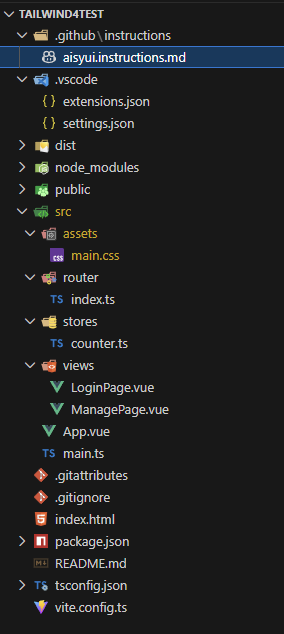





 扫一扫
扫一扫


 2707
2707

 被折叠的 条评论
为什么被折叠?
被折叠的 条评论
为什么被折叠?
 到【灌水乐园】发言





