






 本文介绍了如何在jenkins中进行参数化构建,详细讲述了流水线代码的改造过程,包括改造后的流水线结构及所使用的变量。此外,还探讨了如何实现可联动的参数化构建,提到了Active Choices Plug-in和Git Parameter插件的安装和配置,以及参数化构建过程中添加参数的步骤。
jenkins参数化构建
git代码:https://gitee.com/Squirrel_Aha/rancher-pipeline-demo.git
1.流水线代码
//jenkins+rancher流水线测试
pipeline {
	agent any
	stages {
		stage('git代码拉取') {
			//拉代码
			steps {
				checkout([$class:'GitSCM',branches:[[name:'*/master']],extensions:[],userRemoteConfigs:[[credentialsId:'gitee',url:'https://gitee.com/Squirrel_Aha/rancher-pipeline-demo.git']]])
			}
		}
		stage('maven打包') {
			//打包
			steps {
				sh "mvn clean -U install -Dmaven.test.skip=true"
			}
		}
		stage('打docker镜像') {
			// 打镜像
			steps {
				// sh "mvn dockerfile:build"
				sh "docker build -t 192.168.16.44:5000/rancher-pipeline-demo:latest --build-arg JAR_FILE_NAME=rancher-pipeline-demo-0.0.1-SNAPSHOT.jar --build-arg JAR_PORT=8888 ./target"
			}
		}
		stage('推送镜像到仓库') {
			// 推送镜像
			steps {
				// sh "mvn dockerfile:build"
				sh "docker push 192.168.16.44:5000/rancher-pipeline-demo:latest"
			}
		}
		stage('部署服务') {
			// 通知rancher部署服务
			steps {
				rancherRedeploy alwaysPull: true, credential: 'rancher', images: '192.168.16.44:5000/rancher-pipeline-demo:latest', workload: '/project/c-rw7dq:p-4fdxr/workloads/deployment:test:rancher-pipeline-demo'
			}
		}
	}
}
2.改造流水线
2.1 改造后的流水线
//jenkins+rancher流水线测试
pipeline {
	agent any
	stages {
		stage('git代码拉取') {
			//拉代码
			steps {
				checkout([$class:'GitSCM',branches:[[name:'$git_branche']],extensions:[],userRemoteConfigs:[[credentialsId:'$git_credential',url:'$git_url']]])
			}
		}
		stage('maven打包') {
			//打包
			steps {
				sh "mvn clean -U install -Dmaven.test.skip=true"
			}
		}
		stage('打docker镜像') {
			// 打镜像
			steps {
				// sh "mvn dockerfile:build"
				sh "docker build -t $docker_registry_url/$project_name:$docker_tag --build-arg JAR_FILE_NAME=$project_name-0.0.1-SNAPSHOT.jar --build-arg JAR_PORT=$project_port ./target"
			}
		}
		stage('推送镜像到仓库') {
			// 推送镜像
			steps {
				// sh "mvn dockerfile:build"
				sh "docker push $docker_registry_url/$project_name:$docker_tag"
			}
		}
		stage('部署服务') {
			// 通知rancher部署服务
			steps {
				rancherRedeploy alwaysPull: true, credential: '$rancher_credential', images: '$docker_registry_url/$project_name:$docker_tag', workload: '$rancher_workload'
			}
		}
	}
}
2.2 改造后的流水线用到的变量
| 变量名 | 变量描述 |
|---|---|
| project_name | 项目名 |
| git_branche | git分支 |
| git_credential | git仓库凭据 |
| git_url | git仓库地址 |
| docker_registry_url | docker镜像仓库地址 |
| docker_tag | docker镜像tag |
| project_port | docker容器要暴露的服务端口 |
| rancher_credential | rancher凭据 |
| rancher_workload | rancher工作负载路径 |
3.可联动的参数化构建
3.1 Active Choices Plug-in和Git Parameter
可联动的参数化构建改造需要安装Active Choices Plug-in和Git Parameter
3.2 参数配置
3.2.1 参数化构建过程-添加参数
Git Parameter
| Name | Description | Parameter Type | Default Value |
|---|---|---|---|
| git_branche | git分支 | Branche | master |
Active Choices Parameter
| Name | Script | Fallback Script | Description | Choice Type |
|---|---|---|---|---|
| task_name | return [“demo1”,“demo2”]; | return [“nothing to choose”]; | 任务名 | Single Select |
Active Choices Reactive Parameter
| Name | Script | Fallback Script | Description | Choice Type | Referenced parameters |
|---|---|---|---|---|---|
| project_name | switch(task_name){ case “demo1”: case “demo2”: return [“rancher-pipeline-demo”]; default: return [“nothing to choose”]; } | return [“nothing to choose”]; | 项目名 | Single Select | task_name |
| git_credential | switch(task_name){ case “demo1”: case “demo2”: return [“gitee”]; default: return [“nothing to choose”]; } | return [“nothing to choose”]; | git仓库凭据 | Single Select | task_name |
| git_url | switch(task_name){ case “demo1”: case “demo2”: return [“https://gitee.com/Squirrel_Aha/rancher-pipeline-demo.git”]; default: return [“nothing to choose”]; } | return [“nothing to choose”]; | git仓库地址 | Single Select | task_name |
| docker_registry_url | switch(task_name){ case “demo1”: case “demo2”: return [“192.168.16.44:5000”]; default: return [“nothing to choose”]; } | return [“nothing to choose”]; | docker镜像仓库地址 | Single Select | task_name |
| docker_tag | switch(task_name){ case “demo1”: case “demo2”: return [“latest”]; default: return [“nothing to choose”]; } | return [“nothing to choose”]; | docker镜像tag | Single Select | task_name |
| project_port | switch(task_name){ case “demo1”: case “demo2”: return [“8888”]; default: return [“nothing to choose”]; } | return [“nothing to choose”]; | docker容器要暴露的服务端口 | Single Select | task_name |
| rancher_credential | switch(task_name){ case “demo1”: case “demo2”: return [“rancher”]; default: return [“nothing to choose”]; } | return [“nothing to choose”]; | rancher凭据 | Single Select | task_name |
| rancher_workload | switch(task_name){ case “demo1”: return ["/project/c-s6thx:p-gbdf2/workloads/deployment:test:demo1"]; case “demo2”: return ["/project/c-s6thx:p-gbdf2/workloads/deployment:test:demo2"]; default: return [“nothing to choose”]; } | return [“nothing to choose”]; | rancher工作负载路径 | Single Select | task_name |
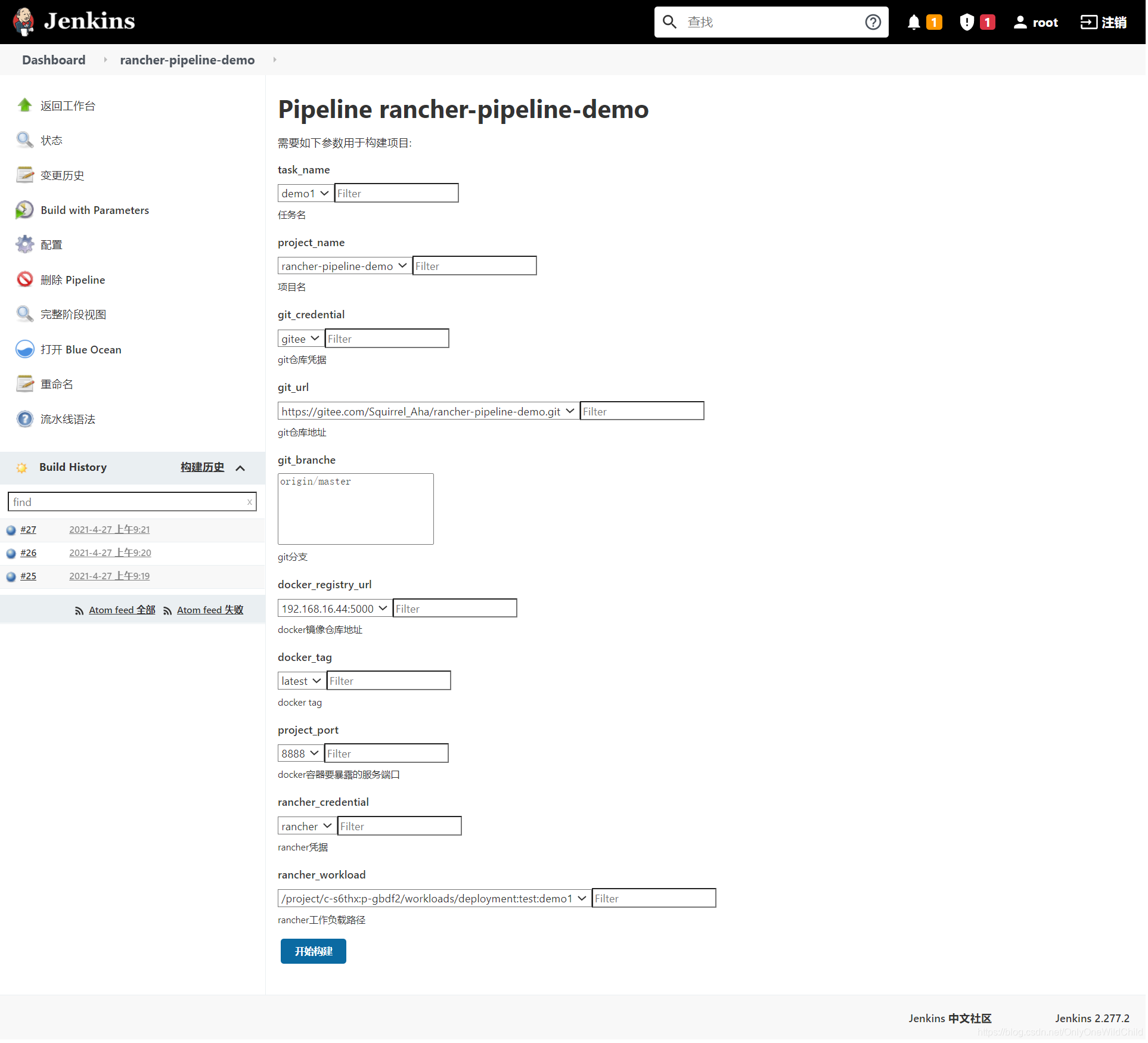
最终效果





 扫一扫
扫一扫


 1226
1226

 被折叠的 条评论
为什么被折叠?
被折叠的 条评论
为什么被折叠?
 到【灌水乐园】发言





