


🎯 案例集合Tabs:原生tab | 自定义tab 背景模糊
🌍 案例集合Tabs
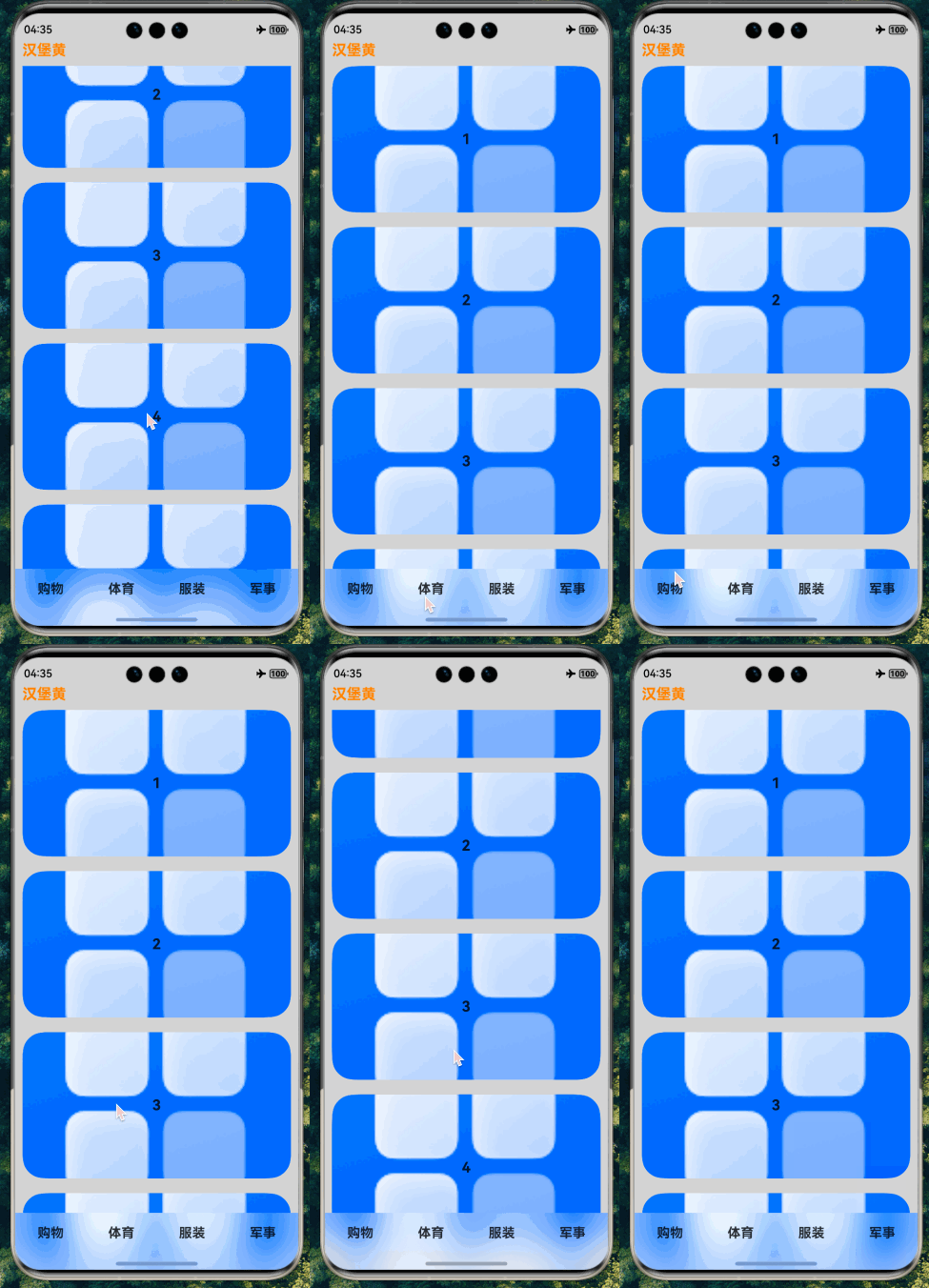
🏷️ 效果图
📖 参考
🧩 拆解
- tabs背景模糊
import { window } from "@kit.ArkUI"
import { common } from "@kit.AbilityKit"

/**
 * tab模拟数据
 */
const tabsMockData: string[] = ['购物', '体育', '服装', '军事']
/**
 * TabContents模拟数据
 */
const tabContentsMockData: number[] = [1, 2, 3, 4, 5]
/**
 * 安全区高度
 */
interface AvoidArea {
  topRectHeight: number
  bottomRectHeight: number
}

/**
 * 安全类型边距枚举
 * statusBarType 状态栏
 * navBarType 导航栏
 */
const statusBarType = window.AvoidAreaType.TYPE_SYSTEM
const navBarType = window.AvoidAreaType.TYPE_NAVIGATION_INDICATOR

@Component
export struct TabsBlurComp {
  /**
   * UI上下文
   */
  private context = this.getUIContext()?.getHostContext() as common.UIAbilityContext
  /**
   * 窗口对象
   */
  private windowClass = this.context.windowStage.getMainWindowSync()
  /**
   * 安全区高度对象(状态栏、导航栏)
   */
  @State avoidArea: AvoidArea = { topRectHeight: 0, bottomRectHeight: 0 }

  aboutToAppear(): void {
    this.windowClass.setWindowLayoutFullScreen(true)
    this.windowClass.on('avoidAreaChange', this.onAvoidAreaChange)
    this.setAvoidArea()
  }

  aboutToDisappear(): void {
    this.windowClass.setWindowLayoutFullScreen(false)
    this.windowClass.off('avoidAreaChange', this.onAvoidAreaChange)
  }

  /**
   * 设置状态栏和导航栏避让区域 && 监听不同设备避让区域的变化
   */
  setAvoidArea() {
    const statusBarArea = this.windowClass.getWindowAvoidArea(statusBarType)
    this.avoidArea.topRectHeight = statusBarArea.topRect.height
    const navBarArea = this.windowClass.getWindowAvoidArea(navBarType)
    this.avoidArea.bottomRectHeight = navBarArea.bottomRect.height
  }

  onAvoidAreaChange = (data: window.AvoidAreaOptions) => {
    if (data.type === statusBarType) {
      this.avoidArea.topRectHeight = data.area.topRect.height
    } else if (data.type === navBarType) {
      this.avoidArea.bottomRectHeight = data.area.bottomRect.height
    }
  }

  /**
   * 标签内容
   */
  @Builder
  tabContentsBuilder() {
    List({ space: 20 }) {
      ForEach(tabContentsMockData, (item: number) => {
        ListItem() {
          Stack({ alignContent: Alignment.Center }) {
            Image($r('app.media.startIcon'))
              .syncLoad(true)
              .draggable(false)
              .width('100%')
              .height(200)
            Text(item.toString())
              .fontSize(20)
              .fontWeight(FontWeight.Bold)
          }
          .borderRadius(30)
          .clip(true)
        }
      })

      ListItem() {
        Text().height(50)
      }
    }
    .width('100%')
    .height('100%')
    .padding(10)
    .scrollBar(BarState.Off) // 关闭滚动条
    .edgeEffect(EdgeEffect.None) // 关闭边缘效果
  }

  /**
  * tab标签
  */
  @Builder
  tabBuilder(label: string) {
    Column() {
      Text(label)
        .fontSize(18)
        .fontWeight(FontWeight.Bold)
    }
    .height('100%')
    .justifyContent(FlexAlign.Center)
    .padding({ top: 5 })
  }

  build() {
    Column() {
      Row() {
        Text('汉堡黄')
          .fontSize(20)
          .fontWeight(FontWeight.Bold)
          .fontColor('#ffff8b16')
      }
      .width('100%')
      .padding({
        top: this.getUIContext().px2vp(this.avoidArea.topRectHeight),
        left: 10
      })

      // 标签导航
      Tabs({ barPosition: BarPosition.End }) {
        ForEach(tabsMockData, (item: string) => {
          TabContent() {
            this.tabContentsBuilder()
          }
          .tabBar(this.tabBuilder(item))
        })
      }
      .barHeight(50)
      // start关键
      .barOverlap(true)
      .barBackgroundBlurStyle(BlurStyle.Thin)
      // end
      .safeAreaPadding({ bottom: this.getUIContext().px2vp(this.avoidArea.bottomRectHeight) })
      .layoutWeight(1)
    }
    .size({ height: '100%', width: '100%' })
    .backgroundColor('#ffd4d4d4')
  }
}
- 自定义tabs背景模糊
import { window } from "@kit.ArkUI"
import { common } from "@kit.AbilityKit"

/**
 * tab模拟数据
 */
const tabsMockData: string[] = ['购物', '体育', '服装', '军事']
/**
 * TabContents模拟数据
 */
const tabContentsMockData: number[] = [1, 2, 3, 4, 5]
/**
 * 安全区高度
 */
interface AvoidArea {
  topRectHeight: number
  bottomRectHeight: number
}

/**
 * 安全类型边距枚举
 * statusBarType 状态栏
 * navBarType 导航栏
 */
const statusBarType = window.AvoidAreaType.TYPE_SYSTEM
const navBarType = window.AvoidAreaType.TYPE_NAVIGATION_INDICATOR

@Component
export struct CustomTabsBlurComp {
  /**
   * UI上下文
   */
  private context = this.getUIContext()?.getHostContext() as common.UIAbilityContext
  /**
   * 窗口对象
   */
  private windowClass = this.context.windowStage.getMainWindowSync()
  /**
   * 安全区高度对象(状态栏、导航栏)
   */
  @State avoidArea: AvoidArea = { topRectHeight: 0, bottomRectHeight: 0 }

  aboutToAppear(): void {
    this.windowClass.setWindowLayoutFullScreen(true)
    this.windowClass.on('avoidAreaChange', this.onAvoidAreaChange)
    this.setAvoidArea()
  }

  aboutToDisappear(): void {
    this.windowClass.setWindowLayoutFullScreen(false)
    this.windowClass.off('avoidAreaChange', this.onAvoidAreaChange)
  }

  /**
   * 设置状态栏和导航栏避让区域 && 监听不同设备避让区域的变化
   */
  setAvoidArea() {
    const statusBarArea = this.windowClass.getWindowAvoidArea(statusBarType)
    this.avoidArea.topRectHeight = statusBarArea.topRect.height
    const navBarArea = this.windowClass.getWindowAvoidArea(navBarType)
    this.avoidArea.bottomRectHeight = navBarArea.bottomRect.height
  }

  onAvoidAreaChange = (data: window.AvoidAreaOptions) => {
    if (data.type === statusBarType) {
      this.avoidArea.topRectHeight = data.area.topRect.height
    } else if (data.type === navBarType) {
      this.avoidArea.bottomRectHeight = data.area.bottomRect.height
    }
  }

  /**
   * 标签内容
   */
  @Builder
  tabContentsBuilder() {
    List({ space: 20 }) {
      ForEach(tabContentsMockData, (item: number) => {
        ListItem() {
          Stack({ alignContent: Alignment.Center }) {
            Image($r('app.media.startIcon'))
              .syncLoad(true)
              .draggable(false)
              .width('100%')
              .height(200)
            Text(item.toString())
              .fontSize(20)
              .fontWeight(FontWeight.Bold)
          }
          .borderRadius(30)
          .clip(true)
        }
      })

      ListItem() {
        Text().height(70)
      }
    }
    .width('100%')
    .height('100%')
    .padding(10)
    .scrollBar(BarState.Off) // 关闭滚动条
    .edgeEffect(EdgeEffect.None) // 关闭边缘效果
  }

  /**
  * tab标签
  */
  @Builder
  tabBuilder(label: string) {
    Column() {
      Text(label)
        .fontSize(18)
        .fontWeight(FontWeight.Bold)
    }
    .height(50)
    .justifyContent(FlexAlign.Center)
    .padding({ top: 5 })
  }

  build() {
    Column() {
      Row() {
        Text('汉堡黄')
          .fontSize(20)
          .fontWeight(FontWeight.Bold)
          .fontColor('#ffff8b16')
      }
      .width('100%')
      .padding({
        top: this.getUIContext().px2vp(this.avoidArea.topRectHeight),
        left: 10
      })

      // 标签导航
      Stack({ alignContent: Alignment.Bottom }) {
        Tabs({ barPosition: BarPosition.End }) {
          ForEach(tabsMockData, (item: string) => {
            TabContent() {
              this.tabContentsBuilder()
            }
          })
        }
        .barHeight(0)

        // 自定义tab
        Row() {
          ForEach(tabsMockData, (item: string) => {
            this.tabBuilder(item)
          })
        }
        .width('100%')
        .justifyContent(FlexAlign.SpaceAround)
        .backgroundBlurStyle(BlurStyle.COMPONENT_ULTRA_THIN, { scale: 0.3 })
        .padding({ bottom: this.getUIContext().px2vp(this.avoidArea.bottomRectHeight) })

      }
      .blendMode(BlendMode.SRC_OVER, BlendApplyType.FAST)
      .layoutWeight(1)

    }
    .size({ height: '100%', width: '100%' })
    .backgroundColor('#ffd4d4d4')
  }
}
🌸🌼🌺






 扫一扫
扫一扫


 975
975

 被折叠的 条评论
为什么被折叠?
被折叠的 条评论
为什么被折叠?
 到【灌水乐园】发言





