


 本文详细介绍如何在Android中自定义Button的样式,包括设置颜色、形状和圆角效果。通过示例代码展示了如何使用XML资源文件定义Button背景,实现美观的界面设计。
Android中设置Button的颜色形状圆角
效果图:

代码块:
<Button
   android:id="@+id/button1"
   android:layout_width="269dp"
   android:layout_height="wrap_content"
   android:layout_centerHorizontal="true"
   android:background="@drawable/bt_shape"
   android:text="登录"
   android:textColor="#ffffffff" />
bt_shape.xml中的代码
<?xml version="1.0" encoding="utf-8"?>
<shape xmlns:android="http://schemas.android.com/apk/res/android">
    <solid android:color="#69A5FF"/>
    <corners
    android:topLeftRadius="25dip"
    android:topRightRadius="25dip"
    android:bottomLeftRadius="25dip"
    android:bottomRightRadius="25dp"/>
</shape>
根据自己想要的圆角弧度去修改corners中的值就可以
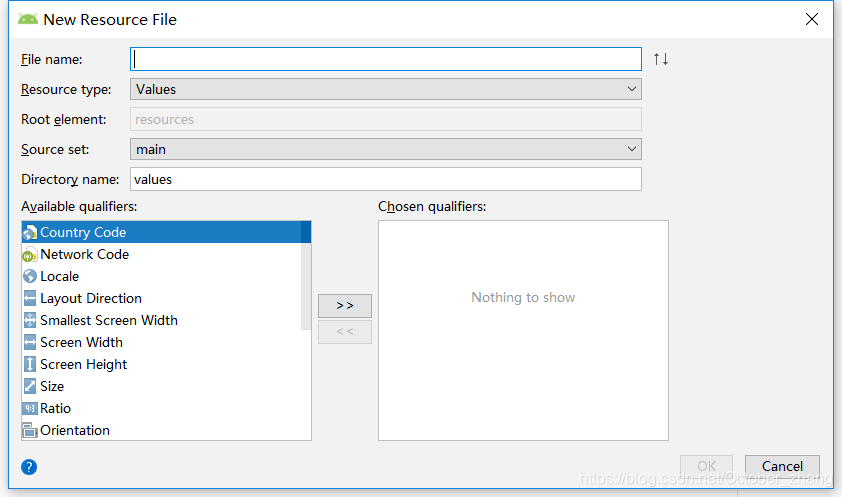
android:background就是设置Button样式的,这里我是在drawable文件夹中自定义了xml文件来写,怎么在drawable中创建xml文件呢?如下:
首先找到项目里的app文件夹右键New->Android Resource File,然后创建文件,文件名自己随便定义,只需要记得选择Resource type为drawable就好
默认:
改后:
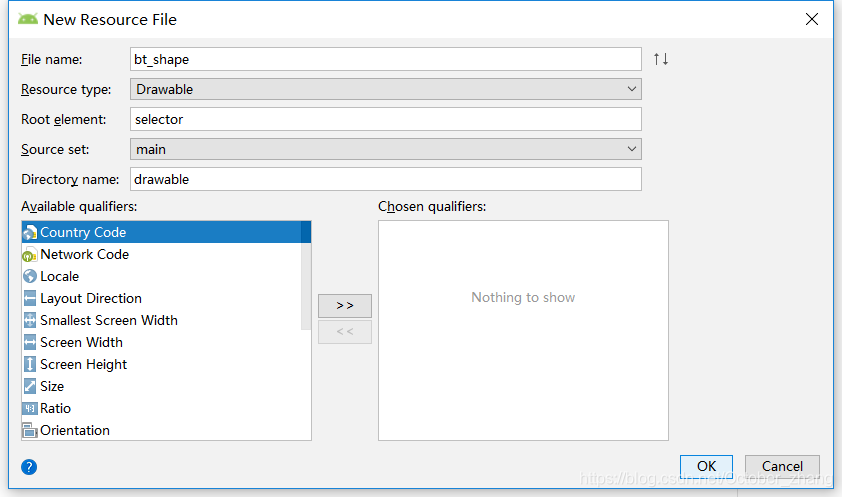
点击OK就新建好了,然后编写上面的代码进行设置






 扫一扫
扫一扫


 6662
6662

 被折叠的 条评论
为什么被折叠?
被折叠的 条评论
为什么被折叠?
 到【灌水乐园】发言





