



 本文详细介绍了使用HTML、CSS和JavaScript构建简易计算器的过程。计算器具备基本的数学运算功能,包括加、减、乘、除,同时实现了数字输入、运算符选择、结果展示及重置功能。文章提供了完整的代码示例,包括前端界面设计和后端逻辑处理。
效果图如下
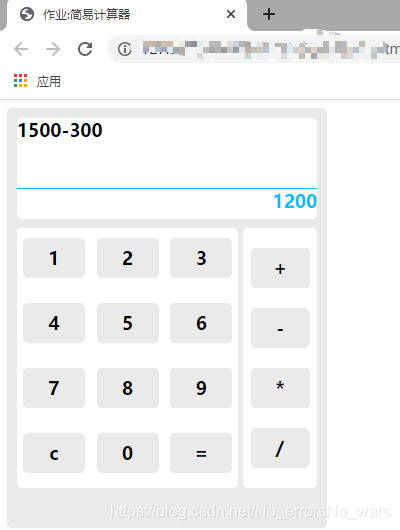
- List item
.calculator_box{
	width: 300px;
	background-color:#eaeaea;
	height: 400px;
	border-radius: 5px;
	padding: 10px;
}
.top{
	background-color: white;
	height: 100px;
	border-radius: 5px;
	font-size:18px;
	font-weight: bold;
}

.top_performance{
	height: 70px;
	border-bottom: 1px solid deepskyblue;
	width: 100%;

}

.top_result{
	height: 30px;
	color: #00BFFF;
	background-color: white;
	border-radius: 5px;
	text-align: right;
}

.below{
	margin-top: 10px;
	background-color:#EAEAEA;
	border-radius: 5px;
	display: flex;
	justify-content: space-around;
}

.num_keys{
	width: 75%;
	font-size: 18px;
	font-weight: bold;
	display: flex;
	flex-wrap: wrap;
	justify-content: space-around;
	margin-right: 5px;
	background-color: white;
	border-radius: 5px;
}

.num_keys span{
	background-color: #EAEAEA;
	margin: 10px 0px;
	height: 40px;
	width: 28%;
	text-align: center;
	line-height: 40px;
	border-radius: 5px;
	cursor:pointer;
}

.num_keys span:hover{
	color: white;
	background-color: deepskyblue;
}

.oper{
	width: 25%;
	font-size: 18px;
	font-weight: bold;
	display: flex;
	flex-wrap: wrap;
	justify-content: space-around;
	padding: 10px 0px;
	background-color:white;
	border-radius: 5px;
}

.oper span{
	background-color: #EAEAEA;
	width: 80%;
	height: 40px;
	text-align: center;
	line-height: 40px;
	border-radius: 5px;
	cursor: pointer;
	margin: 10px 0px;
	margin: 10px 0px;
}

.oper span:hover{
	color: white;
	background-color: deepskyblue;
}
var num1 = "";/*设置第一个数字变量,默认为空*/
var num2 = "";/*设置第二个数字变量,默认为空*/
var oper = "";/*设置一个运算符 符号变量,默认为空*/

/*接收用户所输入的数字
n为html传递回来的参数
*/
function f1(n){
	/* 如何判定,输入的数字为第一个还是第二个
	判定方法如下
	以默认设置的符号变量为依据,符号变量之前的为第一个数字,符号变量之后的为第二个数字
	逻辑如下
	符号变量默认为空,进行if条件判断,当符号变量为空时,将所输入的数字挨个与前一项做拼接,如1+1=11;
	当符号变量不为空时,停止拼接第一个数字变量,开始拼接第二个数字变量
	*/
   if(oper == ""){
	   num1=num1+n;/*进行拼接第一个数字变量*/
   }
   else{
	   num2 = num2 + n;/*进行拼接第二个数字变量*/
   }
   /*在f2()函数中调用f3()函数,刷新表达式div*/
   f3();
}
/*接收用户所输入的运算符
o为html传递回来的参数
*/
function f2(o){
	/*将html传递回来的符号型参数赋值给oper*/
	oper=o;
	/*在f2()函数中调用f3()函数,刷新表达式div*/
	f3();
}
// 将num1、num2、oper拼接赋值给指定id="expr"的该元素
function f3(){
	/*在html文件中给头部显示器部分设定了唯一指定id="expr"
	在f3()函数中,设置了expr变量,并通过getElementById()方法返回了指定id="expr"的该元素的值
	*/
	var expr = document.getElementById("expr");
	/*对指定id="expr"的该元素的innerText的属性进行更改,将其更改为num1拼接oper拼接num2*/
	expr.innerText = num1 + oper + num2;
}
// 点击“=”触发的函数
function f4(){
	/* 若num1、num2、oper三个变量不为空 则进行运算
	通过switch case 语法来实现 对不同参数的不同操作
	*/
   // oper为html传递回来的参数
	switch(oper){
		// 为‘+’时,进行加法运算
			case "+":
				result = Number(num1)+Number(num2);
				break;
		// 为‘-’时,进行减法运算
			case "-":
				result = Number(num1)-Number(num2);
				break;
		// 为‘*’时,进行乘法运算
			case "*":
				result = Number(num1)*Number(num2);
				break;
		// 为‘/’时,进行除法运算
			case "/":
				result = Number(num1)/Number(num2);
				break;
		}
		// 设置了result_box变量,并通过getElementById()方法返回了指定id="result_box"的该元素的值
		var result_box = document.getElementById("result_box");
		/*对指定id="result_box"的该元素的innerText的属性进行更改,将result的值赋值给它*/
		result_box.innerText= result;
}

// 重置计算器
function f5(){
	 num1 = "";//操作数字num1置空
	 num2 = "";//操作数字num2置空
	 oper = "";//操作运算符oper置空
	 document.getElementById("expr").innerText = "";//通过getElementById()方法返回了id="expr"的元素的innerText属性,将其更改为空
	 document.getElementById("result_box").innerText = 0;//通过getElementById()方法返回了id="result_box"的元素的innerText属性,将其更改为0


}
html代码
			</div>
			<!-- 这是头部的显示结果部分 -->
			<div class="top_result" id="result_box">

			</div>
		</div>
		<!-- 这是下面的总体div -->
		<div class="below">
			<!-- 这是下方左侧数字按键div -->
			<div class="num_keys">
				<span onclick="f1(1)">1</span>
				<span onclick="f1(2)">2</span>
				<span onclick="f1(3)">3</span>
				<span onclick="f1(4)">4</span>
				<span onclick="f1(5)">5</span>
				<span onclick="f1(6)">6</span>
				<span onclick="f1(7)">7</span>
				<span onclick="f1(8)">8</span>
				<span onclick="f1(9)">9</span>
				<span onclick="f5()">c</span>
				<span onclick="f1(1)">0</span>
				<span onclick="f4()">=</span>
			</div>
			<!-- 这是下方右侧运算符div -->
			<div class="oper">
				<span onclick="f2('+')">+</span>
				<span onclick="f2('-')">-</span>
				<span onclick="f2('*')">*</span>
				<span onclick="f2('/')">/</span>
			</div>
		</div>
	</div>
</body>
效果图





 扫一扫
扫一扫


 1567
1567

 被折叠的 条评论
为什么被折叠?
被折叠的 条评论
为什么被折叠?
 到【灌水乐园】发言





