



Servlet开发简化
使用原生的Servlet进行开发时会存在大量的重复代码,特别是doGet和doPost方法出现在每个Servlet中,使我们烦不胜烦,分发处理时需要重复的编写大量的if-else语句,参数接收时要不断地编写验证,参数过多时使用手工接收也略显不便。使用反射机制可以对这一切的弊端进行调整。
- 新建一个String工具类
package com.gub.util;

public class GUBStringUtil {
    /**
     * 将传入字符串首字母变成大写
     * @param data 传入字符串
     * @return
     */
    public static String initcap(String data){
        if(data==null||"".equals(data)){
            return data;
        }
        if(data.length()==1){
            return data.toUpperCase();
        }else{
            return data.substring(0,1).toUpperCase()+data.substring(1);
        }
    }
}
- 新建一个自动接收工具类帮我们自动接收对象。
package com.gub.util;

import java.lang.reflect.Field;
import java.lang.reflect.Method;
import java.text.SimpleDateFormat;

public class FillParam {
    private Object currentObj;//表示当前对象
    private String paramName;//需要设置内容的属性名称
    private String value;//属性值
    private String[] arrayValue;//属性数组
    private Field field;//表示当前属性

    /**
     * 构造接受需要设置当前程序执行的类对象,属性名称及属性值,并为其赋值
     * @param currentObj 需要设置属性的对象
     * @param paramName 属性名称
     * @param value 属性值
     */
    public FillParam(Object currentObj,String paramName,String value){
        this.currentObj = currentObj;
        this.paramName = paramName;
        this.value = value;
        try{
            this.paramInit();
            this.setValue();
        }catch(Exception e){e.printStackTrace();}
    }

    //当属性为数组类型时调用此构造
    public FillParam(Object currentObj,String paramName,String[] arrayValue){
        this.currentObj = currentObj;
        this.paramName = paramName;
        this.arrayValue = arrayValue;
        try{
            this.paramInit();
            this.setValue();
        }catch(Exception e){e.printStackTrace();}
    }


    public FillParam(Object currentObj,String paramName){
        this.currentObj = currentObj;
        this.paramName = paramName;
        try{
            this.paramInit();
        }catch(Exception e){e.printStackTrace();}
    }

    /**
     * 初始化各参数,取得传入对象的传入属性
     */
    private void paramInit() throws Exception{
        String[] result = this.paramName.split("\\.");//将属性名字按点拆分
        if(result.length==2){//表示只有一层关系
            //取得要设置属性的对象
            this.currentObj = this.currentObj.getClass().getMethod("get"
                    +GUBStringUtil.initcap(result[0])).invoke(this.currentObj);
            this.field = this.currentObj.getClass().getDeclaredField(result[1]);
        }else{//表示有多层关系
            for(int x=0;x<result.length;x++){
                //取得属性
                this.field = this.currentObj.getClass().getDeclaredField(result[x]);
                if(x<result.length-1){
                    //取得对象
                    this.currentObj = this.currentObj.getClass().getMethod("get"
                            +GUBStringUtil.initcap(result[x])).invoke(this.currentObj);
                }
            }
        }
    }

    private void setValue() throws Exception{
        String typeName = this.field.getType().getSimpleName();
        //取得set方法
        Method setMethod = this.currentObj.getClass().
                getMethod("set"+GUBStringUtil.initcap(this.field.getName()),
                        this.field.getType());
        if(typeName.contains("[]")){//如果是为数组属性设置值
            if("string[]".equalsIgnoreCase(typeName)){
                setMethod.invoke(this.currentObj,(Object)this.arrayValue);
            }else if("int[]".equalsIgnoreCase(typeName)){
                int[] temp = new int[this.arrayValue.length];
                for(int x=0;x<temp.length;x++){
                    temp[x] = Integer.parseInt(this.arrayValue[x]);
                }
                setMethod.invoke(this.currentObj,(Object)temp);
            }else if("Integer[]".equalsIgnoreCase(typeName)){
                Integer[] temp = new Integer[this.arrayValue.length];
                for(int x=0;x<temp.length;x++){
                    temp[x] = Integer.parseInt(this.arrayValue[x]);
                }
                setMethod.invoke(this.currentObj,(Object)temp);
            }else if("double[]".equals(typeName)){
                double[] temp = new double[this.arrayValue.length];
                for(int x=0;x<temp.length;x++){
                    temp[x] = Double.parseDouble(this.arrayValue[x]);
                }
                setMethod.invoke(this.currentObj,(Object)temp);
            }else if("Double[]".equals(typeName)){
                Double[] temp = new Double[this.arrayValue.length];
                for(int x=0;x<temp.length;x++){
                    temp[x] = Double.parseDouble(this.arrayValue[x]);
                }
                setMethod.invoke(this.currentObj,(Object)temp);
            }
        }else{//如果是基本数据类型
            if("string".equalsIgnoreCase(typeName)){
                setMethod.invoke(this.currentObj,this.value);
            }else if("int".equalsIgnoreCase(typeName)||"integer".equalsIgnoreCase(typeName)){
                setMethod.invoke(this.currentObj,Integer.parseInt(this.value));
            }else if("double".equalsIgnoreCase(typeName)){
                setMethod.invoke(this.currentObj,Double.parseDouble(this.value));
            }else if("date".equalsIgnoreCase(typeName)){
                setMethod.invoke(this.currentObj,new SimpleDateFormat("yyyy-MM-dd").parse(this.value));
            }
        }
    }

    /**
     * 取得属性类型
     * @return 属性类型
     */
    public String getFieldType(){
        return this.field.getType().getSimpleName();
    }

}
- 新建一个基本类型数据验证工具类。
package com.gub.util;

public class ValidateUtil {
    /**
     * 验证数据是否非空
     * @param data 要验证的数据
     * @return 若数据非空,返回true,否则返回false
     */
    public static boolean validateEmpty(String data){
        return data!=null&&data.length()>0;
    }

    /**
     * 验证数据是否满足正则要求
     * @param data 要验证的数据
     * @param regex 正则表达式
     * @return 若数据满足正则返回true,否则返回false
     */
    public static boolean validateRegex(String data,String regex){
        if(validateEmpty(data)){
            return data.matches(regex);
        }
        return false;
    }

    /**
     * 验证数据是否为整数
     * @param data 要验证的数据
     * @return 若数据为整数返回true,否则返回false
     */
    public static boolean validateInt(String data){
        return validateRegex(data,"\\d+");
    }

    /**
     * 验证数据是否为数字
     * @param data 要验证的数据
     * @return 若数据为数字返回true,否则返回false
     */
    public static boolean validateNum(String data){
        return validateRegex(data,"\\d+(\\.\\d+)?");
    }

    /**
     * 验证数据是否为日期
     * @param data 要验证的数据
     * @return 若数据为日期返回true,否则返回false
     */
    public static boolean validateDate(String data){
        //判断是否满足日期格式
        if(validateRegex(data,"\\d{4}-\\d{1,2}-\\d{1,2}")){
            return true;
        }else{
            //判断是否满足日期时间格式
            return validateRegex(data,"\\d{4}-\\d{1,2}-\\d{1,2} \\d{2}:\\d{2}:\\d{2}");
        }
    }
}
- 新建一个数据自动验证类,验证应在数据转型之前进行。
package com.gub.util;

import com.jspsmart.upload.SmartUpload;

import javax.servlet.http.HttpServletRequest;
import java.util.HashMap;
import java.util.Map;
import java.util.ResourceBundle;

public class ValidateHandle {
    private HttpServletRequest request;
    private String rule;
    private ResourceBundle messagesResource ;
    private SmartUpload smart;
    //保存错误信息
    private Map<String,String> errors = new HashMap<String,String>();

    public ValidateHandle(HttpServletRequest request,
                          String rule, ResourceBundle messagesResource,
                          SmartUpload smart) {
        this.request = request;
        this.rule = rule;
        this.messagesResource = messagesResource;
        this.smart = smart;
    }

    public boolean validate(){
        if(!ValidateUtil.validateEmpty(this.rule)){//没有验证规则,验证直接通过
            return true;
        }
        //判断表单是否已封装
        boolean isMultipart = this.request.getContentType().contains("multipart/form-data");
        String[] result = this.rule.split("\\|");
        for(int x=0;x<result.length;x++){
            String[] temp = result[x].split(":");
            if(!temp[1].contains("[]")){//不是数组对象
                String value = null;//取得传入数据
                if(!isMultipart){//表单未封装
                    value = this.request.getParameter(temp[0]);
                }else{//表单已封装
                    value = this.smart.getRequest().getParameter(temp[0]);
                }
                if("string".equalsIgnoreCase(temp[1])){
                    if(!ValidateUtil.validateEmpty(value)){//空验证未通过
                        this.errors.put(temp[0],this.messagesResource.getString("validate.empty"));
                    }
                }else if("int".equalsIgnoreCase(temp[1])||"integer".equalsIgnoreCase(temp[1])){
                    if(!ValidateUtil.validateEmpty(value)){//空验证未通过
                        this.errors.put(temp[0],this.messagesResource.getString("validate.empty"));
                    }else{
                        if(!ValidateUtil.validateInt(value)){//整数验证未通过
                            this.errors.put(temp[0],this.messagesResource.getString("validate.integer"));
                        }
                    }
                }else if("double".equalsIgnoreCase(temp[1])){
                    if(!ValidateUtil.validateEmpty(value)){//空验证未通过
                        this.errors.put(temp[0],this.messagesResource.getString("validate.empty"));
                    }else{
                        if(!ValidateUtil.validateNum(value)){//数字验证未通过
                            this.errors.put(temp[0],this.messagesResource.getString("validate.number"));
                        }
                    }
                }else if("date".equalsIgnoreCase(temp[1])){
                    if(!ValidateUtil.validateEmpty(value)){//数字验证未通过
                        this.errors.put(temp[0],this.messagesResource.getString("validate.empty"));
                    }else{
                        if(!ValidateUtil.validateDate(value)){//日期验证未通过
                            this.errors.put(temp[0],this.messagesResource.getString("validate.date"));
                        }
                    }
                }
            }else{//表示数组对象
                String[] arrayValue = null;//取得传入数据
                if(!isMultipart){//表单未封装
                    arrayValue = this.request.getParameterValues(temp[0]);
                }else{//表单已封装
                    arrayValue = this.smart.getRequest().getParameterValues(temp[0]);
                }
                if(arrayValue==null){//此时数据不存在
                    this.errors.put(temp[0],this.messagesResource.getString("validate.empty"));
                }else{
                    if("int[]".equalsIgnoreCase(temp[1])||"integer[]".equalsIgnoreCase(temp[1])){
                        for(int y=0;y<arrayValue.length;y++){
                            if(!ValidateUtil.validateInt(arrayValue[y])){
                                this.errors.put(temp[0]+"-"+y,this.messagesResource.getString("validate.integer"));
                            }
                        }
                    }else if("double[]".equalsIgnoreCase(temp[1])){
                        for(int y=0;y<arrayValue.length;y++){
                            if(!ValidateUtil.validateNum(arrayValue[y])){
                                this.errors.put(temp[0]+"-"+y,this.messagesResource.getString("validate.number"));
                            }
                        }
                    }else if("date[]".equalsIgnoreCase(temp[1])){
                        for(int y=0;y<arrayValue.length;y++){
                            if(!ValidateUtil.validateDate(arrayValue[y])){
                                this.errors.put(temp[0]+"-"+y,this.messagesResource.getString("validate.date"));
                            }
                        }
                    }
                }
            }
        }
       return this.errors.size()==0;
    }

    /**
     * 取得所有的错误信息
     * @return 所有的错误信息集合
     */
    public Map<String,String> getErrors(){
        return this.errors;
    }
}
- 新建类SmartUtil,对SmartUpload进行封装,以简化使用
package com.gub.util;

import com.jspsmart.upload.SmartUpload;

import javax.servlet.http.HttpServletRequest;
import java.io.File;
import java.util.*;

public class SmartUtil {
    private SmartUpload smart;
    private HttpServletRequest request;

    public SmartUtil(SmartUpload smart, HttpServletRequest request) {
        this.smart = smart;
        this.request = request;
    }

    public boolean isUpload(){
        return this.count()>0;
    }

    public int count(){
        return this.smart.getFiles().getCount();
    }

    public SmartUpload getSmart(){
        return this.smart;
    }

    public String createSingleName(){
        String photoName = null;
        if(this.isUpload()){
            if(this.smart.getFiles().getFile(0).getSize()>0){
                photoName = UUID.randomUUID()+"."+this.smart.getFiles().getFile(0).getFileExt();
            }
        }
        return photoName;
    }

    public Map<Integer,String> createMultiNames(){
        Map<Integer,String> names = new HashMap<Integer,String>();
        if(this.isUpload()){
            for(int x=0;x<this.count();x++){
                String photoName = UUID.randomUUID()+"."+this.smart.getFiles().getFile(x).getFileExt();
                names.put(x,photoName);
            }
        }
        return names;
    }

    public void save(Integer index,String path) throws Exception{
        String savePath = this.request.getServletContext().getRealPath(path);
        if(this.smart.getFiles().getFile(index).getSize()>0){
            File file = new File(savePath);
            if(!file.getParentFile().exists()){
                file.mkdirs();
            }
            this.smart.getFiles().getFile(index).saveAs(savePath);
        }
    }

    public void save(String path)throws Exception{
        this.save(0,path);
    }

    public void save(Map<Integer,String> paths)throws Exception{
        Iterator<Map.Entry<Integer,String>> iter = paths.entrySet().iterator();
        while(iter.hasNext()){
            Map.Entry<Integer,String> me = iter.next();
            this.save(me.getKey(),me.getValue());
        }
    }

    public void delete(String path){
        String deletePath = this.request.getServletContext().getRealPath(path);
        File file = new File(deletePath);
        if(file.exists()){
            file.delete();
        }
    }

    public void delete(List<String> paths){
        Iterator<String> iter = paths.iterator();
        while(iter.hasNext()){
            this.delete(iter.next());
        }
    }
}
- 新建Annotation用以判断是否需要自动进行数据的接收
package com.gub.util.annotation;

import java.lang.annotation.Retention;
import java.lang.annotation.RetentionPolicy;

@Retention(RetentionPolicy.RUNTIME)
public @interface AutoAssign {

}
- 新建DispatcherServlet类,所有的servlet应该继承DispatcherServlet。
package com.gub.util.servlet;

import com.gub.util.FillParam;
import com.gub.util.ValidateHandle;
import com.jspsmart.upload.SmartUpload;

import javax.servlet.ServletException;
import javax.servlet.http.HttpServlet;
import javax.servlet.http.HttpServletRequest;
import javax.servlet.http.HttpServletResponse;
import java.io.IOException;
import java.lang.annotation.Annotation;
import java.lang.reflect.Field;
import java.lang.reflect.Method;
import java.util.Enumeration;
import java.util.ResourceBundle;

public class DispatcherServlet extends HttpServlet {
    private static final String MESSAGES = "Messages";

    protected HttpServletRequest request;
    protected HttpServletResponse response;
    private ResourceBundle messagesResource ;
    private SmartUpload smart;

    private boolean autoAssignFlag = false;//自动赋值功能默认关闭

    @Override
    public void init() throws ServletException {
        this.messagesResource = ResourceBundle.getBundle(MESSAGES);
    }

    @Override
    public void doGet(HttpServletRequest request, HttpServletResponse response) throws ServletException, IOException {
        this.request = request;
        this.response = response;
        try{
            //判断表单是否已封装
            if(this.request.getContentType().contains("multipart/form-data")){
                this.smart = new SmartUpload();
                this.smart.initialize(super.getServletConfig(),this.request,this.response);
                this.smart.upload();
            }
        }catch(Exception e){
            e.printStackTrace();
        }
        Annotation[] ans = this.getClass().getAnnotations();//取得所有的Annotation
        for(int x=0;x<ans.length;x++){//循环列出所有的Annotation
            //取得Annotation的名字
            String annotationName = ans[x].annotationType().getSimpleName();
            if("AutoAssign".equals(annotationName)){//表示开启自动赋值功能
                this.autoAssignFlag = true;//开启自动赋值功能
            }
        }
        if (this.autoAssignFlag){//如果开启了自动赋值
            if(this.validate()){//数据验证通过
                this.paramHandle();//赋值
                execute();//执行方法
            }else{
                //跳转到错误显示
                request.getRequestDispatcher(this.getMsg("error.page")).forward(request,response);
            }
        }else{//如果没开启了自动赋值则直接执行方法
            execute();//执行方法
        }
    }

    @Override
    public void doPost(HttpServletRequest request, HttpServletResponse response) throws ServletException, IOException {
        this.doGet(request,response);
    }

    /**
     * 根据索引取得保存在Messages.properties里的数据
     * @param key 保存索引
     * @return 保存在Messages.properties里的数据
     */
    protected String getMsg(String key){
        return this.messagesResource.getString(key);
    }

    /**
     * 自动执行方法
     */
    private void execute(){
        String path = "error.page";//跳转路径的索引名
        //取得要执行的方法名称
        String methodName = this.request.getRequestURI().substring(request.getRequestURI().lastIndexOf("/")+1);
        try{
            Method method = this.getClass().getMethod(methodName);//取得要执行的方法
            String typeName = method.getGenericReturnType().getTypeName();// 获取返回值类型
            if("java.lang.String".equals(typeName)){//此时方法的返回值为String
                path = (String)method.invoke(this);//执行方法并取得跳转路径
                //跳转到指定路径
                request.getRequestDispatcher(this.getMsg(path)).forward(request,response);
            }else if("void".equals(typeName)){//此时方法的返回值为void
                method.invoke(this);//只执行方法
            }
        }catch(Exception e){
            e.printStackTrace();
        }
    }

    /**
     * 赋值前进行验证操作
     * @return 验证通过返回true,否则返回false
     */
    private boolean validate(){
        try{
            //取得要验证的方法名称
            String validateMethod = this.request.getRequestURI().substring(this.request.getRequestURI().lastIndexOf("/")+1);
            //取得验证规则属性名称
            String validateFieldName = validateMethod + "ValidateRule";
            //取得验证规则属性
            Field validateField = this.getClass().getDeclaredField(validateFieldName);
            validateField.setAccessible(true);//解除禁止
            String rule = (String)validateField.get(this);//取得验证规则
            ValidateHandle vh = new ValidateHandle(this.request,
                    rule,this.messagesResource,this.smart);
            boolean flag = vh.validate();
            this.request.setAttribute("errors",vh.getErrors());
            return flag;
        }catch(Exception e){
            e.printStackTrace();
        }
        return false;
    }
    /**
     * 自动赋值
     */
    public void paramHandle(){
        try{
            Enumeration<String> enu = null;
            //判断表单是否已封装
            boolean isMultipart = this.request.getContentType().contains("multipart/form-data");
            if(!isMultipart){//表单未封装
                enu = this.request.getParameterNames();//枚举取得所有参数的名字
            }else{
                enu = this.smart.getRequest().getParameterNames();
            }
            while(enu.hasMoreElements()){//循环输出
                String paramName = enu.nextElement();//取得参数的名字
                if(paramName.contains(".")){//名字中包含.可以赋值
                    //取得参数类型
                    String type = new FillParam(this,paramName).getFieldType();
                    if(!isMultipart){
                        //判断类型是否为数组类型
                        if(!type.contains("[]")){//不是数组类型
                            String value = this.request.getParameter(paramName);//取得参数值
                            new FillParam(this,paramName,value);//为对象赋值
                        }else{//数组类型
                            String[] arrayValue = this.request.getParameterValues(paramName);//取得所有的参数值
                            new FillParam(this,paramName,arrayValue);//为对象赋值
                        }
                    }else{//表单已被封装
                        //判断类型是否为数组类型
                        if(!type.contains("[]")){//不是数组类型
                            String value = this.smart.getRequest().getParameter(paramName);//取得参数值
                            new FillParam(this,paramName,value);//为对象赋值
                        }else{//数组类型
                            String[] arrayValue = this.smart.getRequest().getParameterValues(paramName);//取得所有的参数值
                            new FillParam(this,paramName,arrayValue);//为对象赋值
                        }
                    }
                }
            }
        }catch(Exception e){
            e.printStackTrace();
        }
    }

    public SmartUpload getSmart(){
        return this.smart;
    }

    public HttpServletRequest getRequest(){
        return this.request;
    }

    public HttpServletResponse getResponse(){
        return this.response;
    }
}
- 此时我们的工具类就都写好了,开始进行测试:新建VO类和一个用于控制的Servlet,并建立表单页面。
package com.gub.vo;

import java.util.Date;

public class Member {
    private Integer id;
    private String name;
    private Double salary;
    private Date credate;

    public Member() {
    }
    //Setter,Getter略
    //toString()略
}
package com.gub.servlet;

import com.gub.util.SmartUtil;
import com.gub.util.annotation.AutoAssign;

import com.gub.util.servlet.AbstractServlet;
import com.gub.vo.Member;

import javax.servlet.annotation.WebServlet;

@AutoAssign
@WebServlet(name="MemberServlet",urlPatterns="/MemberServlet/*")
public class MemberServlet extends DispatcherServlet{
    //定义验证规则
    private String insertValidateRule = "member.id:Integer|member.name:String|" +
            "member.salary:Double|member.credate:Date|ai:int[]";
    private Member member = new Member();
    public Member getMember() {
        return member;
    }
    public void setMember(Member member) {
        this.member = member;
    }

    public String insert(){
        System.out.println("====insert====");
        System.out.println(this.member);
        SmartUtil su = new  SmartUtil(super.getSmart(),super.request);
        try {
            su.delete("/upload/02dca8ae-a8a3-41a5-9824-a203ba9a50c1.png");
        } catch (Exception e) {
            e.printStackTrace();
        }
        return "index.page";
    }

    public void update(){
        System.out.println("====update====");
    }
}
<%@ page contentType="text/html;charset=UTF-8" language="java" %>
<%@ page pageEncoding="UTF-8" %>
<%
  String basePath = request.getScheme()+"://"+request.getServerName()+":"+
          request.getServerPort()+request.getContextPath();
%>
<html>
  <head>
    <title>Index</title>
  </head>
  <body>
    <form action="<%=basePath%>/MemberServlet/insert" method="post" enctype="multipart/form-data" >
      <label>ID:</label>
      <input type="text" id="member.id" name="member.id" /><br>
      <label>用户名:</label>
      <input type="text" id="member.name" name="member.name" /><br>
      <label>工资:</label>
      <input type="text" id="member.salary" name="member.salary" /><br>
      <label>日期:</label>
      <input type="text" id="member.credate" name="member.credate" /><br>
      <label>兴趣爱好:</label>
      <input type="checkbox"  name="ai" value="0" />踢足球
      <input type="checkbox"  name="ai" value="1" />羽毛球
      <input type="checkbox"  name="ai" value="2" />乒乓球
      <input type="checkbox"  name="ai" value="hehe" />篮球
      <br>
      <label>图片</label>
      <input type="file" name="photo" /><br>
      <input type="submit" value="提交" />
    </form>
  </body>
</html>
运行项目后发现:数据验证和接收正常,文件也能正常的上传。
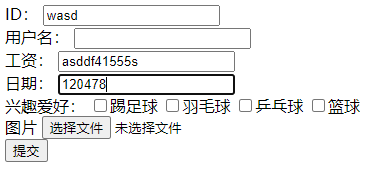



此时我们会发现,Servlet节约大大量的代码,逻辑更加的清晰了。项目下载





 扫一扫
扫一扫


 764
764

 被折叠的 条评论
为什么被折叠?
被折叠的 条评论
为什么被折叠?
 到【灌水乐园】发言





