


 本文主要介绍了Vuex的相关知识,包括其用途、import进来的对象结构、store实例在组件中的引用方法,还详细阐述了Vuex的核心概念,如State、Getters、Mutations、Actions和Module,最后讲解了Vuex中的表单处理方法。

新钛云服已为您服务1073天

一、Vuex是干什么用的?
Vuex是用于对复杂应用进行状态管理用的(官方说法是它是一种状态管理模式)。
“杀鸡不用宰牛刀”。对于简单的项目,根本用不着Vuex这把“宰牛刀”。那简单的项目用什么呢?用Vue.js官方提供的“事件总线”就可以了。
二、我们import进来的Vuex对象都包含些什么呢?
我们使用Vuex的时候怎么用呢?通常都是这样:
import Vue from 'vue';
import Vuex from 'vuex';

Vue.use(Vuex);

new Vuex.Store({
state: {     //放置state的值
    count: 0,
    str:"abcd234"
    },
  getters: {   //放置getters方法
      strLen: state => state.str.length
  },
  // mutations只能是同步操作
  mutations: {   //放置mutations方法
       increment(state, payload) {
          //在这里改变state中的数据
          state.count = payload.number;
       }
  },
  // actions可以是异步操作
  actions: {      //放置actions方法
       actionName({ commit }) {
          //dosomething
         commit('mutationName')
       },
       getSong ({commit}, id) {
          api.getMusicUrlResource(id).then(res => {
            let url = res.data.data[0].url;
          })
          .catch((error) => {  // 错误处理
              console.log(error);
         });
      }
}
});

new Vue({
  el: '#app',
  store,
  ...
});
这里import进来的Vuex是个什么东西呢?我们用console.log把它输出一下:
console.log(Vuex)
通过输出,我们发现其结构如下:
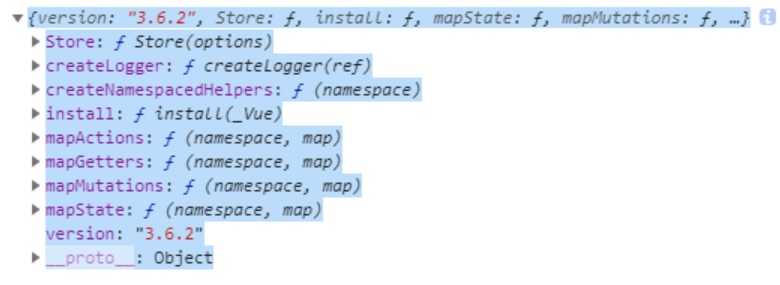
可见,import进来的Vuex它实际上是一个对象,里面包含了Store这一构造函数,还有几个mapActions、mapGetters、mapMutations、mapState这几个辅助方法(后面再讲)。
除此之外,还有一个install方法。我们发现,import之后要对其进行Vue.use(Vuex)的操作。根据这两个线索,我们就明白了,Vuex本质上就是一个Vue.js的插件。
三、创建好的store实例怎么在各个组件中都能引用到?
Vuex 通过 store 选项,提供了一种机制将状态从根组件“注入”到每一个子组件中(需调用 Vue.use(Vuex)):
const app = new Vue({
  el: '#app',
  // 把 store 对象提供给 “store” 选项,这可以把 store 的实例注入所有的子组件
  store,
  components: { Counter },
  template: `
    <div class="app">
      <counter></counter>
    </div>
  `
})
通过在根实例中注册 store 选项,该 store实例会注入到根组件下的所有子组件中,且子组件能通过 this.$store 访问到。
四、Vuex中的几大核心概念
1. State
这个很好理解,就是状态数据。Vuex所管理的就是状态,其它的如Actions、Mutations都是来辅助实现对状态的管理的。Vue组件要有所变化,也是直接受到State的驱动来变化的。
可以通过
this.$store.state来直接获取状态,也可以利用vuex提供的mapState辅助函数将state映射到计算属性computed中去。
2. Getters
Getters本质上是用来对状态进行加工处理。Getters与State的关系,就像Vue.js的computed与data的关系。 getter的返回值会根据它的依赖被缓存起来,且只有当它的依赖值发生了改变才会被重新计算。
可以通过this.$store.getters.valueName对派生出来的状态进行访问。或者直接使用辅助函数mapGetters将其映射到本地计算属性中去。
3. Mutations
更改 Vuex的 store中的状态的唯一方法是提交 mutation。Vuex中的 mutation非常类似于事件:每个 mutation都有一个字符串的 事件类型 (type) 和 一个 回调函数 (handler)。这个回调函数就是我们实际进行状态更改的地方。
你不能直接调用一个 mutation handler。这个选项更像是事件注册:“当触发一个类型为 increment 的 mutation时,调用此函数。”要唤醒一个mutation handler,你需要以相应的 type 调用store.commit方法,并且它会接受 state 作为第一个参数,也可以向 store.commit 传入额外的参数,即 mutation 的 载荷(payload):
const store = new Vuex.Store({
  state: {
    count: 1
  },
  mutations: {
    increment (state) {
      // 变更状态
      state.count++
    }
  }
})
store.commit('increment')
// ...
mutations: {
  increment (state, n) {
    state.count += n
  }
}
store.commit('increment', 10)
在大多数情况下,载荷应该是一个对象,这样可以包含多个字段并且记录的 mutation 会更易读:
// ...
mutations: {
  increment (state, payload) {
    state.count += payload.amount
  }
}
store.commit('increment', {
  amount: 10
})
// ***或者以对象风格提交***
mutations: {
  increment (state, payload) {
    state.count += payload.amount
  }
}
store.commit({
  type: 'increment',
  amount: 10
})
Mutation需遵守 Vue的响应规则
既然 Vuex的 store中的状态是响应式的,那么当我们变更状态时,监视状态的 Vue组件也会自动更新。这也意味着 Vuex中的 mutation也需要与使用 Vue一样遵守一些注意事项:
最好提前在你的
store中初始化好所有所需属性。当需要在对象上添加新属性时,你应该:
使用
Vue.set(obj, 'newProp', 123), 或者以新对象替换老对象。例如,利用对象展开运算符 我们可以这样写:
state.obj = { ...state.obj, newProp: 123 }
Mutation必须是同步函数
一条重要的原则就是要记住 mutation必须是同步函数。为什么?请参考下面的例子:
mutations: {
  someMutation (state) {
    api.callAsyncMethod(() => {
      state.count++
    })
  }
}
现在想象,我们正在 debug一个 app并且观察 devtool中的 mutation日志。每一条 mutation被记录,devtools都需要捕捉到前一状态和后一状态的快照。然而,在上面的例子中 mutation中的异步函数中的回调让这不可能完成:因为当 mutation触发的时候,回调函数还没有被调用,devtools不知道什么时候回调函数实际上被调用——实质上任何在回调函数中进行的状态的改变都是不可追踪的。
在组件中提交 Mutation
除了这种使用 this.$store.commit('xxx') 提交 mutation的方式之外,还有一种方式,即使用 mapMutations 辅助函数将组件中的 methods映射为 this.$store.commit。例如:
import { mapMutations } from 'vuex'

export default {
  // ...
  methods: {
    ...mapMutations([
      'increment', // 将 `this.increment()` 映射为 `this.$store.commit('increment')`

      // `mapMutations` 也支持载荷:
      'incrementBy' // 将 `this.incrementBy(amount)` 映射为 `this.$store.commit('incrementBy', amount)`
    ]),
    ...mapMutations({
      add: 'increment' // 将 `this.add()` 映射为 `this.$store.commit('increment')`
    })
  }
}
经过这样的映射之后,就可以通过调用方法的方式来触发其对应的(所映射到的)mutation commit了,比如,上例中调用add()方法,就相当于执行了this.$store.commit('increment')了。
4. Actions
Action类似于 mutation,不同在于:
Action提交的是mutation,而不是直接变更状态。Action可以包含任意异步操作。
Action函数接受一个与 store实例具有相同方法和属性的 context对象,因此你可以调用 context.commit 提交一个 mutation,或者通过 context.state 和 context.getters 来获取 state和 getters。
分发 Action
Action 通过 store.dispatch 方法触发:
store.dispatch('increment')
Actions 支持同样的载荷方式和对象方式进行分发:
// 以载荷形式分发
store.dispatch('incrementAsync', {
  amount: 10
})

// 以对象形式分发
store.dispatch({
  type: 'incrementAsync',
  amount: 10
})
另外,你需要知道, this.$store.dispatch 可以处理被触发的 action 的处理函数返回的 Promise,并且 this.$store.dispatch 仍旧返回 Promise。
actions: {
  actionA ({ commit }) {
    return new Promise((resolve, reject) => {
      setTimeout(() => {
        commit('someMutation')
        resolve()
      }, 1000)
    })
  }
}

store.dispatch('actionA').then(() => {
  // ...
})
5. Module
Module是什么概念呢?它实际上是对于store的一种切割。由于Vuex使用的是单一状态树,这样整个应用的所有状态都会集中到一个比较大的对象上面,那么,当应用变得非常复杂时,store对象就很可能变得相当臃肿!Vuex允许我们将 store分割成一个个的模块(module)。每个模块拥有自己的 state、mutation、action、getter、甚至是嵌套子模块——从上至下进行同样方式的分割。
(1)模块的局部状态
对于每个模块内部的 mutation 和 getter,接收的第一个参数就是模块的局部状态对象,对于模块内部的 getter,根节点状态会作为第三个参数暴露出来。同样,对于模块内部的 action,局部状态通过 context.state 暴露出来,根节点状态则为 context.rootState:
const moduleA = {
  state: () => ({
    count: 0
  }),
  mutations: {
    increment (state) {
      // 这里的 `state` 对象是模块的局部状态
      state.count++
    }
  },

  getters: {
    doubleCount (state) {
      return state.count * 2
    },
    sumWithRootCount (state, getters, rootState) {
      return state.count + rootState.count
    }
  },

  actions: {
    incrementIfOddOnRootSum ({ state, commit, rootState }) {
      if ((state.count + rootState.count) % 2 === 1) {
        commit('increment')
      }
    }
  }
}
(2)命名空间
默认情况下,模块内部的 action、mutation和 getter是注册在全局命名空间的——这样使得多个模块能够对同一 mutation或 action作出响应。
如果希望你的模块具有更高的封装度和复用性,你可以通过添加 namespaced: true 的方式使其成为带命名空间的模块。当模块被注册后,它的所有 getter、action及 mutation都会自动根据模块注册的路径调整命名。例如:
const store = new Vuex.Store({
  modules: {
    account: {
      namespaced: true,

      // 模块内容(module assets)
      state: { ... }, // 模块内的状态已经是嵌套的了,使用 `namespaced` 属性不会对其产生影响
      getters: {
        isAdmin () { ... } // -> getters['account/isAdmin']
      },
      actions: {
        login () { ... } // -> dispatch('account/login')
      },
      mutations: {
        login () { ... } // -> commit('account/login')
      },

      // 嵌套模块
      modules: {
        // 继承父模块的命名空间
        myPage: {
          state: { ... },
          getters: {
            profile () { ... } // -> getters['account/profile']
          }
        },

        // 进一步嵌套命名空间
        posts: {
          namespaced: true,

          state: { ... },
          getters: {
            popular () { ... } // -> getters['account/posts/popular']
          }
        }
      }
    }
  }
})
启用了命名空间的 getter 和 action 会收到局部化的 getter,dispatch 和 commit。换言之,你在使用模块内容(module assets)时不需要在同一模块内额外添加空间名前缀。更改 namespaced 属性后不需要修改模块内的代码。
(3)在带命名空间的模块内访问全局内容(Global Assets)
如果你希望使用全局 state和 getter,rootState 和 rootGetters 会作为第三和第四参数传入 getter,也会通过 context 对象的属性传入 action。
若需要在全局命名空间内分发 action或提交 mutation,将 { root: true } 作为第三参数传给 dispatch 或 commit 即可。
modules: {
  foo: {
    namespaced: true,

    getters: {
      // 在这个模块的 getter 中,`getters` 被局部化了
      // 你可以使用 getter 的第四个参数来调用 `rootGetters`
      someGetter (state, getters, rootState, rootGetters) {
        getters.someOtherGetter // -> 'foo/someOtherGetter'
        rootGetters.someOtherGetter // -> 'someOtherGetter'
      },
      someOtherGetter: state => { ... }
    },

    actions: {
      // 在这个模块中, dispatch 和 commit 也被局部化了
      // 他们可以接受 `root` 属性以访问根 dispatch 或 commit
      someAction ({ dispatch, commit, getters, rootGetters }) {
        getters.someGetter // -> 'foo/someGetter'
        rootGetters.someGetter // -> 'someGetter'

        dispatch('someOtherAction') // -> 'foo/someOtherAction'
        dispatch('someOtherAction', null, { root: true }) // -> 'someOtherAction'

        commit('someMutation') // -> 'foo/someMutation'
        commit('someMutation', null, { root: true }) // -> 'someMutation'
      },
      someOtherAction (ctx, payload) { ... }
    }
  }
}
(4)在带命名空间的模块注册全局 action
若需要在带命名空间的模块注册全局 action,你可添加 root: true,并将这个 action 的定义放在函数 handler 中。例如:
{
  actions: {
    someOtherAction ({dispatch}) {
      dispatch('someAction')
    }
  },
  modules: {
    foo: {
      namespaced: true,

      actions: {
        someAction: {
          root: true,
          handler (namespacedContext, payload) { ... } // -> 'someAction'
        }
      }
    }
  }
}
(5)带命名空间绑定函数
当使用 mapState, mapGetters, mapActions 和 mapMutations 这些函数来绑定带命名空间的模块时,写起来可能比较繁琐:
computed: {
  ...mapState({
    a: state => state.some.nested.module.a,
    b: state => state.some.nested.module.b
  })
},
methods: {
  ...mapActions([
    'some/nested/module/foo', // -> this['some/nested/module/foo']()
    'some/nested/module/bar' // -> this['some/nested/module/bar']()
  ])
}
对于这种情况,你可以将模块的空间名称字符串作为第一个参数传递给上述函数,这样所有绑定都会自动将该模块作为上下文。于是上面的例子可以简化为:
computed: {
  ...mapState('some/nested/module', {
    a: state => state.a,
    b: state => state.b
  })
},
methods: {
  ...mapActions('some/nested/module', [
    'foo', // -> this.foo()
    'bar' // -> this.bar()
  ])
}
(6)模块动态注册
在 store创建之后,你可以使用 store.registerModule 方法注册模块:
import Vuex from 'vuex'

const store = new Vuex.Store({ /* 选项 */ })

// 注册模块 `myModule`
store.registerModule('myModule', {
  // ...
})
// 注册嵌套模块 `nested/myModule`
store.registerModule(['nested', 'myModule'], {
  // ...
})
之后就可以通过 store.state.myModule 和 store.state.nested.myModule 访问模块的状态。
模块动态注册功能使得其他 Vue 插件可以通过在 store 中附加新模块的方式来使用 Vuex 管理状态。例如,vuex-router-sync插件就是通过动态注册模块将vue-router 和 vuex结合在一起,实现应用的路由状态管理。
你也可以使用 store.unregisterModule(moduleName) 来动态卸载模块。注意,你不能使用此方法卸载静态模块(即创建 store时声明的模块)。
注意,你可以通过 store.hasModule(moduleName) 方法检查该模块是否已经被注册到 store。
保留 state
在注册一个新 module时,你很有可能想保留过去的 state,例如从一个服务端渲染的应用保留 state。你可以通过 preserveState 选项将其归档:store.registerModule('a', module, { preserveState: true })。
当你设置 preserveState: true 时,该模块会被注册,action、mutation和 getter会被添加到 store中,但是 state不会。这里假设 store的 state已经包含了这个 module的 state并且你不希望将其覆写。
(7)模块重用
有时我们可能需要创建一个模块的多个实例,例如:
创建多个
store,他们共用同一个模块 (例如当runInNewContext选项是false或'once'时,为了在服务端渲染中避免有状态的单例 (opens new window))在一个
store中多次注册同一个模块
如果我们使用一个纯对象来声明模块的状态,那么这个状态对象会通过引用被共享,导致状态对象被修改时 store 或模块间数据互相污染的问题。
实际上这和 Vue组件内的 data 是同样的问题。因此解决办法也是相同的——使用一个函数来声明模块状态(仅 2.3.0+ 支持):
const MyReusableModule = {
  state: () => ({
    foo: 'bar'
  }),
  // mutation, action 和 getter 等等...
}
五、Vuex中的表单处理
当在严格模式中使用 Vuex时,在属于 Vuex的 state上使用 v-model 会比较棘手:
<input v-model="obj.message">
假设这里的 obj 是在计算属性中返回的一个属于 Vuex store 的对象,在用户输入时,v-model 会试图直接修改 obj.message。在严格模式中,由于这个修改不是在 mutation 函数中执行的, 这里会抛出一个错误。
用“Vuex 的思维”去解决这个问题的方法是:给 <input> 中绑定 value,然后侦听 input 或者 change 事件,在事件回调中调用一个方法:
<input :value="message" @input="updateMessage">
computed: {
  ...mapState({
    message: state => state.obj.message
  })
},
methods: {
  updateMessage (e) {
    this.$store.commit('updateMessage', e.target.value)
  }
}
下面是 mutation函数:
// ...
mutations: {
  updateMessage (state, message) {
    state.obj.message = message
  }
}
必须承认,这样做比简单地使用“v-model + 局部状态”要啰嗦得多,并且也损失了一些 v-model 中很有用的特性。另一个方法是使用带有 setter 的双向绑定计算属性:
<input v-model="message">
computed: {
  message: {
    get () {
      return this.$store.state.obj.message
    },
    set (value) {
      this.$store.commit('updateMessage', value)
    }
  }
}
了解新钛云服
新钛云服荣膺第四届FMCG零售消费品行业CIO年会「年度数字化服务最值得信赖品牌奖」
新钛云服三周岁,公司月营收超600万元,定下百年新钛的发展目标
当IPFS遇见云服务|新钛云服与冰河分布式实验室达成战略协议
新钛云服正式获批工信部ISP/IDC(含互联网资源协作)牌照
新钛云服,打造最专业的Cloud MSP+,做企业业务和云之间的桥梁
往期技术干货
刚刚,OpenStack 第 19 个版本来了,附28项特性详细解读!
OpenStack与ZStack深度对比:架构、部署、计算存储与网络、运维监控等

点????分享

戳????在看





 扫一扫
扫一扫


 被折叠的 条评论
为什么被折叠?
被折叠的 条评论
为什么被折叠?
 到【灌水乐园】发言





