





 本文详细介绍如何使用Android中的ExpandableListView组件,包括布局设置、数据绑定及适配器编写。通过实例演示了一级与二级列表项的展开与折叠效果,以及自定义视图和交互处理。
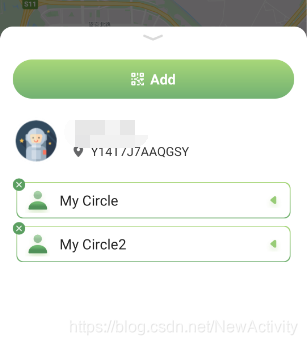
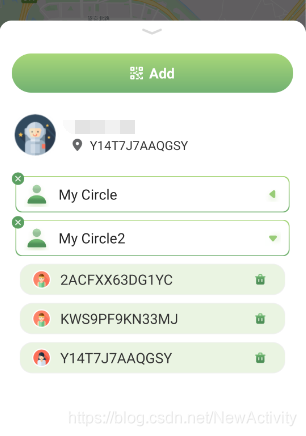
效果图如下:
关闭状态:
点击一级条目展开状态:
使用如下:
1.在主界面布局里使用:
<ExpandableListView
    android:layout_marginLeft="16dp"
    android:layout_marginRight="16dp"
    android:layout_width="match_parent"
    android:layout_height="wrap_content"
    android:id="@+id/el_fragment_third"
    ></ExpandableListView>
2.一级条目布局
item_expandable_levelone.xml
<?xml version="1.0" encoding="utf-8"?>
<LinearLayout xmlns:android="http://schemas.android.com/apk/res/android"
    android:layout_width="match_parent"
    android:layout_height="wrap_content"
    android:layout_marginTop="16dp"
    android:orientation="vertical">
    <RelativeLayout
        android:id="@+id/item_expandable_rl"
        android:layout_width="match_parent"
        android:layout_height="56dp"
        android:background="@drawable/bg_expandable_circle">

        <ImageView
            android:id="@+id/item_expandable_deletecircle"
            android:layout_width="wrap_content"
            android:layout_height="wrap_content"
            android:paddingRight="7dp"
            android:paddingBottom="7dp"
            android:src="@mipmap/icon_expandable_deletecircle" />

        <ImageView
            android:id="@+id/item_expandable_user"
            android:layout_width="wrap_content"
            android:layout_height="wrap_content"
            android:layout_centerVertical="true"
            android:paddingLeft="16dp"
            android:src="@mipmap/icon_expandable_user" />

        <TextView
            android:id="@+id/item_expandable_circlename"
            android:layout_width="wrap_content"
            android:layout_height="wrap_content"
            android:layout_centerVertical="true"
            android:layout_marginLeft="12dp"
            android:layout_toRightOf="@id/item_expandable_user"
            android:text="@string/expandable_item_001"
            android:textColor="#232323"
            android:textSize="18sp" />

        <ImageView
            android:id="@+id/item_expandable_left"
            android:layout_width="wrap_content"
            android:layout_height="wrap_content"
            android:layout_alignParentRight="true"
            android:layout_centerVertical="true"
            android:layout_marginRight="16dp"
            android:src="@mipmap/icon_expandable_left" />
    </RelativeLayout>
</LinearLayout>
3.二级条目布局
item_expandable_leveltwo.xml
<?xml version="1.0" encoding="utf-8"?>
<LinearLayout xmlns:android="http://schemas.android.com/apk/res/android"
    android:layout_width="match_parent"
    android:layout_height="wrap_content"
    android:orientation="vertical">

    <RelativeLayout
        android:id="@+id/rr_location_layout"
        android:layout_width="match_parent"
        android:layout_height="40dp"
        android:layout_marginLeft="10dp"
        android:layout_marginTop="5dp"
        android:layout_marginBottom="5dp"
        android:layout_marginRight="10dp"
        android:background="@drawable/bg_item_circle_shadow_location"
        >

        <ImageView
            android:layout_centerVertical="true"
            android:id="@+id/iv_location_head"
            android:layout_width="24dp"
            android:layout_height="24dp"
            android:layout_marginLeft="16dp"
            android:src="@mipmap/logo_profile_head" />

        <TextView
            android:id="@+id/tv_location_id"
            android:layout_width="wrap_content"
            android:layout_height="wrap_content"
            android:layout_marginLeft="12dp"
            android:layout_centerVertical="true"
            android:layout_toRightOf="@id/iv_location_head"
            android:text="ID:5468nkk"
            android:textColor="#333333"
            android:textSize="18sp" />

        <ImageView
            android:id="@+id/iv_location_icon"
            android:layout_width="wrap_content"
            android:layout_height="wrap_content"
            android:layout_alignParentRight="true"
            android:layout_marginTop="8dp"
            android:layout_marginRight="24dp"
            />

        <ImageView
            android:padding="8dp"
            android:id="@+id/iv_location_delete"
            android:layout_width="wrap_content"
            android:layout_height="wrap_content"
            android:src="@mipmap/icon_expandable_delete"
            android:layout_alignParentRight="true"
            android:layout_marginRight="16dp"
            android:layout_centerVertical="true"
            />
    </RelativeLayout>
</LinearLayout>
4.UserInfo:
public class UserInfo {
    private int imgPath;
    private String id;
    private String Name;
    private String Latitude;
    private String Longitude;

    public void setIsTrue(boolean aTrue) {
        isTrue = aTrue;
    }

    public boolean getIsTrue() {
        return isTrue;
    }

    private boolean isTrue;//点击


    public void setImgPath(int imgPath) {
        this.imgPath = imgPath;
    }

    public void setId(String id) {
        this.id = id;
    }

    public void setName(String name) {
        Name = name;
    }

    public void setLatitude(String latitude) {
        Latitude = latitude;
    }

    public void setLongitude(String longitude) {
        Longitude = longitude;
    }

    public int getImgPath() {
        return imgPath;
    }

    public String getId() {
        return id;
    }

    public String getName() {
        return Name;
    }

    public String getLatitude() {
        return Latitude;
    }

    public String getLongitude() {
        return Longitude;
    }
}
5.activity里代码(只写跟控件有关的)
private ExpandableListView mel_linkageView;
     @Override
     protected void onCreate(Bundle savedInstanceState) {
         super.onCreate(savedInstanceState);
         setContentView(R.layout.frag_third);

         initView();
     }
     private void initView() {
        mel_linkageView = view.findViewById(R.id.el_fragment_third);
        mel_linkageView.setGroupIndicator(null);//去掉自带箭头
        mel_linkageView.setDividerHeight(0);
        //userListInfo 为要展示的数据,添加过程省略。。。假设里面已经有数据
        List<List<UserInfo>> userListInfo =new ArrayList<List<UserInfo>>();
        List<UserInfo> userInfos =new ArrayList<UserInfo>();
        List<UserInfo> userInfos =new ArrayList<UserInfo>();
        UserInfo userinfo =new UserInfo(); userinfo.set...等等
        userListInfo.add(userInfos);
        userListInfo.add(userInfos2);


        String[] groups = {"My Circle","My Circle2"};
        MyExpandableAdapterTypeTwo myAdapter = new MyExpandableAdapterTypeTwo(groups,userListInfo,this);
        mel_linkageView.setAdapter(myAdapter);
        //设置ExpandableListView各级列表全部展开
        if(myAdapter !=null){
                for (int i = 0; i < myAdapter.getGroupCount(); i++) {
                    mel_linkageView.expandGroup(i);//全部展开
                }
        }

     }
注:1.userListInfo 是我要展示的二级数据,本来的动态获取的。如果做测试的话也可以自己new一些UserInfo放到list里面,在把 list放入userListInfo。
2.group是我展示的一级数据,因为我的一级列表是固定的,所以group的长度也是固定的,这个也可以动态获取。
3.其中setGroupIndicator是去掉ExpandableListView自带的箭头,setDividerHeight是去除条目之间带的横线。
4.MyExpandableAdapterTypeTwo 负责主要展示
6.MyExpandableAdapterTypeTwo:
public class MyExpandableAdapterTypeTwo extends BaseExpandableListAdapter {

    private String[] groups;
    private List<List<UserInfo>> childs;
    private Activity activity;

    public MyExpandableAdapterTypeTwo(String[] gro, List<List<UserInfo>> chi, Activity act) {
        groups = gro;
        childs = chi;
        activity = act;
    }

    /*一级列表个数*/
    @Override
    public int getGroupCount() {
        return groups.length;
    }

    /*每个二级列表的个数*/
    @Override
    public int getChildrenCount(int groupPosition) {
        return childs.get(groupPosition).size();
    }

    /*一级列表中单个item*/
    @Override
    public Object getGroup(int groupPosition) {
        return groups[groupPosition];
    }

    /*二级列表中单个item*/
    @Override
    public Object getChild(int groupPosition, int childPosition) {
        return childs.get(groupPosition).get(childPosition);
    }

    @Override
    public long getGroupId(int groupPosition) {
        return groupPosition;
    }

    @Override
    public long getChildId(int groupPosition, int childPosition) {
        return childPosition;
    }

    /*每个item的id是否固定,一般为true*/
    @Override
    public boolean hasStableIds() {
        return true;
    }

    /*#TODO 填充一级列表
     * isExpanded 是否已经展开
     * */
    @Override
    public View getGroupView(int groupPosition, boolean isExpanded, View convertView, ViewGroup parent) {
        if (convertView == null) {
            convertView = activity.getLayoutInflater().inflate(R.layout.item_expandable_levelone, null);
        }
        ImageView mIvLeft = convertView.findViewById(R.id.item_expandable_left);
        TextView mTvCircle = convertView.findViewById(R.id.item_expandable_circlename);
        mTvCircle.setText(groups[groupPosition]);
        //控制展开和关闭时一级条目右侧的图标
        if (isExpanded) {
            mIvLeft.setImageResource(R.mipmap.icon_expandable_leftdown);
        } else {
            mIvLeft.setImageResource(R.mipmap.icon_expandable_left);
        }

        return convertView;
    }

    /*#TODO 填充二级列表*/
    @Override
    public View getChildView(final int groupPosition, final int childPosition, boolean isLastChild, View convertView, ViewGroup parent) {
        if (convertView == null) {
            convertView = activity.getLayoutInflater().inflate(R.layout.item_expandable_leveltwo, null);
        }
        ImageView mIvHead = convertView.findViewById(R.id.iv_location_head);
        TextView mTvId = convertView.findViewById(R.id.tv_location_id);
        ImageView mIvDelete = convertView.findViewById(R.id.iv_location_delete);

        final UserInfo mUserInfo = childs.get(groupPosition).get(childPosition);
        mTvId.setText(mUserInfo.getId());
        if (mUserInfo.getImgPath() == 0) {
            mIvHead.setImageResource(R.mipmap.icon_contacts_1);
        } else {
            mIvHead.setImageResource(mUserInfo.getImgPath());
        }

        mIvDelete.setOnClickListener(new View.OnClickListener() {
            @Override
            public void onClick(View v) {

            }
        });

        return convertView;
    }

    /*二级列表中每个能否被选中,如果有点击事件一定要设为true*/
    @Override
    public boolean isChildSelectable(int groupPosition, int childPosition) {
        return true;
    }





 扫一扫
扫一扫


 509
509

 被折叠的 条评论
为什么被折叠?
被折叠的 条评论
为什么被折叠?
 到【灌水乐园】发言





