


 本文详细介绍如何从零开始搭建LAMP(Linux + Apache + MariaDB + PHP)环境,并提供了一个自动化安装脚本,涵盖软件安装、配置及服务启动等关键步骤。
lamp简介
LAMP是指一组通常一起使用运行动态网站或者服务器的自由软件名称首字母缩写:
L:linux操作系统
A:apache 网页服务器
M:mariaDB或mysql 数据库管理系统或数据库服务器
P:php perl或python 脚本语言
LAMP平台搭建
lamp平台软件安装次序:
httpd > mysql > php
安装httpd
# 下载相关软件包
[root@localhost src]# wget https://dlcdn.apache.org/apr/apr-1.7.0.tar.gz
[root@localhost src]# wget https://dlcdn.apache.org/apr/apr-util-1.6.1.tar.gz
[root@localhost src]# wget https://dlcdn.apache.org/httpd/httpd-2.4.48.tar.gz

# 安装开发工具包
[root@localhost src]# yum groups mark install 'Development Tools' -y

# 下载epel源
[root@localhost ~]# yum -y install epel-release

# 安装依赖包
[root@localhost ~]# yum -y install openssl-devel pcre-devel expat-devel libtool gcc gcc-c++ make ncurses-devel openssl-devel openssl cmake mariadb-devel ncurses-compat-libs  libxml2 libxml2-devel openssl openssl-devel bzip2 bzip2-devel libcurl libcurl-devel libicu-devel libjpeg libjpeg-devel libpng libpng-devel openldap-devel  pcre-devel freetype freetype-devel gmp gmp-devel libmcrypt libmcrypt-devel readline readline-devel libxslt libxslt-devel mhash mhash-devel php-mysqlnd libsqlite3x-devel  libzip-devel

#创建apache用户
[root@localhost src]# useradd -r -M -s /sbin/nologin apache

# 解压软件包
[root@localhost src]# tar xf apr-1.7.0.tar.gz -C /usr/src/
[root@localhost src]# tar xf apr-util-1.6.1.tar.gz -C /usr/src/
[root@localhost src]# tar xf httpd-2.4.48.tar.gz -C /usr/src/

# 编译安装apr包
[root@localhost apr-1.7.0]# sed -i '/$RM "$cfgfile"/d' configure

[root@localhost apr-1.7.0]# ./configure --prefix=/usr/local/apr
checking build system type... x86_64-pc-linux-gnu
checking host system type... x86_64-pc-linux-gnu
checking target system type... x86_64-pc-linux-gnu
Configuring APR library
······过程略

[root@localhost apr-1.7.0]# make && make install
······过程略

# 编译安装apr-util包
[root@localhost apr-util-1.6.1]# ./configure  --prefix=/usr/local/apr-util --with-apr=/usr/local/apr

[root@localhost apr-util-1.6.1]# make && make install
······过程略

# 编译安装httpd包
[root@localhost httpd-2.4.48]# ./configure --prefix=/usr/local/httpd \
>--enable-so \
>--enable-ssl \
>--enable-cgi \
>--enable-rewrite \
>--with-zlib \
>--with-pcre \
>--with-apr=/usr/local/apr \
>--with-apr-util=/usr/local/apr-util \
>--enable-modules=most \
>--enable-mpms-shared=all \
>--with-mpm=prefork
[root@localhost httpd-2.4.48]# make && make install
······略

# 配置httpd文件
[root@localhost ~]# sed -i 's/#ServerName www.example.com:80/ServerName www.example.com:80/g' /usr/local/httpd/conf/httpd.conf
[root@localhost ~]# echo 'export PATH=/usr/local/httpd/bin:$PATH' > /etc/profile.d/httpd.sh
[root@localhost ~]# ln -s /usr/local/httpd/include/ /usr/include/httpd
[root@localhost ~]# echo 'MANPATH /usr/local/httpd/man' >> /etc/man_db.conf


# 使用service启动服务
[root@localhost ~]# cat /usr/lib/systemd/system/httpd.service
[Unit]
Description=The Apache http server
After=network.targe

[Service]
Type=forking
ExecStart=/usr/local/httpd/bin/apachectl start
ExecStop=/usr/local/httpd/bin/apachectl stop
ExecReload=/usr/local/httpd/bin/apachectl restart

[Install]
WantedBy=multi-user.target

[root@localhost ~]# systemctl daemon-reload
[root@localhost ~]# systemctl enable --now  httpd
Created symlink /etc/systemd/system/multi-user.target.wants/httpd.service → /usr/lib/systemd/system/httpd.service.
安装mysql
# 创建mysql用户
[root@localhost ~]# useradd -r -M -s /sbin/nologin mysql

# mysql下载地址
https://downloads.mysql.com/archives/community/

# 解压软件包
[root@localhost src]# tar xf mysql-5.7.34-linux-glibc2.12-x86_64.tar.gz -C /usr/local/
[root@localhost local]# mv mysql-5.7.34-linux-glibc2.12-x86_64/ mysql

# 修改文件属主属组
[root@localhost local]# chown -R mysql.mysql /usr/local/mysql/

# 添加环境变量
[root@localhost local]# echo 'export PATH=/usr/local/mysql/bin:$PATH' > /etc/profile.d/mysql.sh

# 修改文件
[root@localhost mysql]# ln -s /usr/local/mysql/include/ /usr/include/mysql
[root@localhost mysql]# vim /etc/man_db.conf
[root@localhost mysql]# cat /etc/man_db.conf
······
MANDATORY_MANPATH			/usr/man
MANDATORY_MANPATH			/usr/share/man
MANDATORY_MANPATH			/usr/local/share/man
MANDATORY_MANPATH                       /usr/local/httpd/man
MANDATORY_MANPATH                       /usr/local/mysql/man
······
#lamp架构需要做此操作,单独部署不需要
[root@localhost mysql]# echo "/usr/local/mysql/lib" > /etc/ld.so.conf.d/mysql.conf
[root@localhost mysql]# ldconfig
[root@localhost mysql]# cat /etc/ld.so.conf.d/mysql.conf
/usr/local/mysql/lib

[root@localhost ~]# mkdir /opt/data
[root@localhost ~]# chown -R mysql.mysql /opt/data/

# 初始化数据库
[root@localhost ~]# mysqld --initialize-insecure --user mysql --datadir /opt/data
2021-09-23T08:45:10.561076Z 0 [Warning] TIMESTAMP with implicit DEFAULT value is deprecated. Please use --explicit_defaults_for_timestamp server option (see documentation for more details).
2021-09-23T08:45:10.725149Z 0 [Warning] InnoDB: New log files created, LSN=45790
2021-09-23T08:45:10.750948Z 0 [Warning] InnoDB: Creating foreign key constraint system tables.
2021-09-23T08:45:10.814212Z 0 [Warning] No existing UUID has been found, so we assume that this is the first time that this server has been started. Generating a new UUID: 8fd8ab0f-1c4a-11ec-863d-000c297ee75a.
2021-09-23T08:45:10.814904Z 0 [Warning] Gtid table is not ready to be used. Table 'mysql.gtid_executed' cannot be opened.
2021-09-23T08:45:11.279071Z 0 [Warning] CA certificate ca.pem is self signed.
2021-09-23T08:45:11.611950Z 1 [Warning] root@localhost is created with an empty password ! Please consider switching off the --initialize-insecure option.

# 生成配置文件
[root@localhost ~]# cat > /etc/my.cnf <<EOF
> [mysqld]
> basedir = /usr/local/mysql
> datadir = /opt/data
> socket = /tmp/mysql.sock
> port = 3306
> pid-file = /opt/data/mysql.pid
> user = mysql
> skip-name-resolve
> EOF

#以service启动服务
[root@localhost ~]# cat /usr/lib/systemd/system/mysqld.service
[Unit]
Description=Mysql  server daemon
After=network.targe

[Service]
Type=forking
ExecStart=/usr/local/mysql/support-files/mysql.server start
ExecStop=/usr/local/mysql/support-files/mysql.serve stop

[Install]
WantedBy=multi-user.target

[root@localhost ~]# sed -i 's!^basedir=!basedir=/usr/local/mysql!g;s!^datadir=!datadir=/opt/data!g' /usr/local/mysql/support-files/mysql.server

[root@localhost ~]# systemctl daemon-reload
[root@localhost ~]# systemctl enable --now mysqld
Created symlink /etc/systemd/system/multi-user.target.wants/mysqld.service → /usr/lib/systemd/system/mysqld.service.

# 修改myql数据库密码
[root@localhost ~]# mysql -uroot -e "set password=password('123')"
安装php
# 下载php软件包
https://www.php.net/downloads.php#v8.0.10

# 解压软件包
[root@localhost src]# tar xf php-8.0.10

# 下载软件
[root@localhost ~]# yum -y install http://mirror.centos.org/centos/8-stream/PowerTools/x86_64/os/Packages/oniguruma-devel-6.8.2-2.el8.x86_64.rpm

# 编译安装
[root@localhost php-8.0.10]# ./configure --prefix=/usr/local/php --with-config-file-path=/etc --enable-fpm --disable-debug --disable-rpath --enable-shared --enable-soap --with-openssl --enable-bcmath --with-iconv --with-bz2 --enable-calendar --with-curl --enable-exif --enable-ftp --enable-gd --with-jpeg --with-zlib-dir --with-freetype --with-gettext --enable-mbstring --enable-pdo --with-mysqli=mysqlnd --with-pdo-mysql=mysqlnd --with-readline --enable-shmop --enable-simplexml --enable-sockets --with-zip --enable-mysqlnd-compression-support --with-pear --enable-pcntl --enable-posix
······
[root@localhost php-8.0.10]# make && make install
······

# 设置环境变量
[root@localhost php-8.0.10]# echo "export PATH=/usr/local/php/bin:$PATH" > /etc/profile.d/php.sh
[root@localhost php-8.0.10]# source /etc/profile.d/php.sh
[root@localhost php-8.0.10]# which php
/usr/local/php/bin/php


[root@localhost php-8.0.10]# cp /etc/php.ini /opt/
[root@localhost php-8.0.10]# cp php.ini-production /etc/php.ini
cp:是否覆盖'/etc/php.ini'? y
[root@client php-8.0.10]# cp sapi/fpm/init.d.php-fpm /etc/init.d/php-fpm
[root@client php-8.0.10]# chmod +x /etc/rc.d/init.d/php-fpm
[root@client php-8.0.10]# cp /usr/local/php/etc/php-fpm.conf.default /usr/local/php/etc/php-fpm.conf
[root@client php-8.0.10]# cp /usr/local/php/etc/php-fpm.d/www.conf.default /usr/local/php/etc/php-fpm.d/www.conf
[root@client php-8.0.10]#

[root@localhost ~]# service php-fpm start
Starting php-fpm  done

[root@localhost ~]# ss -antl
LISTEN         0              128                        127.0.0.1:9000                      0.0.0.0:*
apache配置
[root@localhost ~]# sed -i '/proxy_module/s/#//g' /usr/local/httpd/conf/httpd.conf
[root@localhost ~]# sed -i '/proxy_fcgi_module/s/#//g' /usr/local/httpd/conf/httpd.conf
[root@localhost php]# cd etc/
[root@localhost etc]# ls
pear.conf  php-fpm.conf.default  php-fpm.d
[root@localhost etc]# cp php-fpm.conf.default php-fpm.conf
[root@localhost etc]# cd php-fpm.d/
[root@localhost php-fpm.d]# ls
www.conf.default
[root@localhost php-fpm.d]# cp www.conf.default www.conf


# 创建生成页面
[root@localhost httpd]# cd htdocs/
[root@localhost htdocs]# ls
index.html
[root@localhost htdocs]# mkdir test
[root@localhost htdocs]# cd test/
[root@localhost test]# vim index.php
[root@localhost test]# cat index.php
<?php
   phpinfo();
?>
[root@localhost test]# chown -R apache.apache /usr/local/httpd/htdocs

# 在文件最后加入以下内容
[root@localhost test]# vi /usr/local/httpd/conf/httpd.conf
<VirtualHost *:80>
    DocumentRoot "/usr/local/httpd/htdocs/test"
    ServerName www.test.com
    ProxyRequests Off
    ProxyPassMatch ^/(.*\.php)$ fcgi://127.0.0.1:9000/usr/local/httpd/htdocs/test/$1
    <Directory "/usr/local/httpd/htdocs/test">
        Options none
        AllowOverride none
        Require all granted
    </Directory>
</VirtualHost>


[root@localhost test]# vi /usr/local/httpd/conf/httpd.conf
    AddType application/x-compress .Z
    AddType application/x-gzip .gz .tgz
    AddType application/x-httpd-php .php			#添加此行
    AddType application/x-httpd-php-source .phps	#添加此行

    DirectoryIndex index.php(添加此内容) index.htm

# 重启服务
[root@localhost ~]# systemctl restart httpd
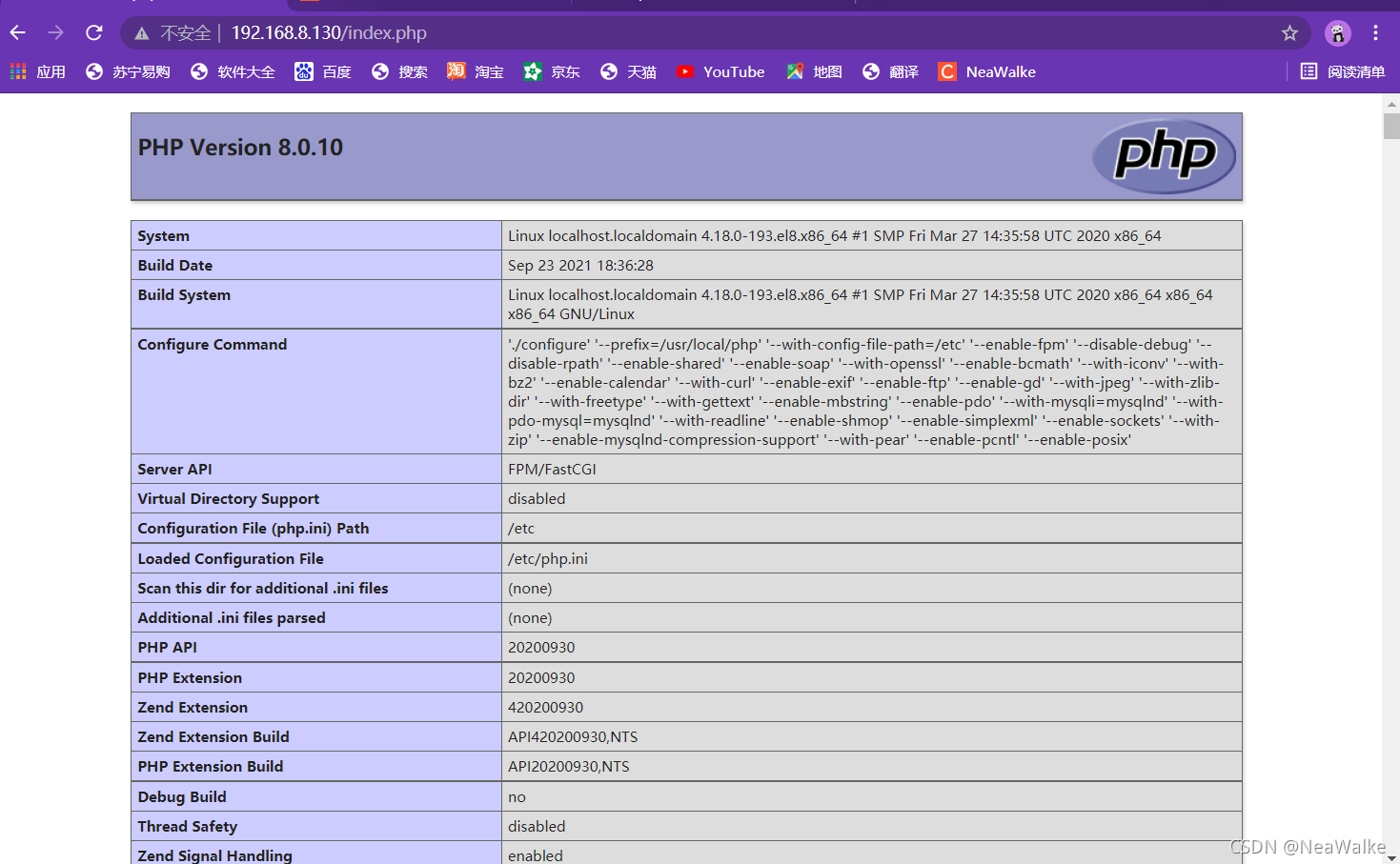
访问效果
脚本安装
#!/bin/bash

install_dir=/usr/local
mysql_data=/opt/data

read -p "输入数据库密码:" password
if [ -z $password ];then
        password=123
fi

read -p "选择php版本7或8:" version
echo $version |grep '7'
if [ $? -eq 0 ];then
    version=1
fi


function php7(){
    cd /usr/src/php-7.4.24
    ./configure --prefix=$install_dir/php \--with-config-file-path=/etc --enable-fpm --enable-inline-optimization --disable-debug --disable-rpath --enable-shared --enable-soap --with-openssl --enable-bcmath --with-iconv --with-bz2 --enable-calendar --with-curl --enable-exif  --enable-ftp --enable-gd --with-jpeg  --with-zlib-dir --with-freetype --with-gettext --enable-json --enable-mbstring --enable-pdo --with-mysqli=mysqlnd --with-pdo-mysql=mysqlnd --with-readline --enable-shmop --enable-simplexml --enable-sockets --with-zip --enable-mysqlnd-compression-support --with-pear --enable-pcntl --enable-posix && make && make install
    mv /etc/php.ini /opt/
    cp php.ini-production /etc/php.ini
    cp sapi/fpm/init.d.php-fpm /etc/init.d/php-fpm
    chmod +x /etc/rc.d/init.d/php-fpm
}

function php8(){
    cd /usr/src/php-8.0.11
    ./configure --prefix=/usr/local/php --with-config-file-path=/etc --enable-fpm --disable-debug --disable-rpath --enable-shared --enable-soap --with-openssl --enable-bcmath --with-iconv --with-bz2 --enable-calendar --with-curl --enable-exif --enable-ftp --enable-gd --with-jpeg --with-zlib-dir --with-freetype --with-gettext --enable-mbstring --enable-pdo --with-mysqli=mysqlnd --with-pdo-mysql=mysqlnd --with-readline --enable-shmop --enable-simplexml --enable-sockets --with-zip --enable-mysqlnd-compression-support --with-pear --enable-pcntl --enable-posix && make && make install
    mv /etc/php.ini /opt/
    cp php.ini-production /etc/php.ini
    cp sapi/fpm/init.d.php-fpm /etc/init.d/php-fpm
    chmod +x /etc/rc.d/init.d/php-fpm
}


#下载依赖包
yum groups mark install 'Development Tools' -y
yum -y install epel-release

yum -y install openssl-devel pcre-devel expat-devel libtool gcc gcc-c++ make ncurses-compat-libs perl ncurses-devel  openssl cmake mariadb-devel ncurses-compat-libs  libxml2 libxml2-devel openssl  bzip2 bzip2-devel libcurl libcurl-devel libicu-devel libjpeg libjpeg-devel libpng libpng-devel openldap-devel   freetype freetype-devel gmp gmp-devel libmcrypt libmcrypt-devel readline readline-devel libxslt libxslt-devel mhash mhash-devel php-mysqlnd libsqlite3x-devel  libzip-devel
yum -y install http://mirror.centos.org/centos/8-stream/PowerTools/x86_64/os/Packages/oniguruma-devel-6.8.2-2.el8.x86_64.rpm


#解压软件包
if [ ! -d $install_dir/mysql ];then
        tar xf soft/mysql-5.7.34-linux-glibc2.12-x86_64.tar.gz -C $install_dir
        ln -s mysql-5.7.34-linux-glibc2.12-x86_64  $install_dir/mysql
fi


if [ ! -d /usr/src/httpd-2.4.48 ];then
    tar xf soft/httpd-2.4.48.tar.gz -C /usr/src
fi
if [ ! -d /usr/src/apr-util-1.6.1 ];then
        tar xf soft/apr-util-1.6.1.tar.gz -C /usr/src
fi
if [ ! -d /usr/src/apr-1.7.0 ];then
        tar xf soft/apr-1.7.0.tar.gz -C /usr/src
fi

if [ ! -d /usr/src/php-8.0.11 ];then
        tar xf soft/php-8.0.11.tar.gz -C /usr/src
fi
if [ ! -d /usr/src/php-7.4.24 ];then
        tar xf soft/php-7.4.24.tar.xz -C /usr/src
fi


id apache &> /dev/null
if [ $? -ne 0 ];then
        useradd -r -M -s /sbin/nologin apache
fi


#安装apr
cd /usr/src/apr-1.7.0
sed -i '/$RM "$cfgfile"/d' configure
if [ ! -d $install_dir/apr ];then
	./configure --prefix=$install_dir/apr && make && make install
fi

#安装apr-util
cd /usr/src/apr-util-1.6.1
if [ ! -d $install_dir/apr-util ];then
	./configure --prefix=$install_dir/apr-util --with-apr=$install_dir/apr && make && make install
fi

#安装httpd
cd /usr/src/httpd-2.4.48
if [ ! -d $install_dir/httpd ];then
    ./configure  --prefix=$install_dir/httpd \
	--enable-so \
	--enable-ssl \
	--enable-cgi \
	--enable-rewrite \
	--with-zlib \
	--with-pcre \
	--with-apr=/usr/local/apr \
	--with-apr-util=/usr/local/apr-util/ \
	--enable-modules=most \
	--enable-mpms-shared=all \
	--with-mpm=prefork && make && make install
    cat >> $install_dir/httpd/conf/httpd.conf <<EOF
<VirtualHost *:80>
    DocumentRoot "/usr/local/httpd/htdocs/test"
    ServerName www.test.com
    ProxyRequests Off
    ProxyPassMatch ^/(.*\.php)$ fcgi://127.0.0.1:9000/usr/local/httpd/htdocs/test/$1
    <Directory "/usr/local/httpd/htdocs/test">
        Options none
        AllowOverride none
        Require all granted
    </Directory>
</VirtualHost>
EOF

sed -i 's#AddType application/x-gzip .gz .tgz#AddType application/x-gzip .gz .tgz\n    AddType application/x-httpd-php .php\n    AddType application/x-httpd-php-source .phps#g' $install_dir/httpd/conf/httpd.conf

sed -i 's/DirectoryIndex index.html/DirectoryIndex index.php index.html/g' $install_dir/httpd/conf/httpd.conf
fi

sed -i 's/#ServerName/ServerName/g' $install_dir/httpd/conf/httpd.conf
echo "export PATH=$install_dir/httpd/bin:\$PATH" > /etc/profile.d/httpd.sh
ln -s $install_dir/httpd/include /usr/include/httpd
echo "MANDATORY_MANPATH $install_dir/httpd/man" >> /etc/man_db.conf


cat > /usr/lib/systemd/system/httpd.service <<EOF
[Unit]
Description=HTTPD server daemon
After=network.target

[Service]
Type=forking
ExecStart=$install_dir/httpd/bin/apachectl start
ExecStop=$install_dir/httpd/bin/apachectl stop
ExecReload=/bin/kill -HUP $MAINPID

[Install]
WantedBy=multi-user.target
EOF

sed -i '/proxy_module/s/#//g' $install_dir/httpd/conf/httpd.conf
sed -i '/proxy_fcgi_module/s/#//g' $install_dir/httpd/conf/httpd.conf

systemctl daemon-reload
systemctl enable --now httpd

# 安装mysql数据库

id mysql &> /dev/null
if [ $? -ne 0 ];then
	useradd -r -M -s /sbin/nologin mysql
fi


chown -R mysql.mysql $install_dir/mysql*
echo "export PATH=$install_dir/mysql/bin:\$PATH" > /etc/profile.d/mysql.sh
ln -s $install_der/mysql/include /usr/include/mysql
echo "MANDATORY_MANPATH $install_dir/mysql/man" >> /etc/man_db.conf
echo "/usr/local/mysql/lib" > /etc/ld.so.conf.d/mysql.conf
ldconfig


if [ ! -d $mysql_data ];then
	mkdir -p $mysql_data
	chown -R mysql.mysql $mysql_data
fi


ls=$(ls $mysql_data | wc -l)
if [ $ls -eq 0 ];then
    $install_dir/mysql/bin/mysqld --initialize-insecure --user=mysql --datadir=$mysql_data
fi

cat > /etc/my.cnf <<EOF
[mysqld]
basedir = $install_dir/mysql
datadir = $mysql_data
socket = /tmp/mysql.sock
port = 3306
pid-file = $mysql_data/mysql.pid
user = mysql
skip-name-resolve
EOF

sed -i "s#^basedir=#basedir=$install_dir/mysql#g;s#^datadir=#datadir=$mysql_data#g" $install_dir/mysql/support-files/mysql.server


cat > /usr/lib/systemd/system/mysql.service <<EOF
[Unit]
Description=mysql server daemon
After=network.target

[Service]
Type=forking
ExecStart=$install_dir/mysql/support-files/mysql.server start
ExecStop=$install_dir/mysql/support-files/mysql.server stop
ExecReload=/bin/kill -HUP $MAINPID

[Install]
WantedBy=multi-user.target
EOF

systemctl daemon-reload
systemctl enable --now mysql

/usr/local/mysql/bin/mysql -uroot -e "set password=password('$password')"


# 安装php
if [ $version -eq 1 ];then
    php7
else
    php8
fi

echo "export PATH=$install_dir/php/bin:\$PATH" > /etc/profile.d/php.sh
cp $install_dir/php/etc/php-fpm.conf.default $install_dir/php/etc/php-fpm.conf
cp $install_dir/php/etc/php-fpm.d/www.conf.default  /$install_dir/php/etc/php-fpm.d/www.conf

cat > /usr/lib/systemd/system/php-fpm.service <<EOF
[Unit]
Description=php-fpm server daemon
After=network.target

[Service]
Type=forking
ExecStart=/etc/init.d/php-fpm start
ExecStop=/etc/init.d/php-fpm stop
ExecReload=/bin/kill -HUP

[Install]
WantedBy=multi-user.target
EOF

systemctl daemon-reload
systemctl enable --now php-fpm

cd $install_dir/php/etc
cp php-fpm.conf.default php-fpm.conf
cd $install_dir/php/etc/php-fpm.d
cp www.conf.default www.conf

mkdir $install_dir/httpd/htdocs/test

cat > $install_dir/httpd/htdocs/test/index.php <<EOF
<?php
    phpinfo();
?>
EOF
chown -R apache.apache $install_dir/httpd/htdocs


systemctl restart httpd





 扫一扫
扫一扫


 464
464

 被折叠的 条评论
为什么被折叠?
被折叠的 条评论
为什么被折叠?
 到【灌水乐园】发言





