



参考:https://blog.youkuaiyun.com/qq_27454363/article/details/126517907
1. 查看已安装mysql
rpm -qa|grep mariadb
# mariadb-libs-5.5.68-1.el7.x86_64
在Centos7中默认安装有MariaDB(MySQL的分支),但为了需要,还是要在系统中安装MySQL,通过yum安装完成之后可以自动覆盖掉MariaDB。
2. 安装MySQL官方的 Yum Repository
2.1 下载mysql
wget -i -c http://dev.mysql.com/get/mysql57-community-release-el7-10.noarch.rpm2.2 rpm 安装
rpm -ivh https://repo.mysql.com//mysql57-community-release-el7-11.noarch.rpm2.3 安装MySQL服务器
yum -y install mysql-community-server安装时有以下报错:
The GPG keys listed for the "MySQL 5.7 Community Server" repository are already installed but they are not correct for this package.
Check that the correct key URLs are configured for this repository.
Failing package is: mysql-community-client-5.7.39-1.el7.x86_64
GPG Keys are configured as: file:///etc/pki/rpm-gpg/RPM-GPG-KEY-mysql
报错原因:MySQL GPG 密钥已过期导致
解决办法:执行以下下命令解决
rpm --import https://repo.mysql.com/RPM-GPG-KEY-mysql-20222.4 再次安装
yum -y install mysql-community-server3. 启动MySQL
systemctl start mysqld.service3.1 查看MySQL运行状态
systemctl status mysqld.service3.2 更改mysql密码
查看mysql临时密码
cat /var/log/mysqld.log | grep 'password'临时密码如下:
2022-08-25T00:45:22.149109Z 1 [Note] A temporary password is generated for root@localhost: Yo#gWGS<K0z:3.3 登陆mysql
mysql -uroot -p 回车,复制密码Yo#gWGS<K0z:
3.4 修改密码
MySQL默认必须修改密码之后才能操作数据库!
MySQL有密码设置的规范,具体是与validate_password_policy的值有关,需先修改如下参数:
mysql> set global validate_password_policy=0;
mysql> set global validate_password_length=1;
mysql> ALTER USER 'root'@'localhost' IDENTIFIED BY 'new_passwd';
4. 设置root账户可远程连接
设置root用户Host为%;进行如下设置后,才能远程连接或使用脚本连接!!
mysql> Grant all on *.* to 'root'@'%' identified by 'new_passwd' with grant option;
mysql> flush privileges;
5. 修改mysql的编码
vim /etc/my.conf 增加以下配置,保存退出。
[mysqld]
character-set-server=utf8
[client]
default-character-set=utf8
[mysql]
default-character-set=utf8
重启mysql
systemctl restart mysqld.service 查询mysql编码
mysql> show variables like 'character%';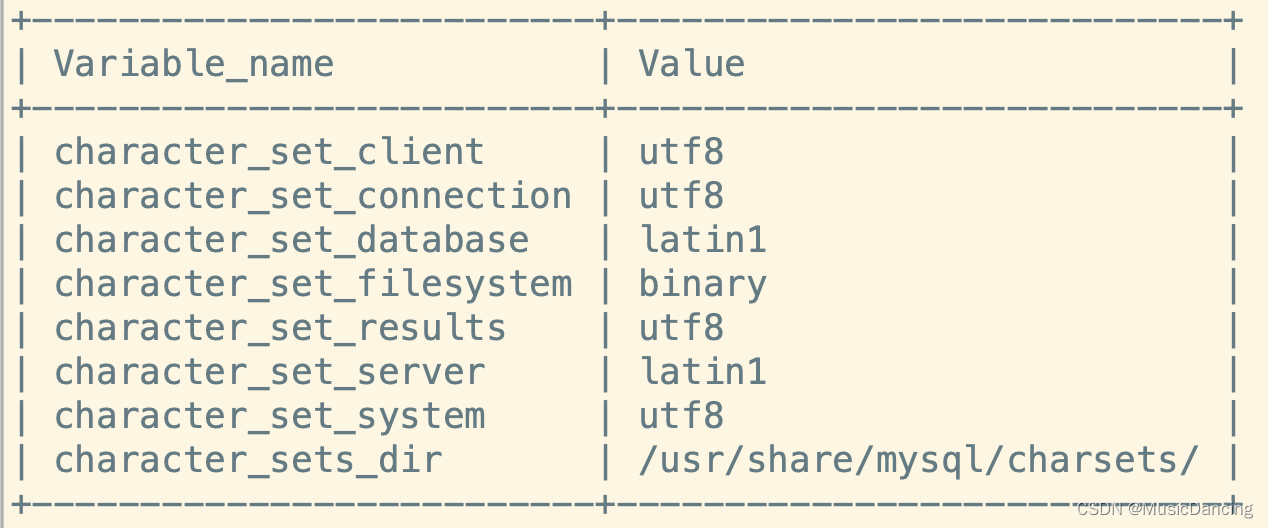
6. 卸载yum
此时还有一个问题,因为安装了Yum Repository,以后每次yum操作都会自动更新,需要把这个卸载掉。
yum -y remove mysql57-community-release-el7-10.noarch





 扫一扫
扫一扫


 2833
2833

 被折叠的 条评论
为什么被折叠?
被折叠的 条评论
为什么被折叠?
 到【灌水乐园】发言





