


一、前言
在开发数据-曲线功能时,如果把曲线和数据分立开来,观测起来不是很方便。只显示曲线,虽然能观测到变化趋势,但是无法读到精确的值;只显示数据,虽然可以读到精确的值,但是无法直观的看出曲线的变化趋势。示波器通常会采用示数线(一根垂直于界面的直线)来读数,移动到哪,就显示该点的值,这样就中和了曲线和数据二者的优势,让用户使用起来很便捷。
其实之前就写过类似的功能,如下:
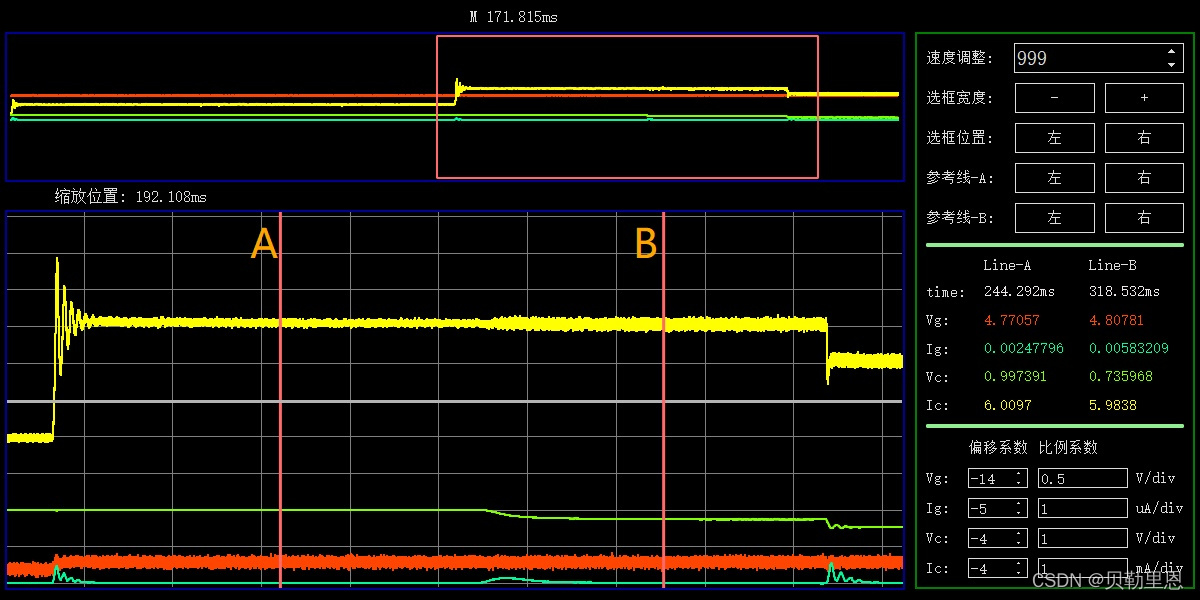
但是当时刚刚接触QWT,也没有图形视图框架的基础,当时不知道怎么索引画布上的图元,所以采用的是按钮的形式来移动数据游标,可以结合速度调节按钮来实现快慢移动,虽然实现了预期的功能,但是这样操作起来还是很不方便。
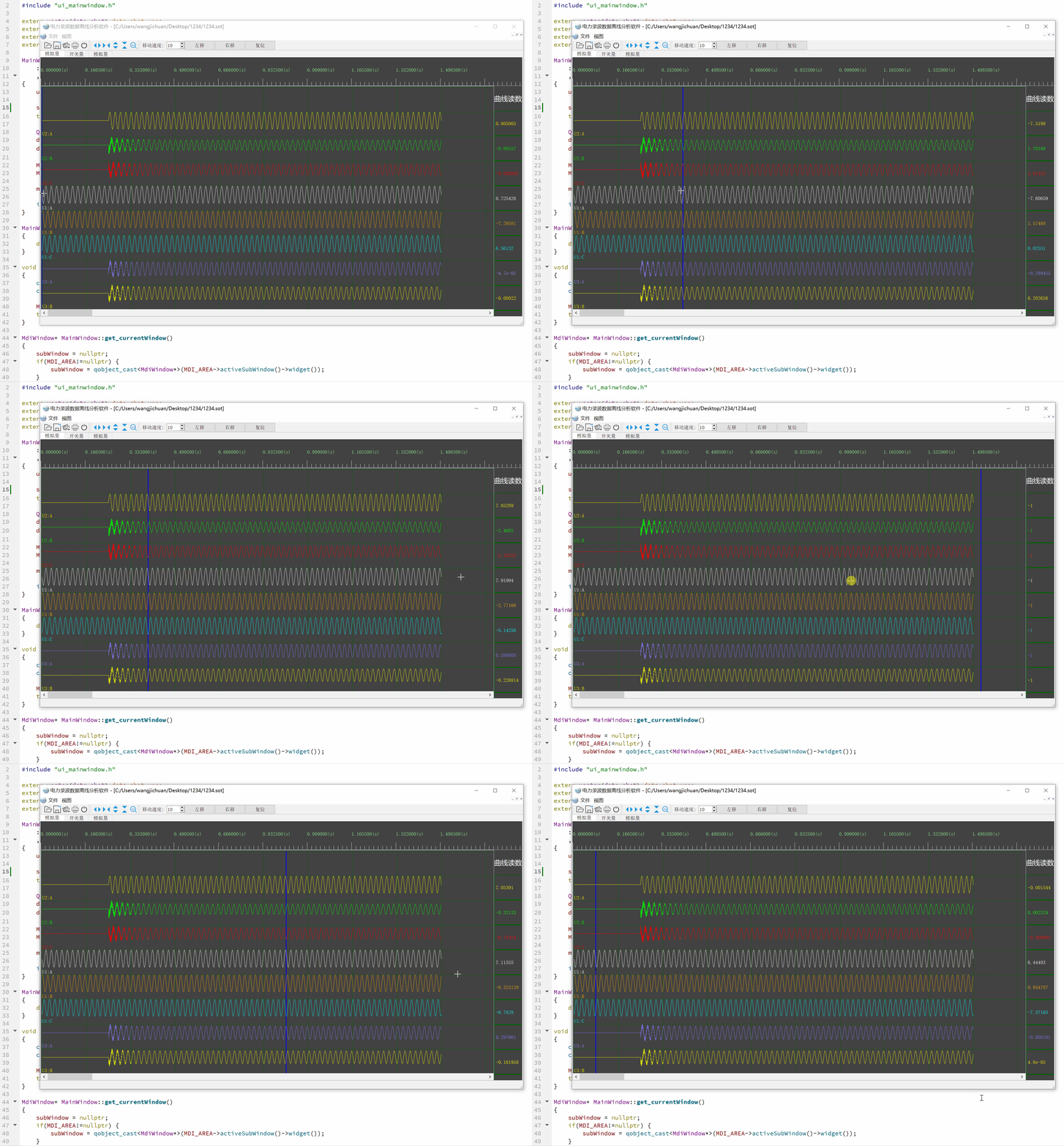
这次在之前的基础上做了一些改进,可以直接通过鼠标来移动数据游标,实现精确读数。
二、效果展示
三、思路分析
我们将数据游标逐步分解:1、对象;2、动作
1、对象
数据游标是一个自定义的Qwt图元,可以参考:QWT–自定义图元项
2、动作
很明显这是一个鼠标事件,我们只需要重写鼠标事件:
void mousePressEvent(QMouseEvent *event);
void mouseMoveEvent(QMouseEvent *event);
void mouseReleaseEvent(QMouseEvent *event);
四、关键代码
自定义QWT图元类–数据游标线
#ifndef QWTVALUELINE_H
#define QWTVALUELINE_H

#include <qwt_plot_item.h>
#include <qwt_painter.h>

#include "DataDefine.h"

class QPainter;
class QPen;
class QFont;
class QwtScaleMap;
class QwtScaleDiv;

class QwtValueLine : public QwtPlotItem
{
public:
    QwtValueLine();

    QPointF ValueLine_Pos1;
    QPointF ValueLine_Pos2;
    QColor ValueLine_Color;

    virtual int rtti() const; //指定当前图元项代表的意义
    virtual void draw( QPainter *p,
        const QwtScaleMap &xMap, const QwtScaleMap &yMap,
        const QRectF &rect ) const; //自定义图元项绘制函数

    void set_ValueLine_Pos1(QPointF);
    void set_ValueLine_Pos2(QPointF);
    void set_ValueLine_Color(QColor);
};

#endif // QWTVALUELINE_H
#include "qwtvalueline.h"

QwtValueLine::QwtValueLine()
{
    ValueLine_Pos1 = QPointF(-1,-1);
    ValueLine_Pos2 = QPointF(-1,-1);
    ValueLine_Color = QColor(255,0,0);
}

int QwtValueLine::rtti() const //虚函数,指定当前图元项代表的意义
{
    return QwtPlotItem::Rtti_PlotUserItem + valueLine_item;
}
void QwtValueLine::draw( QPainter *p,
                  const QwtScaleMap &xMap, const QwtScaleMap &yMap,
                  const QRectF &rect ) const //纯虚函数,自定义图元项绘制函数
{
    p->setRenderHints(QPainter::Antialiasing, true); //设置反锯齿
    p->setPen(QPen(ValueLine_Color,3));

    QwtPainter::drawLine(p,ValueLine_Pos1,ValueLine_Pos2);
}

void QwtValueLine::set_ValueLine_Pos1(QPointF pos1)
{
    this->ValueLine_Pos1 = pos1;
    this->itemChanged();
}
void QwtValueLine::set_ValueLine_Pos2(QPointF pos2)
{
    this->ValueLine_Pos2 = pos2;
    this->itemChanged();
}
void QwtValueLine::set_ValueLine_Color(QColor color)
{
    this->ValueLine_Color = color;
    this->itemChanged();
}
QwtPlot中重写鼠标事件
void PlotView::mousePressEvent(QMouseEvent *event)
{
    mousePressed = event->pos();    //物理坐标

    isSelected_valueLine = false;

    for(int i=0; i<this->itemList().size(); ++i) {
        if(this->itemList().at(i)->rtti() == QwtPlotItem::Rtti_PlotUserItem + valueLine_item) {
            valueLine = (QwtValueLine*)this->itemList()[i];
            //valueLine = dynamic_cast<QwtValueLine*>(this->itemList()[i]);
        }
    }

    if(valueLine != nullptr) {
        if(qAbs(mousePressed.x() - valueLine->ValueLine_Pos1.x()) <= 10) {
            isSelected_valueLine = true;
        }
    }
}

void PlotView::mouseMoveEvent(QMouseEvent *event)
{
    mouseMoved = event->pos();

}

void PlotView::mouseReleaseEvent(QMouseEvent *event)
{
    mouseReleased = event->pos();

    float moveDistance = 0.0;		//鼠标移动的物理距离
    int adjust_moveNum = 0;			//调整后移动的数据点数
    float adjust_moveLength = 0.0;	//调整后移动的物理距离

    //画布上0-1之间的物理距离
    int x1 = this->transform(QwtPlot::xBottom,0);
    int x2 = this->transform(QwtPlot::xBottom,1);
    int x_space = x2-x1;

    //数据个数、数据总物理长度、单个数据物理长度
    int N_data = parentWidget->parentWidget->data_chat_vec.at(0).time_vec.size();
    double M_length = parentWidget->parentWidget->stretch_delta_H*x_space;
    double single_data_length = M_length / N_data;

    //移动示数线
    if(isSelected_valueLine) {
        moveDistance = mouseReleased.x() - mousePressed.x();
        adjust_moveNum = moveDistance / single_data_length;         //调整后移动的数据个数
        adjust_moveLength = adjust_moveNum*single_data_length;      //调整后移动的物理距离

        if(valueLine != nullptr) {
            QPointF pos1 = QPointF(valueLine->ValueLine_Pos1.x()+adjust_moveLength,valueLine->ValueLine_Pos1.y());
            QPointF pos2 = QPointF(valueLine->ValueLine_Pos2.x()+adjust_moveLength,valueLine->ValueLine_Pos2.y());

			//示数线不能超出显示范围
            if(pos1.x() < single_data_length*10 || pos2.x() < single_data_length*10 || pos1.x() >= 100*x_space || pos2.x() >= 100*x_space) {
                return;

            //更新示数线坐标,重绘
            valueLine->set_ValueLine_Pos1(QPointF(valueLine->ValueLine_Pos1.x()+adjust_moveLength,valueLine->ValueLine_Pos1.y()));
            valueLine->set_ValueLine_Pos2(QPointF(valueLine->ValueLine_Pos2.x()+adjust_moveLength,valueLine->ValueLine_Pos2.y()));
            this->replot();
        }
    }
    isSelected_valueLine = false;

    //更新示数
    double valueLine_length = valueLine->ValueLine_Pos1.x();    //当前示数线x坐标
    int index = valueLine_length / single_data_length;          //当前示数线位置对应的数据索引下标

    for(int i=0; i<parentWidget->parentWidget->m_list_Value.at(parentWidget->parentWidget->m_tabWidget->currentIndex()).size(); ++i) {  //更新当前画布上的所有示数标签的读数
        double value = 0.0;
        if(index < parentWidget->parentWidget->data_chat_vec.at(parentWidget->parentWidget->m_tabWidget->currentIndex()).curve_vec.at(i).data_vec.size()) {
            value = parentWidget->parentWidget->data_chat_vec.at(parentWidget->parentWidget->m_tabWidget->currentIndex()).curve_vec.at(i).data_vec.at(index);
        }else {
            value = -1;
        }
        parentWidget->parentWidget->m_list_Value.at(parentWidget->parentWidget->m_tabWidget->currentIndex()).at(i)->setText(QString::number(value));
    }

}






 扫一扫
扫一扫


 到【灌水乐园】发言



