





通常来说B端产品很少有无线滚动的需求,至于为什么有这篇文章,难免会有一些不近人情的甲方baba或者产品经理甚至UI给前端找活干,下文讲讲实现无限滚动的一些思路。
前期准备
-
封装一个异步请求,实际场景为分页请求。
import userList from "./toolscat-data.json"; export const fetchUser = (options) => { return new Promise((resolve, reject) => { const { pageNum = 1, pageSize = 10 } = options; const arr = userList.slice((pageNum - 1) * pageSize, pageNum * pageSize); if (pageNum === 1) { resolve({ code: 200, message: "success", data: { list: arr, total: userList.length, pageNum, pageSize, pages: Math.ceil(userList.length / pageSize), }, }); } else { setTimeout(() => { resolve({ code: 200, message: "success", data: { list: arr, total: userList.length, pageNum, pageSize, pages: Math.ceil(userList.length / pageSize), }, }); }, 3000); } }); }; -
测试数据
toolscat-data.json[ { "user_name": "杜军", "mobile": "13572026712", "user_email": "a.pdefirev@aqnurtsbq.sl", "sex": 0, "id": "210000200310047097" }, { "user_name": "尹洋", "mobile": "13554283352", "user_email": "e.vxl@ckur.asia", "sex": 1, "id": "210000198605111674" }, { "user_name": "尹洋", "mobile": "13570943973", "user_email": "v.mbfzqv@flunp.mg", "sex": 1, "id": "320000197709187834" }, { "user_name": "白强", "mobile": "18938074031", "user_email": "n.kigzq@tlboj.中国互联.网络", "sex": 1, "id": "630000200309036639" }, { "user_name": "袁平", "mobile": "13263376191", "user_email": "w.xgvsp@ndvwkqlxoe.cv", "sex": 1, "id": "110000198904276248" }, { "user_name": "李静", "mobile": "13593247553", "user_email": "y.tmkbro@surbcky.il", "sex": 1, "id": "340000201002208665" }, { "user_name": "黄军", "mobile": "13288337048", "user_email": "o.elrzixxl@lbsmsfm.nl", "sex": 0, "id": "310000200809091322" }, { "user_name": "余磊", "mobile": "18995830064", "user_email": "f.tqfqqff@maeqwg.cl", "sex": 1, "id": "500000199108192681" }, { "user_name": "李军", "mobile": "18942246516", "user_email": "p.ftjcgqxs@fgsfswxbvr.sc", "sex": 0, "id": "430000202202106109" }, { "user_name": "龚娜", "mobile": "13548748776", "user_email": "j.qlabnbb@pwxjz.cx", "sex": 1, "id": "330000198812294810" }, { "user_name": "石勇", "mobile": "13216146281", "user_email": "d.uccien@msnh.iq", "sex": 1, "id": "820000199402280636" }, { "user_name": "赵超", "mobile": "13558723534", "user_email": "y.zvhcneqke@ibcolqa.pk", "sex": 1, "id": "410000197102245753" }, { "user_name": "林勇", "mobile": "13268745683", "user_email": "x.lgdvqnjc@vfitp.by", "sex": 0, "id": "330000202110275227" }, { "user_name": "邵明", "mobile": "18966842637", "user_email": "c.ihqagaf@nxo.tv", "sex": 1, "id": "460000201610107785" }, { "user_name": "康娜", "mobile": "13569628735", "user_email": "y.ckwhg@snvymzieil.nz", "sex": 0, "id": "50000020210708654X" }, { "user_name": "许敏", "mobile": "13547109504", "user_email": "e.krl@zbdfmxno.eh", "sex": 0, "id": "340000197308125361" }, { "user_name": "顾娟", "mobile": "13531285583", "user_email": "p.akudtry@xnnpa.cc", "sex": 0, "id": "210000197909167517" }, { "user_name": "毛敏", "mobile": "13246234227", "user_email": "o.egsxdk@ureqk.my", "sex": 1, "id": "360000201003010240" }, { "user_name": "沈杰", "mobile": "13247317617", "user_email": "u.tjixttx@gwudbgr.dz", "sex": 0, "id": "810000198905117228" }, { "user_name": "尹桂英", "mobile": "18957746536", "user_email": "p.dohiv@vvkdjc.mil", "sex": 1, "id": "820000198406137867" }, { "user_name": "金秀兰", "mobile": "13588320457", "user_email": "f.mknqag@rydcnjxhn.ag", "sex": 1, "id": "510000198701177471" }, { "user_name": "钱敏", "mobile": "18993195378", "user_email": "t.irhs@cyt.si", "sex": 1, "id": "330000199207194402" }, { "user_name": "余刚", "mobile": "13597654210", "user_email": "u.aelh@mdjvx.vu", "sex": 0, "id": "210000202302284446" }, { "user_name": "郭军", "mobile": "13287682177", "user_email": "v.gpq@ogzmy.hn", "sex": 1, "id": "640000201506221389" }, { "user_name": "林芳", "mobile": "18918134851", "user_email": "y.cevbkr@cvsuffwvh.aero", "sex": 0, "id": "50000020221123432X" }, { "user_name": "郝敏", "mobile": "18983131218", "user_email": "k.wetenbvkck@cpjj.rw", "sex": 0, "id": "230000200201041503" }, { "user_name": "郭娜", "mobile": "13526987657", "user_email": "b.rhejgdvd@gcchvkymjf.ee", "sex": 1, "id": "460000197203166877" }, { "user_name": "袁秀兰", "mobile": "13584683453", "user_email": "c.sxx@shhmcwzj.中国互联.网络", "sex": 0, "id": "820000198812076043" }, { "user_name": "贺伟", "mobile": "18948783155", "user_email": "n.dscx@fghuaemxg.name", "sex": 0, "id": "310000198904232736" }, { "user_name": "萧洋", "mobile": "18966727437", "user_email": "d.hvi@xzkjtag.mv", "sex": 0, "id": "450000200001293918" }, { "user_name": "董娜", "mobile": "13583585213", "user_email": "v.xmjl@npkct.sk", "sex": 1, "id": "420000201411153415" }, { "user_name": "戴磊", "mobile": "13242883674", "user_email": "c.qwyeelhlpy@qavgogvv.pa", "sex": 1, "id": "46000020180121847X" }, { "user_name": "戴娜", "mobile": "13534841418", "user_email": "d.mluvurz@ncsuwo.int", "sex": 0, "id": "120000198808297120" }, { "user_name": "孔杰", "mobile": "13222114465", "user_email": "k.aefgpns@iwipgwn.tp", "sex": 0, "id": "710000198410165259" }, { "user_name": "苏娜", "mobile": "18913157164", "user_email": "l.hhmk@vxn.dm", "sex": 0, "id": "430000201707105123" }, { "user_name": "龚强", "mobile": "13581375552", "user_email": "u.buwhn@hccnwj.kr", "sex": 0, "id": "420000200201228509" }, ]
监听滚动条滚动事件
原理
监听滚动条滚动事件,当滚动到容器底部时展示加载图标并发异步请求。
具体实现
<div class="infinite-scroll-event-content">
  <ul class="event-ul">
    <li
      class="li-item"
      v-for="(user, index) in eventConfig.list"
      :key="index"
    >
      <p>{{ index + 1 }}</p>
      <p>{{ user.user_name }}</p>
      <p>{{ user.sex === 0 ? "男" : "女" }}</p>
      <p>{{ user.user_email }}</p>
      <p>{{ user.mobile }}</p>
    </li>
  </ul>
  <div
    class="loading-icon"
    :style="{
      visibility: eventConfig.isEventLoading ? 'visible' : 'hidden',
    }"
  >
    <el-icon size="24" color="red" class="is-loading">
      <Loading />
    </el-icon>
  </div>
</div>
const eventConfig = reactive({
  pageNum: 1,
  pageSize: 10,
  pages: 0,
  list: [],
  isEventLoading: false,
});
const handleScroll = () => {
  const container = document.querySelector(".infinite-scroll-event-content");
  const itemsContainer = document.querySelector(".event-ul");
  container.addEventListener(
    "scroll",
    throttle(() => {
      // 文档高度
      const documentHeight = itemsContainer.scrollHeight;
      // 视口高度
      const viewportHeight = container.clientHeight;
      // 滚动距离
      const scrollTop = container.scrollTop;
      // 判断是否滚动到底部
      if (scrollTop + viewportHeight >= documentHeight) {
        if (eventConfig.pageNum > eventConfig.pages) return;
        loadMore();
      }
    }, 500)
  );
};

const loadMore = async () => {
  try {
    if (eventConfig.isEventLoading) return;
    eventConfig.isEventLoading = true;
    const res = await fetchUser({
      pageNum: eventConfig.pageNum,
      pageSize: eventConfig.pageSize,
    });
    if (res.code == 200) {
      eventConfig.pages = res.data.pages;
      eventConfig.list = [...eventConfig.list, ...res.data.list];
      eventConfig.pageNum++;
      eventConfig.isEventLoading = false;
    }
  } catch (error) {
    console.log(error);
  }
};

onMounted(() => {
  loadMore();
  handleScroll();
});
监听元素重复度
原理
利用重叠度观察器(IntersectionObserver)观察指定DOM元素和其他元素的重合度,实际场景中观察到加载图标和可视容器重合时,展示加载图标,发送异步请求。
具体实现
<div class="infinite-scroll-observe-content">
  <ul class="observe-ul">
    <li
      class="li-item"
      v-for="(user, index) in observeConfig.list"
      :key="index"
    >
      <p>{{ index + 1 }}</p>
      <p>{{ user.user_name }}</p>
      <p>{{ user.sex === 0 ? "男" : "女" }}</p>
      <p>{{ user.user_email }}</p>
      <p>{{ user.mobile }}</p>
    </li>
  </ul>
  <div
    class="observe-loading-icon"
    :style="{
      visibility: observeConfig.isObserveLoading ? 'visible' : 'hidden',
    }"
  >
    <el-icon size="24" color="red" class="is-loading">
      <Loading />
    </el-icon>
  </div>
</div>
const observeConfig = reactive({
  pageNum: 1,
  pageSize: 10,
  pages: 0,
  list: [],
  isObserveLoading: false,
});

const loadMoreObserve = async () => {
  try {
    if (observeConfig.isObserveLoading) return;
    observeConfig.isObserveLoading = true;
    const res = await fetchUser({
      pageNum: observeConfig.pageNum,
      pageSize: observeConfig.pageSize,
    });
    if (res.code == 200) {
      observeConfig.pages = res.data.pages;
      observeConfig.list = [...observeConfig.list, ...res.data.list];
      observeConfig.pageNum++;
      observeConfig.isObserveLoading = false;
    }
  } catch (error) {
    console.log(error);
  }
};

const createObserver = () => {
  const ob = new IntersectionObserver(
    async (entries) => {
      for (const entry of entries) {
        if (entry.isIntersecting) {
          if (observeConfig.pageNum > observeConfig.pages) return;
          await loadMoreObserve();
        }
      }
    },
    {
      root: null,
      threshold: 0,
    }
  );
  ob.observe(document.querySelector(".observe-loading-icon"));
};

onMounted(() => {
  createObserver();
  loadMoreObserve();
});
样式代码
.infinite-scroll {
  display: flex;
  width: 100%;
  gap: 12px;
  &-event,
  &-observe {
    flex: 1;
    height: 600px;

    h2 {
      margin: 0;
      padding: 12px;
    }
    &-content {
      height: 100%;
      overflow-y: auto;
      border: 1px solid #ccc;
      background-color: #f5f5f5;
      padding: 12px;
      ul {
        margin: 0;
        padding: 0;
        list-style: none;
        .li-item {
          height: 100px;
          background-color: #fff;
          margin-bottom: 12px;
          display: flex;
          align-items: center;
          gap: 20px;
          padding: 0 12px;
        }
      }
      .loading-icon,
      .observe-loading-icon {
        display: flex;
        justify-content: center;
        align-items: center;
        height: 100px;
      }
    }
  }
}
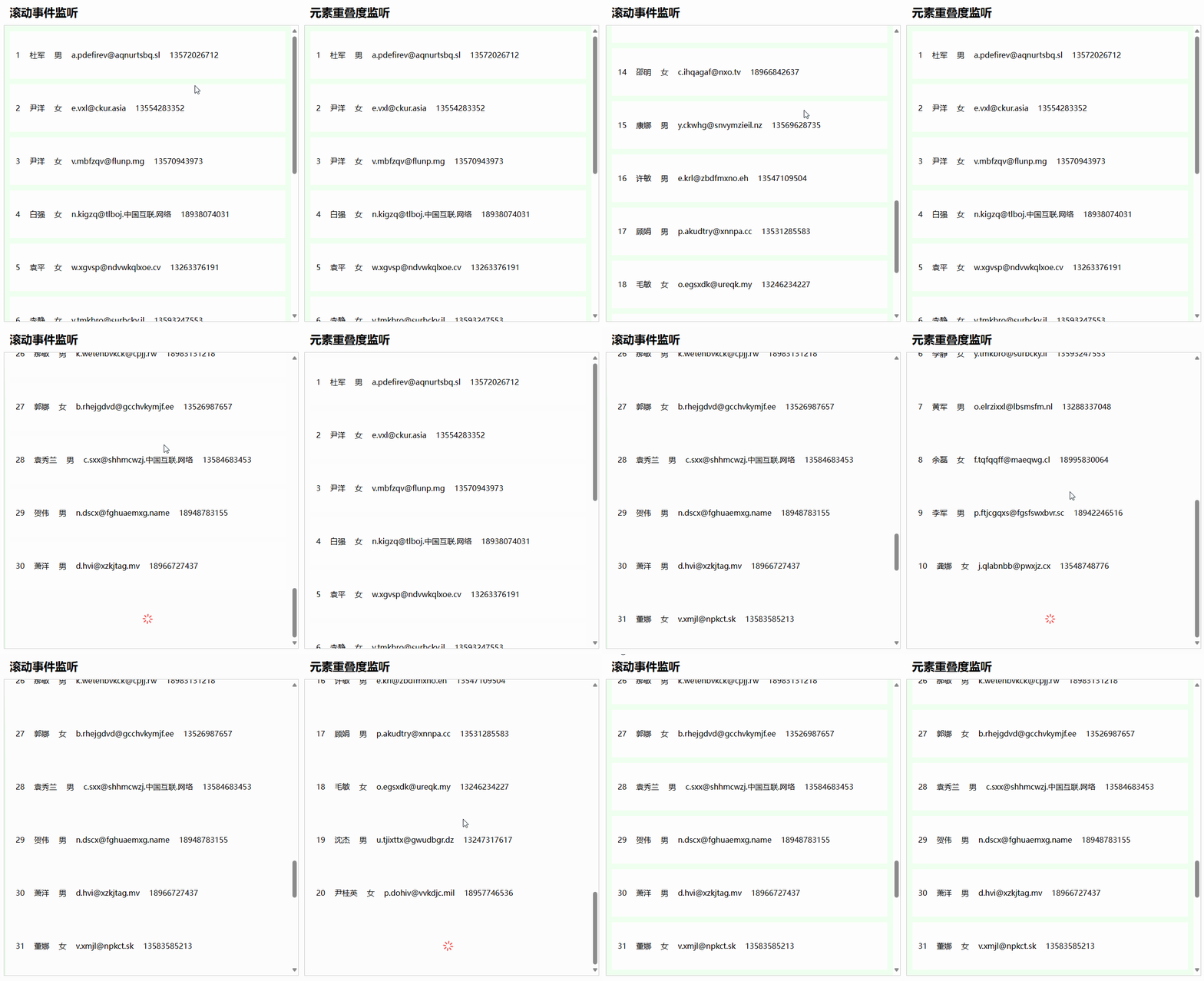
实现效果






 扫一扫
扫一扫


 1202
1202

 被折叠的 条评论
为什么被折叠?
被折叠的 条评论
为什么被折叠?
 到【灌水乐园】发言





