



 本文详细介绍如何在SpringBoot项目中整合MyBatis框架,包括引入依赖、配置数据源(如Druid)、创建实体类、定义Mapper接口及其实现,以及通过Controller进行测试。
Spring Boot中使用MyBatis
整合MyBatis之前,先搭建一个基本的Spring Boot项目开启Spring Boot。然后引入mybatis-spring-boot-starter和数据库连接驱动(这里使用关系型数据库MySQL 5.7.27)。
mybatis-spring-boot-starter
在pom中引入:
	<dependency>
   	 	<groupId>org.mybatis.spring.boot</groupId>
    	<artifactId>mybatis-spring-boot-starter</artifactId>
    	<version>2.1.0</version>
	</dependency>
不同版本的Spring Boot和MyBatis版本对应不一样,具体可查看官方文档。
通过dependency:tree命令查看mybatis-spring-boot-starter都有哪些隐性依赖:
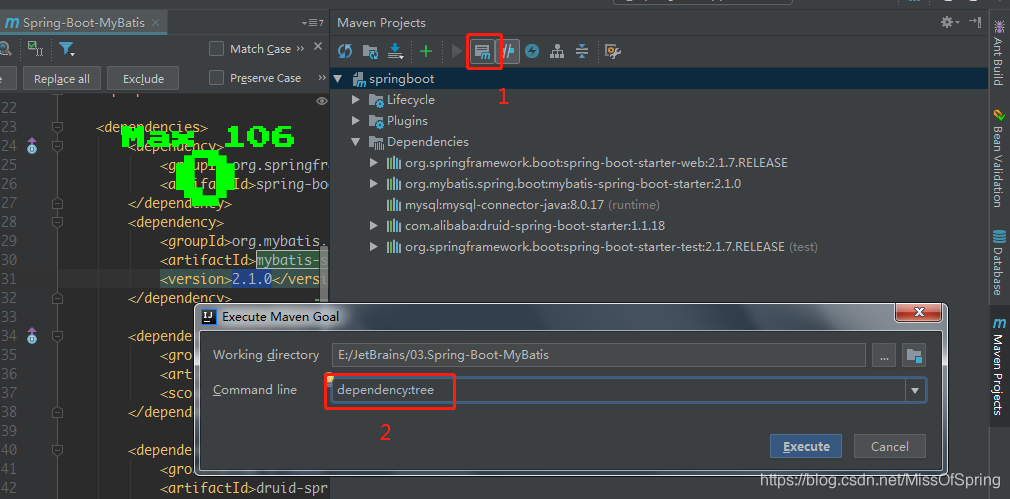
	[INFO] +- org.mybatis.spring.boot:mybatis-spring-boot-starter:jar:2.1.0:compile
	[INFO] |  +- org.springframework.boot:spring-boot-starter-jdbc:jar:2.1.7.RELEASE:compile
	[INFO] |  |  +- com.zaxxer:HikariCP:jar:3.2.0:compile
	[INFO] |  |  \- org.springframework:spring-jdbc:jar:5.1.9.RELEASE:compile
	[INFO] |  |     \- org.springframework:spring-tx:jar:5.1.9.RELEASE:compile
	[INFO] |  +- org.mybatis.spring.boot:mybatis-spring-boot-autoconfigure:jar:2.1.0:compile
	[INFO] |  +- org.mybatis:mybatis:jar:3.5.2:compile
	[INFO] |  \- org.mybatis:mybatis-spring:jar:2.0.2:compile
可发现其包含了spring-boot-starter-jdbc依赖,默认使用tomcat-jdbc数据源。
引入mysql-connector
在pom中引入:
 <dependency>
        <groupId>mysql</groupId>
        <artifactId>mysql-connector-java</artifactId>
        <scope>runtime</scope>
  </dependency>
Druid数据源
Druid是一个关系型数据库连接池,是阿里巴巴的一个开源项目Druid。Druid不但提供连接池的功能,还提供监控功能,可以实时查看数据库连接池和SQL查询的工作情况。
- 配置Druid依赖
Druid为Spring Boot项目提供了对应的starter:
<dependency>
      <groupId>com.alibaba</groupId>
      <artifactId>druid-spring-boot-starter</artifactId>
      <version>1.1.18</version>
 </dependency>
- Druid数据源配置
上面通过dependency:tree命令查看mybatis starter的隐性依赖发现,Spring Boot的数据源配置的默认类型是org.apache.tomcat.jdbc.pool.Datasource,为了使用Druid连接池,需要在application.yml下配置:
 servlet:
    context-path: /web

spring:
  datasource:
    druid:
      # 数据库访问配置, 使用druid数据源
      type: com.alibaba.druid.pool.DruidDataSource
      driver-class-name: com.mysql.cj.jdbc.Driver
      url: jdbc:mysql://localhost:3306/testspringall?serverTimezone=UTC&useUnicode=true&characterEncoding=utf-8&useSSL=true
      username: root
      password: root
      # 连接池配置
      initial-size: 5
      min-idle: 5
      max-active: 20
      # 连接等待超时时间
      max-wait: 30000
      # 配置检测可以关闭的空闲连接间隔时间
      time-between-eviction-runs-millis: 60000
      # 配置连接在池中的最小生存时间
      min-evictable-idle-time-millis: 300000
      validation-query: select '1' from dual
      test-while-idle: true
      test-on-borrow: false
      test-on-return: false
      # 打开PSCache,并且指定每个连接上PSCache的大小
      pool-prepared-statements: true
      max-open-prepared-statements: 20
      max-pool-prepared-statement-per-connection-size: 20
      # 配置监控统计拦截的filters, 去掉后监控界面sql无法统计, 'wall'用于防火墙
      filters: stat,wall
      # Spring监控AOP切入点,如x.y.z.service.*,配置多个英文逗号分隔
      aop-patterns: com.springboot.servie.*


  # WebStatFilter配置
  web-stat-filter:
    enabled: true
    # 添加过滤规则
    url-pattern: /*
    # 忽略过滤的格式
    exclusions: '*.js,*.gif,*.jpg,*.png,*.css,*.ico,/druid/*'

  # StatViewServlet配置
  stat-view-servlet:
    enabled: true
    # 访问路径为/druid时,跳转到StatViewServlet
    url-pattern: /druid/*
    # 是否能够重置数据
    reset-enable: false
    # 需要账号密码才能访问控制台
    login-username: druid
    login-password: druid123
    # IP白名单
    # allow: 127.0.0.1
    # IP黑名单(共同存在时,deny优先于allow)
    # deny: 192.168.1.218

  # 配置StatFilter
  filter:
    stat:
      log-slow-sql: true

jpa:
	show-sql: true
	hibernate:
  		ddl-auto: update
上述配置不但配置了Druid作为连接池,而且还开启了Druid的监控功能。 其他配置可参考官方wiki 。
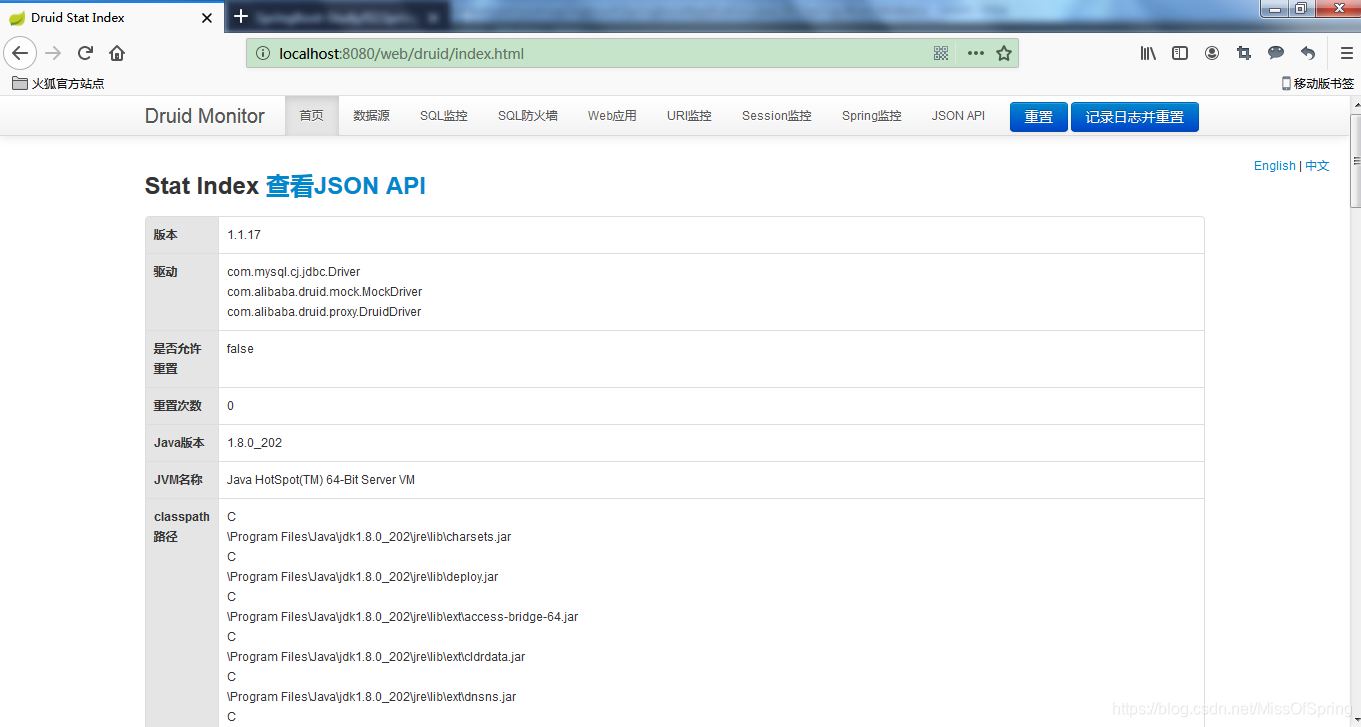
配置完成之后,运行项目,并访问http://localhost:8080/web/druid:
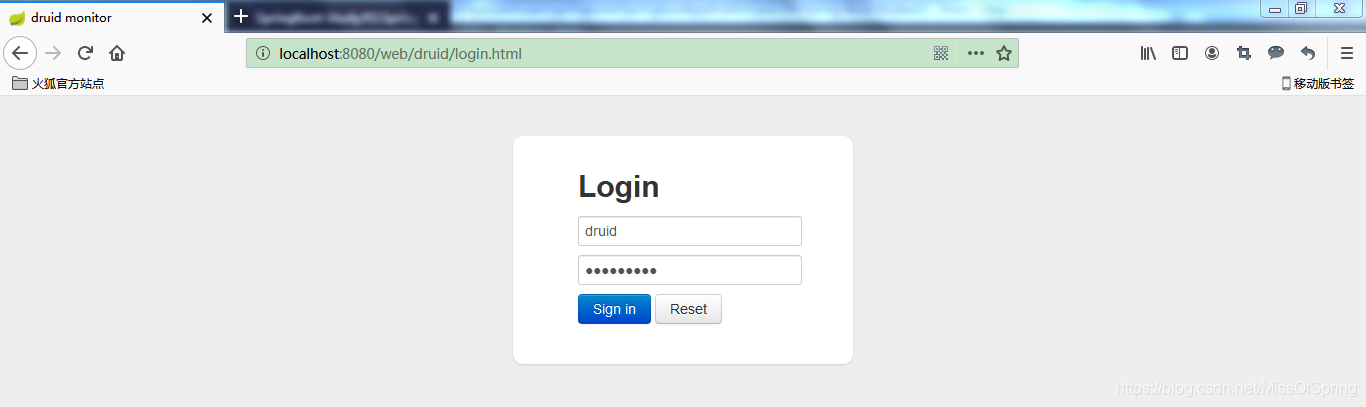
输入账号密码即可看到Druid监控后台:
关于Druid的更多说明,可查看官方wiki参考项 。
使用MyBatis
使用的库表:
##testspringall为数据库名称,上边yml中muysql链接中记得要指定数据库哦~
CREATE TABLE "testspringall"."STUDENT" (
    "SNO" VARCHAR(3) NOT NULL ,
    "SNAME" VARCHAR(9) NOT NULL ,
    "SSEX" CHAR(2) NOT NULL
);

INSERT INTO "testspringall"."STUDENT" VALUES ('001', 'KangKang', 'M ');
INSERT INTO "testspringall"."STUDENT" VALUES ('002', 'Mike', 'M ');
INSERT INTO "testspringall"."STUDENT" VALUES ('003', 'Jane', 'F ');
创建对应实体:
public class Student implements Serializable{
    private static final long serialVersionUID = -339516038496531943L;
    private String sno;
    private String name;
    private String sex;
    // get,set略
}
创建一个包含基本CRUD的StudentMapper:
public interface StudentMapper {
    int add(Student student);
    int update(Student student);
    int deleteByIds(String sno);
    Student queryStudentById(Long id);
}
StudentMapper的实现可以基于xml也可以基于注解。
- 使用注解方式
继续编辑StudentMapper:
@Component
@Mapper
public interface StudentMapper {
    @Insert("insert into student(sno,sname,ssex) values(#{sno},#{name},#{sex})")
    int add(Student student);

    @Update("update student set sname=#{name},ssex=#{sex} where sno=#{sno}")
    int update(Student student);

    @Delete("delete from student where sno=#{sno}")
    int deleteBysno(String sno);

    @Select("select * from student where sno=#{sno}")
    @Results(id = "student",value= {
        @Result(property = "sno", column = "sno", javaType = String.class),
        @Result(property = "name", column = "sname", javaType = String.class),
        @Result(property = "sex", column = "ssex", javaType = String.class)
    })
    Student queryStudentBySno(String sno);
简单的语句只需要使用@Insert、@Update、@Delete、@Select这4个注解即可,动态SQL语句需要使用@InsertProvider、@UpdateProvider、@DeleteProvider、@SelectProvider等注解。具体可参考MyBatis官方文档 。
- 使用xml方式
使用xml方式需要在application.yml中进行一些额外的配置:
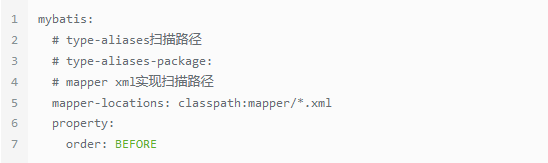
测试
接下来编写Service:
 public interface StudentService {
  int add(Student student);
  int update(Student student);
  int deleteBysno(String sno);
  Student queryStudentBySno(String sno);
}
实现类:
@Service("studentService")
public class StudentServiceImp implements StudentService {

	@Autowired
	private StudentMapper studentMapper;

	@Override
	public int add(Student student) {
		return this.studentMapper.add(student);
	}

	@Override
	public int update(Student student) {
		return this.studentMapper.update(student);
	}

	@Override
	public int deleteBysno(String sno) {
		return this.studentMapper.deleteBysno(sno);
	}

	@Override
	public Student queryStudentBySno(String sno) {
		return this.studentMapper.queryStudentBySno(sno);
	}
}
编写controller:
@RestController
public class TestController {

	@Autowired
	private StudentService studentService;

	@RequestMapping( value = "/querystudent", method = RequestMethod.GET)
	public Student queryStudentBySno(String sno) {
		return this.studentService.queryStudentBySno(sno);
	}
}
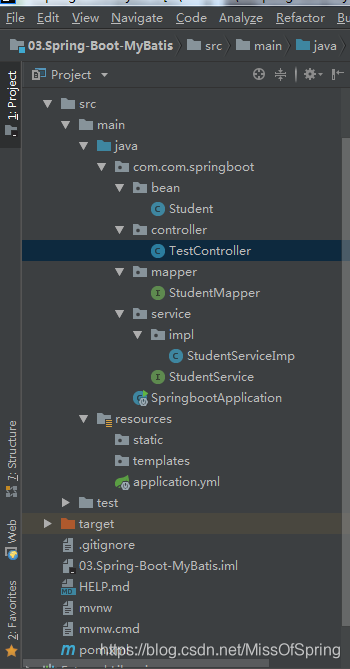
完整的项目目录如下图所示:
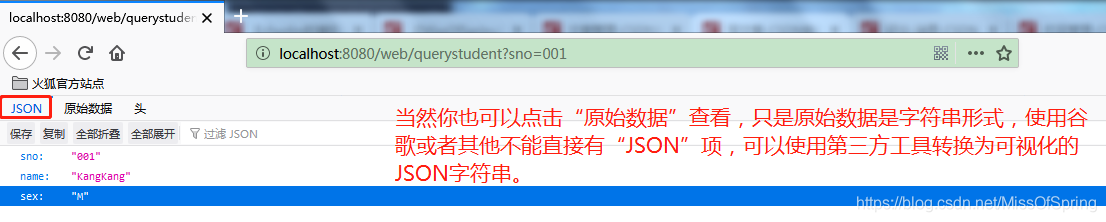
启动项目访问:http://localhost:8080/web/querystudent?sno=001:
查看SQL监控情况:
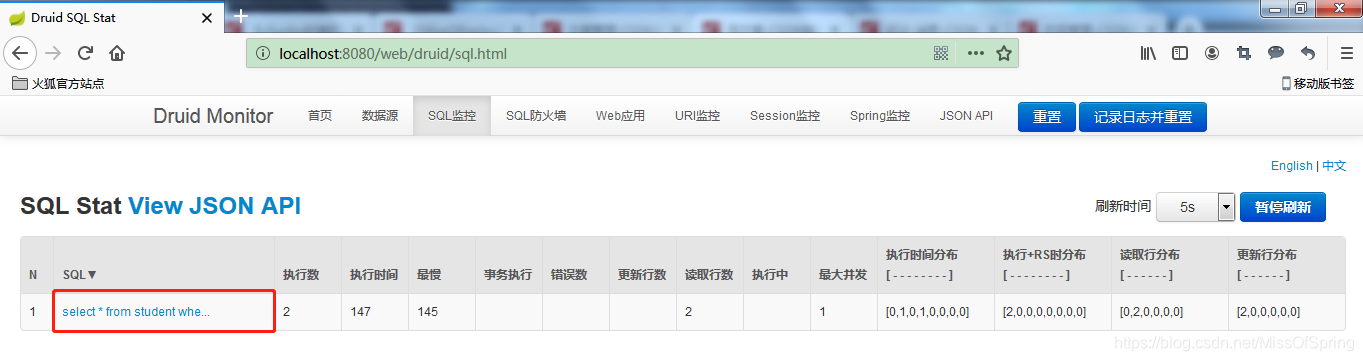
可看到其记录的就是刚刚访问/querystudent得到的SQL。
这里比较蛋疼的是这个SQL还不能直接完整查看【必须通过点击红色框中的超链接进去查看或者鼠标放在链接上查看】。
source code





 扫一扫
扫一扫


 1万+
1万+

 被折叠的 条评论
为什么被折叠?
被折叠的 条评论
为什么被折叠?
 到【灌水乐园】发言





