



 本文深入探讨了非阻塞式IO的概念及其在Java NIO中的应用,包括使用channel和selector进行多线程处理,以及buffer的读写操作。通过具体代码示例,展示了如何利用NIO进行文件复制,对比了不同方式的效率。
非阻塞式IO
- 使用channel代替stream
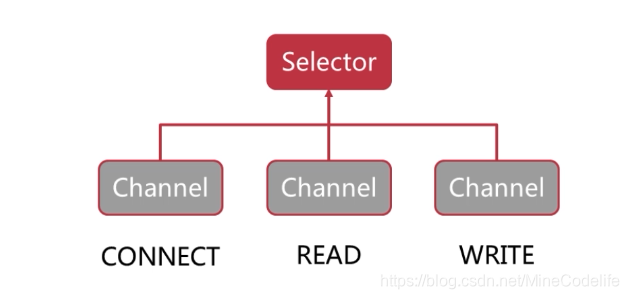
- 使用selector监控多条channel
- 可以在一个线程里处理多个channel I/O
Buffer解析
buffer既可以写也可以读,一开始我们向buffer写入到了position位置个数据
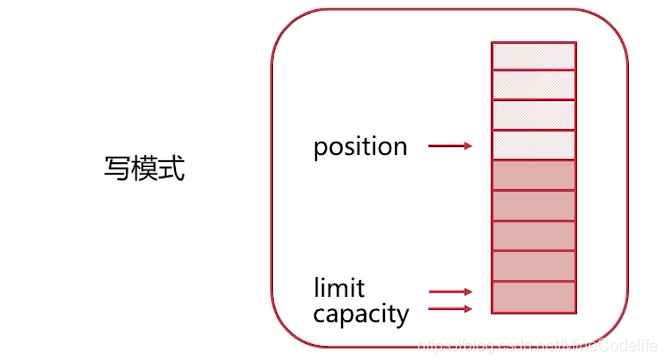
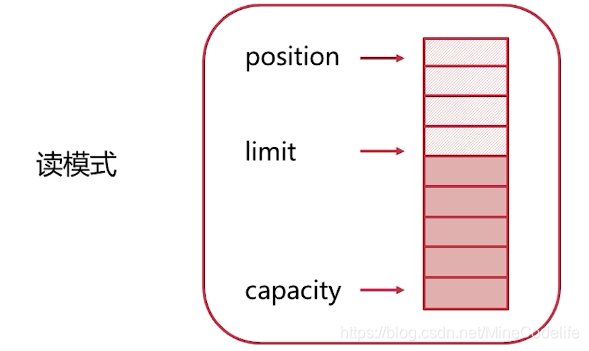
现在想从buffer里面读出数据,调用buffer的flip()方法 调整为读模式
将position位置指向开始的位置。limit指向已有数据的尾部
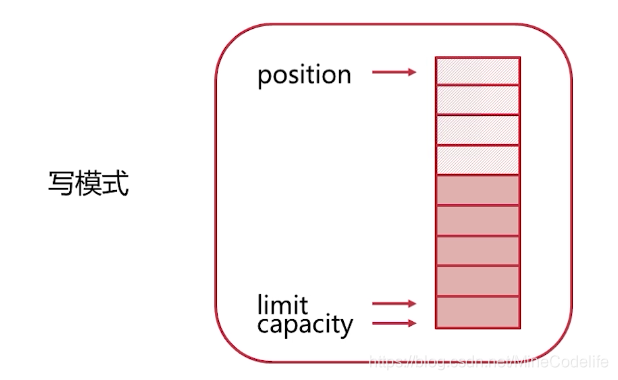
读完以后我们又想开始写入数据到buffer,调用buffer的clear()方法,调整为写模式。limit指向capacity,position指向开始位置
clear()并没有真正的清除数据只是调整了指针。
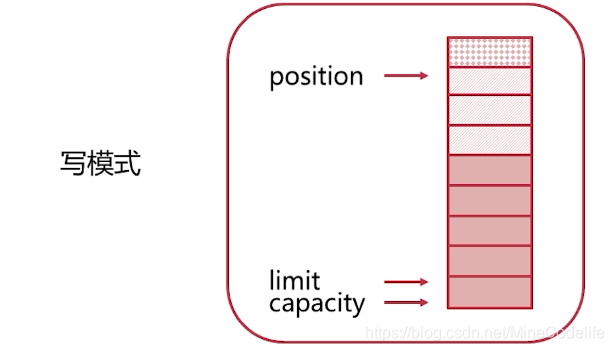
如果buffer未读完。又想写入。调用buffer的compact()方法,把未读完的数据放到buffer前部,
将position指向未读完数据的下面开始写入
Channel解析
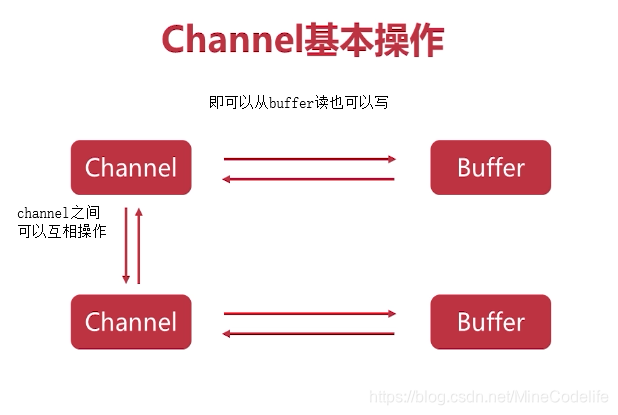
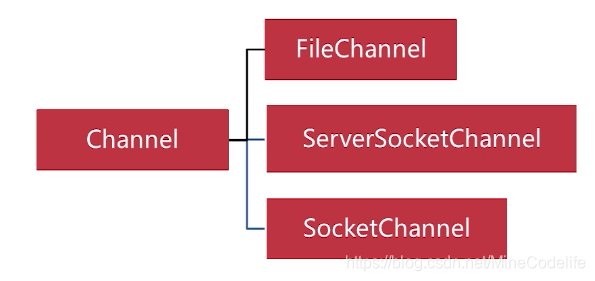
selector 解析
在selector上注册channel,监听channel的状态
代码示例
package main.java.com.founder.study.javaio.nio;

import java.io.*;
import java.nio.ByteBuffer;
import java.nio.channels.FileChannel;

/**
 * Created by Founder on 2020/6/28.
 */
interface FileCopyRunner {
    void copyFile(File source, File target);

}

public class FileCopyDemo{

    public static void main(String[] args) {

        FileCopyRunner noBufferStreamCopy = new FileCopyRunner() {
            @Override
            public void copyFile(File source, File target)  {
                FileInputStream in =null;
                FileOutputStream os = null;
                try {
                    in = new FileInputStream(source);
                   os = new FileOutputStream(target);
                    int result ;
                    while( (result = in.read()) != -1){
                        os.write(result);
                    }

                } catch (IOException e) {
                    e.printStackTrace();
                }finally {
                    close(os);
                    close(in);
                }
            }
        };

        FileCopyRunner bufferStreamCopy = new FileCopyRunner() {
            @Override
            public void copyFile(File source, File target) {
                FileInputStream in =null;
                FileOutputStream os = null;
                byte[] buffer =new byte[1024];
                try {

                    in = new FileInputStream(source);
                    os = new FileOutputStream(target);
                    int len ;
                    while( (len = in.read(buffer)) != -1){
                        os.write(buffer,0,len);
                    }

                } catch (IOException e) {
                    e.printStackTrace();
                }finally {
                    close(os);
                    close(in);
                }
            }
        };


        FileCopyRunner nioBufferCopy = new FileCopyRunner() {
            @Override
            public void copyFile(File source, File target) {
                FileChannel fin =null;
                FileChannel fout = null ;
                try {
                    fin= new FileInputStream(source).getChannel();
                    fout = new FileOutputStream(target).getChannel();
                    ByteBuffer buffer = ByteBuffer.allocate(1024);
                    // 从channel中读入数据写进buffer
                    while (fin.read(buffer)!= -1){
                        //将buffer调整为读模式
                        buffer.flip();
                        //从buffer中读出写进写进文件
                        while (buffer.hasRemaining()){
                            fout.write(buffer);

                        }
                        //循环读完buffer后将buffer转为写模式
                        buffer.clear();
                    }
                } catch (Exception e) {
                    e.printStackTrace();
                }finally {
                    close(fin);
                    close(fout);
                }
            }
        };


        FileCopyRunner nioTransferCopy =  new FileCopyRunner() {
            @Override
            public void copyFile(File source, File target) {
                FileChannel fin =null;
                FileChannel fout = null;
                try {
                    fin = new FileInputStream(source).getChannel();
                    fout = new FileOutputStream(target).getChannel();
                    Long transferd = 0L;
                    while(transferd != fin.size()){
                        transferd +=fin.transferTo(0,fin.size(),fout);
                    }


                } catch (Exception e) {
                    e.printStackTrace();
                }finally {
                    close(fin);
                    close(fout);
                }

            }
        };
    }

    private static void close(Closeable closeable) {
        try {
            closeable.close();
        } catch (IOException e) {
            e.printStackTrace();
        }
    }
}





 扫一扫
扫一扫


 被折叠的 条评论
为什么被折叠?
被折叠的 条评论
为什么被折叠?
 到【灌水乐园】发言





