



 本文深入探讨了SpringBoot中的定时任务和异步任务处理。讲解了SpringBoot如何通过@EnableScheduling和@Scheduled注解实现定时任务,对比了Java Timer、Quartz和SpringBoot自带定时任务的优缺点。同时,介绍了Quartz的cron表达式,并提供了一个在线cron表达式生成器。此外,还展示了如何使用@Async注解实现异步任务,以及如何通过Future获取异步任务结果。内容涵盖了从基础概念到实战应用的全面知识。
第十章 SpringBoot整合定时任务和异步任务处理
10-1 SpringBoot定时任务schedule讲解
1.定时器比较
什么是定时任务,使用场景 ?
比如八月十五,定时任务会轮询,加载到任务区里面,去检测
比如电商系统,下单量、访客、交易量,用于数据分析
- 某个时间定时处理某个任务
- 发邮件、短信等
- 消息提醒
- 订单通知
- 统计报表系统
- …
常见定时任务
- Java自带的java.util.Timer类配置比较麻烦,时间延后问题,有些BUG
- Quartz框架: 配置更简单,xml或者注解适合分布式或者大型调度作业,功能很强大
- SpringBoot框架自带,很便捷
定时器比较
| 框架名称 | Cron表达式 | 固定间隔执行 | 固定频率执行 | 任务持久化 | 难易度 |
|---|---|---|---|---|---|
| TimerTask | 不支持 | 支持 | 支持 | 不支持 | 一般 |
| schedule | 支持 | 支持 | 支持 | 不支持 | 简单 |
| Quartz | 支持 | 支持 | 支持 | 支持 | 难 |
在实际应用中,如果没有分布式场景(quartz 支持分布式, schedule 不支持(需要自己实现,用分布式锁),schedule跟spring结合的更好,还是很适用的。
2.SpringBoot使用注解方式开启定时器
- 启动类里面 @EnableScheduling开启定时任务,自动扫描
- 定时任务业务类 加注解 @Component被容器扫描
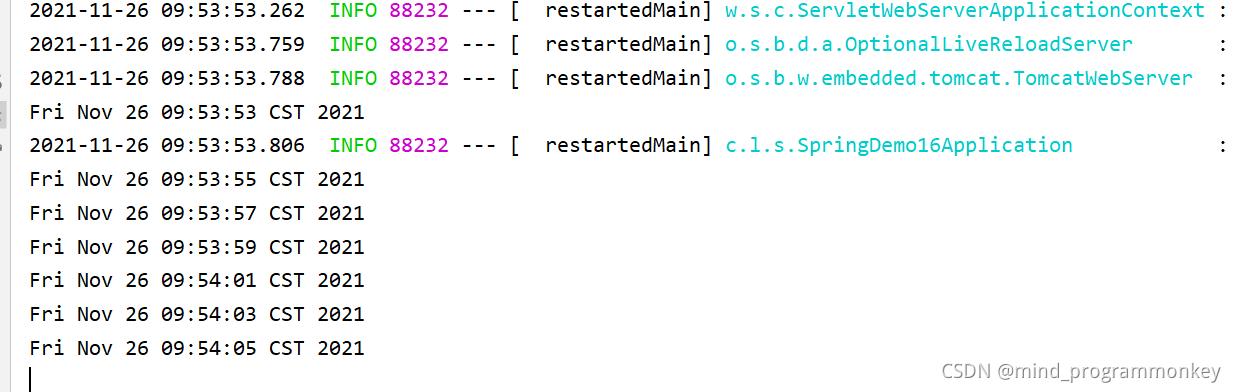
- 定时执行的方法加上注解 @Scheduled(fixedRate=2000) 定期执行一次
启动类
package com.lcz.spring_demo16;

import org.springframework.boot.SpringApplication;
import org.springframework.boot.autoconfigure.SpringBootApplication;
import org.springframework.scheduling.annotation.EnableScheduling;

@SpringBootApplication
@EnableScheduling
public class SpringDemo16Application {

    public static void main(String[] args) {
        SpringApplication.run(SpringDemo16Application.class, args);
    }

}
任务类
package com.lcz.spring_demo16.controller;

import org.springframework.scheduling.annotation.Scheduled;
import org.springframework.stereotype.Component;

import java.util.Date;

/**
 * @author : codingchao
 * @date : 2021-11-26 09:52
 * @Description:
 **/
@Component
public class ScheduledController {
    @Scheduled(fixedRate = 2000)
    public void printDate(){
        System.out.println(new Date());
    }
}
小结
	1、常见定时任务 Java自带的java.util.Timer类
		timer:配置比较麻烦,时间延后问题
		timertask:不推荐

	2、Quartz框架
		配置更简单
		xml或者注解

	3、SpringBoot使用注解方式开启定时任务
		1)启动类里面 @EnableScheduling开启定时任务,自动扫描
		2)定时任务业务类 加注解 @Component被容器扫描
		3)定时执行的方法加上注解 @Scheduled(fixedRate=2000) 定期执行一次
10-2 SpringBoot常用定时任务配置实战
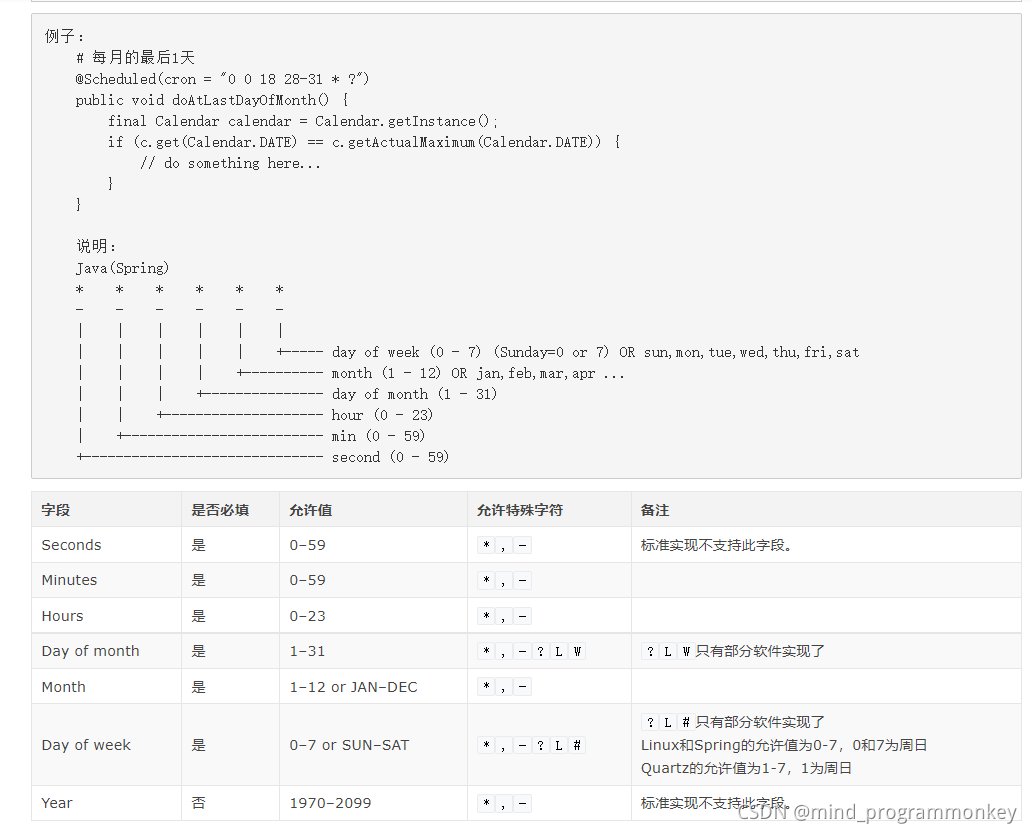
1.cron详细说明
cron一共有7位,但是最后一位是年,可以留空,所以我们可以写6位:
-
第一位,表示秒,取值0-59
-
第二位,表示分,取值0-59
-
第三位,表示小时,取值0-23
-
第四位,日期天/日,取值1-31
-
第五位,日期月份,取值1-12
-
第六位,星期,取值1-7,星期一,星期二…,注:不是第1周,第二周的意思 另外:1表示星期天,2表示星期一。
-
第七位,年份,可以留空,取值1970-2099
cron中,还有一些特殊的符号,含义如下:
(*)星号:可以理解为每的意思,每秒,每分,每天,每月,每年...
(?)问号:问号只能出现在日期和星期这两个位置,表示这个位置的值不确定,每天3点执行,所以第六位星期的位置,我们是不需要关注的,就是不确定的值。同时:日期和星期是两个相互排斥的元素,通过问号来表明不指定值。比如,1月10日,比如是星期1,如果在星期的位置是另指定星期二,就前后冲突矛盾了。
(-)减号:表达一个范围,如在小时字段中使用“10-12”,则表示从10到12点,即10,11,12
(,)逗号:表达一个列表值,如在星期字段中使用“1,2,4”,则表示星期一,星期二,星期四
(/)斜杠:如:x/y,x是开始值,y是步长,比如在第一位(秒) 0/15就是,从0秒开始,每15秒,最后就是0,15,30,45,60    另:*/y,等同于0/y
常见cron表达式
0 0 10,14,16 * * ? 每天上午10点,下午2点,4点
0 0/30 9-17 * * ? 朝九晚五工作时间内每半小时
0 0 12 ? * WED 表示每个星期三中午12点
"0 0 12 * * ?" 每天中午12点触发
"0 15 10 ? * *" 每天上午10:15触发
"0 15 10 * * ?" 每天上午10:15触发
"0 15 10 * * ? *" 每天上午10:15触发
"0 15 10 * * ? 2005" 2005年的每天上午10:15触发
"0 * 14 * * ?" 在每天下午2点到下午2:59期间的每1分钟触发
"0 0/5 14 * * ?" 在每天下午2点到下午2:55期间的每5分钟触发
"0 0/5 14,18 * * ?" 在每天下午2点到2:55期间和下午6点到6:55期间的每5分钟触发
"0 0-5 14 * * ?" 在每天下午2点到下午2:05期间的每1分钟触发
"0 10,44 14 ? 3 WED" 每年三月的星期三的下午2:10和2:44触发
"0 15 10 ? * MON-FRI" 周一至周五的上午10:15触发
"0 15 10 15 * ?" 每月15日上午10:15触发
"0 15 10 L * ?" 每月最后一日的上午10:15触发
"0 15 10 ? * 6L" 每月的最后一个星期五上午10:15触发
"0 15 10 ? * 6L 2002-2005" 2002年至2005年的每月的最后一个星期五上午10:15触发
"0 15 10 ? * 6#3" 每月的第三个星期五上午10:15触发
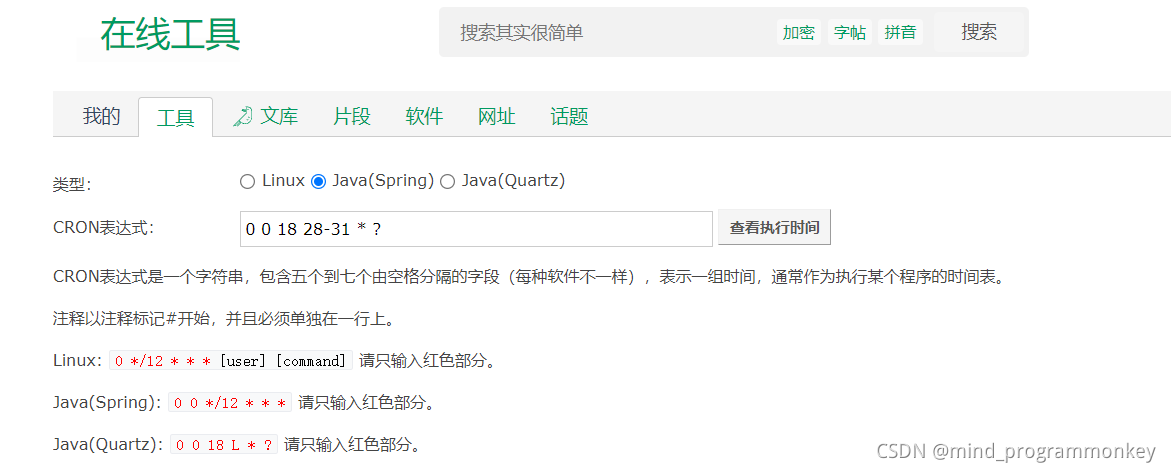
2.crontab工具
- fixedRate: 定时多久执行一次(从上一次开始执行时间点后xx秒再次执行;)
- fixedDelay: 上一次执行结束时间点后xx秒再次执行。就是等任务结束之后才去执行。
不同场景
-
如果每调度一次,下次不管有没有结束都统计,就是用fixedRate
-
如果调度需要等任务结束,再去执行,就用fixedDelay。相当于总耗时,任务耗时加定时耗时
小结:
简介:SpringBoot常用定时任务表达式配置和在线生成器
	1、cron 定时任务表达式 @Scheduled(cron="*/1 * * * * *") 表示每秒
		1)crontab 工具  https://tool.lu/crontab/
	2、fixedRate: 定时多久执行一次(上一次开始执行时间点后xx秒再次执行;)
	3、fixedDelay: 上一次执行结束时间点后xx秒再次执行
	4、fixedDelayString:  字符串形式,可以通过配置文件指定
10-3 SpringBoot2.x异步任务实战
1.异步任务
有时接收到客户端请求后,在后台分发多个任务异步执行,而主线程先对客户端进行响应以提高用户体验。这时就涉及到了异步任务的调用。
设想一个场景:用户请求支付订单,这时应快速响应订单支付提交,而后台需要异步开启用户积分增加、减少商品库存、检测薅羊毛等一系列任务。
-
创建异步任务业务类如
MyAsyncTask并添加@Component注解。 -
在需要被异步调用的方法上添加
@Async注解
异步任务MyAsyncTask
package com.lcz.spring_demo16.task;

import org.springframework.scheduling.annotation.Async;
import org.springframework.stereotype.Component;

/**
 * @author : codingchao
 * @date : 2021-11-26 10:52
 * @Description:
 **/
@Component
public class MyAsyncTask {
    @Async
    public void task1() {
        long begin = System.currentTimeMillis();
        //模拟增加用户积分
        try {
            Thread.sleep(1000);
        } catch (InterruptedException e) {
            e.printStackTrace();
        }
        long end = System.currentTimeMillis();
        System.out.println("task1 spent:"+(end-begin));
    }

    @Async
    public void task2() {
        long begin = System.currentTimeMillis();
        //模拟减少商品库存
        try {
            Thread.sleep(2000);
        } catch (InterruptedException e) {
            e.printStackTrace();
        }
        long end = System.currentTimeMillis();
        System.out.println("task2 spent:"+(end-begin));
    }

    @Async
    public void task3() {
        long begin = System.currentTimeMillis();
        //检测薅羊毛
        try {
            Thread.sleep(3000);
        } catch (InterruptedException e) {
            e.printStackTrace();
        }
        long end = System.currentTimeMillis();
        System.out.println("task3 spent:"+(end-begin));
    }

}
启动类
在启动类上添加 @EnableAsync注解以使组件中的 @Async注解生效
异步测试执行
package com.lcz.spring_demo16.controller;

import com.lcz.spring_demo16.task.MyAsyncTask;
import org.springframework.beans.factory.annotation.Autowired;
import org.springframework.web.bind.annotation.RequestMapping;
import org.springframework.web.bind.annotation.RestController;

/**
 * @author : codingchao
 * @date : 2021-11-26 10:55
 * @Description:
 **/
@RestController
public class AsyncController {
    @Autowired
    private MyAsyncTask myAsyncTask;

    @RequestMapping("submit")
    public String submitOrder() {
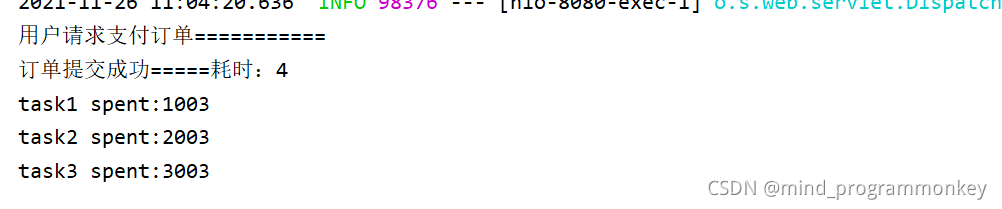
        System.out.println("用户请求支付订单===========");
        long begin = System.currentTimeMillis();
        myAsyncTask.task1();
        myAsyncTask.task2();
        myAsyncTask.task3();
        long end = System.currentTimeMillis();
        System.out.println("订单提交成功=====耗时:" + (end - begin));
        return "success";
    }

}
输出结果:
2.Future
如果你想在异步执行一系列任务并获取任务执行结果后再响应该怎么办?JDK并发包为我们提供了 Future模式,实现了在主线程通过一个变量监控异步线程的执行状态从而在其执行完毕时获取执行结果。
- 在异步任务执行完后返回一个
AyncResult实例,用你想返回的数据构造该实例
package com.lcz.spring_demo16.task;

import org.springframework.scheduling.annotation.Async;
import org.springframework.scheduling.annotation.AsyncResult;
import org.springframework.stereotype.Component;

import java.util.concurrent.Future;

/**
 * @author : codingchao
 * @date : 2021-11-26 10:52
 * @Description:
 **/
@Component
public class MyAsyncTask {
    @Async
    public void task1() {
        long begin = System.currentTimeMillis();
        //模拟增加用户积分
        try {
            Thread.sleep(1000);
        } catch (InterruptedException e) {
            e.printStackTrace();
        }
        long end = System.currentTimeMillis();
        System.out.println("task1 spent:"+(end-begin));
    }

    @Async
    public void task2() {
        long begin = System.currentTimeMillis();
        //模拟减少商品库存
        try {
            Thread.sleep(2000);
        } catch (InterruptedException e) {
            e.printStackTrace();
        }
        long end = System.currentTimeMillis();
        System.out.println("task2 spent:"+(end-begin));
    }

    @Async
    public void task3() {
        long begin = System.currentTimeMillis();
        //检测薅羊毛
        try {
            Thread.sleep(3000);
        } catch (InterruptedException e) {
            e.printStackTrace();
        }
        long end = System.currentTimeMillis();
        System.out.println("task3 spent:"+(end-begin));
    }

    @Async
    public Future<String> task4(){
        long begin = System.currentTimeMillis();
        //模拟增加用户积分
        try {
            Thread.sleep(1000);
        } catch (InterruptedException e) {
            e.printStackTrace();
        }
        long end = System.currentTimeMillis();
        System.out.println("task1 spent:"+(end-begin));
        return new AsyncResult<>("task4");
    }

    @Async
    public Future<String> task5() {
        long begin = System.currentTimeMillis();
        //模拟减少商品库存
        try {
            Thread.sleep(2000);
        } catch (InterruptedException e) {
            e.printStackTrace();
        }
        long end = System.currentTimeMillis();
        System.out.println("task2 spent:"+(end-begin));
        return new AsyncResult<>("task4");
    }

    @Async
    public Future<String> task6() {
        long begin = System.currentTimeMillis();
        //检测薅羊毛
        try {
            Thread.sleep(3000);
        } catch (InterruptedException e) {
            e.printStackTrace();
        }
        long end = System.currentTimeMillis();
        System.out.println("task3 spent:"+(end-begin));
        return new AsyncResult<>("task4");
    }

}
- 在调用异步方法时获取异步结果变量
future,通过该变量循环判断任务执行状态isDone并获取执行结果get,直接调用get是阻塞的。
package com.lcz.spring_demo16.controller;

import com.lcz.spring_demo16.task.MyAsyncTask;
import org.springframework.beans.factory.annotation.Autowired;
import org.springframework.scheduling.annotation.Async;
import org.springframework.scheduling.annotation.AsyncResult;
import org.springframework.web.bind.annotation.RequestMapping;
import org.springframework.web.bind.annotation.RestController;

import java.util.concurrent.Future;

/**
 * @author : codingchao
 * @date : 2021-11-26 10:55
 * @Description:
 **/
@RestController
public class AsyncController {
    @Autowired
    private MyAsyncTask myAsyncTask;

    @RequestMapping("submit")
    public String submitOrder() {
        System.out.println("用户请求支付订单===========");
        long begin = System.currentTimeMillis();
        myAsyncTask.task1();
        myAsyncTask.task2();
        myAsyncTask.task3();
        long end = System.currentTimeMillis();
        System.out.println("订单提交成功=====耗时:" + (end - begin));
        return "success";
    }

    @RequestMapping("submit2")
    public String submitOrder2() {
        System.out.println("收到订单支付的请求");
        long begin = System.currentTimeMillis();
        Future<String> task4 = myAsyncTask.task4();
        Future<String> task5 = myAsyncTask.task5();
        Future<String> task6 = myAsyncTask.task6();
        while (true) {
            if (task4.isDone() && task5.isDone() && task6.isDone()) {
                long end = System.currentTimeMillis();
                System.out.println("响应耗时:"+(end-begin));
                break;
            }
        }
        return "success";
    }


}
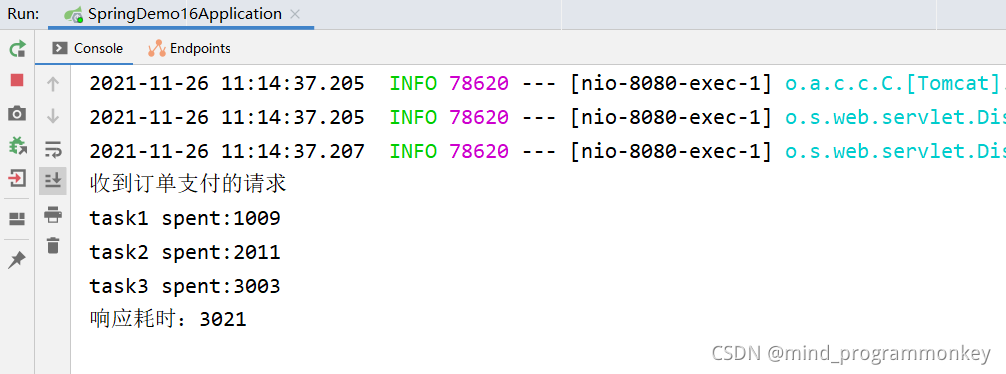
控制台输出结果
小结 :
简介:讲解什么是异步任务,和使用SpringBoot2.x开发异步任务实战
	1、什么是异步任务和使用场景:适用于处理log、发送邮件、短信……等
		下单接口->查库存 100
				余额校验 150
				风控用户100
				....


	2、启动类里面使用@EnableAsync注解开启功能,自动扫描

	3、定义异步任务类并使用@Component标记组件被容器扫描,异步方法加上@Async
		注意点:
			1)要把异步任务封装到类里面,不能直接写到Controller
			2)增加Future<String> 返回结果 AsyncResult<String>("task执行完成");
			3)如果需要拿到结果 需要判断全部的 task.isDone()
	4、通过注入方式,注入到controller里面,如果测试前后区别则改为同步则把Async注释掉





 扫一扫
扫一扫


 被折叠的 条评论
为什么被折叠?
被折叠的 条评论
为什么被折叠?
 到【灌水乐园】发言





