



 本文介绍了SpringBoot Starter的作用和工作原理,它简化了项目开发中依赖的管理和配置。接着详细讲解了SpringBoot 2.x下常用模板引擎如Freemarker和Thymeleaf的集成步骤,包括相关依赖、配置以及前后端代码实现,帮助开发者快速理解和应用这两种模板引擎。
第七章 SpringBoot常用starter介绍和整合模板Freemaker、thymeleaf
07-1 SpringBoot Starter讲解
1.Spring starter是什么
starter是SpringBoot中的一个新发明,它有效的降低了项目开发过程的复杂程度,对于简化开发操作有着非常好的效果。
Starter starter是一组方便的依赖项描述符,您可以将其包含在您的应用程序中。您可以获得所需的所有 Spring 和相关技术的一站式服务,而无需搜索示例代码和复制粘贴加载的依赖项描述符。例如,如果您想开始使用 Spring 和 JPA 进行数据库访问,只需在您的项目中包含 spring-boot-starter-data-jpa 依赖项,就可以了。
2.Spring starter作用是什么
传统的做法:
在没有starter之前,假如我想要在Spring中使用jpa,那我可能需要做以下操作:
- 在Maven中引入使用的数据库的依赖(即JDBC的jar);
- 引入jpa的依赖;
- 在xxx.xml中配置一些属性信息
- 反复的调试直到可以正常运行
需要注意的是,这里操作在我们*每次新建一个需要用到jpa的项目的时候都需要重复的做一次*。也许你在第一次自己建立项目的时候是在Google上自己搜索了一番,花了半天时间解决掉了各种奇怪的问题之后,jpa终于能正常运行了。有些有经验的人会在OneNote上面把这次建立项目的过程给记录下来,包括操作的步骤以及需要用到的配置文件的内容,在下一次再创建jpa项目的时候,就不需要再次去Google了,只需要照着笔记来,之后再把所有的配置文件copy&paste就可以了。
像上面这样的操作也不算不行,事实上我们在没有starter之前都是这么干的,但是这样做有几个问题:
- 如果过程比较繁琐,这样一步步操作会增加出错的可能性
- 不停地copy&paste不符合Don’t repeat yourself精神
- 在第一次配置的时候(尤其如果开发者比较小白),需要花费掉大量的时间
使用Spring Boot Starter提升效率
starter的主要目的就是为了解决上面的这些问题。
starter的理念:starter会把所有用到的依赖都给包含进来,避免了开发者自己去引入依赖所带来的麻烦。需要注意的是不同的starter是为了解决不同的依赖,所以它们内部的实现可能会有很大的差异,例如jpa的starter和Redis的starter可能实现就不一样,这是因为starter的本质在于synthesize,这是一层在逻辑层面的抽象,也许这种理念有点类似于Docker,因为它们都是在做一个“包装”的操作,如果你知道Docker是为了解决什么问题的,也许你可以用Docker和starter做一个类比。
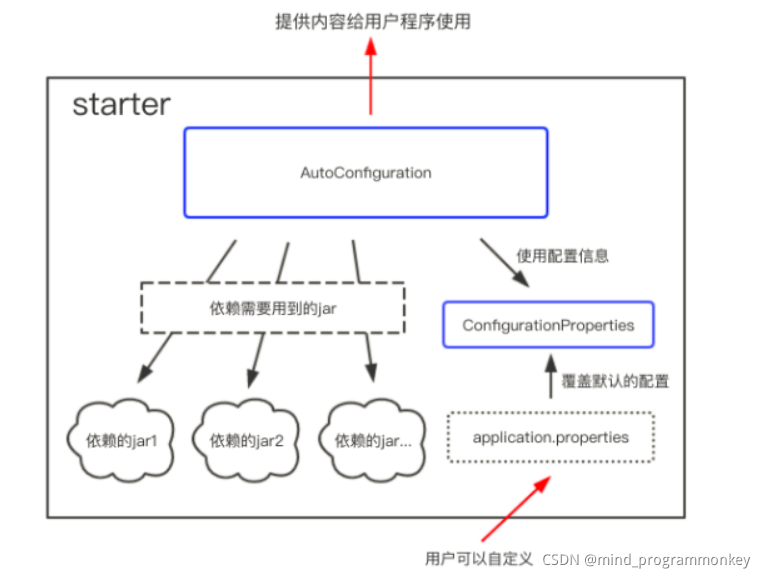
starter的实现:虽然不同的starter实现起来各有差异,但是他们基本上都会使用到两个相同的内容:ConfigurationProperties和AutoConfiguration。因为Spring Boot坚信“约定大于配置”这一理念,所以我们使用ConfigurationProperties来保存我们的配置,并且这些配置都可以有一个默认值,即在我们没有主动覆写原始配置的情况下,默认值就会生效,这在很多情况下是非常有用的。除此之外,starter的ConfigurationProperties还使得所有的配置属性被聚集到一个文件中(一般在resources目录下的application.properties),这样我们就告别了Spring项目中XML地狱。
starter的整体逻辑:
3.常用的starter
-
spring-boot-starter
这是Spring Boot的核心启动器,包含了自动配置、日志和YAML。 -
spring-boot-starter-amqp
通过spring-rabbit来支持AMQP协议(Advanced Message Queuing Protocol. 。 -
spring-boot-starter-aop
支持面向方面的编程即AOP,包括spring-aop和AspectJ。 -
spring-boot-starter-artemis
通过Apache Artemis支持JMS的API(Java Message Service API. 。 -
spring-boot-starter-batch
支持Spring Batch,包括HSQLDB数据库。 -
spring-boot-starter-cache
支持Spring的Cache抽象。 -
spring-boot-starter-cloud-connectors
支持Spring Cloud Connectors,简化了在像Cloud Foundry或Heroku这样的云平台上连接服务。 -
spring-boot-starter-data-elasticsearch
支持ElasticSearch搜索和分析引擎,包括spring-data-elasticsearch。 -
spring-boot-starter-data-gemfire
支持GemFire分布式数据存储,包括spring-data-gemfire。 -
spring-boot-starter-data-jpa
支持JPA(Java Persistence API. ,包括spring-data-jpa、spring-orm、Hibernate。 -
spring-boot-starter-data-mongodb
支持MongoDB数据,包括spring-data-mongodb。 -
spring-boot-starter-data-rest
通过spring-data-rest-webmvc,支持通过REST暴露Spring Data数据仓库。 -
spring-boot-starter-data-solr
支持Apache Solr搜索平台,包括spring-data-solr。 -
spring-boot-starter-freemarker
支持FreeMarker模板引擎。 -
spring-boot-starter-groovy-templates
支持Groovy模板引擎。 -
spring-boot-starter-hateoas
通过spring-hateoas支持基于HATEOAS的RESTful Web服务。 -
spring-boot-starter-hornetq
通过HornetQ支持JMS。 -
spring-boot-starter-integration
支持通用的spring-integration模块。 -
spring-boot-starter-jdbc
支持JDBC数据库。 -
spring-boot-starter-jersey
支持Jersey RESTful Web服务框架。 -
spring-boot-starter-jta-atomikos
通过Atomikos支持JTA分布式事务处理。 -
spring-boot-starter-jta-bitronix
通过Bitronix支持JTA分布式事务处理。 -
spring-boot-starter-mail
支持javax.mail模块。 -
spring-boot-starter-mobile
支持spring-mobile。 -
spring-boot-starter-mustache
支持Mustache模板引擎。 -
spring-boot-starter-redis
支持Redis键值存储数据库,包括spring-redis。 -
spring-boot-starter-security
支持spring-security。 -
spring-boot-starter-social-facebook
支持spring-social-facebook -
spring-boot-starter-social-linkedin
支持pring-social-linkedin -
spring-boot-starter-social-twitter
支持pring-social-twitter -
spring-boot-starter-test
支持常规的测试依赖,包括JUnit、Hamcrest、Mockito以及spring-test模块。 -
spring-boot-starter-thymeleaf
支持Thymeleaf模板引擎,包括与Spring的集成。 -
spring-boot-starter-velocity
支持Velocity模板引擎。 -
spring-boot-starter-web
S支持全栈式Web开发,包括Tomcat和spring-webmvc。 -
spring-boot-starter-websocket
支持WebSocket开发。 -
spring-boot-starter-ws
支持Spring Web Services。
Spring Boot应用启动器面向生产环境的还有2种,具体如下: -
spring-boot-starter-actuator
增加了面向产品上线相关的功能,比如测量和监控。 -
spring-boot-starter-remote-shell
增加了远程ssh shell的支持。
最后,Spring Boot应用启动器还有一些替换技术的启动器,具体如下: -
spring-boot-starter-jetty
引入了Jetty HTTP引擎(用于替换Tomcat. 。 -
spring-boot-starter-log4j
支持Log4J日志框架。 -
spring-boot-starter-logging
引入了Spring Boot默认的日志框架Logback。 -
spring-boot-starter-tomcat
引入了Spring Boot默认的HTTP引擎Tomcat。 -
spring-boot-starter-undertow
引入了Undertow HTTP引擎(用于替换Tomcat. 。
07-2 SpringBoot2.x常见模板引擎讲解和官方推荐使用
- JSP(后端渲染,消耗性能)
- Java Server Pages 动态网页技术,由应用服务器中的JSP引擎来编译和执行,再将生成的整个页面返回给客户端;
- 可以写java代码
- 持表达式语言(el、jstl)
- 内建函数
- JSP->Servlet(占用JVM内存)permSize
- javaweb官方推荐
- springboot不推荐
- Freemarker
- FreeMarker Template Language(FTL) 文件一般保存为 xxx.ftl
- 严格依赖MVC模式,不依赖Servlet容器(不占用JVM内存)
- 内建函数
- Thymeleaf (主推)
- 轻量级的模板引擎(负责逻辑业务的不推荐,解析DOM或者XML会占用多的内存)
- 可以直接在浏览器中打开且正确显示模板页面
07-3 SpringBoot2.x整合模板引擎freemarker实战
1.Freemarker相关依赖
<dependencies>
        <dependency>
            <groupId>org.springframework.boot</groupId>
            <artifactId>spring-boot-starter-freemarker</artifactId>
        </dependency>
        <dependency>
            <groupId>org.springframework.boot</groupId>
            <artifactId>spring-boot-starter-web</artifactId>
        </dependency>

        <dependency>
            <groupId>org.springframework.boot</groupId>
            <artifactId>spring-boot-starter-test</artifactId>
            <scope>test</scope>
        </dependency>
    </dependencies>
2.application.properties的配置
spring.resources.static-locations=classpath:/META-INF/resources/,classpath:/resources/,classpath:/static/,\
  classpath:/public/,classpath:/templates/,

# 属性
server.name = "lcz"
server.domain = "lcz.com"

# 是否开启thymeleaf缓存,本地为false,生产建议为true
spring.freemarker.cache=false

spring.freemarker.charset=UTF-8
spring.freemarker.allow-request-override=false
spring.freemarker.check-template-location=true

#类型
spring.freemarker.content-type=text/html

spring.freemarker.expose-request-attributes=true
spring.freemarker.expose-session-attributes=true

#文件后缀
spring.freemarker.suffix=.ftl
#路径
spring.freemarker.template-loader-path=classpath:/templates/
3.后端逻辑代码
domain/ServerSettings
package com.lcz.spring_demo13.domain;

import org.springframework.boot.context.properties.ConfigurationProperties;
import org.springframework.context.annotation.PropertySource;
import org.springframework.stereotype.Component;

/**
 * @author : codingchao
 * @date : 2021-11-23 21:00
 * @Description:
 **/
@Component
@PropertySource({"classpath:application.properties"})
@ConfigurationProperties(prefix = "server")
public class ServerSettings {
    private String name;
    private String domain;

    public String getName() {
        return name;
    }

    public void setName(String name) {
        this.name = name;
    }

    public String getDomain() {
        return domain;
    }

    public void setDomain(String domain) {
        this.domain = domain;
    }
}
controller/FreemakerController
package com.lcz.spring_demo13.controller;

import com.lcz.spring_demo13.domain.ServerSettings;
import org.springframework.beans.factory.annotation.Autowired;
import org.springframework.stereotype.Controller;
import org.springframework.ui.ModelMap;
import org.springframework.web.bind.annotation.GetMapping;
import org.springframework.web.bind.annotation.RequestMapping;

/**
 * @author : codingchao
 * @date : 2021-11-23 21:05
 * @Description:
 **/
@Controller
@RequestMapping("/freemaker")
public class FreemakerController {
    @Autowired
    private ServerSettings serverSettings;

    @GetMapping("/api")
    public String index(ModelMap modelMap){
        modelMap.addAttribute("setting",serverSettings);
        return "fm/index"; //不用加后缀,在配置文件里面指定了后缀
    }
}
4.前端逻辑代码
resources/templates/fm/index.ftl
<!DOCTYPE html>
<html>
<head>
<meta charset="UTF-8">
<title>Insert title here</title>
</head>
<body>
<h1>freemaker整合</h1>

<h1> ${setting.name} </h1>
<h1> ${setting.domain} </h1>

</body>
</html>
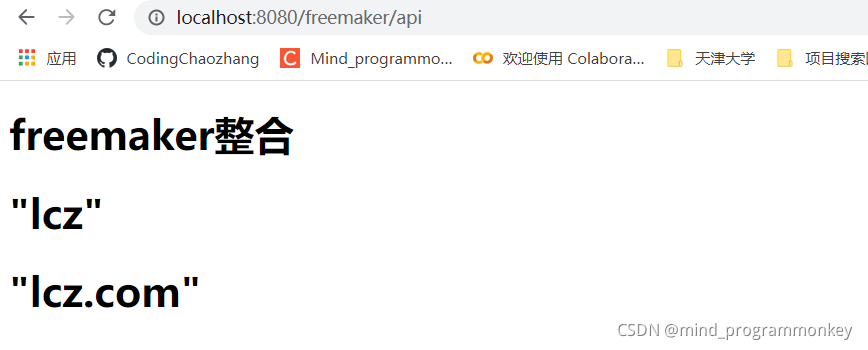
5.展示效果
07-4 SpringBoot2.x整合模板引擎thymeleaf
1.Thymeleaf相关依赖
<dependency>
    <groupId>org.springframework.boot</groupId>
    <artifactId>spring-boot-starter-thymeleaf</artifactId>
</dependency>
2.application.properties
spring.resources.static-locations=classpath:/META-INF/resources/,classpath:/resources/,classpath:/static/,\
  classpath:/public/,classpath:/templates/,

# 属性
server.name = "lcz"
server.domain = "lcz.com"

## 是否开启thymeleaf缓存,本地为false,生产建议为true
#spring.freemarker.cache=false
#
#spring.freemarker.charset=UTF-8
#spring.freemarker.allow-request-override=false
#spring.freemarker.check-template-location=true
#
##类型
#spring.freemarker.content-type=text/html
#
#spring.freemarker.expose-request-attributes=true
#spring.freemarker.expose-session-attributes=true
#
##文件后缀
#spring.freemarker.suffix=.ftl
##路径
#spring.freemarker.template-loader-path=classpath:/templates/


#开发时关闭缓存,不然没法看到实时页面
spring.thymeleaf.cache=false
spring.thymeleaf.mode=HTML5
#前缀
spring.thymeleaf.prefix=classpath:/templates/
#编码
spring.thymeleaf.encoding=UTF-8
#类型
spring.thymeleaf.content-type=text/html
#名称的后缀
spring.thymeleaf.suffix=.html
3.后端逻辑代码
controller/ThymleafController.java
package com.lcz.spring_demo13.controller;

import com.lcz.spring_demo13.domain.ServerSettings;

import org.springframework.beans.factory.annotation.Autowired;
import org.springframework.stereotype.Controller;
import org.springframework.ui.ModelMap;
import org.springframework.web.bind.annotation.GetMapping;
import org.springframework.web.bind.annotation.RequestMapping;


@Controller
@RequestMapping("/thymeleaf")
public class ThymeleafController {

	@Autowired
	private ServerSettings setting;

	@GetMapping("hello")
	public String index(){
		return "index";  //不用加后缀,在配置文件里面已经指定了后缀
	}

	@GetMapping("info")
	public String admin(ModelMap modelMap){
		modelMap.addAttribute("setting", setting);
		return "admin/info";  //不用加后缀,在配置文件里面已经指定了后缀
	}
}
4.前端代码
resources/templates/tl/index.html
<!DOCTYPE html>
<html>
<head>
<meta charset="UTF-8">
<title>Insert title here</title>
</head>
<body>
模板引擎整合thymeleaf
<h5>直接访问</h5>
</body>
</html>
resources/templates/tl/admin/info.html
<!DOCTYPE html>
<html>
<head>
<meta charset="UTF-8">
<title>Insert title here</title>
</head>
<body>
模板引擎整合thymeleaf  admin/info.html
<h1 th:text="${setting.name}">测试内容</h1>
</body>
</html>
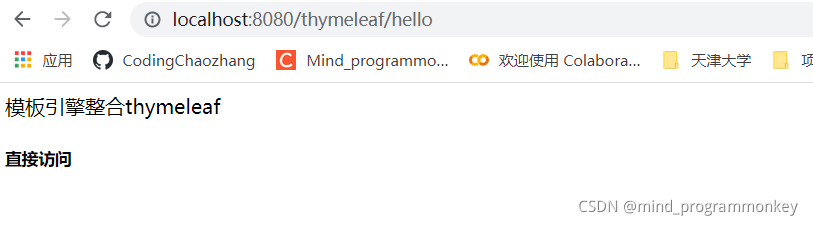
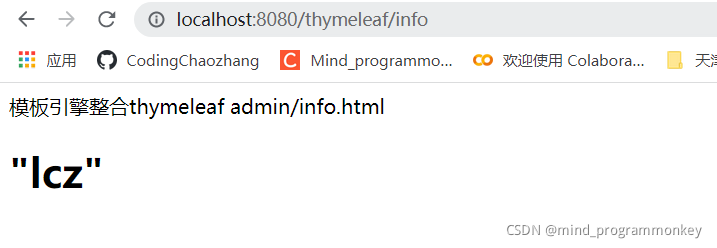
5.展示效果





 扫一扫
扫一扫


 596
596

 被折叠的 条评论
为什么被折叠?
被折叠的 条评论
为什么被折叠?
 到【灌水乐园】发言





