





一、ForEach的使用API
ForEach()里面有三个参数,但我们一般只写前两个参数,第三个参数是可选的。但如果涉及到数组的删除操作时,非常建议写上第三个参数,否则删除时很可能会出现Bug!
原因:列表渲染完毕后,在数组的中段进行删除操作,如果不写第三个参数来给数组生成唯一的标识,在删除中间的列表项后,后面的数组的下标会变化,ForEach组件会认为后面的那些数据是新数据,从而会引起后面数据的再次渲染。这会导致例如后面组件的选中状态等发生改变。
解决方法:在ForEach里面增加第三个回调函数来给每一项加上唯一标识,这样就可以避免后面数组再次重新渲染,达到不破坏后面数组状态的目的。
ForEach(arr: Array<any>, itemGenerator: (item: any, index: number) => void, keyGenerator?: (item: any, index: number) => string)
| 参数名 | 类型 | 必填 | 说明 |
|---|---|---|---|
| arr | Array<any> | 是 | 数据源,为Array类型的数组。 说明: - 可以设置为空数组,此时不会创建子组件。 - 可以设置返回值为数组类型的函数,例如arr.slice(1, 3),但设置的函数不应改变包括数组本身在内的任何状态变量,例如不应使用Array.splice(),Array.sort()或Array.reverse()这些会改变原数组的函数。 |
| itemGenerator | (item: any, index: number) => void | 是 | 组件生成函数。 - 为数组中的每个元素创建对应的组件。 - item参数(可选):arr数组中的数据项。 - index参数(可选):arr数组中的数据项索引。 说明: - 组件的类型必须是ForEach的父容器所允许的。例如,ListItem组件要求ForEach的父容器组件必须为List组件。 |
| keyGenerator | (item: any, index: number) => string | 否 | 键值生成函数。 - 为数据源arr的每个数组项生成唯一且持久的键值。函数返回值为开发者自定义的键值生成规则。 - item参数(可选):arr数组中的数据项。 - index参数(可选):arr数组中的数据项索引。 说明: - 如果函数缺省,框架默认的键值生成函数为(item: T, index: number) => { return index + '__' + JSON.stringify(item); } - 键值生成函数不应改变任何组件状态。 |
说明
- ForEach的itemGenerator函数可以包含if/else条件渲染逻辑。另外,也可以在if/else条件渲染语句中使用ForEach组件。
- 在初始化渲染时,ForEach会加载数据源的所有数据,并为每个数据项创建对应的组件,然后将其挂载到渲染树上。如果数据源非常大或有特定的性能需求,建议使用LazyForEach组件。最佳实践请参考使用懒加载优化性能。
二、水果购物车案例
效果图:
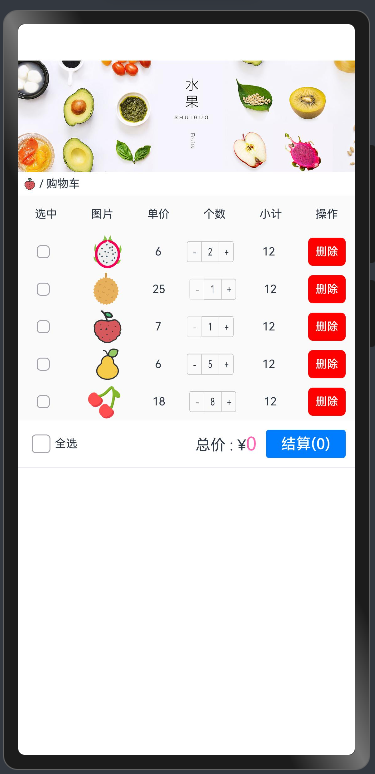
案例代码:
下载文章顶部图片资源,解压到media里面,将下方代码复制到pages/fruitPage.ets里保存打开预览器查看效果。
interface IFruit {
  id: number
  name?: string
  img: ResourceStr
  price: number
  count: number
}

@Observed
class Fruit {
  id: number
  name?: string
  img: ResourceStr
  price: number
  count: number

  constructor(id: number, name: string, img: ResourceStr, price: number, count: number) {
    this.id = id
    this.name = name
    this.img = img
    this.price = price
    this.count = count
  }
}

@Entry
@Component
struct fruitPage {
  menuList: string[] = ['选中', '图片', '单价', '个数', '小计', '操作']
  @State fruitList: Fruit[] = [
    new Fruit(1, '火龙果', $r('app.media.huolongg'), 6, 2),
    new Fruit(2, '榴莲', $r('app.media.liulian'), 25, 1),
    new Fruit(3, '荔枝', $r('app.media.lizhi'), 7, 1),
    new Fruit(4, '鸭梨', $r('app.media.yali'), 6, 5),
    new Fruit(5, '樱桃', $r('app.media.yingtao'), 18, 8),
  ]

  build() {
    Column() {
      Image($r('app.media.fruit'))
        .width('100%')
      Row() {
        Image($r('app.media.lizhi'))
          .width(15)
          .borderRadius('50%')
          .aspectRatio(1)
        Text(' / 购物车')
          .fontSize(12)
      }
      .width('100%')
      .padding(5)

      ShopList({ menuList: this.menuList, fruitList: this.fruitList })
    }
    .width('100%')
    .height('100%')
  }
}

@Component
struct ShopList {
  @Prop menuList: string[]
  @Link fruitList: Fruit[]
  @Provide totalPrice: number = 0
  @Provide totalCount: number = 0
  @State @Watch('toPrice') idArray: string[] = [] // 存储选中商品的id

  toPrice() {
    this.totalPrice = this.fruitList.filter(eve => this.idArray.includes(eve.id.toString()))
      .reduce((acc, cur) => acc + cur.price * cur.count, 0)
    this.totalCount = this.fruitList.filter(eve => this.idArray.includes(eve.id.toString()))
      .reduce((acc, cur) => acc + cur.count, 0)
  }

  build() {
    List() {
      // 表头
      ListItem() {
        Row() {
          ForEach(this.menuList, (item: string, index) => {
            Text(item)
              .fontSize(12)
          }, (item: string, index: number) => item)
        }
        .width('100%')
        .height(40)
        .backgroundColor('#fafafa')
        .justifyContent(FlexAlign.SpaceAround)
      }

      if (this.fruitList.length > 0) {
        ForEach(this.fruitList, (item: Fruit, index) => {
          ListItem() {
            fruitListItem({
              item: item,
              delListItem: () => {
                this.fruitList = this.fruitList.filter(eve => eve.id !== item.id)
              }
            })
          }
        }, (item: string, index: number) => item)
        ListItem() {
          TotalComp({ idArray: this.idArray })
        }
      } else {
        ListItem() {
          Row() {
            Text('🛒').fontSize(30)
            Text('空空如也').fontColor('#919398').fontSize(30)
          }
          .justifyContent(FlexAlign.Center)
          .width('100%')
          .height(40)
          .border({ width: { top: 1 }, color: { top: '#f3f3f3' } })
          .margin({ top: 10 })
        }
      }
    }
  }
}

@Component
struct fruitListItem {
  @ObjectLink item: Fruit
  delListItem = () => {
  }

  build() {
    Row() {
      Checkbox({ name: this.item.id.toString(), group: 'fruit' })
        .width(14)
        .shape(CheckBoxShape.ROUNDED_SQUARE)
        .margin({ left: 20 })
      Image(this.item.img)
        .height('100%')
        .aspectRatio(1)
        .offset({ x: 18 })
      Text(this.item.price.toString())
        .fontSize(12)
        .offset({ x: 30 })
      Counter() {
        Text(this.item.count.toString())
      }
      .scale({ x: 0.5, y: 0.7 })
      .offset({ x: 13 })
      .enableInc(true)
      .enableDec(this.item.count > 1)
      .onInc(() => {
        this.item.count++
      })
      .onDec(() => {
        this.item.count--
      })

      Text('12')
        .fontSize(12)
        .width(40)
      Button('删除')
        .width(40)
        .backgroundColor(Color.Red)
        .fontColor(Color.White)
        .borderRadius(5)
        .padding({ left: 8, right: 8 })
        .fontSize(12)
        .height(30)
        .offset({ x: -10 })
        .onClick(() => {
          this.delListItem()
        })
    }
    .width('100%')
    .height(40)
    .backgroundColor('#fafafa')
    .justifyContent(FlexAlign.SpaceBetween)
  }
}

@Component
struct TotalComp {
  @Consume totalPrice: number
  @Consume totalCount: number
  @Link idArray: string[]

  build() {
    Row() {
      Row() {
        CheckboxGroup({ group: 'fruit' })
          .onChange((event) => {
            this.idArray = event.name
          })
          .checkboxShape(CheckBoxShape.ROUNDED_SQUARE)

        Text('全选')
          .fontSize(12)
      }
      .layoutWeight(1)

      Row({ space: 10 }) {
        Text() {
          Span('总价 : ¥')
          Span(this.totalPrice.toString()).fontSize(20).fontColor('#ff69b4')
        }

        Button(`结算(${this.totalCount})`)
          .borderRadius(3)
          .height(30)
      }
    }
    .width('100%')
    .padding(10)
    .border({ width: { bottom: 1 }, color: { bottom: '#eceff4' } })
  }
}
2.1 水果购物车的ForEach第三个参数
在上方代码92-101中就是ForEach循环语句,负责循环渲染列表项。
ForEach(this.fruitList, (item: Fruit, index) => {
          ListItem() {
            fruitListItem({
              item: item,
              delListItem: () => {
                this.fruitList = this.fruitList.filter(eve => eve.id !== item.id)
              }
            })
          }
        }, (item: string, index: number) => item)
我们着重关注这一行:
ForEach(this.fruitList, (item: Fruit, index) => {
  ListItem() {}
}, (item: string, index: number) => item)
这就是保证每一项数据都有特定的唯一标识的ForEach第三个参数,需要注意的是,在 (item: string, index: number) => item 中,里面的index没有使用到,可省略,改成 (item: string) => item 一样能实现效果。
三、商品购物车案例
效果图:
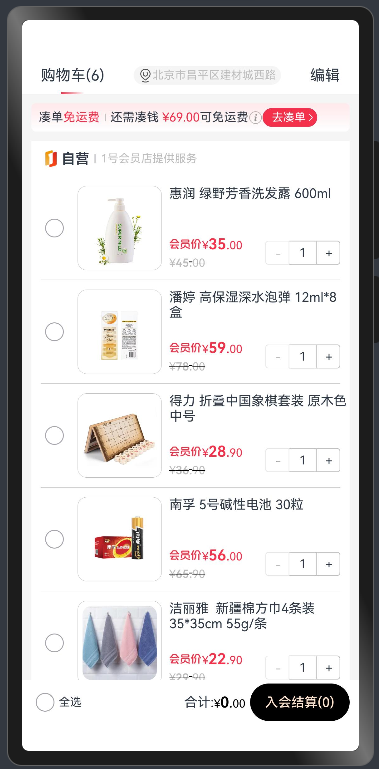
代码:
ets/data/GoodData.ets
export interface Good {
  id: string // id
  wname: string // 名称
  jdPrice: number // 会员价
  imageurl: string // 图片
  jdMainPrice: number // 原价
}

@Observed
export class CartGood {
  id: string // id
  good: Good // 商品
  count: number // 个数

  constructor(good: Good, count: number = 1) {
    this.id = good.id
    this.good = good
    this.count = count
  }
}


export const goodList: CartGood[] = [
  new CartGood({
    id: '16756',
    wname: '惠润 绿野芳香洗发露 600ml',
    jdPrice: 35.00,
    imageurl: 'https://m.360buyimg.com/mobilecms/s558x558_jfs/t1/188208/35/38739/41823/6515995cF15cdb08a/cf82ab82e3e36eb7.jpg!q50.jpg.webp',
    jdMainPrice: 45.00,
  }),
  new CartGood({
    id: '16758',
    wname: '潘婷 高保湿深水泡弹 12ml*8盒',
    jdPrice: 59.00,
    imageurl: 'https://m.360buyimg.com/mobilecms/s558x558_jfs/t1/246382/22/1792/26433/6596a0ccFea974bdb/f4961f6aeb7d998f.png!q50.jpg.webp',
    jdMainPrice: 78.00,
  }),
  new CartGood({
    id: '29714',
    wname: '得力 折叠中国象棋套装 原木色 中号',
    jdPrice: 28.90,
    imageurl: 'https://m.360buyimg.com/mobilecms/s558x558_jfs/t1/182908/16/25089/133946/62959bf1E13ddee79/f8c0cd4baaa57db8.jpg!q50.jpg.webp',
    jdMainPrice: 36.90,
  }),
  new CartGood({
    id: '854',
    wname: '南孚 5号碱性电池 30粒',
    jdPrice: 56.00,
    imageurl: 'https://m.360buyimg.com/mobilecms/s558x558_jfs/t1/199998/27/33294/68995/642aceebF857a36e0/994c63e2c6fa0bbb.png!q50.jpg.webp',
    jdMainPrice: 65.90,
  }),
  new CartGood(
    {
      id: '34849',
      wname: '洁丽雅  新疆棉方巾4条装  35*35cm 55g/条',
      jdPrice: 22.90,
      imageurl: 'https://m.360buyimg.com/mobilecms/s558x558_jfs/t1/245460/14/1920/91732/659534b6Fa05d822a/7a92fea15856ee28.png!q50.jpg.webp',
      jdMainPrice: 29.90,
    },
  ), new CartGood(
  {
    id: '3484',
    wname: '洁柔手帕纸Lotion',
    jdPrice: 12.40,
    imageurl: 'https://img14.360buyimg.com/mobilecms/s360x360_jfs/t1/141643/29/1675/581709/5ef85e48Efc16bf7d/1a42445a7d7d55c4.jpg!q70.dpg.webp',
    jdMainPrice: 29.90,
  },
)
]
ets/pages/Index.ets
import { CartGood, goodList } from '../data/GoodData'

const MAIN_RED: string = '#f4304b'

const LIGHT_GRAY: string = '#f5f5f5'

const DEEP_GRAY: string = '#bebebe'

@Entry
@Component
struct Main {
  @State list: CartGood[] = goodList
  @State @Watch('filterGoods') idArray: string[] = [] // 存储选中商品的id
  @Provide totalPrice: number = 0 // 总价
  @Provide totalCount: number = 0 // 总数

  filterGoods() {
    this.totalPrice = this.list.filter(item => this.idArray.includes(item.id))
      .reduce((sum: number, item: CartGood) => sum + item.good.jdPrice * item.count, 0)
    this.totalCount = this.list.filter(item => this.idArray.includes(item.id))
      .reduce((sum: number, item: CartGood) => sum + item.count, 0)

  }

  build() {
    Column() {
      // 标题
      TitleCom({ count: this.list.length })
      // 内容
      ContentCom({ list: this.list })

      // 支付
      PayCom({ idArray: this.idArray })
    }
    .height('100%')
    .backgroundColor(LIGHT_GRAY)
  }
}

// 内容区域
@Component
struct ContentCom {
  @Link list: CartGood[]

  build() {
    Scroll() {
      Column() {
        // 支付
        FreightCom()
          .margin(10)
        // 商品列表
        Column({ space: 10 }) {
          ListTitleCom()
          // 自营区域
          List() {
            ForEach(this.list, (item: CartGood, index: number) => {
              ListItem() {
                GoodsListItem({ item: item })
              }
              .swipeAction({ end: this.delItem(item.id) })
            }, (item: CartGood, index: number) => {
              return item.id
            })
          }
          .divider({
            strokeWidth: .5,
            startMargin: 10,
            endMargin: 10,
            color: DEEP_GRAY
          })
        }
        .backgroundColor(Color.White)
        .margin({ left: 10, right: 10 })

        // 空车 商品为空时显示
        if (this.list.length == 0) {
          EmptyCom()
        }
      }
    }
    .align(Alignment.Top)
    .padding({ bottom: 10 })
    .edgeEffect(EdgeEffect.Spring)
    .layoutWeight(1)
  }

  // 列表删除按钮样式
  @Builder
  delItem(id: string) {
    Text('删除')
      .width(60)
      .height('100%')
      .backgroundColor(Color.Red)
      .fontColor('#fff')
      .textAlign(TextAlign.Center)
      .onClick(() => {
        this.list = this.list.filter(item => item.id != id)
      })
  }
}

// 标题(显示商品种类)
@Component
struct TitleCom {
  @Prop count: number = 0

  build() {
    Row() {
      // 文字
      Stack({ alignContent: Alignment.Bottom }) {
        Text(`购物车(${this.count})`)
          .height('100%')
        Text('')
          .width(25)
          .height(2)
          .linearGradient({ angle: 90, colors: [[MAIN_RED, 0], [Color.White, 1]] })
      }
      .height('100%')

      // 地址
      Row() {
        Image($r('app.media.ic_yhd_location'))
          .width(15)
          .fillColor(DEEP_GRAY)
        Text('北京市昌平区建材城西路')
          .fontSize(12)
          .fontColor(DEEP_GRAY)
      }
      .height(20)
      .padding({ left: 5, right: 5 })
      .borderRadius(10)
      .backgroundColor(LIGHT_GRAY)

      // 编辑
      Text('编辑')
    }
    .padding({ left: 20, right: 20 })
    .width('100%')
    .height(40)
    .justifyContent(FlexAlign.SpaceBetween)
    .backgroundColor(Color.White)
  }
}

// 运费(地址下方)
@Component
struct FreightCom {
  // 默认 69 可以由外部传入
  minPrice: number = 69.00
  @Consume totalPrice: number

  build() {
    Column() {
      // 运费不够 提示
      if(this.minPrice > this.totalPrice){
        Row() {
          Row({ space: 5 }) {
            // 凑单免运费
            Text() {
              Span('凑单')
              Span('免运费')
                .fontColor(MAIN_RED)
            }
            .fontSize(13)
            .fontFamily('medium')

            // 分割线
            Divider()
              .vertical(true)
              .height(8)
              .color(DEEP_GRAY)
              .strokeWidth(1)

            // 运费信息

            Row() {
              Text() {
                Span('还需凑钱 ')
                Span(`¥${(this.minPrice - this.totalPrice).toFixed(2)}`)
                  .fontColor(MAIN_RED)
                Span('可免运费')
              }
              .fontSize(13)

              Image($r('app.media.ic_yhd_order_info'))
                .width(15)
            }
          }

          // 按钮
          Button() {
            Row() {
              Text('去凑单')
                .fontColor(Color.White)
                .fontSize(12)
              Image($r('app.media.ic_public_arrow_right'))
                .height(14)
                .width(10)
                .fillColor(Color.White)
            }
            .backgroundColor(MAIN_RED)
            .borderRadius(20)
            .padding({
              left: 10,
              top: 3,
              bottom: 3,
              right: 2
            })
          }
        }
        .width('100%')
      } else {
        // 运费足够 提示
        Row({ space: 5 }) {
          Text('运费')
            .backgroundColor(MAIN_RED)
            .fontSize(12)
            .fontColor(Color.White)
            .padding(2)
            .borderRadius(3)
          Divider()
            .vertical(true)
            .height(12)
            .strokeWidth(2)
          Text('已免运费')
            .fontSize(12)
            .fontColor(Color.Gray)
          Image('/common/day08-10/yhd/ic_yhd_order_info.png')
            .width(15)

        }
      }
    }
    .borderRadius(5)
    .height(30)
    .padding({ left: 8, right: 8 })
    .linearGradient({ colors: [['#ffe8ea', 0], [Color.White, 1]] })
    .width('100%')
    .justifyContent(FlexAlign.Center)
  }
}

// 支付(最下方组件)
@Component
struct PayCom {
  @Link idArray: string[]
  @Consume totalPrice: number
  @Consume totalCount: number

  build() {
    Row() {
      Row() {
        CheckboxGroup({
          group: 'cart'
        })
          .selectedColor(MAIN_RED)
          .onChange((event) => {
            this.idArray = event.name
          })
        Text('全选')
          .fontSize(12)
      }

      Row() {
        Text('合计:')
          .fontSize(14)
        PriceCom({
          fontColor: Color.Black,
          price: this.totalPrice
        })
        Button(`入会结算(${this.totalCount})`)
          .fontColor('#ffe3cc')
          .backgroundColor(Color.Black)
          .fontSize(14)
          .margin({ left: 5 })
      }

    }
    .justifyContent(FlexAlign.SpaceBetween)
    .padding({ left: 10, right: 10 })
    .height(48)
    .width('100%')
    .backgroundColor(Color.White)
  }
}

// 价格(根据传入的价格渲染数字)
@Component
struct PriceCom {
  @Prop price: number = 0
  fontColor: ResourceColor = MAIN_RED
  discard: boolean = false

  getSplicePrice() {
    return this.price.toFixed(2)
      .split('.')
  }

  build() {
    Text() {
      Span('¥')
        .fontSize(12)
      Span(this.getSplicePrice()[0]
        .toString())
        .fontSize(this.discard ? 12 : 16)
        .fontWeight(600)
      Span('.')
      Span(this.getSplicePrice()[1] == undefined ? '00' : this.getSplicePrice()[1])
        .fontSize(12)
    }
    .fontColor(this.fontColor)
    .decoration({ type: this.discard ? TextDecorationType.LineThrough : TextDecorationType.None })
  }
}

// 空车:购物车为空显示
@Component
struct EmptyCom {
  build() {
    Column({ space: 20 }) {
      Image($r('app.media.ic_yhd_cart_empty'))
        .width(90)
      Text('购物车竟然是空的~')
        .fontSize(14)
        .fontColor(Color.Gray)
    }
    .width('100%')
    .backgroundColor(Color.White)
    .padding(50)

  }
}

// 列表区域标题:装饰用
@Component
struct ListTitleCom {
  build() {
    Row({ space: 5 }) {
      Image($r('app.media.ic_yhd_logo'))
        .width(12)
      Text('自营')
        .fontWeight(600)
        .fontSize(15)
      Divider()
        .vertical(true)
        .height(10)
        .strokeWidth(2)
      Text('1号会员店提供服务')
        .fontColor(DEEP_GRAY)
        .fontSize(12)
    }
    .alignSelf(ItemAlign.Start)
    .padding({ left: 15, top: 10 })
  }
}

// 列表项:
@Component
struct GoodsListItem {
  @ObjectLink item: CartGood

  build() {
    Row({ space: 10 }) {
      // 左
      Checkbox({
        group: 'cart',
        name: this.item.id
      })
        .shape(CheckBoxShape.CIRCLE)
        .selectedColor(MAIN_RED)


      // 右
      Row({ space: 8 }) {
        // 商品图片
        Image(this.item.good.imageurl)
          .width(90)
          .padding(5)
          .border({ width: .5, color: DEEP_GRAY })
          .borderRadius(10)
        //   信息
        Column() {
          // 标题
          Text(this.item.good.wname)
            .maxLines(2)
            .textOverflow({ overflow: TextOverflow.Ellipsis })
            .fontSize(14)
            .fontWeight(400)
            .width('100%')
          // 价格 + 数量
          Row() {
            Column() {
              // 左
              Row() {
                Image($r('app.media.ic_yhd_hyj'))
                  .width(35)
                PriceCom({ price: this.item.good.jdPrice })
              }

              PriceCom({ discard: true, fontColor: DEEP_GRAY, price: this.item.good.jdMainPrice })
            }
            .alignItems(HorizontalAlign.Start)

            Blank()

            // 个数 Counter 内置组件
            Counter() {
              Text(this.item.count.toString())
            }
            .enableInc(true)
            .enableDec(this.item.count > 1)
            .scale({ x: .8, y: .8 })
            .onInc(() => {
              this.item.count += 1
            })
            .onDec(() => {
              this.item.count -= 1
            })
          }
          .justifyContent(FlexAlign.SpaceBetween)
          .width('100%')
        }
        .height(90)
        .justifyContent(FlexAlign.SpaceBetween)
        .layoutWeight(1)
      }
      .layoutWeight(1)
    }
    .padding({ left: 10, top: 10, bottom: 10 })

  }
}
3.1 商品购物车的ForEach第三个参数
在文件 ets/pages/Indexets 中代码第6 - 63行就是ForEach循环语句,负责循环渲染列表项。
ForEach(this.list, (item: CartGood, index: number) => {
ListItem() {
GoodsListItem({ item: item })
}
.swipeAction({ end: this.delItem(item.id) })
}, (item: CartGood, index: number) => {
return item.id
})
我们着重关注这一行:
(item: CartGood, index: number) => {
return item.id
}
在这个案例中,第三个参数item类型不是string类型了,而是复杂数据类型(CartGood),在这里即使index没有用到,也不可以删除。否则会出现Bug!例如全部选中删除中间项,后面的数组会重新渲染并且选中状态就没了。
如果将item类型改成string类型,下方返回item,也可以正常实现效果,但是index依旧不可以省略!如果省略index,那么每次点击item的删除,传过去的则不是id,而是数组下标!这个就很迷。。。想删张三结果把李四删了。。。
需要注意的点:
对比两个案例,都用到了ForEach的第三个参数来生成唯一标识。但是第二个商品购物车案例有点蹊跷,虽然index没有用到,但是不可省略。具体原因不去深究了,后面会随着API更新迭代掉。
结论:第三个参数最好还是写上,把item和index都写上吧~
二编:Bug解决了~
Q1. 第三个回调参数里item是什么东西,为什么写类型和写string一样可以实现效果?
A1:以水果购物车为例:
ForEach(this.fruitList, (item: Fruit, index) => {
  ListItem() {
    fruitListItem({
      item: item,
      delListItem: () => {
        this.fruitList = this.fruitList.filter(eve => eve.id !== item.id)
      }
    })
  }
}, (item: string, index) => {
  console.log(item,'item')
  return item
})
在上面的代码里,第三个回调参数里打印了item,我们可以看到输出结果为:
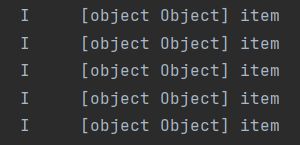
这说明item为 Fruit 对象,那我们把输出语句改成 console.log(JSON.stringify(item)) 再来试试呢,结果发现输出为:

这验证了我们的说法。
结论
过程省略,我相信各位对结论比较感兴趣,因为我的这个步骤写的不是特别好,所以我们直接上结论:
结论:当涉及到了数组的删除时,为了避免后面的数据重新渲染,第三个回调函数的参数里,item类型最好与第二个回调函数里的对应(虽然写string也可以),index必须写,即使没有用到,因为这两个是一 一对应的,否则删除时是以数据在数组中的下标来删除的。第三个回调函数的参数里item的类型最好和第二个回调函数的item的类型相同。
ForEach(this.fruitList, (item: Fruit, index) => {
  ListItem() {
    fruitListItem({
      item: item,
      delListItem: () => {
        this.fruitList = this.fruitList.filter(eve => eve.id !== item.id)
      }
    })
  }
}, (item: Fruit, index) => {
  return item.id.toString()
})
第二个回调函数里的index如果没有用到则可以省略哈~
如果第三个回调函数的item执意要写item为string类型,则生成的键值为 index_[object object] ,应该是这样子的,这块还没有验证过。不过可以确定的是,键值已经被我们自定义赋值了,删除数据也不会更改后面数据的键值从而导致刷新了,问题解决。





 扫一扫
扫一扫


 1367
1367

 被折叠的 条评论
为什么被折叠?
被折叠的 条评论
为什么被折叠?
 到【灌水乐园】发言





