unction varargout = multi_wavelet(varargin)

% Begin initialization code - DO NOT EDIT
gui_Singleton = 1;
gui_State = struct('gui_Name',       mfilename, ...
                   'gui_Singleton',  gui_Singleton, ...
                   'gui_OpeningFcn', @multi_wavelet_OpeningFcn, ...
                   'gui_OutputFcn',  @multi_wavelet_OutputFcn, ...
                   'gui_LayoutFcn',  [] , ...
                   'gui_Callback',   []);
if nargin && ischar(varargin{1})
    gui_State.gui_Callback = str2func(varargin{1});
end

if nargout
    [varargout{1:nargout}] = gui_mainfcn(gui_State, varargin{:});
else
    gui_mainfcn(gui_State, varargin{:});
end
% End initialization code - DO NOT EDIT


% --- Executes just before multi_wavelet is made visible.
function multi_wavelet_OpeningFcn(hObject, eventdata, handles, varargin)
% This function has no output args, see OutputFcn.
% hObject    handle to figure
% eventdata  reserved - to be defined in a future version of MATLAB
% handles    structure with handles and user data (see GUIDATA)
% varargin   command line arguments to multi_wavelet (see VARARGIN)
% Choose default command line output for multi_wavelet
handles.output = hObject;

% Update handles structure
guidata(hObject, handles);

% UIWAIT makes multi_wavelet wait for user response (see UIRESUME)
% uiwait(handles.figure1);


% --- Outputs from this function are returned to the command line.
function varargout = multi_wavelet_OutputFcn(hObject, eventdata, handles)
% varargout  cell array for returning output args (see VARARGOUT);
% hObject    handle to figure
% eventdata  reserved - to be defined in a future version of MATLAB
% handles    structure with handles and user data (see GUIDATA)

% Get default command line output from handles structure
varargout{1} = handles.output;


% --- Executes on button press in pushbutton1.
function pushbutton1_Callback(hObject, eventdata, handles)
% hObject    handle to pushbutton1 (see GCBO)
% eventdata  reserved - to be defined in a future version of MATLAB
% handles    structure with handles and user data (see GUIDATA)
global I ;
[fname,pname]=uigetfile('*.*');
I=imread(strcat(pname,'\',fname));
[m,n,k]=size(I);
if k~=1
I=rgb2gray(I);
end
I=double(I);
axes(handles.axes1);
imshow(mat2gray(I));
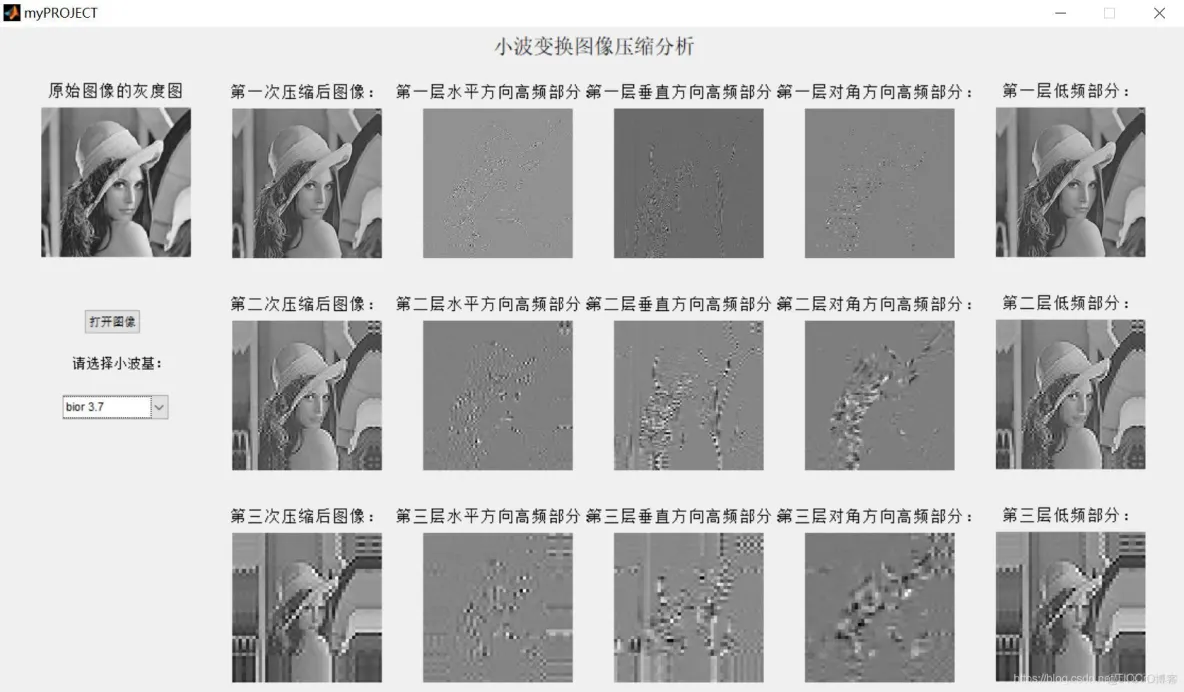
title('原始图像的灰度图');

% --- Executes on selection change in popupmenu1.
function popupmenu1_Callback(hObject, eventdata, handles)
% hObject    handle to popupmenu1 (see GCBO)
% eventdata  reserved - to be defined in a future version of MATLAB
% handles    structure with handles and user data (see GUIDATA)

% Hints: contents = get(hObject,'String') returns popupmenu1 contents as cell array
%        contents{get(hObject,'Value')} returns selected item from popupmenu1

global I ;
w1=get(handles.popupmenu1,'value')
switch w1   %选择小波基
case 1
   w2= 'bior 3.7';
case 2
    w2='bior 1.1';
case 3
    w2='bior 1.3';
case 4
    w2='bior 1.5';
case 5
   w2='bior 2.2';
case 6
   w2='bior 2.4';
case 7
   w2= 'bior 2.6';
case 8
    w2='bior 2.8';
case 9
    w2='bior 3.1';
case 10
    w2='bior 3.3';
case 11
    w2='bior 3.5';
case 12
    w2='bior 3.9';
case 13
    w2='bior 4.4';
case 14
    w2='bior 5.5';
case 15
    w2='bior 6.8';
case 16
    w2='db1';
case 17
    w2='db4';
case 18
    w2='db15';
end
disp('压缩前图像的大小');%显示文字
whos('I')           %显示图像属性
% 进行二维小波变换 'bior3.7'
[a,b] = wavedec2(I, 3,w2); % 分三层,wavedec2:2维多层小波分解
% 提取各层低频信息
c1 = appcoef2( a, b,w2, 1 );%提取二维小波分解低频系数
axes(handles.axes18);
imshow(c1, []);
title('第一层低频部分:');
ca1=wcodemat(c1,440,'mat',0);   %对第一层信息进行量化编码
axes(handles.axes2);
imshow(ca1, []);
title('第一次压缩后图像:');
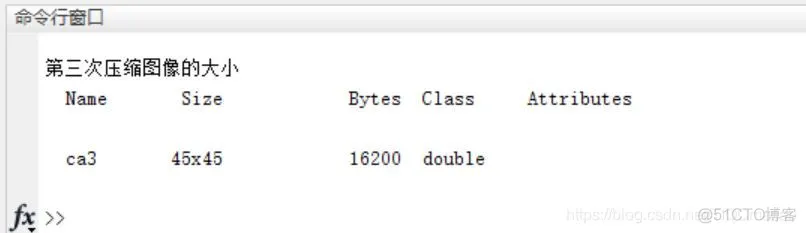
disp('第一次压缩图像的大小');%显示文字
whos('ca1');
c2= appcoef2( a, b,w2, 2 );
axes(handles.axes19);
imshow(c2, []);
title('第二层低频部分:');
ca2=wcodemat(c2,440,'mat',0);   %对第一层信息进行量化编码
axes(handles.axes6);
- 1.
- 2.
- 3.
- 4.
- 5.
- 6.
- 7.
- 8.
- 9.
- 10.
- 11.
- 12.
- 13.
- 14.
- 15.
- 16.
- 17.
- 18.
- 19.
- 20.
- 21.
- 22.
- 23.
- 24.
- 25.
- 26.
- 27.
- 28.
- 29.
- 30.
- 31.
- 32.
- 33.
- 34.
- 35.
- 36.
- 37.
- 38.
- 39.
- 40.
- 41.
- 42.
- 43.
- 44.
- 45.
- 46.
- 47.
- 48.
- 49.
- 50.
- 51.
- 52.
- 53.
- 54.
- 55.
- 56.
- 57.
- 58.
- 59.
- 60.
- 61.
- 62.
- 63.
- 64.
- 65.
- 66.
- 67.
- 68.
- 69.
- 70.
- 71.
- 72.
- 73.
- 74.
- 75.
- 76.
- 77.
- 78.
- 79.
- 80.
- 81.
- 82.
- 83.
- 84.
- 85.
- 86.
- 87.
- 88.
- 89.
- 90.
- 91.
- 92.
- 93.
- 94.
- 95.
- 96.
- 97.
- 98.
- 99.
- 100.
- 101.
- 102.
- 103.
- 104.
- 105.
- 106.
- 107.
- 108.
- 109.
- 110.
- 111.
- 112.
- 113.
- 114.
- 115.
- 116.
- 117.
- 118.
- 119.
- 120.
- 121.
- 122.
- 123.
- 124.
- 125.
- 126.
- 127.
- 128.
- 129.
- 130.
- 131.
- 132.
- 133.
- 134.
- 135.
- 136.
- 137.







 扫一扫
扫一扫


 3760
3760

 被折叠的 条评论
为什么被折叠?
被折叠的 条评论
为什么被折叠?
 到【灌水乐园】发言





