


一、简介
1 概念
在图像处理中的空间变换(spatial transformation)分成两种情况,有仿射变换(Affine Transformation)及投影变换(Perspective Transformation)。
仿射变换是从一个二维坐标变换到另一个二维坐标,它是一种线性变换,保持了图像的平行性和平直性,即在变换之后,原先图像中的直线与平行线还是保持一致。只是位置存在变化。仿射变换包括平移(Translation)、缩放(Scale)、翻转(Flip)、旋转(Rotation)和剪切(Shear)。
而投影变换则是指利用投影光束映射图像到投影面上,原始图像与变换后的图像存在着投影变换的关系。
对于数学上的表示而言,这两者都是一样的,始终存在着一个变换矩阵使得原图像与变换后的图像能够互相转换。
2 举个例子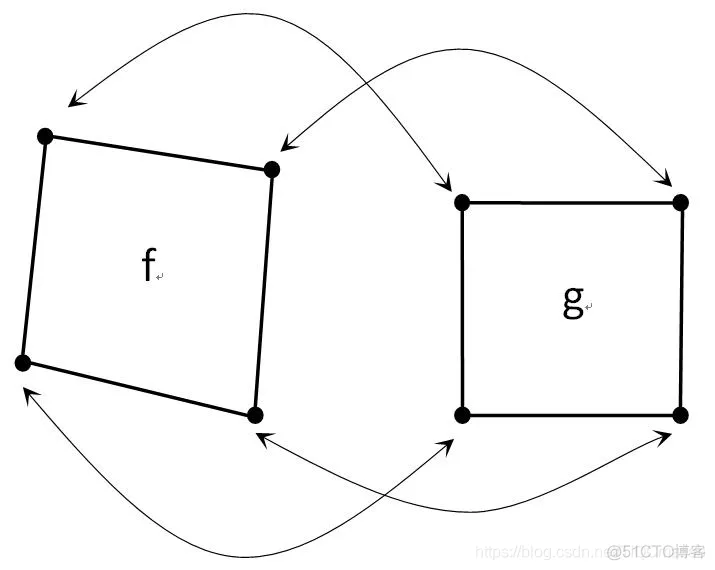
如上图所示,假设f为原图像,g为变换后图像。
通过一定的变换关系,使得f变换到g。如果我们知道对应角点的坐标,则可以通过以下的式子进行推算。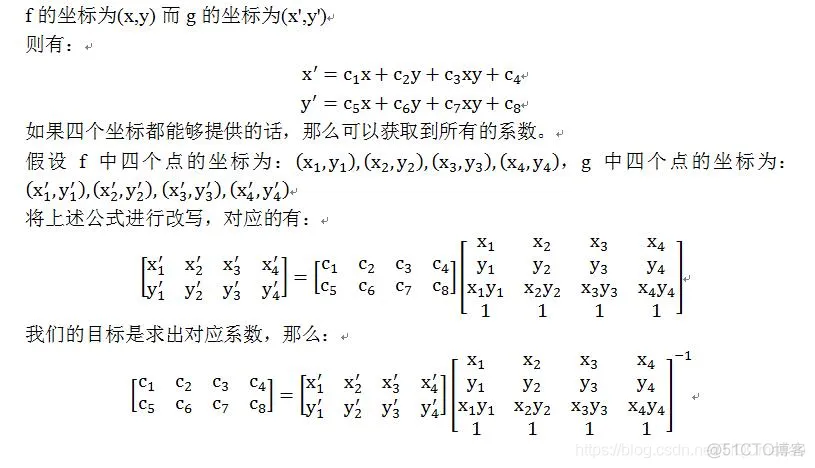
二、源代码
function varargout = affine_trans(varargin)
% AFFINE_TRANS M-file for affine_trans.fig
%      AFFINE_TRANS, by itself, creates a new AFFINE_TRANS or raises the existing
%      singleton*.
%
%      H = AFFINE_TRANS returns the handle to a new AFFINE_TRANS or the handle to
%      the existing singleton*.
%
%      AFFINE_TRANS('CALLBACK',hObject,eventData,handles,...) calls the local
%      function named CALLBACK in AFFINE_TRANS.M with the given input arguments.
%
%      AFFINE_TRANS('Property','Value',...) creates a new AFFINE_TRANS or raises the
%      existing singleton*.  Starting from the left, property value pairs are
%      applied to the GUI before affine_trans_OpeningFunction gets called.  An
%      unrecognized property name or invalid value makes property application
%      stop.  All inputs are passed to affine_trans_OpeningFcn via varargin.
%
%      *See GUI Options on GUIDE's Tools menu.  Choose "GUI allows only one
%      instance to run (singleton)".
%
% See also: GUIDE, GUIDATA, GUIHANDLES

% Edit the above text to modify the response to help affine_trans

% Last Modified by GUIDE v2.5 21-May-2009 16:53:05

% Begin initialization code - DO NOT EDIT
gui_Singleton = 1;
gui_State = struct('gui_Name',       mfilename, ...
                   'gui_Singleton',  gui_Singleton, ...
                   'gui_OpeningFcn', @affine_trans_OpeningFcn, ...
                   'gui_OutputFcn',  @affine_trans_OutputFcn, ...
                   'gui_LayoutFcn',  [] , ...
                   'gui_Callback',   []);
if nargin & isstr(varargin{1})
    gui_State.gui_Callback = str2func(varargin{1});
end

if nargout
    [varargout{1:nargout}] = gui_mainfcn(gui_State, varargin{:});
else
    gui_mainfcn(gui_State, varargin{:});
end
% End initialization code - DO NOT EDIT


% --- Executes just before affine_trans is made visible.
function affine_trans_OpeningFcn(hObject, eventdata, handles, varargin)
% This function has no output args, see OutputFcn.
% hObject    handle to figure
% eventdata  reserved - to be defined in a future version of MATLAB
% handles    structure with handles and user data (see GUIDATA)
% varargin   command line arguments to affine_trans (see VARARGIN)
f = checkerboard(50);
axes(handles.axes1);
imshow(f);
s = 0.8;
theta = pi/6;
T = [s*cos(theta) s*sin(theta) 0
    -s*sin(theta) s*cos(theta) 0
     0          0          1];
tform = maketform('affine',T);
g = imtransform(f,tform,'nearest');
axes(handles.axes2);
imshow(g);
set(handles.theta_edit,'string',30);

% Choose default command line output for affine_trans
handles.output = hObject;

% Update handles structure
guidata(hObject, handles);

% UIWAIT makes affine_trans wait for user response (see UIRESUME)
% uiwait(handles.figure1);


% --- Outputs from this function are returned to the command line.
function varargout = affine_trans_OutputFcn(hObject, eventdata, handles)
% varargout  cell array for returning output args (see VARARGOUT);
% hObject    handle to figure
% eventdata  reserved - to be defined in a future version of MATLAB
% handles    structure with handles and user data (see GUIDATA)

% Get default command line output from handles structure
varargout{1} = handles.output;


% --- Executes during object creation, after setting all properties.
function theta_edit_CreateFcn(hObject, eventdata, handles)
% hObject    handle to θ_edit (see GCBO)
% eventdata  reserved - to be defined in a future version of MATLAB
% handles    empty - handles not created until after all CreateFcns called

% Hint: edit controls usually have a white background on Windows.
%       See ISPC and COMPUTER.
if ispc
    set(hObject,'BackgroundColor','white');
else
    set(hObject,'BackgroundColor',get(0,'defaultUicontrolBackgroundColor'));
end


function theta_edit_Callback(hObject, eventdata, handles)
% hObject    handle to θ_edit (see GCBO)
% eventdata  reserved - to be defined in a future version of MATLAB
% handles    structure with handles and user data (see GUIDATA)

% Hints: get(hObject,'String') returns contents of θ_edit as text
%        str2double(get(hObject,'String')) returns contents of θ_edit as a double


% --- Executes during object creation, after setting all properties.
function interpolate_pop_menu_CreateFcn(hObject, eventdata, handles)
% hObject    handle to interpolate_pop_menu (see GCBO)
% eventdata  reserved - to be defined in a future version of MATLAB
% handles    empty - handles not created until after all CreateFcns called

% Hint: popupmenu controls usually have a white background on Windows.
%       See ISPC and COMPUTER.
if ispc
    set(hObject,'BackgroundColor','white');
else
    set(hObject,'BackgroundColor',get(0,'defaultUicontrolBackgroundColor'));
end


% --- Executes on selection change in interpolate_pop_menu.
function interpolate_pop_menu_Callback(hObject, eventdata, handles)
% hObject    handle to interpolate_pop_menu (see GCBO)
% eventdata  reserved - to be defined in a future version of MATLAB
% handles    structure with handles and user data (see GUIDATA)

% Hints: contents = get(hObject,'String') returns interpolate_pop_menu contents as cell array
% contents{get(hObject,'Value')} returns selected item from interpolate_pop_menu- 1.
- 2.
- 3.
- 4.
- 5.
- 6.
- 7.
- 8.
- 9.
- 10.
- 11.
- 12.
- 13.
- 14.
- 15.
- 16.
- 17.
- 18.
- 19.
- 20.
- 21.
- 22.
- 23.
- 24.
- 25.
- 26.
- 27.
- 28.
- 29.
- 30.
- 31.
- 32.
- 33.
- 34.
- 35.
- 36.
- 37.
- 38.
- 39.
- 40.
- 41.
- 42.
- 43.
- 44.
- 45.
- 46.
- 47.
- 48.
- 49.
- 50.
- 51.
- 52.
- 53.
- 54.
- 55.
- 56.
- 57.
- 58.
- 59.
- 60.
- 61.
- 62.
- 63.
- 64.
- 65.
- 66.
- 67.
- 68.
- 69.
- 70.
- 71.
- 72.
- 73.
- 74.
- 75.
- 76.
- 77.
- 78.
- 79.
- 80.
- 81.
- 82.
- 83.
- 84.
- 85.
- 86.
- 87.
- 88.
- 89.
- 90.
- 91.
- 92.
- 93.
- 94.
- 95.
- 96.
- 97.
- 98.
- 99.
- 100.
- 101.
- 102.
- 103.
- 104.
- 105.
- 106.
- 107.
- 108.
- 109.
- 110.
- 111.
- 112.
- 113.
- 114.
- 115.
- 116.
- 117.
- 118.
- 119.
- 120.
- 121.
- 122.
- 123.
- 124.
- 125.
- 126.
- 127.
- 128.
- 129.
- 130.
- 131.
- 132.
- 133.
- 134.
- 135.
- 136.
三、运行结果
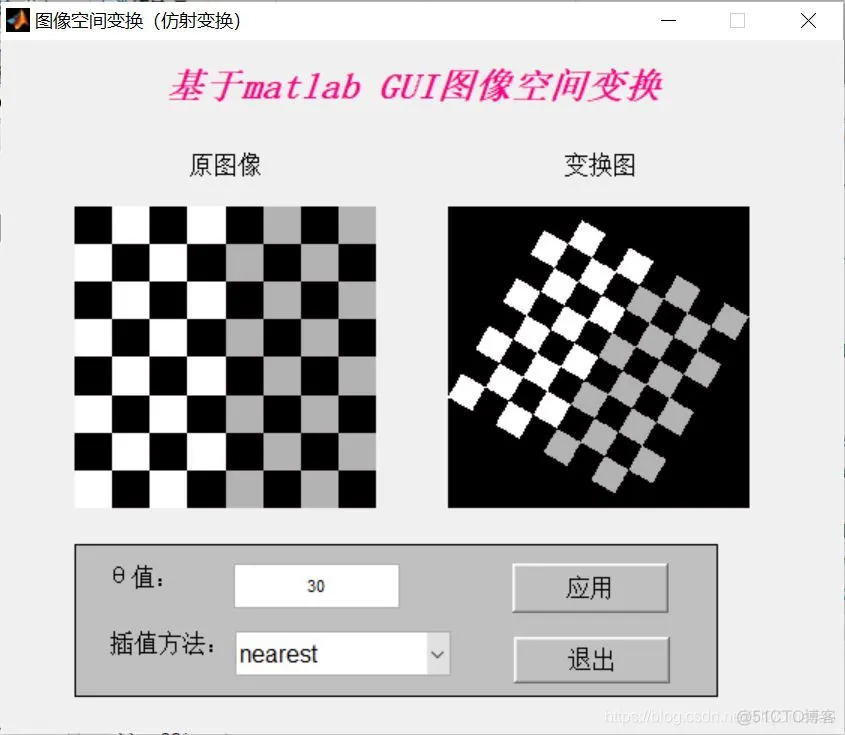
四、备注
版本:2014a





 扫一扫
扫一扫


 1137
1137

 被折叠的 条评论
为什么被折叠?
被折叠的 条评论
为什么被折叠?
 到【灌水乐园】发言





