
3.Ubuntu18.04取消警告音

这篇博客指导读者如何在Linux中打开/etc/inputsrc文件,取消setbell-stylenone的注释,从而在重启终端后实现铃声风格的更改。

1.打开文件 /etc/inputsrc



2.将set bell-style none取消注释
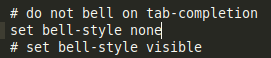
保存,然后关闭终端后重新开启新的终端就可以

这是我的sources.list:deb http://us.archive.ubuntu.com/ubuntu/ focal multiverse # deb-src http://us.archive.ubuntu.com/ubuntu/ focal multiverse deb http://us.archive.ubuntu.com/ubuntu/ focal-updates multiverse # deb-src http://us.archive.ubuntu.com/ubuntu/ focal-updates multiverse ## N.B. software from this repository may not have been tested as ## extensively as that contained in the main release, although it includes ## newer versions of some applications which may provide useful features. ## Also, please note that software in backports WILL NOT receive any review ## or updates from the Ubuntu security team. deb http://us.archive.ubuntu.com/ubuntu/ focal-backports main restricted universe multiverse # deb-src http://us.archive.ubuntu.com/ubuntu/ focal-backports main restricted universe multiverse ## Uncomment the following two lines to add software from Canonical's ## 'partner' repository. ## This software is not part of Ubuntu, but is offered by Canonical and the ## respective vendors as a service to Ubuntu users. # deb http://archive.canonical.com/ubuntu focal partner # deb-src http://archive.canonical.com/ubuntu focal partner ###deb http://security.ubuntu.com/ubuntu focal-security main restricted # deb-src http://security.ubuntu.com/ubuntu focal-security main restricted ###deb http://security.ubuntu.com/ubuntu focal-security universe # deb-src http://security.ubuntu.com/ubuntu focal-security universe ###deb http://security.ubuntu.com/ubuntu focal-security multiverse # deb-src http://security.ubuntu.com/ubuntu focal-security multiverse # This system was installed using small removable media # (e.g. netinst, live or single CD). The matching "deb cdrom" # entries were disabled at the end of the installation process. # For information about how to configure apt package sources, # see the sources.list(5) manual. # 默认注释了源码镜像以提高 apt update 速度,如有需要可自行取消注释 deb https://mirrors.tuna.tsinghua.edu.cn/ubuntu/ focal main restricted universe multiverse # deb-src https://mirrors.tuna.tsinghua.edu.cn/ubuntu/ focal main restricted universe multiverse deb https://mirrors.tuna.tsinghua.edu.cn/ubuntu/ focal-updates main restricted universe multiverse # deb-src https://mirrors.tuna.tsinghua.edu.cn/ubuntu/ focal-updates main restricted universe multiverse deb https://mirrors.tuna.tsinghua.edu.cn/ubuntu/ focal-backports main restricted universe multiverse # deb-src https://mirrors.tuna.tsinghua.edu.cn/ubuntu/ focal-backports main restricted universe multiverse # 以下安全更新软件源包含了官方源与镜像站配置,如有需要可自行修改注释切换 deb http://security.ubuntu.com/ubuntu/ focal-security main restricted universe multiverse # deb-src http://security.ubuntu.com/ubuntu/ focal-security main restricted universe multiverse # 预发布软件源,不建议启用 # deb https://mirrors.tuna.tsinghua.edu.cn/ubuntu/ focal-proposed main restricted universe multiverse # # deb-src https://mirrors.tuna.tsinghua.edu.cn/ubuntu/ focal-proposed main restricted universe multiverse
最新发布
08-13
评论 1
添加红包

请填写红包祝福语或标题

红包个数最小为10个

红包金额最低5元

当前余额3.43前往充值 >
需支付:10.00
成就一亿技术人!
领取后你会自动成为博主和红包主的粉丝 规则
hope_wisdom
发出的红包
实付
使用余额支付
点击重新获取
扫码支付
钱包余额 0

抵扣说明:

1.余额是钱包充值的虚拟货币,按照1:1的比例进行支付金额的抵扣。
2.余额无法直接购买下载,可以购买VIP、付费专栏及课程。

余额充值


