解决 av_read_frame() 文件尾(end of file)

本文解决FFmpeg API进行H264编码时,av_read_frame()读取到文件尾的问题。通过调整探针大小,确保数据正确读取,避免文件尾异常。

一、问题描述

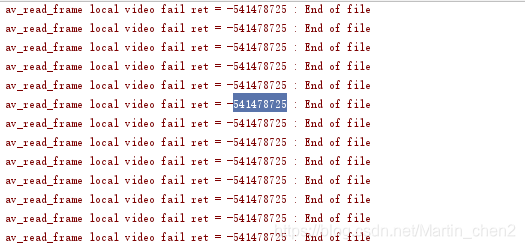
使用ffmpeg API进行h264编码时,av_read_frame()从缓存读取数据,会出现读取到文件尾的情况,截图如下:
读取文件尾截图

二、解决方案

  1. 预处理
    可参考:https://blog.youkuaiyun.com/Martin_chen2/article/details/103069058
  2. 修改探针大小
// 打开输入流时,修改探针probesize的大小
pVideoFormatCtx->probesize = BYTES_PER_FRAME * 8;
pVideoFormatCtx->pb = avio;
if (
FFmpeg 中,`av_read_frame` 是用于从输入流中读取音视频包的函数,但其本身并不直接支持超时或非阻塞操作。为了实现多路复用 I/O 或者超时控制,通常需要结合 `select`(或 `poll`)来监控底层文件描述符的状态,确保在调用 `av_read_frame` 之前数据已经就绪。 ### 使用 `select` 控制 `av_read_frame` 的非阻塞读取 以下是一个使用 `select` 来控制 `av_read_frame` 的完整示例代码: ```c #include <libavformat/avformat.h> #include <sys/select.h> #include <unistd.h> #include <stdio.h> #include <errno.h> int main(int argc, char *argv[]) { if (argc < 2) { fprintf(stderr, "Usage: %s <input file>\n", argv[0]); return -1; } const char *filename = argv[1]; AVFormatContext *fmt_ctx = NULL; if (avformat_open_input(&fmt_ctx, filename, NULL, NULL) < 0) { fprintf(stderr, "Could not open input file\n"); return -1; } if (avformat_find_stream_info(fmt_ctx, NULL) < 0) { fprintf(stderr, "Failed to get input stream information\n"); avformat_close_input(&fmt_ctx); return -1; } int video_stream_index = -1; for (int i = 0; i < fmt_ctx->nb_streams; i++) { if (fmt_ctx->streams[i]->codecpar->codec_type == AVMEDIA_TYPE_VIDEO) { video_stream_index = i; break; } } if (video_stream_index == -1) { fprintf(stderr, "No video stream found\n"); avformat_close_input(&fmt_ctx); return -1; } int fd = dup(0); // 假设使用 stdin 作为监控的文件描述符(实际应根据输入源获取正确的 fd) fd_set read_fds; struct timeval timeout; AVPacket *pkt = av_packet_alloc(); int ret; while (1) { FD_ZERO(&read_fds); FD_SET(fd, &read_fds); timeout.tv_sec = 5; // 设置超时时间 timeout.tv_usec = 0; int select_ret = select(fd + 1, &read_fds, NULL, NULL, &timeout); if (select_ret < 0) { if (errno == EINTR) continue; fprintf(stderr, "Select error: %s\n", strerror(errno)); break; } else if (select_ret == 0) { fprintf(stderr, "Timeout, no data received\n"); continue; } ret = av_read_frame(fmt_ctx, pkt); if (ret < 0) { if (ret == AVERROR(EAGAIN)) { // 数据未就绪,继续循环 fprintf(stderr, "No data available yet\n"); av_packet_unref(pkt); continue; } else if (ret == AVERROR_EOF) { fprintf(stderr, "End of file reached\n"); break; } else { fprintf(stderr, "Error reading frame\n"); break; } } if (pkt->stream_index == video_stream_index) { // 处理视频包 printf("Read video packet of size %d\n", pkt->size); } av_packet_unref(pkt); } avformat_close_input(&fmt_ctx); av_packet_free(&pkt); return 0; } ``` ### 代码说明 - **`select`**:用于监控文件描述符是否可读,设置超时时间以避免 `av_read_frame` 长时间阻塞。 - **`av_read_frame`**:在调用前通过 `select` 判断底层 I/O 是否有数据可读,避免直接阻塞等待。 - **`AVERROR(EAGAIN)`**:当 `av_read_frame` 返回该错误时,表示当前没有数据可读,程序可以选择继续等待或退出。 - **超时控制**:通过 `struct timeval` 设置超时时间,确保不会无限期等待。 上述方式适用于网络流、实时音视频传输等场景,通过 `select` 实现 I/O 多路复用和超时控制,从而提升程序的响应能力和健壮性[^2]。 ###
评论 5
添加红包

请填写红包祝福语或标题

红包个数最小为10个

红包金额最低5元

当前余额3.43前往充值 >
需支付:10.00
成就一亿技术人!
领取后你会自动成为博主和红包主的粉丝 规则
hope_wisdom
发出的红包
实付
使用余额支付
点击重新获取
扫码支付
钱包余额 0

抵扣说明:

1.余额是钱包充值的虚拟货币,按照1:1的比例进行支付金额的抵扣。
2.余额无法直接购买下载,可以购买VIP、付费专栏及课程。

余额充值