



 本文深入讲解了Cookie和Session的工作原理及应用,包括Cookie的创建、获取、更新和删除,以及如何通过Servlet设置Cookie的持久化和有效路径。同时,探讨了Session的使用,包括获取Session、设置Session的非活动时间和数据钝化活化过程。
cookie_demo.jsp

<%@ page language="java" contentType="text/html; charset=UTF-8"
    pageEncoding="UTF-8"%>
<!DOCTYPE html PUBLIC "-//W3C//DTD HTML 4.01 Transitional//EN" "http://www.w3.org/TR/html4/loose.dtd">
<html>
<head>
<meta http-equiv="Content-Type" content="text/html; charset=UTF-8">
<title>Insert title here</title>
</head>
<body>
	<h1>CookieDemo</h1>
	<a href="CreateCookieServlet">创建Cookie对象</a><br>
	<a href="GetCookieServlet">获取Cookie对象</a><br>
</body>
</html>
public class CreateCookieServlet extends HttpServlet {
	private static final long serialVersionUID = 1L;

	protected void doGet(HttpServletRequest request, HttpServletResponse response) throws ServletException, IOException {
		//创建cookie对象,并携带用户信息
		Cookie cookieName = new Cookie("stuName", "zhangsan");
		//响应给客户端
		response.addCookie(cookieName);
	}

	protected void doPost(HttpServletRequest request, HttpServletResponse response) throws ServletException, IOException {
	}

}
public class GetCookieServlet extends HttpServlet {
	private static final long serialVersionUID = 1L;

	protected void doGet(HttpServletRequest request, HttpServletResponse response) throws ServletException, IOException {
		//获取Cookie
		Cookie[] cookies = request.getCookies();

		for (Cookie cookie : cookies) {
			System.out.print("cookieName:"+cookie.getName());
			System.out.println("cookieValue:"+cookie.getValue());
		}
	}

	protected void doPost(HttpServletRequest request, HttpServletResponse response) throws ServletException, IOException {
	}

}

public class UpadteCookieServlet extends HttpServlet {
	private static final long serialVersionUID = 1L;

	protected void doGet(HttpServletRequest request, HttpServletResponse response) throws ServletException, IOException {
		//覆盖式
//		Cookie cookieName = new Cookie("stuName", "lisi");
//		response.addCookie(cookieName);
		//直接式
		Cookie[] cookies = request.getCookies();
		for (Cookie cookie : cookies) {
			if("stuName".equals(cookie.getName())){
				cookie.setValue("wangwu");
				response.addCookie(cookie);
				break;
			}
		}
	}

	protected void doPost(HttpServletRequest request, HttpServletResponse response) throws ServletException, IOException {
	}

}
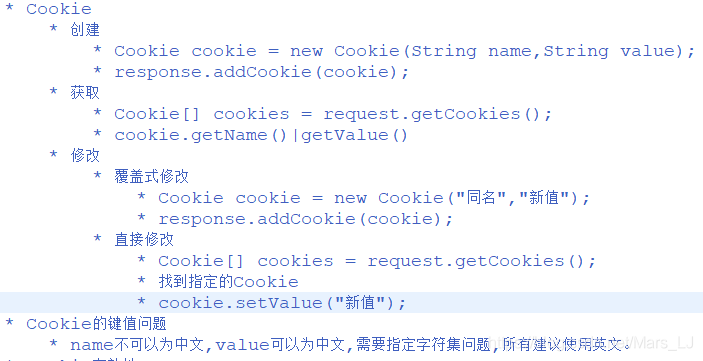
注意:当采用直接式修改cookie值时,光setValue()没用,需要给客户端重新传递Cookie对象!
public class ChiCookieServlet extends HttpServlet {
	private static final long serialVersionUID = 1L;

	protected void doGet(HttpServletRequest request, HttpServletResponse response) throws ServletException, IOException {
		Cookie cookie = new Cookie("stuAge", "18");
		//持久化
		cookie.setMaxAge(30);
		response.addCookie(cookie);
	}

	protected void doPost(HttpServletRequest request, HttpServletResponse response) throws ServletException, IOException {
	}

}

public class ChiCookieServlet extends HttpServlet {
	private static final long serialVersionUID = 1L;

	protected void doGet(HttpServletRequest request, HttpServletResponse response) throws ServletException, IOException {
		Cookie cookie = new Cookie("stuAge", "18");
		//持久化
//		cookie.setMaxAge(30);
		//有效路径
		cookie.setPath(request.getContextPath()+"/a");
		response.addCookie(cookie);
	}

	protected void doPost(HttpServletRequest request, HttpServletResponse response) throws ServletException, IOException {
	}

}
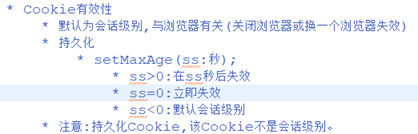
注意:修改地址后,只有当地址在新的格式下才能看到创建的cookie对象信息!
login.jsp

<%@ page language="java" contentType="text/html; charset=UTF-8"
    pageEncoding="UTF-8"%>
<!DOCTYPE html>
<html>
<head>
<meta charset="UTF-8">
<title>登录界面</title>
</head>
<body>

	<form action="UserServlet" method="post">
		<label>用户名称:</label>
		<input value="${cookie.username.value }" class="itxt" type="text" placeholder="请输入用户名" autocomplete="off" tabindex="1" name="username" />
		<br />
		<br />
		<label>用户密码:</label>
		<input value="${cookie.cookiePwd.value }" class="itxt" type="password" placeholder="请输入密码" autocomplete="off" tabindex="1" name="password" />
		<br />
		<br />
		记住密码:<input type="checkbox" name="rp" value="rp"><br>
		<input type="submit" value="登录" id="sub_btn" />
	</form>
</body>
</html>
UserServlet.java

public class UserServlet extends HttpServlet {
	private static final long serialVersionUID = 1L;

	protected void doGet(HttpServletRequest request, HttpServletResponse response) throws ServletException, IOException {
		String username = request.getParameter("username");
		String password = request.getParameter("password");
		String rp = request.getParameter("rp");
		System.out.println("rp:"+rp);
		if(rp != null){
			//将数据存放在Cookie中
			Cookie cookieName = new Cookie("username", username);
			Cookie cookiePwd = new Cookie("cookiePwd", password);
			//将Cookie持久化
			cookieName.setMaxAge(60*60*60*24*7);	//7天
			cookiePwd.setMaxAge(60*60*60*24*7);	//7天
			//将Cookie响应给浏览器
			response.addCookie(cookieName);
			response.addCookie(cookiePwd);
		}
		//跳转
	}

	protected void doPost(HttpServletRequest request, HttpServletResponse response) throws ServletException, IOException {
		doGet(request, response);
	}

}
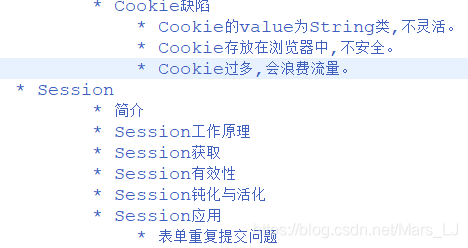
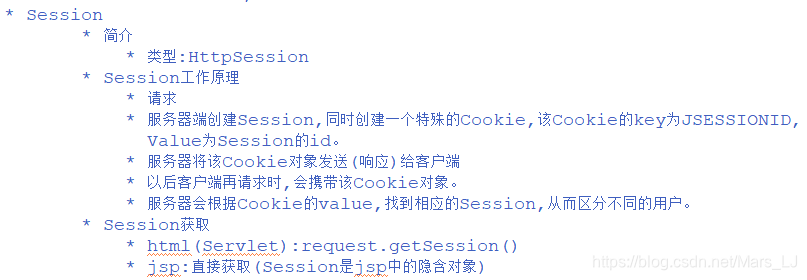
Session_demo.jsp

<%@ page language="java" contentType="text/html; charset=UTF-8"
    pageEncoding="UTF-8"%>
<!DOCTYPE html PUBLIC "-//W3C//DTD HTML 4.01 Transitional//EN" "http://www.w3.org/TR/html4/loose.dtd">
<html>
<head>
<meta http-equiv="Content-Type" content="text/html; charset=UTF-8">
<title>Insert title here</title>
</head>
<body>
	sessionId:<%=session.getId()  %><br>
	<a href="GetSessionServlet">获取Session</a>
</body>
</html>
public class GetSessionServlet extends HttpServlet {
	private static final long serialVersionUID = 1L;

	protected void doGet(HttpServletRequest request, HttpServletResponse response) throws ServletException, IOException {
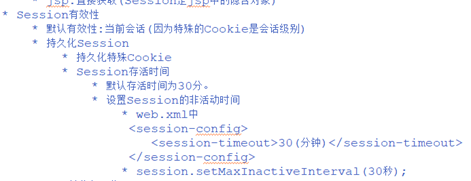
		HttpSession session = request.getSession();
		System.out.println(session.getId());
	}

	protected void doPost(HttpServletRequest request, HttpServletResponse response) throws ServletException, IOException {
		doGet(request, response);
	}

}
public class ChiSessionServlet extends HttpServlet {
	private static final long serialVersionUID = 1L;

	protected void doGet(HttpServletRequest request, HttpServletResponse response) throws ServletException, IOException {
		//持久化Seesion->持久化特殊的Cookie
		Cookie[] cookies = request.getCookies();
		for (Cookie cookie : cookies) {
			if("JSESSIONID".equals(cookie.getName())){
				cookie.setMaxAge(30);
				response.addCookie(cookie);
				break;
			}
		}

		//设置Session的非活动时间
		HttpSession session = request.getSession();
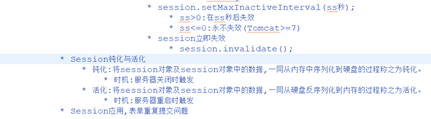
		session.setMaxInactiveInterval(30);
	}

	protected void doPost(HttpServletRequest request, HttpServletResponse response) throws ServletException, IOException {
		doGet(request, response);
	}

}
package com.atguigu.servlet.session;

import java.io.IOException;

import javax.servlet.ServletException;
import javax.servlet.http.HttpServlet;
import javax.servlet.http.HttpServletRequest;
import javax.servlet.http.HttpServletResponse;
import javax.servlet.http.HttpSession;

/**
 * Servlet implementation class ShiSessionServlet
 */
public class ShiSessionServlet extends HttpServlet {
	private static final long serialVersionUID = 1L;

	protected void doGet(HttpServletRequest request, HttpServletResponse response) throws ServletException, IOException {
		HttpSession session = request.getSession();
		//设置session失效
		session.invalidate();
	}

	protected void doPost(HttpServletRequest request, HttpServletResponse response) throws ServletException, IOException {
		doGet(request, response);
	}

}
设置session对象和session数据的钝化 活化
public class Student implements Serializable{

	/**
	 *
	 */
	private String name;

	public String getName() {
		return name;
	}

	public void setName(String name) {
		this.name = name;
	}

	public Student(String name) {
		super();
		this.name = name;
	}

	public Student() {
		super();
	}

	@Override
	public String toString() {
		return "Student [name=" + name + "]";
	}

}
public class ChiSessionServlet extends HttpServlet {
	private static final long serialVersionUID = 1L;

	protected void doGet(HttpServletRequest request, HttpServletResponse response) throws ServletException, IOException {
		//持久化Seesion->持久化特殊的Cookie
		Cookie[] cookies = request.getCookies();
		for (Cookie cookie : cookies) {
			if("JSESSIONID".equals(cookie.getName())){
				cookie.setMaxAge(600);
				response.addCookie(cookie);
				break;
			}
		}

		//设置Session的非活动时间
		HttpSession session = request.getSession();
		session.setMaxInactiveInterval(600);

		session.setAttribute("stu", new Student("zhangsan"));
	}

	protected void doPost(HttpServletRequest request, HttpServletResponse response) throws ServletException, IOException {
		doGet(request, response);
	}

}
注意:在session钝化与活化的过程中,session对象可以直接进行,但session的数据如果需要活化,需要将数据对象实现Seriallized,完成反序列化的功能!





 扫一扫
扫一扫


 1176
1176

 被折叠的 条评论
为什么被折叠?
被折叠的 条评论
为什么被折叠?
 到【灌水乐园】发言





