Qt creator day3练习

Qt Creator在飞凌RK3568上的终极配置指南:从安装到工程配置一步到位 本文详细介绍了如何在飞凌RK3568开发板上配置Qt Creator开发环境,包括Qt 5.14.2的安装、交叉编译工具链的设置以及工程部署的全流程。通过本指南,开发者可以快速搭建高效的嵌入式GUI开发环境,解决常见配置问题,并优化性能。 阅读详情

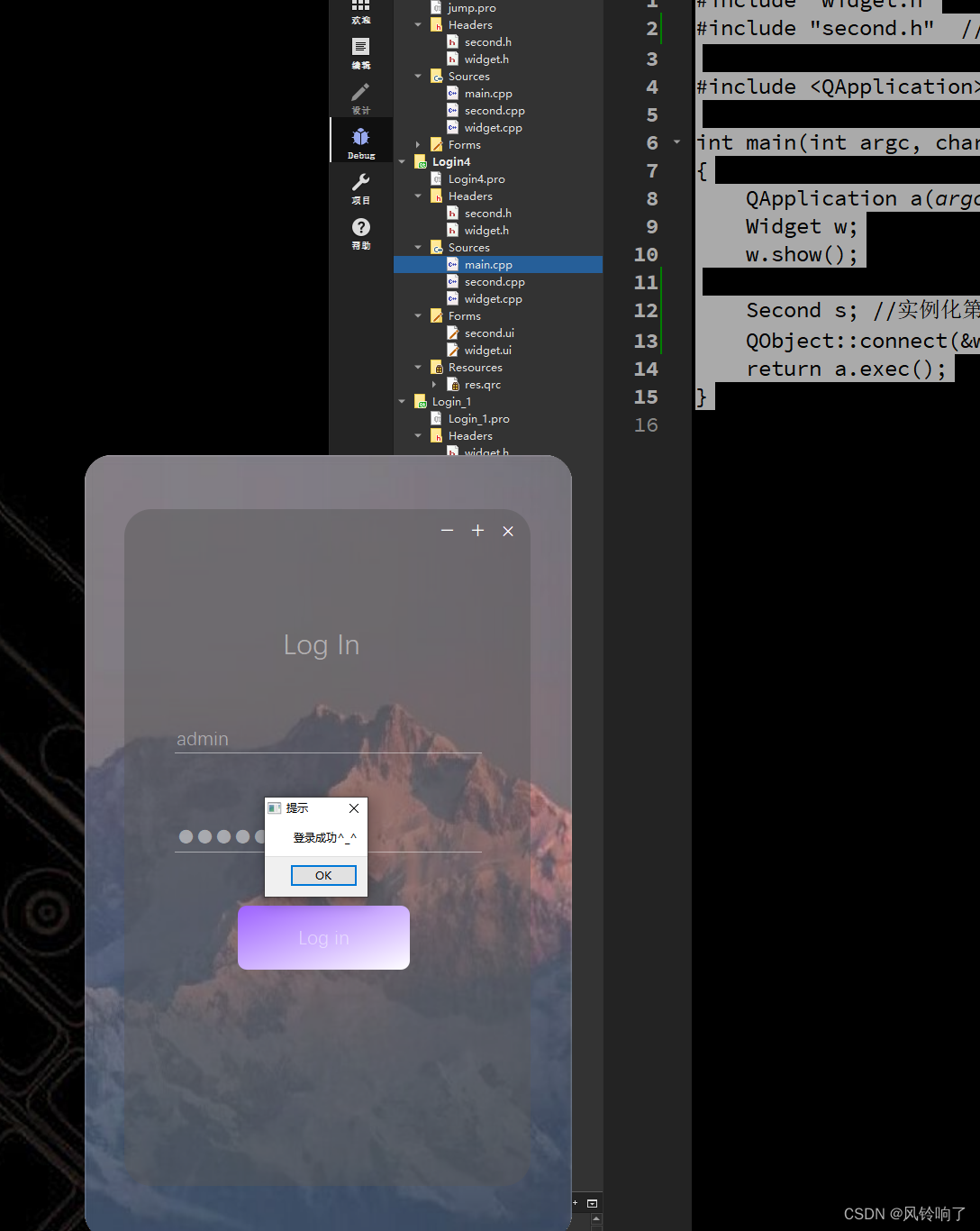
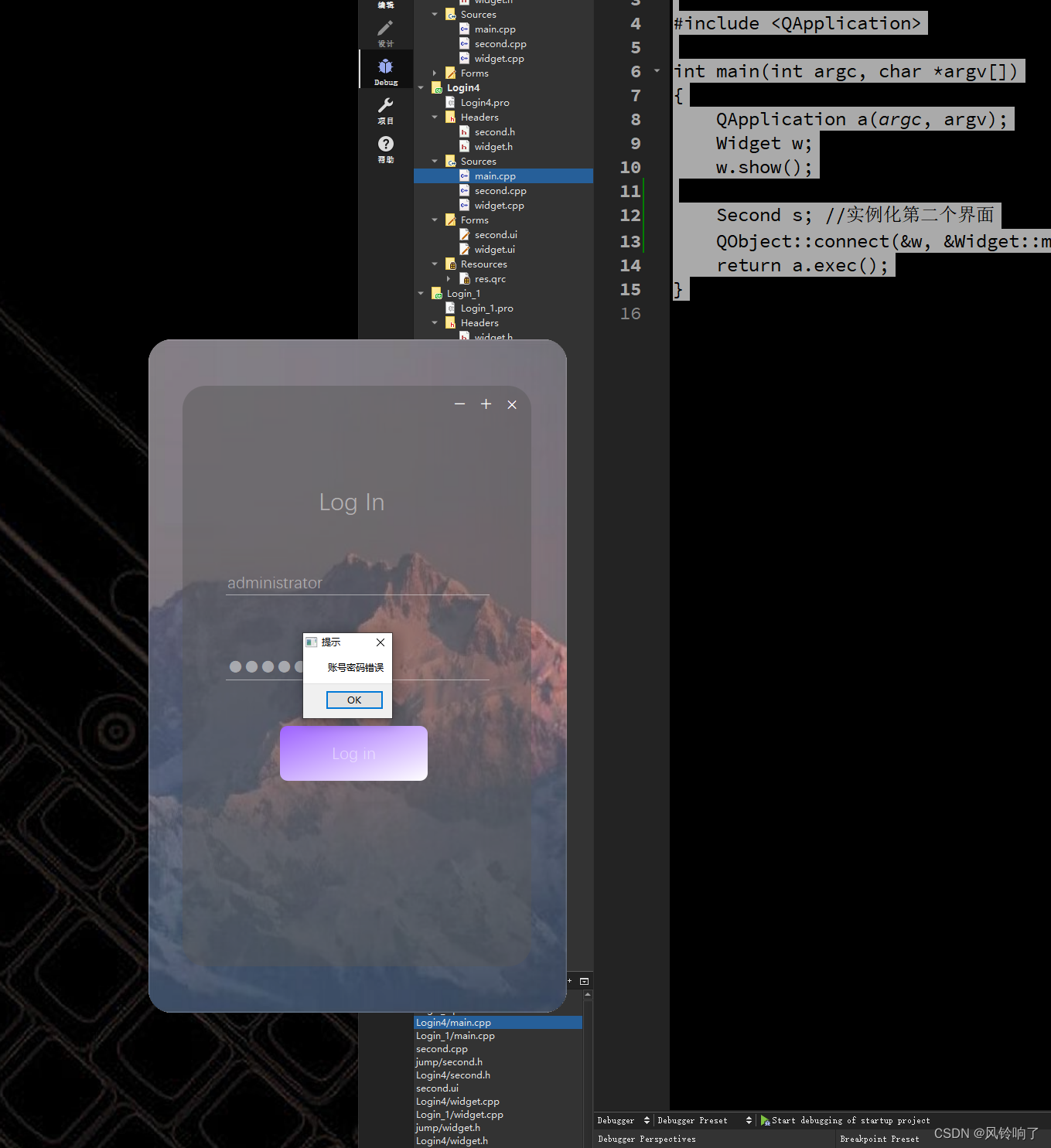
2、升级优化自己应用程序的登录界面。

要求: 1. qss实现

2. 需要有图层的叠加 (QFrame)

3. 设置纯净窗口后,有关闭等窗口功能。

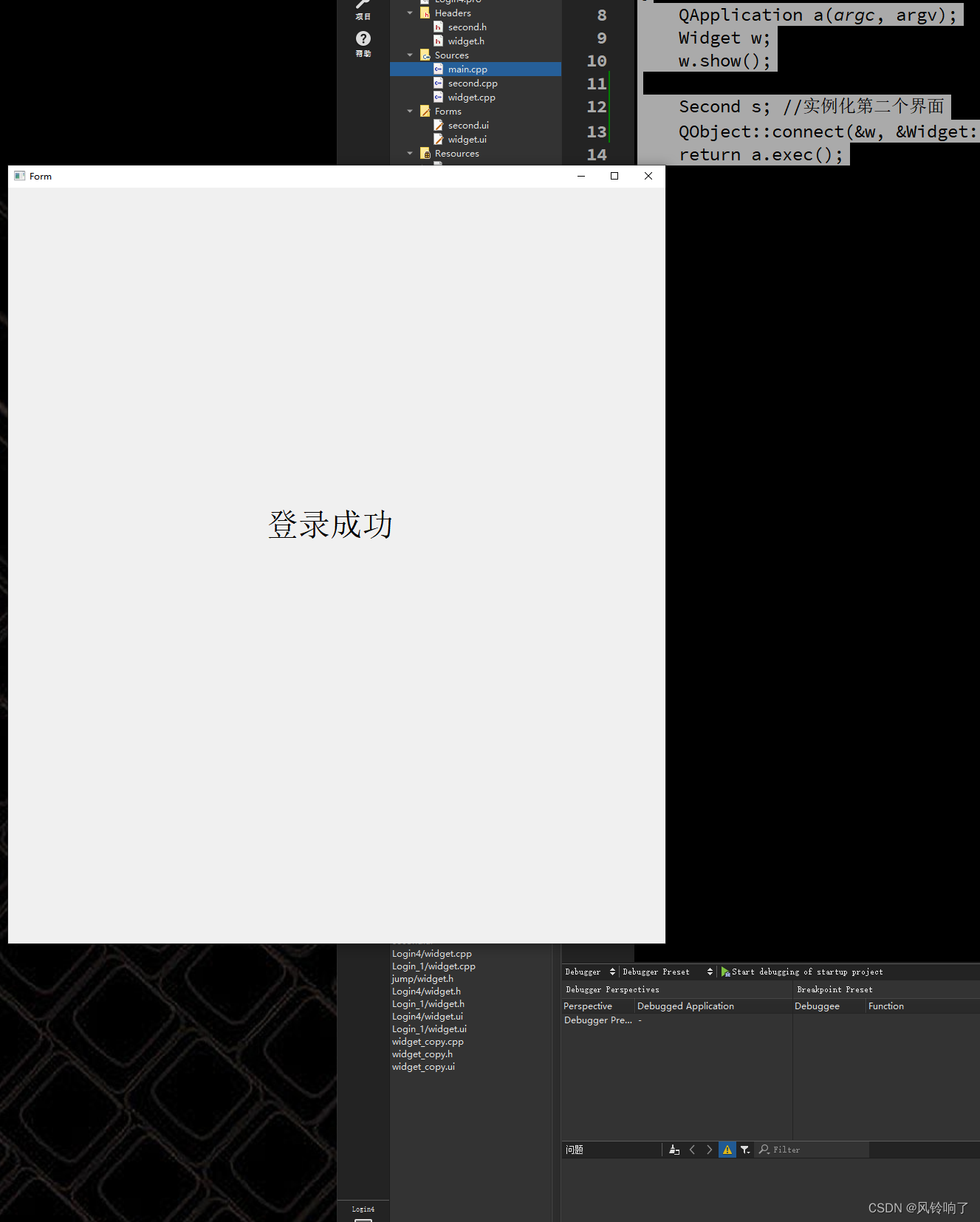
4. 如果账号密码正确,则实现登录界面关闭,另一个应用界面显示。

widget.h

#ifndef WIDGET_H
#define WIDGET_H

#include <QWidget>
#include <QMessageBox>

QT_BEGIN_NAMESPACE
namespace Ui { class Widget; }
QT_END_NAMESPACE

class Widget : public QWidget
{
    Q_OBJECT

public:
    Widget(QWidget *parent = nullptr);
    ~Widget();
signals:
    void my_signal();  //信号函数的声明
    void my_jump();  //第一个界面的跳转信号

private slots:
    void on_pushButton_2_clicked();

    void on_pushButton_3_clicked();

    void on_pushButton_clicked();

private:
    Ui::Widget *ui;
};
#endif // WIDGET_H

second.h

#ifndef SECOND_H
#define SECOND_H

#include <QWidget>

namespace Ui {
class Second;
}

class Second : public QWidget
{
    Q_OBJECT

public:
    explicit Second(QWidget *parent = nullptr);
    ~Second();

public slots:
    void jump_slot(); //第二个界面准备的槽函数

private:
    Ui::Second *ui;
};

#endif // SECOND_H

widget.cpp

#include "widget.h"
#include "ui_widget.h"

Widget::Widget(QWidget *parent)
    : QWidget(parent)
    , ui(new Ui::Widget)
{
    ui->setupUi(this);

    //将自定义的信号和Lambda表达式连接
    connect(this,&Widget::my_signal,[=](){

        //ui->resize(ui->width()+10,ui->height()+10);
    });
    //去掉头部
    this->setWindowFlag(Qt::FramelessWindowHint);

    //去掉空白部分
    this->setAttribute(Qt::WA_TranslucentBackground);
    connect(ui->lineEdit_2,SIGNAL(returnPressed()),ui->pushButton  //回车键登录
            ,SIGNAL(clicked()),Qt::UniqueConnection);

}

Widget::~Widget()
{
    delete ui;
}


void Widget::on_pushButton_2_clicked()
{
    this->close();
}

void Widget::on_pushButton_3_clicked()
{

}

void Widget::on_pushButton_clicked()
{
    QMessageBox *box = new QMessageBox();  //实例化一个box,用来弹出消息
    box->setWindowTitle("提示");

    if(QString(ui->lineEdit->text()) == "admin" && QString(ui->lineEdit_2->text()) == "123456")
    {
        box->setText("登录成功^_^");
        box->show();
        box->exec();
        this->close();
        emit my_jump(); // 触发信号
    }
    else
    {
        box->setText("账号密码错误");
        box->show();  //提示
        box->exec();  //等待用户响应
        ui->lineEdit->setText("");
        ui->lineEdit_2->setText("");
    }
}

second.cpp

#include "second.h"
#include "ui_second.h"

Second::Second(QWidget *parent) :
    QWidget(parent),
    ui(new Ui::Second)
{
    ui->setupUi(this);
}

Second::~Second()
{
    delete ui;
}

void Second::jump_slot()
{
    //显示
    this->show();
}

main.cpp

#include "widget.h"
#include "second.h"  //包含第二个头文件

#include <QApplication>

int main(int argc, char *argv[])
{
    QApplication a(argc, argv);
    Widget w;
    w.show();

    Second s; //实例化第二个界面
    QObject::connect(&w, &Widget::my_jump, &s, &Second::jump_slot);
    return a.exec();
}

LVGL高效加载外部Flash图片资源的实现与优化 本文深入探讨了在嵌入式UI开发中,如何为LVGL高效加载外部Flash中的图片资源。针对内部Flash容量不足的痛点,详细解析了LVGL的图片处理原理,并对比了内存映射与流式解码两种主流实现方案。文章重点提供了性能优化技巧与实战避坑指南,旨在帮助开发者实现流畅的图片加载体验,解决SPI Flash读取慢、内存占用高等核心挑战。 阅读详情

相关推荐

Verilog除法器(32位无符号+带符号)

32位无符号除法器设计 恢复余数法: 恢复余数除法的基本思路是从“部分余数”中减去除数,如果结果为负(不够减),则恢复原来的部分余数,商0. 寄存器使用: reg_r 存放被除数a reg_b 存放除数b reg_r 存放余数(初始清零) 具体做法: 做减法时,减数是reg_b中的除数,被减数是reg_r中的余数左移一位,最低位由reg_q(被除数)的最高位补充。为了能够判断相减结果的正...

qq_38600065的博客 1万+

Qt学习c++

Qt学习C++平台及版本day01 HelloWorld程序生成day02 分析第一个Qt程序1) main.cpp2) mainwindow.h和mainwindow.cpp 平台及版本 【qt】版本:4.5x 【vs】版本:vs2015 【语言】:c++ day01 HelloWorld程序生成 单击 Qt Creator 的菜单项文件->新建文件或项目,出现如图 1 所示的对话框。在这个对话框里选择需要创建的项目或文件的模板 对话框中选择项目类型为 Qt Widgets Application

DZD的博客 6238

Hermes Agent Windows安装教程:本地智能体离线部署实战

本地智能体(Local Agent)是一种运行在用户设备端、无需云端依赖即可响应自然语言指令并自动化执行任务的轻量级AI运行时框架。其核心原理基于配置驱动的任务监听与脚本调用机制,通过服务化驻留实现持续响应能力,技术价值在于保障数据隐私、规避API调用限制、适配内网及老旧系统环境。典型应用场景包括财务报表自动整理、科研仪器数据归档、IT资产变更通知等Windows桌面自动化需求。本文聚焦Hermes Agent这一主流开源实现,围绕Windows平台特有的服务注册、权限模型、杀软拦截、中文路径与YAML编码

weixin_34411563的博客 433

QT day3

【QTextBrowser(熟悉)】 适合多次追加append的文本显示。 带有一个可以拖动的进度条。 【QLineEdit(掌握)】 用于键盘输入字符。 部分属性: text 文字 maxLength 最大长度 echoMode 回显模式(普通、无回显、密文、密文2) readOnly 只读,个人建议使用QWidget的enabled属性代替。 placeHolderText 提示文字 【QSpinBox(熟悉)】 部分属性: minimum 最小...

haogewudi666的博客 1476

从机械臂示教到厨房做饭:ACT模仿学习如何让机器人更“人性化”?

本文探讨了ACT(Action Chunking with Transformers)模仿学习技术如何让机器人更“人性化”,特别是在厨房等复杂场景中的应用。通过动作分块(Action Chunking)和时态融合(Temporal Ensemble)技术,机器人能够像人类一样记忆和执行复杂任务,如烹饪。文章还分析了ACT在家庭场景中的落地挑战及其在康复医疗、柔性制造等领域的跨领域应用潜力。

weixin_30613343的博客 255

RISC-V内核移植实战:从零开始手把手实现RT-Thread上下文切换(附GD32VF103代码解析)

本文详细解析了在RISC-V架构上移植RT-Thread实时操作系统的核心步骤,重点聚焦于上下文切换机制的实现。通过对比ARM Cortex-M与RISC-V在中断处理和寄存器管理上的关键差异,并以GD32VF103开发板为例,手把手指导开发者完成libcpu抽象层适配、线程栈初始化以及三种上下文切换方式的代码编写与调试,为嵌入式开发者从ARM转向RISC-V平台提供了实战指南。

fern8的博客 739

QT学习和代码练习

常用方法:setParent(this)(依赖窗口)、setText("文本")、setStyleSheet("背景色")、move(100,100)(位置)、resize(150,200)(大小)、setIcon(QIcon("路径"))、setEnabled(false)(禁用)方法:this->size()(整体大小)、this->width()(宽)、this->height()(高)、this->size().width()/height()btn1->setText("第一个按钮");

Limit_yang的博客 997

Codex 桌面端自定义模型列表为空 — 修复记录

摘要:Codex桌面端首次启动正常,但二次启动后出现中文界面且模型列表丢失。问题根源在于Electron的Chromium持久化状态损坏,导致UI渲染异常。解决方案包括:1) 将config.toml中的模型路径改为绝对路径;2) 删除损坏的状态文件.codex-global-state.json;3) 清除Chromium用户数据目录AppData\Roaming\Codex\web。验证显示修改后模型功能恢复正常,重装无效的原因是卸载未清除用户数据目录。

猿小白的博客 1153

Qt creator day4练习

如果账号和密码不匹配,弹出错误对话框,给出信息”账号和密码不匹配,是否重新登录“,并提供两个按钮Yes|No,用户点击Yes后,清除密码框中的内容,继续让用户进行登录,如果用户点击No按钮,则直接关闭登录界面。“,并给出两个按钮Yes|No,用户点击Yes后,关闭登录界面,用户点击No后,关闭对话框,继续执行登录功能。完善对话框,点击登录对话框,如果账号和密码匹配,则弹出信息对话框,给出提示”登录成功“,提供一个Ok按钮,用户点击Ok后,关闭登录界面,跳转到其他界面。

M_ningee21的博客 360

手把手教您国内安装 Claude Code 并配置自定义大模型(包含New-API中转和可视化管理工具的使用)

国内免魔法畅用 Claude Code!手把手教你 Windows 安装、配置文件写法、对接阿里百炼 / DeepSeek / 智谱✨,附完整参数、正确命令、三方工具管理方案,新手一次成功!✅

XiaoqiangClub的博客 3783

网神 SecGate 3600 防火墙 app_av_import_save文件上传漏洞(含批量验证poc)

网神 SecGate 3600 防火墙 app_av_import_save文件上传漏洞(含批量验证poc)

weixin_43567873的博客 297

day01(Qt)Qt简介

Qt简介

QR70892的博客 1388

人工智能技术基础系列之:迁移学习

作者:禅与计算机程序设计艺术 1.背景介绍 随着深度学习和神经网络的快速发展,越来越多的应用场景需要处理大量的数据和复杂的任务。然而,由于计算资源、存储空间等条件的限制,传统的人工智能方法往往不能满足实际需求。因此,为了提高效率和降低成本,研究人员提出了迁移学习的概念。本篇文章将详细介绍迁移学习的基

AI天才研究院 699

Qt day01

信号和槽

weixin_61180910的博客 1313

迈瑞BS系列全自动生化分析仪LIS协议接口手册(内含HL7和ASTM)

迈瑞BS系列全自动生化分析仪LIS协议接口手册,内含HL7和ASTM)

Data-Structures-and-Algorithm-Analysis-in-Java.pdf

作者: Weiss, Mark A. 出版社: Addison Wesley Data Structures and Algorithm Analysis in Java is an “advanced algorithms” book that fits between traditional CS2 and Algorithms Analysis courses. In the old ACM Curriculum Guidelines, this course was known as CS7. This text is for readers who want to learn good programming and algorithm analysis skills simultaneously so that they can develop such programs with the maximum amo...

QT编程-day3

当创建一个项目之后,文件夹里会有6个文件。其中有一个为.pro.user文件,这个文件不属于项目源代码的一部分,它是QTCreator专属的用户定制项目设置,保存了这个项目本地化的设置。QTCreator打开项目时会读取这个设置文件,比较该项目里的文件配置与当前的项目位置等是否符合,符合就加载配置,不符合则就会重新建立一个本地化的.pro.user文件。对于链接错误时,最常遇到的就是undefine

Lady_gala的专栏 805

OV9734 DATASHEET,完整规格书

OV9734完整规格书,包括电气参数,尺寸规格,寄存器配置表等

Qt 学习记录 Day-1

下面是三个选项的含义:勾选Generate form, Qt Creator会自动创建窗体文件(form)创建完成后目录树如下打开widget.ui即可进行界面设计。

2401_84377346的博客 741

深度学习工具包 DeepLearningToolbox

深度学习工具包Deprecation notice.-----This toolbox is outdated and no longer maintained.There are much better tools available for deep learning than this toolbox, e.g. [Theano](http://deeplearning.net/software/theano/), [torch](http://torch.ch/) or [tensorflow](http://www.tensorflow.org/)I would suggest you use one of the tools mentioned above rather than use this toolbox.Best, Rasmus.DeepLearnToolbox================A Matlab toolbox for Deep Learning.Deep Learning is a new subfield of machine learning that focuses on learning deep hierarchical models of data.It is inspired by the human brain&#39;s apparent deep (layered, hierarchical) architecture.A good overview of the theory of Deep Learning theory is[Learning Deep Architectures for AI](http://www.iro.umontreal.ca/~bengioy/papers/ftml_book.pdf)For a more informal introduction, see the following videos by Geoffrey Hinton and Andrew Ng.* [The Next Generation of Neural Networks](http://www.youtube.com/watch?v=AyzOUbkUf3M) (Hinton, 2007)* [Recent Developments in Deep Learning](http://www.youtube.com/watch?v=VdIURAu1-aU) (Hinton, 2010)* [Unsupervised Feature Learning and Deep Learning](http://www.youtube.com/watch?v=ZmNOAtZIgIk) (Ng, 2011)If you use this toolbox in your research please cite [Prediction as a candidate for learning deep hierarchical models of data](http://www2.imm.dtu.dk/pubdb/views/publication_details.php?id=6284)```@MASTERSTHESIS\{IMM2012-06284, author = "R. B. Palm", title = "Prediction as a candidate for learning deep hierarchical models of data", year = "2012",}```Contact: rasmusbergpalm at gmail dot comDirectories included in the toolbox-----------------------------------`NN/` - A library for Feedforward Backpropagation Neural Networks`CNN/` - A library for Convolutional Neural Networks`DBN/` - A library for Deep Belief Networks`SAE/` - A library for Stacked Auto-Encoders`CAE/` - A library for Convolutional Auto-Encoders`util/` - Utility functions used by the libraries`data/` - Data used by the examples`tests/` - unit tests to verify toolbox is workingFor references on each library check REFS.mdSetup-----1. Download.2. addpath(genpath(&#39;DeepLearnToolbox&#39;));Example: Deep Belief Network---------------------```matlabfunction test_example_DBNload mnist_uint8;train_x = double(train_x) / 255;test_x = double(test_x) / 255;train_y = double(train_y);test_y = double(test_y);%% ex1 train a 100 hidden unit RBM and visualize its weightsrand(&#39;state&#39;,0)dbn.sizes = [100];opts.numepochs = 1;opts.batchsize = 100;opts.momentum = 0;opts.alpha = 1;dbn = dbnsetup(dbn, train_x, opts);dbn = dbntrain(dbn, train_x, opts);figure; visualize(dbn.rbm{1}.W&#39;); % Visualize the RBM weights%% ex2 train a 100-100 hidden unit DBN and use its weights to initialize a NNrand(&#39;state&#39;,0)%train dbndbn.sizes = [100 100];opts.numepochs = 1;opts.batchsize = 100;opts.momentum = 0;opts.alpha = 1;dbn = dbnsetup(dbn, train_x, opts);dbn = dbntrain(dbn, train_x, opts);%unfold dbn to nnnn = dbnunfoldtonn(dbn, 10);nn.activation_function = &#39;sigm&#39;;%train nnopts.numepochs = 1;opts.batchsize = 100;nn = nntrain(nn, train_x, train_y, opts);[er, bad] = nntest(nn, test_x, test_y);assert(er < 0.10, &#39;Too big error&#39;);```Example: Stacked Auto-Encoders---------------------```matlabfunction test_example_SAEload mnist_uint8;train_x = double(train_x)/255;test_x = double(test_x)/255;train_y = double(train_y);test_y = double(test_y);%% ex1 train a 100 hidden unit SDAE and use it to initialize a FFNN% Setup and train a stacked denoising autoencoder (SDAE)rand(&#39;state&#39;,0)sae = saesetup([784 100]);sae.ae{1}.activation_function = &#39;sigm&#39;;sae.ae{1}.learningRate = 1;sae.ae{1}.inputZeroMaskedFraction = 0.5;opts.numepochs = 1;opts.batchsize = 100;sae = saetrain(sae, train_x, opts);visualize(sae.ae{1}.W{1}(:,2:end)&#39;)% Use the SDAE to initialize a FFNNnn = nnsetup([784 100 10]);nn.activation_function = &#39;sigm&#39;;nn.learningRate = 1;nn.W{1} = sae.ae{1}.W{1};% Train the FFNNopts.numepochs = 1;opts.batchsize = 100;nn = nntrain(nn, train_x, train_y, opts);[er, bad] = nntest(nn, test_x, test_y);assert(er < 0.16, &#39;Too big error&#39;);```Example: Convolutional Neural Nets---------------------```matlabfunction test_example_CNNload mnist_uint8;train_x = double(reshape(train_x&#39;,28,28,60000))/255;test_x = double(reshape(test_x&#39;,28,28,10000))/255;train_y = double(train_y&#39;);test_y = double(test_y&#39;);%% ex1 Train a 6c-2s-12c-2s Convolutional neural network %will run 1 epoch in about 200 second and get around 11% error. %With 100 epochs you&#39;ll get around 1.2% errorrand(&#39;state&#39;,0)cnn.layers = { struct(&#39;type&#39;, &#39;i&#39;) %input layer struct(&#39;type&#39;, &#39;c&#39;, &#39;outputmaps&#39;, 6, &#39;kernelsize&#39;, 5) %convolution layer struct(&#39;type&#39;, &#39;s&#39;, &#39;scale&#39;, 2) %sub sampling layer struct(&#39;type&#39;, &#39;c&#39;, &#39;outputmaps&#39;, 12, &#39;kernelsize&#39;, 5) %convolution layer struct(&#39;type&#39;, &#39;s&#39;, &#39;scale&#39;, 2) %subsampling layer};cnn = cnnsetup(cnn, train_x, train_y);opts.alpha = 1;opts.batchsize = 50;opts.numepochs = 1;cnn = cnntrain(cnn, train_x, train_y, opts);[er, bad] = cnntest(cnn, test_x, test_y);%plot mean squared errorfigure; plot(cnn.rL);assert(er<0.12, &#39;Too big error&#39;);```Example: Neural Networks---------------------```matlabfunction test_example_NNload mnist_uint8;train_x = double(train_x) / 255;test_x = double(test_x) / 255;train_y = double(train_y);test_y = double(test_y);% normalize[train_x, mu, sigma] = zscore(train_x);test_x = normalize(test_x, mu, sigma);%% ex1 vanilla neural netrand(&#39;state&#39;,0)nn = nnsetup([784 100 10]);opts.numepochs = 1; % Number of full sweeps through dataopts.batchsize = 100; % Take a mean gradient step over this many samples[nn, L] = nntrain(nn, train_x, train_y, opts);[er, bad] = nntest(nn, test_x, test_y);assert(er < 0.08, &#39;Too big error&#39;);%% ex2 neural net with L2 weight decayrand(&#39;state&#39;,0)nn = nnsetup([784 100 10]);nn.weightPenaltyL2 = 1e-4; % L2 weight decayopts.numepochs = 1; % Number of full sweeps through dataopts.batchsize = 100; % Take a mean gradient step over this many samplesnn = nntrain(nn, train_x, train_y, opts);[er, bad] = nntest(nn, test_x, test_y);assert(er < 0.1, &#39;Too big error&#39;);%% ex3 neural net with dropoutrand(&#39;state&#39;,0)nn = nnsetup([784 100 10]);nn.dropoutFraction = 0.5; % Dropout fraction opts.numepochs = 1; % Number of full sweeps through dataopts.batchsize = 100; % Take a mean gradient step over this many samplesnn = nntrain(nn, train_x, train_y, opts);[er, bad] = nntest(nn, test_x, test_y);assert(er < 0.1, &#39;Too big error&#39;);%% ex4 neural net with sigmoid activation functionrand(&#39;state&#39;,0)nn = nnsetup([784 100 10]);nn.activation_function = &#39;sigm&#39;; % Sigmoid activation functionnn.learningRate = 1; % Sigm require a lower learning rateopts.numepochs = 1; % Number of full sweeps through dataopts.batchsize = 100; % Take a mean gradient step over this many samplesnn = nntrain(nn, train_x, train_y, opts);[er, bad] = nntest(nn, test_x, test_y);assert(er < 0.1, &#39;Too big error&#39;);%% ex5 plotting functionalityrand(&#39;state&#39;,0)nn = nnsetup([784 20 10]);opts.numepochs = 5; % Number of full sweeps through datann.output = &#39;softmax&#39;; % use softmax outputopts.batchsize = 1000; % Take a mean gradient step over this many samplesopts.plot = 1; % enable plottingnn = nntrain(nn, train_x, train_y, opts);[er, bad] = nntest(nn, test_x, test_y);assert(er < 0.1, &#39;Too big error&#39;);%% ex6 neural net with sigmoid activation and plotting of validation and training error% split training data into training and validation datavx = train_x(1:10000,:);tx = train_x(10001:end,:);vy = train_y(1:10000,:);ty = train_y(10001:end,:);rand(&#39;state&#39;,0)nn = nnsetup([784 20 10]); nn.output = &#39;softmax&#39;; % use softmax outputopts.numepochs = 5; % Number of full sweeps through dataopts.batchsize = 1000; % Take a mean gradient step over this many samplesopts.plot = 1; % enable plottingnn = nntrain(nn, tx, ty, opts, vx, vy); % nntrain takes validation set as last two arguments (optionally)[er, bad] = nntest(nn, test_x, test_y);assert(er < 0.1, &#39;Too big error&#39;);```[![Bitdeli Badge](https://d2weczhvl823v0.cloudfront.net/rasmusbergpalm/deeplearntoolbox/trend.png)](https://bitdeli.com/free "Bitdeli Badge")

C++学习笔记day52-----Qt-designer、qtcreator

designer、qtcreator

displayMessage的博客 3092

QT学习之基础Day1(自用)

1.Qt是什么? Qt(官方发音 [kju:t],音同 cute)是一个跨平台的 C++ 开发库,主要用来开发图形用户界面(Graphical User Interface,GUI)程序,当然也可以开发不带界面的命令行(Command User Interface,CUI)程序。 Qt 是纯 C++ 开发的,所以学好 C++ 非常有必要,Qt 还存在 Python、Ruby、Perl 等脚本语言的绑定, 也就是说可以使用脚本语言开发基于 Qt 的程序。开源社区就是这样,好东西就会被派生扩展,到处使用, 越来

linxiao0915的博客 1180

基于QT的智慧交通管理系统(Day3)

接上篇本文用于记录学期期末实训内容,尽可能做到保姆级别的详细步骤,跟着做准能成第一次写博客,请多担待声明:我也只是个学习一般的学生,这是记录课上老师讲的内容,我现在只能说这么做能行,但我还不清楚为什么这样做,还在努力学习中。

ShangguanLuli的博客 1166

Qt(C++)项目开发学习——day—1

qt安装 具体看下面的博客 QT creator_learning 新建项目 解释头文件——mywidgt.h 解释main.cpp 解释mywidgt.cpp #include "mywidgt.h" #include <QPushButton> #include <mypushbutton.h> #include <QDebug> //命名规范 //...

qq_40433783的博客 291

day_03_QT设计师、创造器

七、设计师的使用 案例一、使用设计师重构加法计算器 案例二、登录对话框 八、QT创造器的使用qtcreator

幻影maple的博客 604

QT5.8+VS2015环境配置(全)

1、下载你想要的QT版本        第一步是下载你想要的QT版本,我这里是下载QT5.8.0,打开链接https://www.qt.io/download/进行下载,点击“Free commercial 30-day trial and open source downloads available”,进入跳转页面时候会出现两个版本供我们选择,分别是“Commercial”和“Open So

wwwsssZheRen的博客 2万+

Qt Creator快捷键

1 .Ctrl(按住)+ Tab快速切换已打开的文件 2 .快速添加方法实体(.cpp)声明, 将光标移动到h文件中的方法声明。按Alt(按住)+ Enter,再按回车键将在cpp中添加该函数的声明。 3 .修改变量名,并应用到所有使用该变量的地方。 将光标移动到需要更改的变量上,按Ctrl + Shift + R,当前变量名称外框为红色时,表示已经已激活全局修改功能,当修改此处变量名称时...

weixin_30689307的博客 161

QT学习笔记01:Qt Creator使用,一个Qt Widget程序,信号与槽,QMainWindow类

QT就是一个框架,包含很多模块

成长的痕迹 621

我的Qt學習日記 DAY 2 Qt 開發環境

Qt 開發環境   Qt 開發環境包括三個基本部分: Qt Framework (QT庫) Qt Creator(IDE) MinGw(編譯調試)     头两个是VS2010和VS2008编译而成的Qt库, 第三个是MinGW版本Qt库, dmg结尾的两个是MacOS系统里使用的Qt库   qt-everywhere-opensource-src-

ming717330的博客 851

Qt入门教程(一):Qt使用的基本知识

Qt是一个跨平台的C++应用程序开发框架。它提供了一套丰富的工具和类库,能够帮助开发者快速开发高质量的应用程序。Qt最初由挪威公司Trolltech开发,现在由Digia公司维护和支持。跨平台性:Qt可以在多个操作系统上运行,包括Windows、macOS、Linux等。这意味着开发者可以使用同一套代码开发应用程序,而不需要为不同的平台编写不同的代码。强大的图形界面设计能力:Qt提供了丰富的图形界面设计工具和类库,开发者可以轻松地创建漂亮的用户界面。

当实力撑不起野心的时候 学习才是唯一出路 2332
上一篇: Qt creator day2练习
下一篇: Qt creator day4练习
风铃响了
博客等级 码龄4年 76粉丝 56原创
评论
成就一亿技术人!
拼手气红包6.0元
还能输入1000个字符
 
 条评论被折叠 查看
添加红包

请填写红包祝福语或标题

个

红包个数最小为10个

元

红包金额最低5元

当前余额3.43元 前往充值 >
需支付:10.00元
成就一亿技术人!
领取后你会自动成为博主和红包主的粉丝 规则
hope_wisdom
发出的红包
实付元
使用余额支付
点击重新获取
扫码支付
钱包余额 0

抵扣说明:

1.余额是钱包充值的虚拟货币,按照1:1的比例进行支付金额的抵扣。
2.余额无法直接购买下载,可以购买VIP、付费专栏及课程。

余额充值