


 本文介绍如何利用Bootstrap-Select插件结合jQuery在后台管理系统中实现选择框的模糊搜索功能。通过引入必要的CDN链接,设置HTML结构,并在JavaScript中调用插件方法,即可轻松实现增强的用户体验。
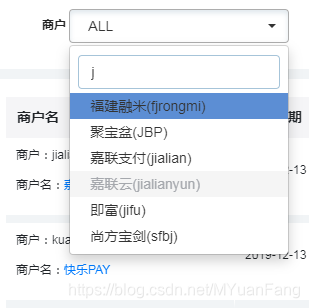
如果你是用jq开发后台管理系统可以用bootstrap-select插件去进行模糊查询:
创建一个demo,引入CDN
<!-- Latest compiled and minified CSS -->
<link rel="stylesheet" href="https://cdn.jsdelivr.net/npm/bootstrap-select@1.13.12/dist/css/bootstrap-select.min.css">

<!-- Latest compiled and minified JavaScript -->
<script src="https://cdn.jsdelivr.net/npm/bootstrap-select@1.13.12/dist/js/bootstrap-select.min.js"></script>

<!-- (Optional) Latest compiled and minified JavaScript translation files -->
<script src="https://cdn.jsdelivr.net/npm/bootstrap-select@1.13.12/dist/js/i18n/defaults-*.min.js"></script>
html中写入
<select class="selectpicker">
  <option>Mustard</option>
  <option>Ketchup</option>
  <option>Barbecue</option>
</select>
script中调用
Via JavaScript
// To style only selects with the my-select class
$('.my-select').selectpicker();
or
// To style all selects
$('select').selectpicker();
If calling bootstrap-select via JavaScript, you will need to wrap your code in a .ready() block or place it at the bottom of the page (after the last instance of bootstrap-select).
$(function () {
	$('select').selectpicker();
});





 扫一扫
扫一扫


 3300
3300

 被折叠的 条评论
为什么被折叠?
被折叠的 条评论
为什么被折叠?
 到【灌水乐园】发言





