


需求如下:
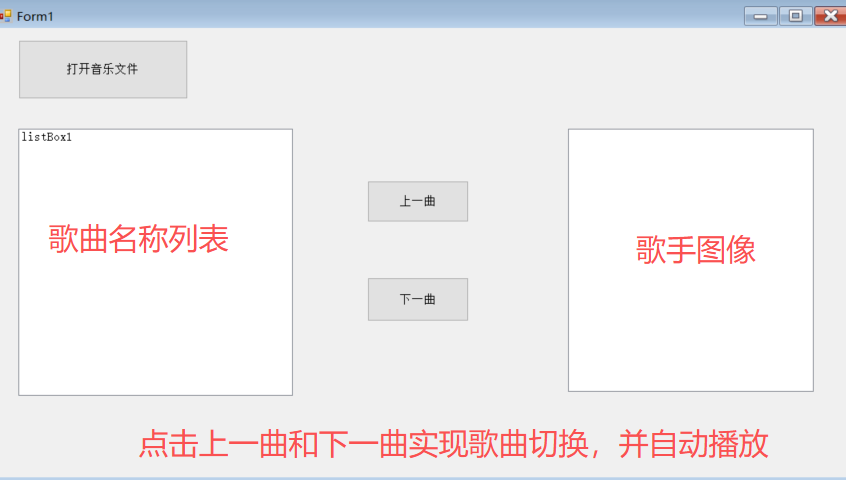
1. 点击音乐文件按钮,打开本地音乐文件,可以实现单选也可以多选音乐文件
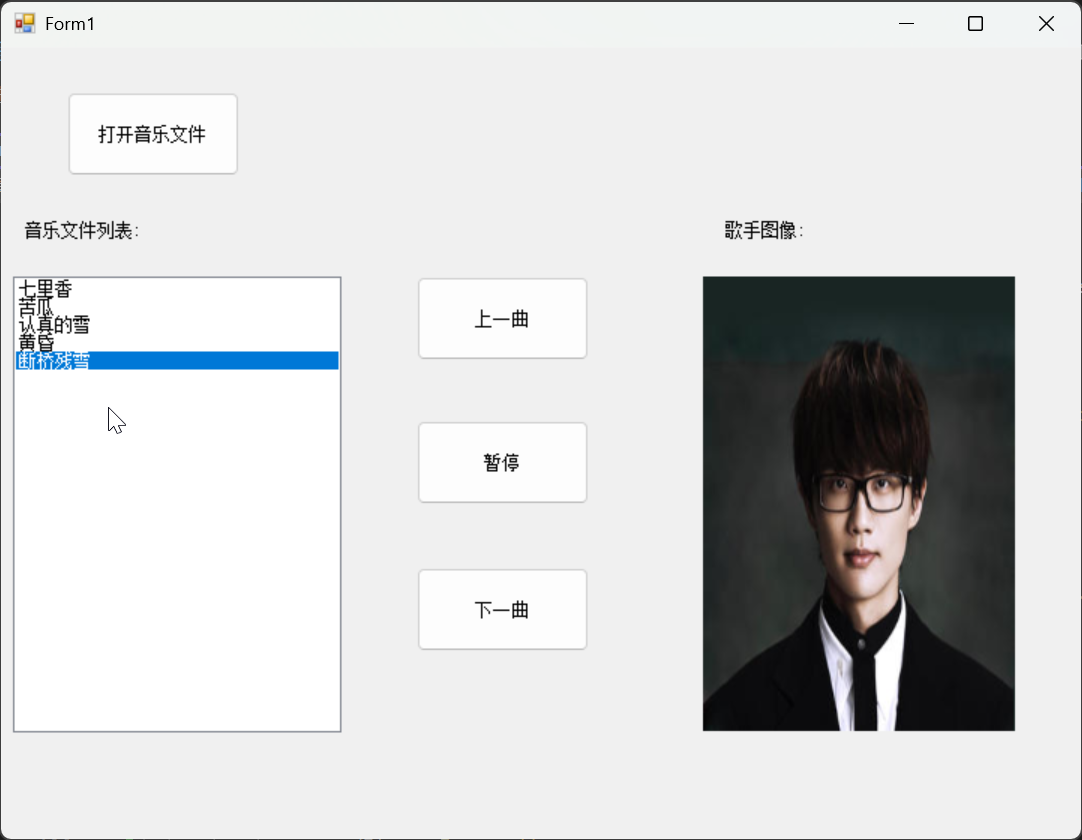
2. 当选择后音乐文件名称添加到ListBox列表框中,双击歌曲名称实现音乐播放,同时在右侧展示对应的歌手图像
3. 点击上一曲和下一曲按钮,可以实现音乐切换并自动播放,同时在右侧展示对应歌手图
像
效果预览
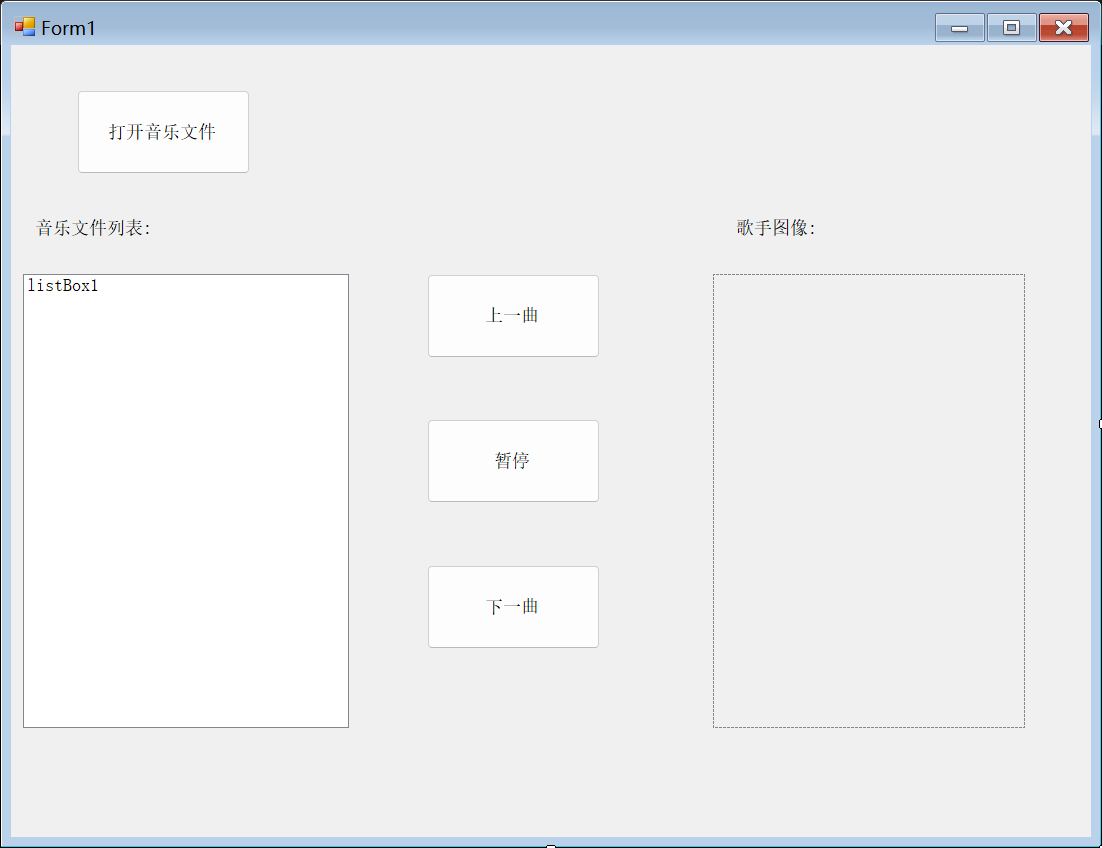
创建 Winform 项目并设计界面
编写代码实现切换逻辑
using System;
using System.Drawing;
using System.IO;
using System.Media;
using System.Windows.Forms;

namespace 第5题
{
    public partial class Form1 : Form
    {
        // 存储选中的音乐文件完整路径(替换原静态变量,避免全局污染)
        private string[] _musicPaths;
        // 存储歌手图片文件完整路径(与音乐文件一一对应)
        private string[] _singerImagePaths;
        // 当前播放的音乐索引(默认从0开始)
        private int _currentMusicIndex = 0;
        // 音乐播放器对象(仅支持WAV格式,MP3需用NAudio等第三方库)
        private readonly SoundPlayer _soundPlayer = new SoundPlayer();

        public Form1()
        {
            InitializeComponent();
            button4.Text = "播放";
        }

        // 绑定一个窗体加载事件
        private void Form1_Load(object sender, EventArgs e)
        {
            string imageFolder = "E:\\桌面\\音乐播放器案例素材\\imgs";
            //检查图片文件夹是否存在
            if (!Directory.Exists(imageFolder))
            {
                MessageBox.Show($"歌手图片文件夹不存在:{imageFolder}", "错误", MessageBoxButtons.OK, MessageBoxIcon.Error);
                return;
            }
            // 加载所有歌手图片路径
            _singerImagePaths = Directory.GetFiles(imageFolder);
            // 检查图片数量是否不为空
            if (_singerImagePaths.Length == 0)
            {
                MessageBox.Show($"歌手图片文件夹中无图片:{imageFolder}", "警告", MessageBoxButtons.OK, MessageBoxIcon.Warning);
            }
        }


        //打开音乐
        private void button1_Click(object sender, EventArgs e)
        {
            //创建文件选择对话框
            OpenFileDialog ofd = new OpenFileDialog();
            // 存储歌曲文件的完整路径
            ofd.InitialDirectory = "E:\\桌面\\音乐播放器案例素材\\mp3";
            ofd.Filter = "音乐文件|*.mp3;*.wav;*.wma|所有文件|*.*";
            ofd.Multiselect = true; // 允许多选文件
            ofd.Title = "选择音乐文件";
            //显示对话框
            if (ofd.ShowDialog() == DialogResult.OK)
            {
                // 清空原有列表
                listBox1.Items.Clear();
                // 记录新选择的音乐路径
                _musicPaths = ofd.FileNames;
                // 重置当前播放索引(新文件从第一首开始)
                _currentMusicIndex = 0;

                foreach (string filePath in _musicPaths)
                {
                    //原文件名"a七里香.wav" → 去掉扩展名→"a七里香" → 去掉第一个字符→"七里香"
                    listBox1.Items.Add(Path.GetFileNameWithoutExtension(filePath).Substring(1)); // 列表显示文件名
                }
            }
        }

        //给列表绑定双击事件 双击也播放音乐
        private void listBox1_DoubleClick(object sender, EventArgs e)
        {
            if (listBox1.SelectedIndex < 0 || _musicPaths == null || _musicPaths.Length == 0)
            {
                MessageBox.Show("请先选择音乐文件!", "提示", MessageBoxButtons.OK, MessageBoxIcon.Information);
                return;
            }
            // 更新当前播放索引为选中项
            _currentMusicIndex = listBox1.SelectedIndex;
            // 播放选中的音乐
            PlayCurrentMusic();
        }

        //上一曲
        private void button2_Click(object sender, EventArgs e)
        {
            //判断是否有音乐文件
            if (_musicPaths == null || _musicPaths.Length == 0)
            {
                MessageBox.Show("请先选择音乐文件!", "提示", MessageBoxButtons.OK, MessageBoxIcon.Information);
                return;
            }
            _currentMusicIndex--;
            if (_currentMusicIndex < 0)
            {
                _currentMusicIndex = _musicPaths.Length - 1;
            }

            listBox1.SelectedIndex = _currentMusicIndex;
            PlayCurrentMusic();
        }

        //下一曲
        private void button3_Click(object sender, EventArgs e)
        {
            //判断是否有音乐文件
            if (_musicPaths == null || _musicPaths.Length == 0)
            {
                MessageBox.Show("请先选择音乐文件!", "提示", MessageBoxButtons.OK, MessageBoxIcon.Information);
                return;
            }

            // 下一曲逻辑:索引+1,若到末尾则跳转到第一首
            _currentMusicIndex++;
            if (_currentMusicIndex >= _musicPaths.Length)
            {
                _currentMusicIndex = 0;
            }

            // 选中ListBox对应项
            listBox1.SelectedIndex = _currentMusicIndex;
            // 播放当前音乐
            PlayCurrentMusic();
        }


        //暂停
        private void button4_Click(object sender, EventArgs e)
        {
            if (_soundPlayer.IsLoadCompleted == false)
            {
                MessageBox.Show("请先选择并播放音乐!", "提示", MessageBoxButtons.OK, MessageBoxIcon.Information);
                return;
            }

            // 状态切换:暂停→播放,播放→暂停
            if (button4.Text.Equals("暂停"))
            {
                _soundPlayer.Stop(); // 暂停播放
                button4.Text = "播放";
            }
            else
            {
                _soundPlayer.Play(); // 继续播放
                button4.Text = "暂停";
            }
        }


        /// <summary>
        /// 工具方法:播放当前索引对应的音乐,并显示对应歌手图片
        /// 作用:避免上一曲/下一曲/双击列表的代码重复
        /// </summary>
        private void PlayCurrentMusic()
        {
            try
            {
                // 加载并播放当前音乐
                _soundPlayer.SoundLocation = _musicPaths[_currentMusicIndex];
                _soundPlayer.Play(); // 异步播放
                button4.Text = "暂停"; // 播放时按钮显示"暂停"

                //加载并显示对应歌手图片(音乐索引与图片索引一一对应)
                if (_singerImagePaths != null && _singerImagePaths.Length > _currentMusicIndex)
                {
                    // 释放旧图片资源,避免内存泄漏
                    if (pictureBox1.Image != null)
                    {
                        pictureBox1.Image.Dispose();
                    }
                    // 加载新图片并自适应显示
                    pictureBox1.Image = Image.FromFile(_singerImagePaths[_currentMusicIndex]);
                    pictureBox1.SizeMode = PictureBoxSizeMode.StretchImage;
                }
                else
                {
                    MessageBox.Show("当前歌曲无对应歌手图片!", "提示", MessageBoxButtons.OK, MessageBoxIcon.Information);
                }
            }
            catch (Exception ex)
            {
                // 捕获播放/图片加载异常
                MessageBox.Show($"操作失败:{ex.Message}", "错误", MessageBoxButtons.OK, MessageBoxIcon.Error);
            }
        }
        //窗体关闭事件

        private void Form1_FormClosing(object sender, FormClosingEventArgs e)
        {
            // 停止播放并释放音乐播放器
            _soundPlayer.Stop();
            _soundPlayer.Dispose();

            // 释放歌手图片资源
            if (pictureBox1.Image != null)
            {
                pictureBox1.Image.Dispose();
            }
        }
    }
}
效果演示
希望对大家有所帮助。感谢大家的关注和点赞。





 扫一扫
扫一扫


 459
459

 被折叠的 条评论
为什么被折叠?
被折叠的 条评论
为什么被折叠?
 到【灌水乐园】发言





