



 @ComponentScan注解用于自动扫描并注册组件到Spring的bean容器中。默认扫描同一包下的配置类,可配置basePackages、basePackageClasses、过滤条件等。包括includeFilters和excludeFilters,支持按注解、类型、ASPECTJ表达式、正则和自定义规则进行过滤。可使用@ComponentScans定义多个扫描规则。
@ComponentScan主要就是定义扫描的路径从中找出标识了需要装配的类自动装配到spring的bean容器中。在配置类上添加 @ComponentScan 注解。该注解默认会扫描该类所在的包下所有的配置类,相当于之前的 <context:component-scan>。@ComponentScan注解默认装配标识了@Controller,@Service,@Repository,@Component注解的类到spring容器中。
例子:
在xml文件配置的方式,我们可以这样来进行配置:

在配置类里面写包扫描:
@Configuration
@ComponentScan(value="com.hlkj")
public class SpringConfig {
    @Bean
    public Person person() {
        return new Person("lisi",20);
    }
}
我们创建PersonController、PersonService、PersonDao这几个类,分别添加了@Controller、@Service、@Repository注解:
@Controller
public class PersonController {
}

@Service
public class PersonService {
}

@Repository
public class PersonDao {
}
单元测试:
@Test
public void test01() {
    ApplicationContext applicationContext = new AnnotationConfigApplicationContext(SpringConfig.class);
    String[] definitionNames = applicationContext.getBeanDefinitionNames();
    for (String name : definitionNames) {
        System.out.println(name);
    }
}
测试结果:
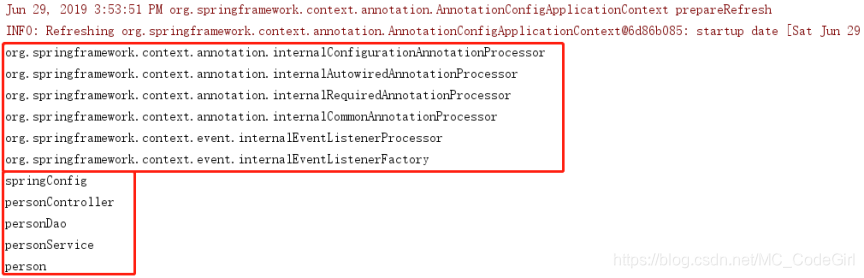
从上面的测试结果我们可以发现主配置类 SpringConfig 也是IOC容器里面的组件,也被纳入了IOC容器的管理;我们从@Configuration这个注解点进去就可以发现这个注解上也标注了@Component的这个注解,也纳入到IOC容器中作为一个组件。
@ComponentScan详细配置:
basePackages与value: 用于指定包的路径,进行扫描
basePackageClasses: 用于指定某个类的包的路径进行扫描
nameGenerator: bean的名称的生成器
useDefaultFilters: 是否开启对@Component,@Repository,@Service,@Controller的类进行检测
includeFilters: 包含的过滤条件
FilterType.ANNOTATION:按照注解过滤
FilterType.ASSIGNABLE_TYPE:按照给定的类型
FilterType.ASPECTJ:使用ASPECTJ表达式
FilterType.REGEX:正则
FilterType.CUSTOM:自定义规则
excludeFilters: 排除的过滤条件,用法和includeFilters一样
下面是includeFilters和excludeFilters的例子:
includeFilters和excludeFilters可以指定要排除哪些包或者是只包含哪些包来进行管理:里面传是一个Filter[]数组。
配置excludeFilters:
@Configuration
@ComponentScan(value = "com.hlkj", excludeFilters = {
        @ComponentScan.Filter(type= FilterType.ANNOTATION, classes = {Controller.class, Service.class})
    })
public class SpringConfig {
    @Bean
    public Person person() {
        return new Person("lisi",20);
    }
}
@Test
public void test02() {
    ApplicationContext applicationContext = new AnnotationConfigApplicationContext(SpringConfig.class);
    String[] definitionNames = applicationContext.getBeanDefinitionNames();
    for (String name : definitionNames) {
        System.out.println(name);
    }
}
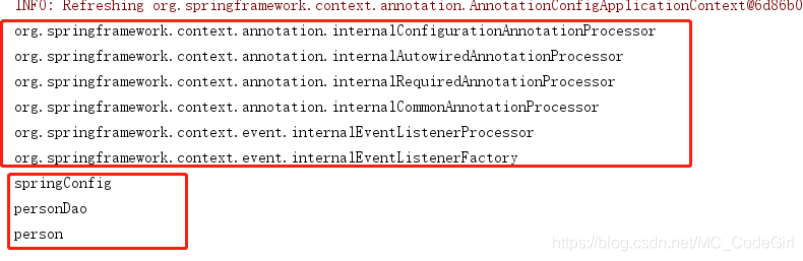
测试结果如下:这个时候,personService、personController这两个组件就已经被排除掉了,不再被IOC容器给管理。
配置includeFilters:
@Configuration
@ComponentScan(value = "com.hlkj", includeFilters = {
        @ComponentScan.Filter(type = FilterType.ANNOTATION, classes = {Controller.class})
    }, useDefaultFilters = false)
public class SpringConfig {
    @Bean
    public Person person() {
        return new Person("lisi",20);
    }
}
@Test
public void test03() {
    ApplicationContext applicationContext = new AnnotationConfigApplicationContext(SpringConfig.class);
    String[] definitionNames = applicationContext.getBeanDefinitionNames();
    for (String name : definitionNames) {
        System.out.println(name);
    }
}
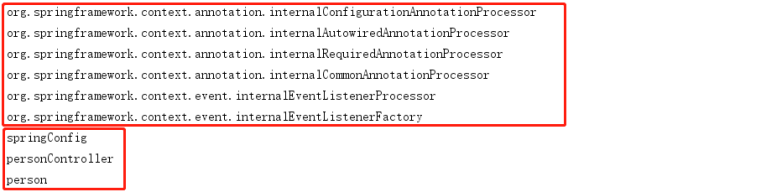
测试结果如下:只有一个bookController被纳入到IOC容器进行管理。
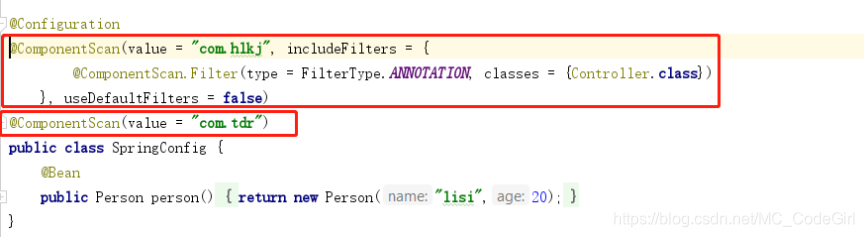
我们还可以用 @ComponentScans来定义多个扫描规则:里面是@ComponentScan规则的数组
注:@ComponentScan的常用方式
-
自定扫描路径下边带有@Controller,@Service,@Repository,@Component注解加入spring容器
-
通过includeFilters加入扫描路径下没有以上注解的类加入spring容器
-
通过excludeFilters过滤出不用加入spring容器的类
-
自定义增加了@Component注解的注解方式
-
@ComponentScan这个注解是可以重复定义的:来指定不同的扫描策略





 扫一扫
扫一扫


 1365
1365

 被折叠的 条评论
为什么被折叠?
被折叠的 条评论
为什么被折叠?
 到【灌水乐园】发言





