
box-sizing、字体图标以及绝对定位的应用

本文介绍了CSS中的`box-sizing`属性,展示了如何通过设置padding实现元素内容区域的扩展。此外,还探讨了如何从Iconfont网站下载自定义字体图标,并通过引入CSS文件和应用类名在页面中使用。最后,通过一个例子讲解了如何利用绝对定位将元素居中于父元素,详细展示了相关CSS代码和效果。

1.box- sizing

    <!DOCTYPE html>
    <html lang="en">
    <head>
        <meta charset="UTF-8">
        <meta http-equiv="X-UA-Compatible" content="IE=edge">
        <meta name="viewport" content="width=device-width, initial-scale=1.0">
        <title>box-sizing</title>
        <style>
            /*
            em:根据元素的上下文来确定它的值
            rem:根据元素的字号来设置
            padding:上、右、下、左(顺时针顺序)
			padding:一个值的时候上下左右相等,二值的时候第一个值得表示上下,第二个值表示左右。
            */
            .box {
                font-size: 30px;
                width: 200px;
                height: 200px;
                border: 2px solid;
                background-color: aquamarine;
                padding: 30px 30px 30px 300px ;
            }
        </style>
    </head>
    <body>
        <div class="box">box</div>
    </body>
    </html>
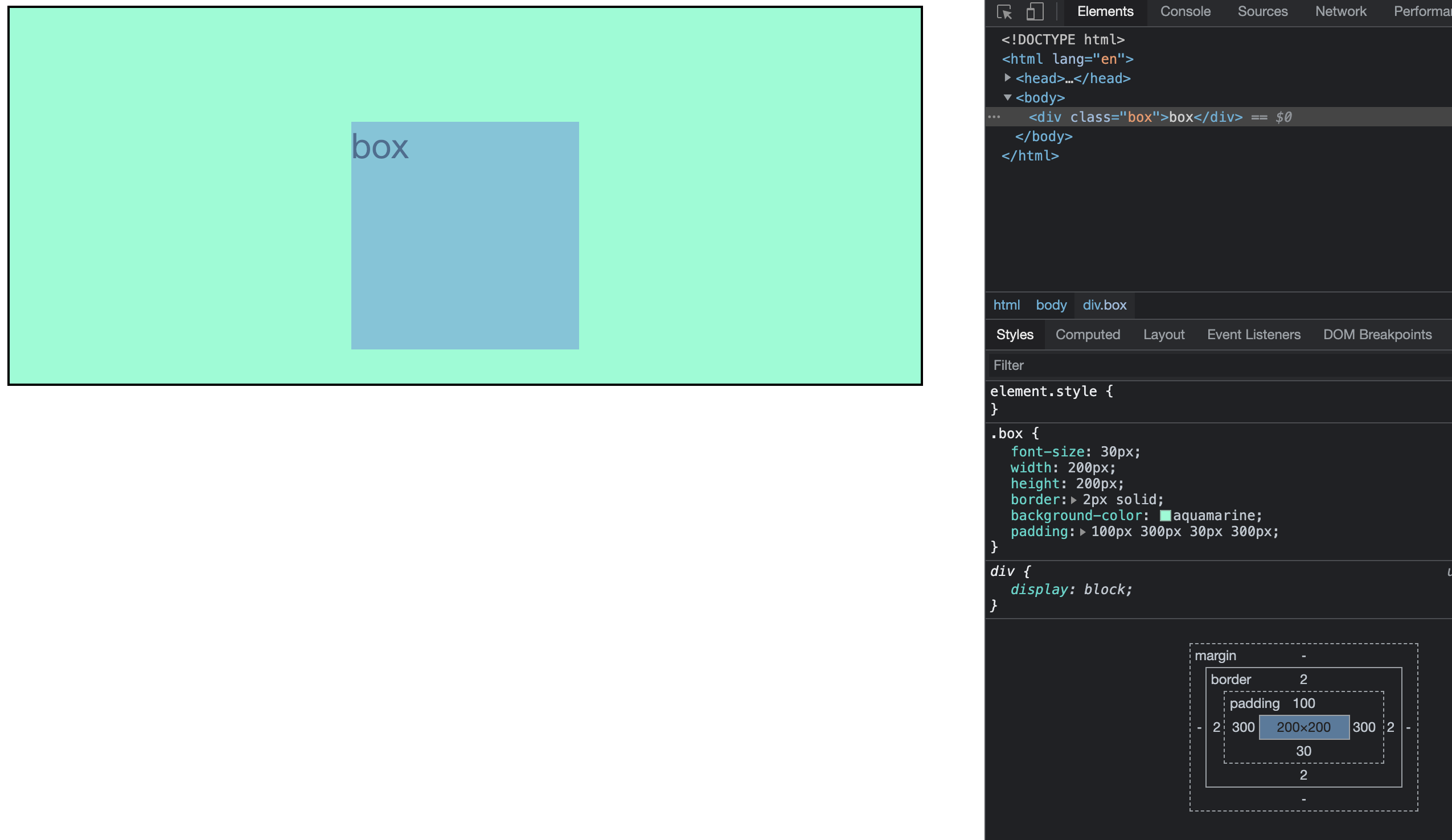
审查元素,可以看见图片右下角蓝色区域200x200px的是box,接着外面是padding、border、margin。

2.自定义字体

网址:iconfont.cn
把想要的图标添加至购物车之后添加到项目中,把项目下载到本地。
一共有三种使用方法,但第二种使用方法人最多。
用法:
1.引入css文件
关键代码: 

<link rel="stylesheet" href="font_icon/iconfont.css">

 2.挑选相应图标并获取类名,应用于页面:

<span class="iconfont icon-xxx"></span>

3.绝对定位的例子

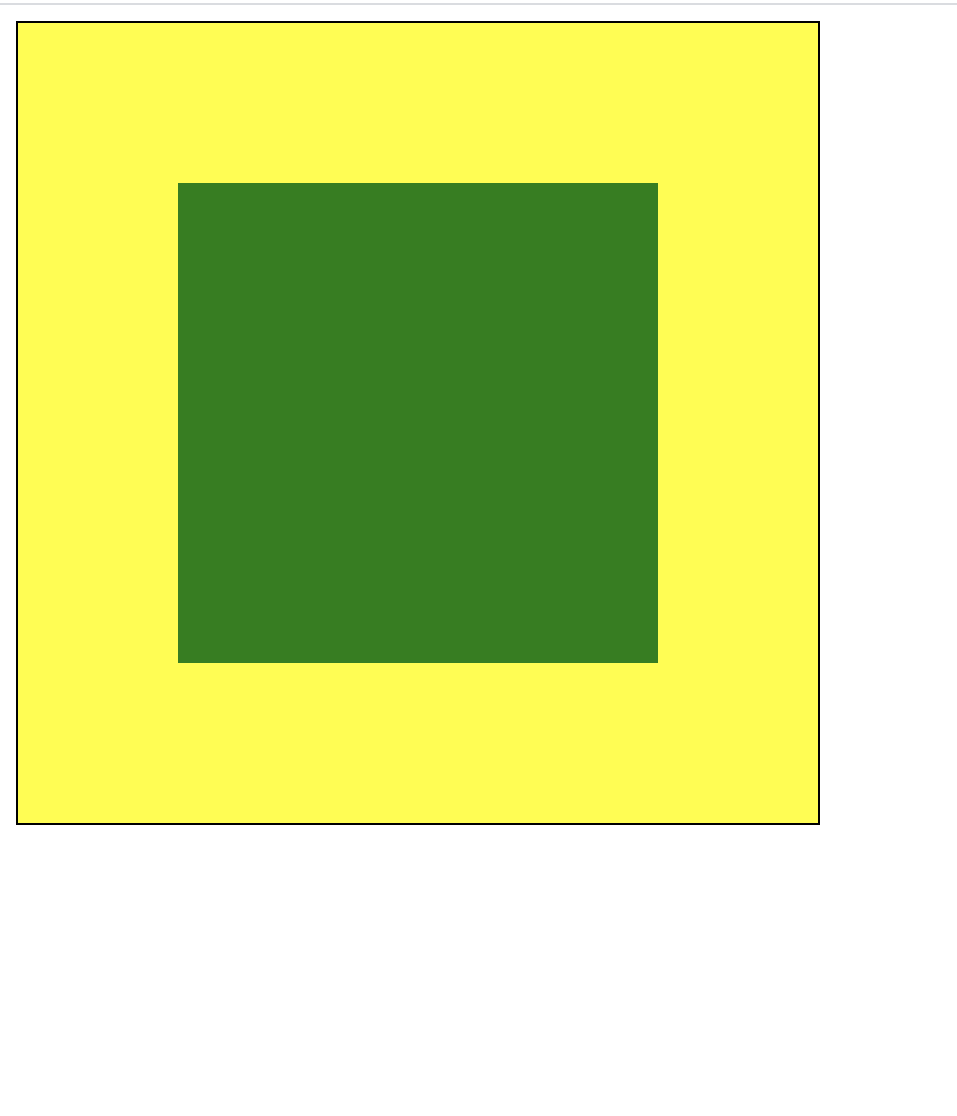
让box居中于parent

完整代码:

<!DOCTYPE html>
<html lang="en">
<head>
    <meta charset="UTF-8">
    <meta http-equiv="X-UA-Compatible" content="IE=edge">
    <meta name="viewport" content="width=device-width, initial-scale=1.0">
    <title>绝对定位的应用:块级居中</title>
    <style>
        .parent{
            border: 1px solid;
            background-color: yellow;
            width: 25em;
            height: 25em;

            /* 转为定位元素 */
            position: relative;
        }
        .box{
            width: 15em;
            height: 15em;
            background-color: green;
        }

        .box{
            /* 绝对定位 */
            position: absolute;
            /* 定位空间 */
            top: 0;
            left: 0;
            right: 0;
            bottom: 0;
            margin: auto;
        }


    </style>
</head>
<body>
    <div class="parent">
        <div class="box"></div>
    </div>
</body>
</html>

效果图:
 

import webbrowser import os from datetime import datetime def generate_search_page(): # 获取当前时间 current_hour = datetime.now().hour greeting = "早上好" if 5 <= current_hour < 9 else "上午好" # 修正后的HTML模板 html_content = f"""<!DOCTYPE html> <html lang="zh-CN"> <head> <meta charset="UTF-8"> <meta name="viewport" content="width=device-width, initial-scale=1.0"> <title>个性化起始页</title> <link href="https://cdn.jsdelivr.net/npm/tailwindcss@2.2.19/dist/tailwind.min.css" rel="stylesheet"> <style> .wallpaper-container {{ background-size: cover; background-position: center; background-attachment: fixed; transition: background-image 1s ease-in-out; min-height: 100vh; display: flex; justify-content: center; align-items: center; padding: 20px; background: linear-gradient(135deg, #1a1a2e, #16213e); }} * {{ margin: 0; padding: 0; border: 0; box-sizing: border-box; font-family: 'Segoe UI', 'Microsoft YaHei', sans-serif; }} .container {{ width: 100%; max-width: 1200px; display: flex; flex-direction: column; align-items: center; }} .logo {{ margin-bottom: 40px; text-align: center; }} .logo h1 {{ font-size: 3rem; background: linear-gradient(45deg, #64b3f4, #00c9ff); -webkit-background-clip: text; background-clip: text; color: transparent; margin-bottom: 10px; text-shadow: 0 2px 10px rgba(0, 0, 0, 0.2); }} .logo p {{ color: #a0d0ff; font-size: 1.2rem; opacity: 0.8; }} .search-container {{ width: 100%; max-width: 700px; margin-bottom: 30px; position: relative; }} #searchForm {{ position: relative; width: 100%; }} #searchInput {{ width: 100%; height: 60px; padding: 0 70px 0 30px; border-radius: 40px; background: rgba(255, 255, 255, 0.1); backdrop-filter: blur(10px); border: 1px solid rgba(255, 255, 255, 0.1); color: white; font-size: 1.1rem; box-shadow: 0 10px 30px rgba(0, 0, 0, 0.3); transition: all 0.3s ease; outline: none; }} #searchInput:focus {{ background: rgba(255, 255, 255, 0.15); box-shadow: 0 10px 40px rgba(0, 0, 0, 0.4); }} #searchInput::placeholder {{ color: rgba(255, 255, 255, 0.6); }} #confirmInput {{ position: absolute; right: 20px; top: 50%; transform: translateY(-50%); width: 40px; height: 40px; background: url('data:image/svg+xml;utf8,<svg xmlns="http://www.w3.org/2000/svg" viewBox="0 0 24 24" fill="white"><path d="M15.5 14h-.79l-.28-.27C15.41 12.59 16 11.11 16 9.5 16 5.91 13.09 3 9.5 3S3 5.91 3 9.5 5.91 16 9.5 16c1.61 0 3.09-.59 4.23-1.57l.27.28v.79l5 4.99L20.49 19l-4.99-5zm-6 0C7.01 14 5 11.99 5 9.5S7.01 5 9.5 5 14 7.01 14 9.5 11.99 14 9.5 14z"/></svg>') center no-repeat; background-size: 24px; border: none; cursor: pointer; opacity: 0.7; transition: opacity 0.3s; }} #confirmInput:hover {{ opacity: 1; }} .apps-container {{ display: grid; grid-template-columns: repeat(auto-fill, minmax(100px, 1fr)); gap: 20px; width: 100%; max-width: 1000px; margin: 20px 0 40px; }} .app-item {{ background: rgba(30, 30, 50, 0.6); backdrop-filter: blur(10px); border-radius: 20px; padding: 20px 15px; display: flex; flex-direction: column; align-items: center; gap: 12px; transition: all 0.3s; cursor: pointer; box-shadow: 0 5px 15px rgba(0, 0, 0, 0.2); }} .app-item:hover {{ transform: translateY(-5px); background: rgba(40, 40, 70, 0.7); box-shadow: 0 8px 25px rgba(0, 0, 0, 0.3); }} .app-icon {{ width: 50px; height: 50px; border-radius: 50%; display: flex; align-items: center; justify-content: center; background: rgba(100, 100, 200, 0.2); font-size: 24px; color: #64b3f4; }} .app-name {{ color: #e2e2e2; font-size: 0.9rem; text-align: center; }} .footer {{ margin-top: 20px; color: rgba(255, 255, 255, 0.5); font-size: 0.9rem; text-align: center; padding: 20px; }} .wallpaper-controls {{ margin-bottom: 20px; background: rgba(0,0,0,0.5); padding: 10px; border-radius: 10px; }} .greeting {{ color: white; font-size: 1.5rem; margin-bottom: 10px; text-align: center; }} /* 响应式设计 */ @media (max-width: 768px) {{ .logo h1 {{ font-size: 2.2rem; }} .logo p {{ font-size: 1rem; }} .apps-container {{ grid-template-columns: repeat(auto-fill, minmax(80px, 1fr)); gap: 15px; }} .app-item {{ padding: 15px 10px; }} .app-icon {{ width: 40px; height: 40px; font-size: 20px; }} }} </style> </head> <body class="wallpaper-container"> <div class="container"> <div class="wallpaper-controls"> <div class="greeting">{greeting}!请开始您的搜索</div> <div class="flex justify-center space-x-4"> <button onclick="changeWallpaper('gradient')" class="bg-blue-500 hover:bg-blue-700 text-white font-bold py-2 px-4 rounded"> 渐变背景 </button> <button onclick="changeWallpaper('nature')" class="bg-green-500 hover:bg-green-700 text-white font-bold py-2 px-4 rounded"> 自然背景 </button> </div> </div> <div class="logo"> <h1>Gopertgle</h1> <p>探索更高效的上网体验</p> </div> <div class="search-container"> <form id="searchForm" action="https://www.baidu.com/s" method="GET" target="_blank"> <input type="text" id="searchInput" name="wd" placeholder="输入关键词开始搜索..." autocomplete="off" autofocus> <button type="submit" id="confirmInput"></button> </form> </div> <div class="apps-container"> <div class="app-item" data-url="https://www.bilibili.com"> <div class="app-icon">B</div> <div class="app-name">哔哩哔哩</div> </div> <div class="app-item" data-url="https://github.com"> <div class="app-icon">G</div> <div class="app-name">GitHub</div> </div> <div class="app-item" data-url="https://www.youkuaiyun.com"> <div class="app-icon">C</div> <div class="app-name">优快云</div> </div> <div class="app-item" data-url="https://www.iconfont.cn"> <div class="app-icon">I</div> <div class="app-name">iconfont</div> </div> <div class="app-item" data-url="https://www.aliyun.com"> <div class="app-icon">A</div> <div class="app-name">阿里云</div> </div> <div class="app-item" data-url="https://www.cnki.net"> <div class="app-icon">知</div> <div class="app-name">中国知网</div> </div> <div class="app-item" data-url="https://www.xjtu.edu.cn"> <div class="app-icon">西</div> <div class="app-name">西交大</div> </div> <div class="app-item" data-url="https://www.baidu.com"> <div class="app-icon">B</div> <div class="app-name">百度</div> </div> </div> <div class="footer"> © {datetime.now().year} 个性化起始页 | 让上网更高效 </div> </div> <script> // 壁纸预设 const wallpapers = {{ 'gradient': 'linear-gradient(135deg, #1a1a2e, #16213e)', 'nature': 'url(https://images.unsplash.com/photo-1501854140801-50d01698950b)' }}; // 切换壁纸 function changeWallpaper(type) {{ document.body.style.backgroundImage = wallpapers[type]; }} // 为应用图标添加点击事件 document.querySelectorAll('.app-item').forEach(item => {{ item.addEventListener('click', function() {{ const url = this.getAttribute('data-url'); if (url) {{ window.open(url, '_blank'); }} }}); }}); // 搜索框聚焦效果增强 const searchInput = document.getElementById('searchInput'); searchInput.addEventListener('focus', () => {{ searchInput.style.transform = 'scale(1.02)'; }}); searchInput.addEventListener('blur', () => {{ searchInput.style.transform = 'scale(1)'; }}); // 初始化页面 changeWallpaper('gradient'); </script> </body> </html>""" # 保存文件 file_path = os.path.abspath('search.html') with open(file_path, 'w', encoding='utf-8') as f: f.write(html_content) # 打开浏览器 webbrowser.open(f'file://{file_path}') # 调用函数生成页面 generate_search_page() 把背景按钮放在左上角,要小点儿,背景会每隔40秒变换一个背景
最新发布
09-29
评论
添加红包

请填写红包祝福语或标题

红包个数最小为10个

红包金额最低5元

当前余额3.43前往充值 >
需支付:10.00
成就一亿技术人!
领取后你会自动成为博主和红包主的粉丝 规则
hope_wisdom
发出的红包
实付
使用余额支付
点击重新获取
扫码支付
钱包余额 0

抵扣说明:

1.余额是钱包充值的虚拟货币,按照1:1的比例进行支付金额的抵扣。
2.余额无法直接购买下载,可以购买VIP、付费专栏及课程。

余额充值


