

前端比较实用的 display: flex; flex-direction: column; align-items: center;

本文分享了14项实用的CSS技巧,包括flex布局、移动端1px实现、元素前后设置border等,帮助开发者解决常见布局与样式问题。

1.flex布局

{
display: flex;
flex-direction: column;
align-items: center;
justify-content: center
 {
   flex:1   //所有的子元素平均分配
 }
}

我写css必定会用到他,自此之后摒弃flaot,毕竟float要清楚浮动,在我看来他完全可以替代float,而且最大的好处就是对任何不确定的宽和高,我们都可以让他垂直居中对齐,想要了解的更深点,可以点击这里http://www.ruanyifeng.com/blog/2015/07/flex-grammar.html.

2.移动端1px的实现

.person-infos{
        position: relative;
        &::before{
            content: "";
            pointer-events: none; /* 防止点击触发 */
            box-sizing: border-box;
            position: absolute;
            width: 200%;
            height: 200%;
            left: 0;
            top: 0;
            border-top:1px solid #fff;
            transform:scale(0.5);
            transform-origin: 0 0;
        }
}

一定要在改元素上设置position:relative,before内设置position: absolute

3.利用::before,::after设置在元素前后设置border

{
  position: relative;
  &::before{
   content: "";
   position: absolute;
   left: 0;
   right: 0;
   top: 0;
   height: 1px;
   background: #f1f1f1;
   }
}

4.设置背景图片,并该图片在一个固定区域内,比如该区域是手机全屏区域减去头部的标题栏

{
    background: url(/static/img/login-back.e7b2e5f.jpg) no-repeat;
    position: absolute;
    top: 40px;  //顶部标题栏的高度
    left: 0;
    width: 100%;
    background-size: 100% 100%;
    height: calc(100% - 40px);
}

推荐使用的是calc,加上我们设置了背景图片的宽和高是100%,100%,这时候我们就可以看到除去头部的40px,剩下的区域都被背景图片占满了。

5.一个值得推荐的 css写的阴影效果,我一直都用,感觉非常使用大部分场景

{   
    border: none;
    border-radius: 5px;
    box-shadow: 0 12px 5px -10px rgba(0,0,0,0.1), 0 0 4px 0 rgba(0,0,0,0.1);
    -webkit-box-shadow: 0 12px 5px -10px rgba(0,0,0,0.1), 0 0 4px 0 rgba(0,0,0,0.1);
}

6.超出长度省略号

{
  overflow: hidden;
  text-overflow:ellipsis;
  white-space: nowrap;
}

7.颜色的渐变(right表示渐变的方向)

{
 background: linear-gradient(to right, #f5adc9, #f38eb6, #f977ab);
}

8.box-sizing

box-sizing: content-box|border-box|inherit;

有时候我们设置内部的div一个固定的宽高,但是由于受padding,border的影响,会让他的宽高比设置的小,如果不想这样,可以设置box-sizing:content-box,具体看http://www.w3school.com.cn/cssref/pr_box-sizing.asp

9.禁用鼠标点击

{ 
  pointer-events: none; 
}

10. input,宽改变border,并且聚焦除掉橙色的边框

{
   border:none;
   outline:none;
   border:1px solid #eee  //自定义
}

11.设置透明,并兼容浏览器

{
  filter: alpha(opacity=50); /* internet explorer */
 -khtml-opacity: 0.5; /* khtml, old safari */
 -moz-opacity: 0.5; /* mozilla, netscape */
 opacity: 0.5; /* fx, safari, opera */
}

12.除input,textarea之外,让任何标签的内容可编辑,可以在该元素上添加 contenteditable="true"

13.自定义滚动条样式


/*定义滚动条高宽及背景 高宽分别对应横竖滚动条的尺寸*/ 
::-webkit-scrollbar 
{ 
    width: 16px; 
    height: 16px; 
    background-color: #F5F5F5; 
} 
   
/*定义滚动条轨道 内阴影+圆角*/ 
::-webkit-scrollbar-track 
{ 
    -webkit-box-shadow: inset 0 0 6px rgba(0,0,0,0.3); 
    border-radius: 10px; 
    background-color: #F5F5F5; 
} 
   
/*定义滑块 内阴影+圆角*/ 
::-webkit-scrollbar-thumb 
{ 
    border-radius: 10px; 
    -webkit-box-shadow: inset 0 0 6px rgba(0,0,0,.3); 
    background-color: #555; 

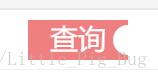
14.实现按钮一边凹陷

.btn{
  display: block;
  width: 100px;
  height: 40px;
  background-color: lightcoral;
  text-align: center;
  line-height: 40px;
  position: relative;
  color: #FFF;
  font-size: 2em;
  margin: 0 auto;
  &::after {
    content: "";
    width: 30px;
    height: 30px;
    border-radius: 30px;
    background: #fff;
    position: absolute;
    display: block;
    right: -15px;
    top: 5px;
  }
}

效果图入下:
 

目前就想到这么多,后期如果有遇到新的,会继续更新。。。。。。。。。。

<div v-show="imgPanelVisible" style="flex: 1 0 auto;height: 238px;color: #fff;padding: 10px 10px 0px 10px;background-color:#206e3c;isolation: isolate;display: flex;flex-direction: column;text-align: center;font-size: 12px;"> <div style="flex: 1 0 auto;display: flex;flex-direction: row;justify-content: flex-start;"> <div class="num0" style="flex: 0 0 auto;display: flex;flex-direction: column;justify-content: center;width: 28px;border: 1px solid #fff;border-right: 0px;position: relative;clip-path: polygon(60% 0, 100% 0, 100% 100%, 60% 100%, 0% 50%);background-color: #fff;"> <div style="margin-right: -8px;">0</div> </div> <div style="flex: 1;display: flex;flex-direction: column;"> <div style="flex: 1;border: 1px solid #fff;border-right: 0px;border-bottom: 0px;display: flex;align-items: center;justify-content: center;background-color:#d81616;"> 3</div> <div style="flex: 1;border: 1px solid #fff;border-right: 0px;border-bottom: 0px;display: flex;align-items: center;justify-content: center;background-color: #2b2b2b;"> 2</div> <div style="flex: 1;border: 1px solid #fff;border-right: 0px;display: flex;align-items: center;justify-content: center;background-color:#d81616;"> 1</div> </div> <div style="flex: 1;display: flex;flex-direction: column;"> <div style="flex: 1 0 auto;border: 1px solid #fff;border-right: 0px;border-bottom: 0px;display: flex;align-items: center;justify-content: center;background-color: #2b2b2b;"> 6</div> <div style="flex: 1 0 auto;border: 1px solid #fff;border-right: 0px;border-bottom: 0px;display: flex;align-items: center;justify-content: center;background-color:#d81616;"> 5</div> <div style="flex: 1 0 auto;border: 1px solid #fff;border-right: 0px;display: flex;align-items: center;justify-content: center;background-color: #2b2b2b;"> 4</div> </div> <div style="flex: 1;display: flex;flex-direction: column;"> <div style="flex: 1 0 auto;border: 1px solid #fff;border-right: 0px;border-bottom: 0px;display: flex;align-items: center;justify-content: center;background-color:#d81616;"> 9</div> <div style="flex: 1 0 auto;border: 1px solid #fff;border-right: 0px;border-bottom: 0px;display: flex;align-items: center;justify-content: center;background-color: #2b2b2b;"> 8</div> <div style="flex: 1 0 auto;border: 1px solid #fff;border-right: 0px;display: flex;align-items: center;justify-content: center;background-color:#d81616;"> 7</div> </div> <div style="flex: 1;display: flex;flex-direction: column;"> <div style="flex: 1 0 auto;border: 1px solid #fff;border-right: 0px;border-bottom: 0px;display: flex;align-items: center;justify-content: center;background-color:#d81616;"> 12</div> <div style="flex: 1 0 auto;border: 1px solid #fff;border-right: 0px;border-bottom: 0px;display: flex;align-items: center;justify-content: center;background-color: #2b2b2b;"> 11</div> <div style="flex: 1 0 auto;border: 1px solid #fff;border-right: 0px;display: flex;align-items: center;justify-content: center;background-color: #2b2b2b;"> 10</div> </div> <div style="flex: 1;display: flex;flex-direction: column;"> <div style="flex: 1 0 auto;border: 1px solid #fff;border-right: 0px;border-bottom: 0px;display: flex;align-items: center;justify-content: center;background-color: #2b2b2b;"> 15</div> <div style="flex: 1 0 auto;border: 1px solid #fff;border-right: 0px;border-bottom: 0px;display: flex;align-items: center;justify-content: center;background-color:#d81616;"> 14</div> <div style="flex: 1 0 auto;border: 1px solid #fff;border-right: 0px;display: flex;align-items: center;justify-content: center;background-color: #2b2b2b;"> 13</div> </div> <div style="flex: 1;display: flex;flex-direction: column;"> <div style="flex: 1 0 auto;border: 1px solid #fff;border-right: 0px;border-bottom: 0px;display: flex;align-items: center;justify-content: center;background-color:#d81616;"> 18</div> <div style="flex: 1 0 auto;border: 1px solid #fff;border-right: 0px;border-bottom: 0px;display: flex;align-items: center;justify-content: center;background-color: #2b2b2b;"> 17</div> <div style="flex: 1 0 auto;border: 1px solid #fff;border-right: 0px;display: flex;align-items: center;justify-content: center;background-color:#d81616;"> 16</div> </div> <div style="flex: 1;display: flex;flex-direction: column;"> <div style="flex: 1 0 auto;border: 1px solid #fff;border-right: 0px;border-bottom: 0px;display: flex;align-items: center;justify-content: center;background-color:#d81616;"> 21</div> <div style="flex: 1 0 auto;border: 1px solid #fff;border-right: 0px;border-bottom: 0px;display: flex;align-items: center;justify-content: center;background-color: #2b2b2b;"> 20</div> <div style="flex: 1 0 auto;border: 1px solid #fff;border-right: 0px;display: flex;align-items: center;justify-content: center;background-color:#d81616;"> 19</div> </div> <div style="flex: 1;display: flex;flex-direction: column;"> <div style="flex: 1 0 auto;border: 1px solid #fff;border-right: 0px;border-bottom: 0px;display: flex;align-items: center;justify-content: center;background-color: #2b2b2b;"> 24</div> <div style="flex: 1 0 auto;border: 1px solid #fff;border-right: 0px;border-bottom: 0px;display: flex;align-items: center;justify-content: center;background-color:#d81616;"> 23</div> <div style="flex: 1 0 auto;border: 1px solid #fff;border-right: 0px;display: flex;align-items: center;justify-content: center;background-color: #2b2b2b;"> 22</div> </div> <div style="flex: 1;display: flex;flex-direction: column;"> <div style="flex: 1 0 auto;border: 1px solid #fff;border-right: 0px;border-bottom: 0px;display: flex;align-items: center;justify-content: center;background-color:#d81616;"> 27</div> <div style="flex: 1 0 auto;border: 1px solid #fff;border-right: 0px;border-bottom: 0px;display: flex;align-items: center;justify-content: center;background-color: #2b2b2b;"> 26</div> <div style="flex: 1 0 auto;border: 1px solid #fff;border-right: 0px;display: flex;align-items: center;justify-content: center;background-color:#d81616;"> 25</div> </div> <div style="flex: 1;display: flex;flex-direction: column;"> <div style="flex: 1 0 auto;border: 1px solid #fff;border-right: 0px;border-bottom: 0px;display: flex;align-items: center;justify-content: center;background-color:#d81616;"> 30</div> <div style="flex: 1 0 auto;border: 1px solid #fff;border-right: 0px;border-bottom: 0px;display: flex;align-items: center;justify-content: center;background-color: #2b2b2b;"> 29</div> <div style="flex: 1 0 auto;border: 1px solid #fff;border-right: 0px;display: flex;align-items: center;justify-content: center;background-color: #2b2b2b;"> 28</div> </div> <div style="flex: 1;display: flex;flex-direction: column;"> <div style="flex: 1 0 auto;border: 1px solid #fff;border-right: 0px;border-bottom: 0px;display: flex;align-items: center;justify-content: center;background-color: #2b2b2b;"> 33</div> <div style="flex: 1 0 auto;border: 1px solid #fff;border-right: 0px;border-bottom: 0px;display: flex;align-items: center;justify-content: center;background-color:#d81616;"> 32</div> <div style="flex: 1 0 auto;border: 1px solid #fff;border-right: 0px;display: flex;align-items: center;justify-content: center;background-color: #2b2b2b;"> 31</div> </div> <div style="flex: 1;display: flex;flex-direction: column;"> <div style="flex: 1 0 auto;border: 1px solid #fff;border-right: 0px;border-bottom: 0px;display: flex;align-items: center;justify-content: center;background-color:#d81616;"> 36</div> <div style="flex: 1 0 auto;border: 1px solid #fff;border-right: 0px;border-bottom: 0px;display: flex;align-items: center;justify-content: center;background-color: #2b2b2b;"> 35</div> <div style="flex: 1 0 auto;border: 1px solid #fff;border-right: 0px;display: flex;align-items: center;justify-content: center;background-color:#d81616;"> 34</div> </div> <div style="flex: 0 0 23px;display: flex;flex-direction: column;"> <div style="flex: 1 0 auto;border: 1px solid #fff;border-bottom: 0px;display: flex;align-items: center;justify-content: center;"> <span style=" transform: rotate(270deg);transform-origin: center;display: inline-block;">3R</span> </div> <div style="flex: 1 0 auto;border: 1px solid #fff;border-bottom: 0px;display: flex;align-items: center;justify-content: center;"> <span style=" transform: rotate(270deg);transform-origin: center;display: inline-block;">2R</span> </div> <div style="flex: 1 0 auto;border: 1px solid #fff;display: flex;align-items: center;justify-content: center;"> <span style=" transform: rotate(270deg);transform-origin: center;display: inline-block;">1R</span> </div> </div> </div> <div style="flex: 0 0 70px;display: flex;flex-direction: row;"> <div style="flex:0 0 29px;"></div> <div style="flex: 1;border: 1px solid #fff;border-top: 0px;border-right: 0px;display: flex;flex-direction: column;justify-content: center;"> <div style="flex: 1 0 auto;display: flex;flex-direction: row;align-items: center;border-bottom: 1px solid #fff;justify-content: center;"> <div style="border: 1px solid #fff;padding: 5px 25px;">一区</div> </div> <div style="flex: 0 0 30px;display: flex;flex-direction: row;"> <div style="flex: 1;border-right: 1px solid #fff;display: flex;flex-direction: row;align-items: center;justify-content: center;"> 1-18</div> <div style="flex: 1;display: flex;flex-direction: row;align-items: center;justify-content: center;"> 单</div> </div> </div> <div style="flex: 1;border: 1px solid #fff;border-top: 0px;border-right: 0px;display: flex;flex-direction: column;justify-content: center;"> <div style="flex: 1 0 auto;display: flex;flex-direction: row;align-items: center;border-bottom: 1px solid #fff;justify-content: center;"> <div style="border: 1px solid #fff;padding: 5px 25px;">二区</div> </div> <div style="flex: 0 0 30px;display: flex;flex-direction: row;"> <div style="flex: 1;border-right: 1px solid #fff;display: flex;flex-direction: row;align-items: center;justify-content: center;"> <div style="background-color:#d81616;color: #d81616;border: 1px solid #fff;padding: 3px 13px;"> 红</div> </div> <div style="flex: 1;display: flex;flex-direction: row;align-items: center;justify-content: center;"> <div style="background-color: #2b2b2b;color: #2b2b2b;border: 1px solid #fff;padding: 3px 13px;"> 黑</div> </div> </div> </div> <div style="flex: 1;border: 1px solid #fff;border-top: 0px;display: flex;flex-direction: column;justify-content: center;"> <div style="flex: 1 0 auto;display: flex;flex-direction: row;align-items: center;border-bottom: 1px solid #fff;justify-content: center;"> <div style="border: 1px solid #fff;padding: 5px 25px;">三区</div> </div> <div style="flex: 0 0 30px;display: flex;flex-direction: row;"> <div style="flex: 1;border-right: 1px solid #fff;display: flex;flex-direction: row;align-items: center;justify-content: center;"> 双</div> <div style="flex: 1;display: flex;flex-direction: row;align-items: center;justify-content: center;"> 19-36</div> </div> </div> <div style="flex:0 0 22px;"></div> </div> <div style="flex: 0 0 60px;display: flex;flex-direction: row;align-items: center;"> <div style="flex: 0 0 auto;background-image: url(./src/assets/img/group_lp/btn_back.png);width: 35px;height: 35px;margin-right: 3px;"> </div> <div style="flex: 0 0 auto;background-image: url(./src/assets/img/group_lp/btn_clear.png);width: 35px;height: 35px;margin-right: 3px;"> </div> <div style="flex: 0 0 auto;background-image: url(./src/assets/img/group_lp/btn_x2.png);width: 35px;height: 35px;margin-right: 3px;"> </div> <div style="flex: 1 1 auto;"></div> <div style="flex: 0 0 auto;background-image: url(./src/assets/img/group_lp/btn_chip.png);width: 35px;height: 35px;margin-right: 8px;display: flex;flex-direction: row;align-items: center;justify-content: center;"> 10</div> <div style="flex: 0 0 auto;background-image: url(./src/assets/img/group_lp/btn_chip.png);width: 35px;height: 35px;margin-right: 8px;display: flex;flex-direction: row;align-items: center;justify-content: center;"> 50</div> <div style="flex: 0 0 auto;background-image: url(./src/assets/img/group_lp/btn_chip.png);width: 35px;height: 35px;margin-right: 8px;display: flex;flex-direction: row;align-items: center;justify-content: center;"> 100</div> <div style="flex: 0 0 auto;background-image: url(./src/assets/img/group_lp/btn_chip.png);width: 35px;height: 35px;display: flex;flex-direction: row;align-items: center;justify-content: center;"> ?</div> <div style="flex: 1 1 auto;"></div> <div class="iconfont" style="flex: 0 0 auto;width: 45px;height: 35px;display: flex;flex-direction: row;align-items: center;justify-content: center;border: 1px solid white;border-radius:5px;font-size: 23px;"> </div> </div> </div> 请整理这里的css, display: flex;flex-direction: row;align-items: center;justify-content: center;不用整理 其他的整理到<style>
最新发布
10-22
评论 1
成就一亿技术人!
拼手气红包6.0元
还能输入1000个字符
 
红包 添加红包
表情包 插入表情
 条评论被折叠 查看
添加红包

请填写红包祝福语或标题

红包个数最小为10个

红包金额最低5元

当前余额3.43前往充值 >
需支付:10.00
成就一亿技术人!
领取后你会自动成为博主和红包主的粉丝 规则
hope_wisdom
发出的红包
实付
使用余额支付
点击重新获取
扫码支付
钱包余额 0

抵扣说明:

1.余额是钱包充值的虚拟货币,按照1:1的比例进行支付金额的抵扣。
2.余额无法直接购买下载,可以购买VIP、付费专栏及课程。

余额充值


