


 本文详细介绍了Qt框架中布局管理器(如QVBoxLayout, QHBoxLayout, QGridLayout, QFormLayout, QStackedLayout)的使用,以及如何通过布局管理器隐式设定组件的父组件。通过示例代码展示了如何创建和管理多个窗口,以及在不同布局中添加和组织组件。同时,文章还探讨了布局管理器如何影响组件的显示和交互,如按键点击事件的响应。
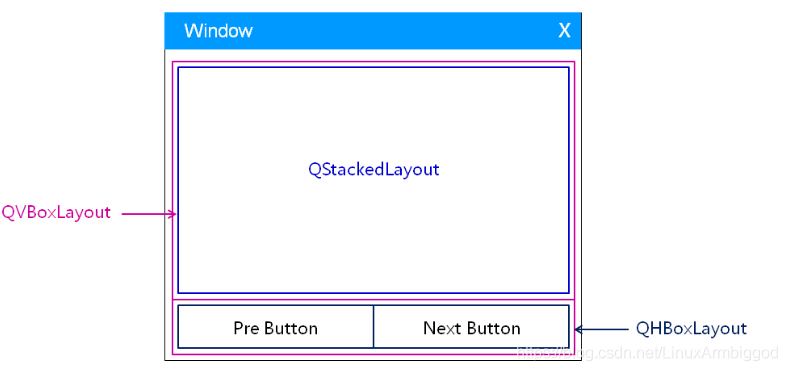
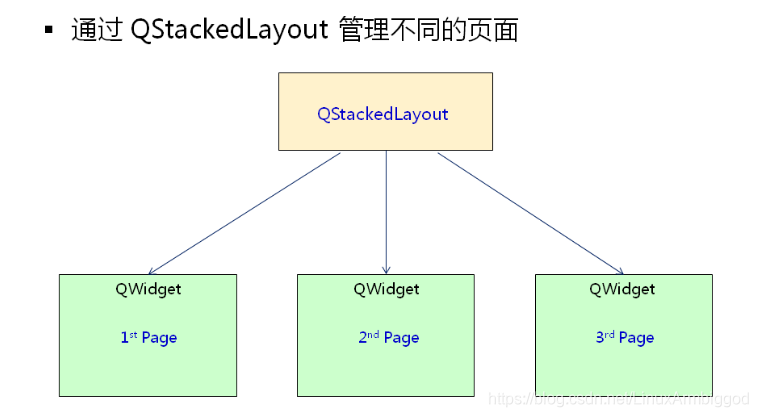
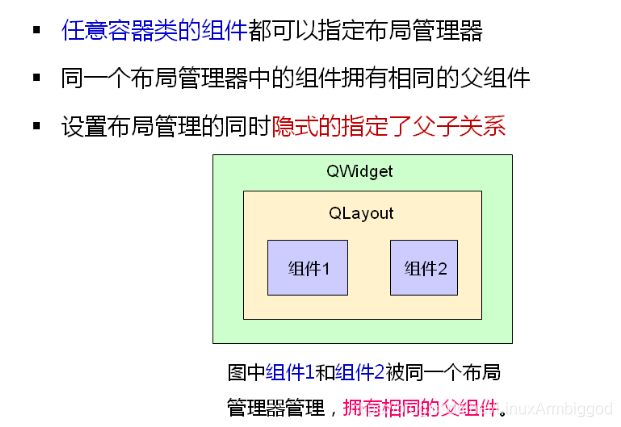
注意:
当有若干个组件被添加到同一个布局管理器中,并且将当前布局管理器设置到 某个窗口QWidget时,那么此时就隐式的指定了布局管理器中的所有组件的父组件都是 该 QWidget 组件。
Widget.h
#ifndef _WIDGET_H_
#define _WIDGET_H_
#include <QtGui/QWidget>
#include <QPushButton>
#include <QLabel>
#include <QLineEdit>
#include <QStackedLayout>
class Widget : public QWidget
{
Q_OBJECT
private:
//水平布局管理器 管理 上一个 下一个 按钮
QPushButton preBtn;//按键
QPushButton nextBtn;
//创建窗口1 :QWidget + 网格布局管理器 + QLabel
QLabel fLbl1; //标签
QLabel fLbl2;
QLabel fLbl3;
QLabel fLbl4;
//创建窗口2 :QWidget + 表单布局管理器 + QLineEdit
QLineEdit sLineEdit; //文本输入 最低0.47元/天 解锁文章






 扫一扫
扫一扫


 1699
1699

 被折叠的 条评论
为什么被折叠?
被折叠的 条评论
为什么被折叠?
 到【灌水乐园】发言





