



 本文深入讲解了时间在计算机科学中的表示方法,包括时间戳、结构体时间格式、内核时间格式之间的转换,以及如何利用关键函数如time(), gmtime(), localtime(), mktime(), strftime()等进行时间管理与格式化。
时间戳:
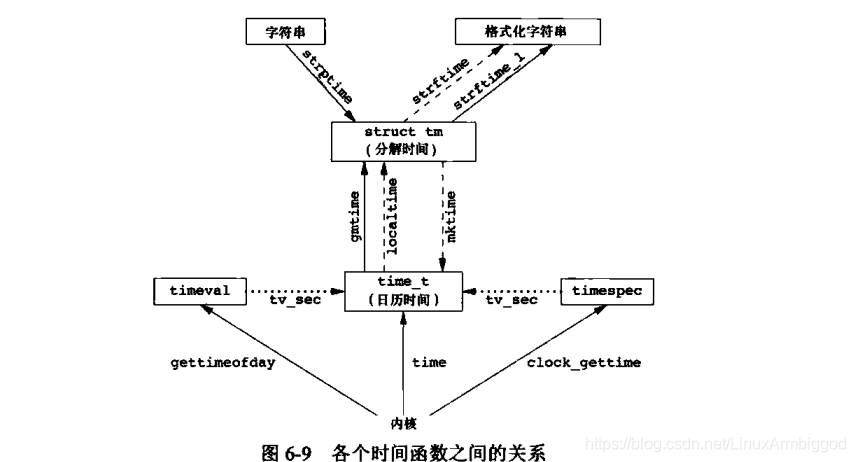
 用户喜欢用字符串格式:char *
 我们,程序员喜欢用结构体表示时间信息中的各个段:struct tm
 内核,以秒为单位: time_t
关键函数
  time_t time(time_t *tloc);
  struct tm *gmtime(const time_t *timep);
  struct tm *localtime(const time_t *timep);
  time_t mktime(struct tm *tm); 注意没有const 修饰,说明 内核可能会改变 struct tm ,即对其进行修正,进位
相互转换关系如下图:
NAME
time - get time in seconds 获取内核时间戳,以秒为单位
SYNOPSIS
#include <time.h>
time_t time(time_t *tloc);
DESCRIPTION
time() returns the time as the number of seconds since the Epoch, 1970-01-01 00:00:00 +0000 (UTC).
If tloc is non-NULL, the return value is also stored in the memory pointed to by tloc.
RETURN VALUE
On success, the value of time in seconds since the Epoch is returned. On error, ((time_t) -1) is returned, and errno is set appropriately.
用法:
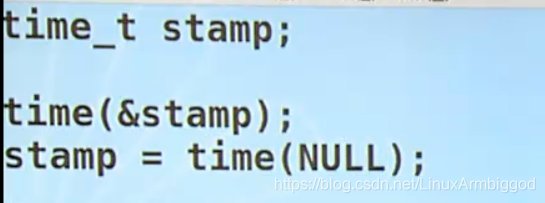
NAME
gmtime localtime mktime- transform date and time to broken-down time or ASCII
SYNOPSIS
#include <time.h>
	time_t * ---> struct tm *
	内核时间戳 time_t格式 转换为 程序员使用的时间格式 结构体格式 tm
   struct tm *gmtime(const time_t *timep);
   struct tm *localtime(const time_t *timep);

   将 结构体格式的时间信息 转化 为内核格式时间,即以秒为单位,注意 mktime 会自动调整 tm 中的时间信息,如 当tm 中的天信息 为150 ,看着天数是溢出的,那么,mktime()会对他进行修正,即当前月天数后 进位到下一个月。其他也一样。
   time_t mktime(struct tm *tm); 注意没有const 修饰,说明 内核可能会改变 struct tm


       struct tm {
           int tm_sec;    /* Seconds (0-60) */
           int tm_min;    /* Minutes (0-59) */
           int tm_hour;   /* Hours (0-23) */
           int tm_mday;   /* Day of the month (1-31) */
           int tm_mon;    /* Month (0-11) */
           int tm_year;   /* Year - 1900 */
           int tm_wday;   /* Day of the week (0-6, Sunday = 0) */
           int tm_yday;   /* Day in the year (0-365, 1 Jan = 0) */
           int tm_isdst;  /* Daylight saving time */
       };
   tm_sec    The number of seconds after the minute, normally in the range 0 to 59, but can be up to 60 to allow for leap seconds.

   tm_min    The number of minutes after the hour, in the range 0 to 59.

   tm_hour   The number of hours past midnight, in the range 0 to 23.

   tm_mday   The day of the month, in the range 1 to 31.

   tm_mon    The number of months since January, in the range 0 to 11.

   tm_year   The number of years since 1900.
NAME
strftime - format date and time,将程序员使用的时间格式,即tm 结构体格式的时间信息转换为普通用户喜欢看到的字符串格式
SYNOPSIS
#include <time.h>
/*
在结构体 const struct tm 中提取出想要的字段format ,存放在 大小为 max 的 buffer s中
*/
size_t strftime(char *s, size_t max, const char *format,
const struct tm *tm);
const char *format:

 %a     The abbreviated name of the day of the week according to the current locale.

   %A     The full name of the day of the week according to the current locale.

   %b     The abbreviated month name according to the current locale.

   %B     The full month name according to the current locale.

   %c     The preferred date and time representation for the current locale.

   %C     The century number (year/100) as a 2-digit integer. (SU)

   %d     The day of the month as a decimal number (range 01 to 31).

...
...
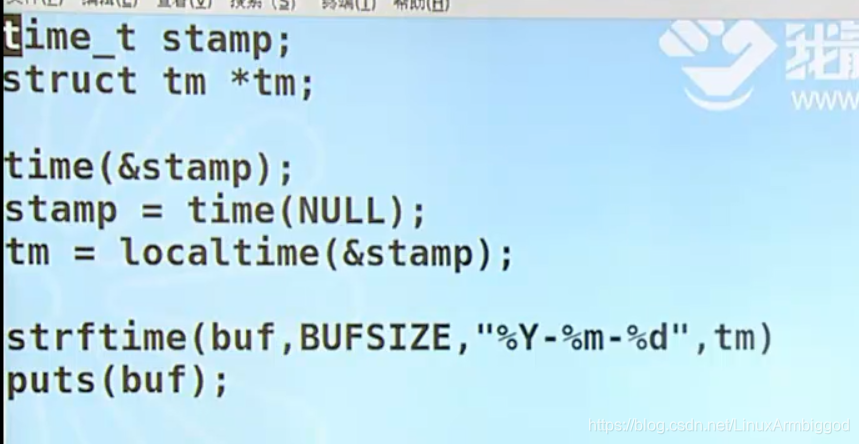
用法:





 扫一扫
扫一扫


 329
329

 被折叠的 条评论
为什么被折叠?
被折叠的 条评论
为什么被折叠?
 到【灌水乐园】发言





