


看B站刘铁猛老师视频学习WPF
1、创建WPF项目
打开VS,新建一个WPF项目,文件结构如下图:
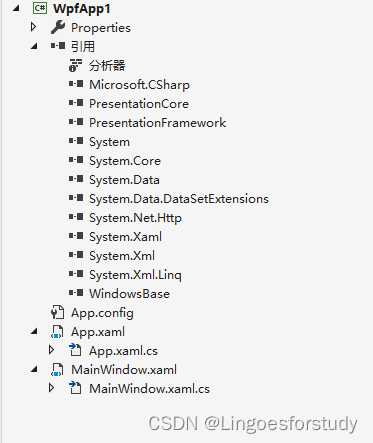
通常, xxx.xaml、 xxx.xaml.cs是一组文件,用来定义一个名称是xxx的类。
2、xxx.xaml文件剖析
<Window x:Class="WpfApp1.MainWindow"
        xmlns="http://schemas.microsoft.com/winfx/2006/xaml/presentation"
        xmlns:x="http://schemas.microsoft.com/winfx/2006/xaml"
        xmlns:d="http://schemas.microsoft.com/expression/blend/2008"
        xmlns:mc="http://schemas.openxmlformats.org/markup-compatibility/2006"
        xmlns:local="clr-namespace:WpfApp1"
        mc:Ignorable="d"
        Title="MainWindow" Height="450" Width="800">
    <Grid>

    </Grid>
</Window>
(1)x:Class="WpfApp1.MainWindow" 表示xmal文件编辑的结果合并到WpfApp1.MainWindow类中;
(2)xxx.xaml.cs文件构造方法中的InitializeComponent()方法就是xxx.xaml编辑生成的;
(3)xmlns,表示引用命名空间,相等与cs文件里的“using 命名空间”;
(4)xmlns="......"表示这是默认命名空间,对应的标签书写时不用写前缀;同一个xmal文件中只能有一个默认命名空间;
(4)xmlns:xx ,表示应用的命名空间前缀是xx,如果要使用这个命名空间的类aaa时,需要写成
<xx:aaa></xx:aaa>
(5)xmlns="http://schemas.microsoft.com/winfx/2006/xaml/presentation" 引用的命名空间与控件、布局相关;
(6)xmlns:x="http://schemas.microsoft.com/winfx/2006/xaml" 引用的命名空间与编译、解析xaml文件相关;
如果要引用的命名空间在当前程序集中,通常用xmlsn:local
xmlns:local="clr-namespace:WpfApp1"
3、App.xaml文件
App类相当与winform程序中的static class Program类;
StartupUri="MainWindow.xaml"相当于winform程序中的Application.Run(new MainView()),表示程序运行是首先打开的是哪个窗体界面
<Application x:Class="WpfApp1.App"
             xmlns="http://schemas.microsoft.com/winfx/2006/xaml/presentation"
             xmlns:x="http://schemas.microsoft.com/winfx/2006/xaml"
             xmlns:local="clr-namespace:WpfApp1"
             StartupUri="MainWindow.xaml">
    <Application.Resources>

    </Application.Resources>
</Application>





 扫一扫
扫一扫


 1704
1704

 被折叠的 条评论
为什么被折叠?
被折叠的 条评论
为什么被折叠?
 到【灌水乐园】发言





