





CodeGate 网关 高效 Http 转发工作
码本服务项目
想在公网环境下轻松承载转发请求,IPv4 和 IPv6 都不在话下,就得靠它!
目录
文章目录
1. 什么是 CodeGate
CodeGate 是一个为了 HTTP 请求转发的网关,它的存在可以让您忽视需要自部署安全证书和域名的成本!
2. 为什么要选择 CodeGate
- 我们提供安全证书和转发服务,如果您没有安全证书,则这是一个不错的选择
- 我们提供IPV4/IPV6双协议支持,能够实现两种网络环境下的 HTTP 转发
- 我们提供多种价格模式,您可以根据需要来选择您期望的价位和转发数据量
- 我们支持多种回复,多种方法的转发,包括但不限于 GET POST PUT DELETE PATCH!
- 我们支持域匹配检测,即使您的 sk 和 id 泄露 也无需担心安全问题!
3. 如何使用 CodeGate
3.1 购买 API 网关服务 或 使用试用 sk
我们提供了一个限时限量的使用凭证,您可以使用下面的信息来进行试用
试用ID:59
试用sk:2668569278496041261
你可以在下面选择不同的价位进行服务的购买,能够有效的提高您的服务安全性!例如您要使用域校验!或者您需要更稳定的服务!
- 3元/200MB每月:https://shop.lingyuzhao.top/product/20
- 8元/500MB每月:https://shop.lingyuzhao.top/product/21
- 20元/1GB每月 :https://shop.lingyuzhao.top/product/22
3.2 直接使用 url 进行API
我们的服务中支持多种转发方法,在这里将进行一些展示,在这里准备了一个测试 API,下面是 API 的代码和地址!
3.2.1 准备了一个需要被测试的目标 API
下面展示的是我们准备的测试 API
@RestController
@ResponseBody
public class Handler {

    /**
     * @return 您测试时候使用的方法!
     */
    @RequestMapping("/test")
    public ResponseEntity<?> test(HttpServletRequest httpServletRequest, @RequestBody(required = false) String json) {
        JSONObject parameterMap = JSONObject.from(httpServletRequest.getParameterMap());
        String origin = httpServletRequest.getHeader("codeBookSourceOrigin");
        if (origin == null) {
            origin = "非 CodeGate 的请求,您可以将本请求阻拦!";
        } else if (origin.isEmpty()) {
            origin = "直接访问,未获取到域!";
        }
        return ResponseEntity.ok(
                "来源:" + origin +
                "; you method = " + httpServletRequest.getMethod() +
                "; you params = " + parameterMap +
                "; you body = " + json
        );
    }
}
这个 API 对应的路径是 http://192.168.9.106:8080/test 当我们直接访问之后,有如下结果
curl -X GET http://192.168.9.106:8080/test

来源:非 CodeGate 的请求,您可以将本请求阻拦!; you method = GET; you params = {}; you body = null
3.3 正式转发
刚刚我们准备了一个测试API,这个API是一个没有 https 的服务,也是我们的目标站点,接下来我们将演示使用码本网关进行转发
转发的时候其实就是访问了一个 API,格式如下
https://api.get.lingyuzhao.top:8081/api/forward?CodeGateSk={您的sk}&CodeGateId={您的id}&targetApiUrl={目标Url(支持参数)}&其它参数=值&...
3.3.1 GET 无参访问
curl -X GET "https://api.get.lingyuzhao.top:8081/api/forward?CodeGateSk=2668569278496041261&CodeGateId=59&targetApiUrl=http://192.168.9.106:8080/test"

来源:直接访问,未获取到域!; you method = GET; you params = {"CodeGateSk":["2668569278496041261"],"CodeGateId":["59"],"targetApiUrl":["http://192.168.9.106:8080/test"]}; you body = null
3.3.2 GET 有参数访问
参数直接放到请求中就可以,网关会自动的将参数映射到您的目标主机!
curl -X GET "https://api.get.lingyuzhao.top:8081/api/forward?CodeGateSk=2668569278496041261&CodeGateId=59&targetApiUrl=http://192.168.9.106:8080/test&p1=123123"

来源:直接访问,未获取到域!; you method = GET; you params = {"CodeGateSk":["2668569278496041261"],"CodeGateId":["59"],"targetApiUrl":["http://192.168.9.106:8080/test"],"p1":["123123"]}; you body = null
3.3.3 Post 无参访问
curl -X POST "https://api.get.lingyuzhao.top:8081/api/forward?CodeGateSk=2668569278496041261&CodeGateId=59&targetApiUrl=http://192.168.9.106:8080/test"

来源:直接访问,未获取到域!; you method = POST; you params = {"CodeGateSk":["2668569278496041261"],"CodeGateId":["59"],"targetApiUrl":["http://192.168.9.106:8080/test"]}; you body = null
3.3.4 Post 有参数访问
参数直接放到请求中就可以,网关会自动的将参数映射到您的目标主机!
curl -X POST "https://api.get.lingyuzhao.top:8081/api/forward?CodeGateSk=2668569278496041261&CodeGateId=59&targetApiUrl=http://192.168.9.106:8080/test&p1=123123"

来源:直接访问,未获取到域!; you method = POST; you params = {"CodeGateSk":["2668569278496041261"],"CodeGateId":["59"],"targetApiUrl":["http://192.168.9.106:8080/test"],"p1":["123123"]}; you body = null
3.3.5 Post 携带请求体 访问
curl -X POST "https://api.get.lingyuzhao.top:8081/api/forward?CodeGateSk=2668569278496041261&CodeGateId=59&targetApiUrl=http://192.168.9.106:8080/test?p1=123123" -H "Content-Type: application/json"  -d '{"p1":123123}'

来源:直接访问,未获取到域!; you method = POST; you params = {"p1":["123123?CodeGateSk=2668569278496041261"],"CodeGateId":["59"],"targetApiUrl":["http://192.168.9.106:8080/test?p1=123123"]}; you body = '{p1:123123}'
3.3.6 JS 访问网关 与 跨域访问域检测
在 JS 中调用网关就会触发跨域检测,
    // 定义目标URL和参数
    const url = new URL('https://api.get.lingyuzhao.top:8081/api/forward');
    const params = {
        CodeGateSk: '2668569278496041261',
        CodeGateId: '59',
        "其它参数名字": "其它参数的值",
        targetApiUrl: 'http://192.168.9.106:8080/test'
    };

    // 将参数添加到URL上
    Object.keys(params).forEach(key => url.searchParams.append(key, params[key]));

    // 定义请求选项
    const requestOptions = {
        method: 'GET', // *GET, POST, PUT, DELETE.
        headers: {
            'Content-Type': 'application/json'
        },
    };

    // 使用 fetch 发起请求
    fetch(url, requestOptions)
        // 这里是简单的将信息展示到页面
        .then(async response => document.body.innerText = await response.text())
        .then(data => console.log(data)) // 打印数据到控制台
        .catch(error => console.error('Error:', error)); // 捕获并打印错误信息
下面是页面的截图

4. 如果我需要放到前端指向网关 sk 和 id 泄露导致的问题
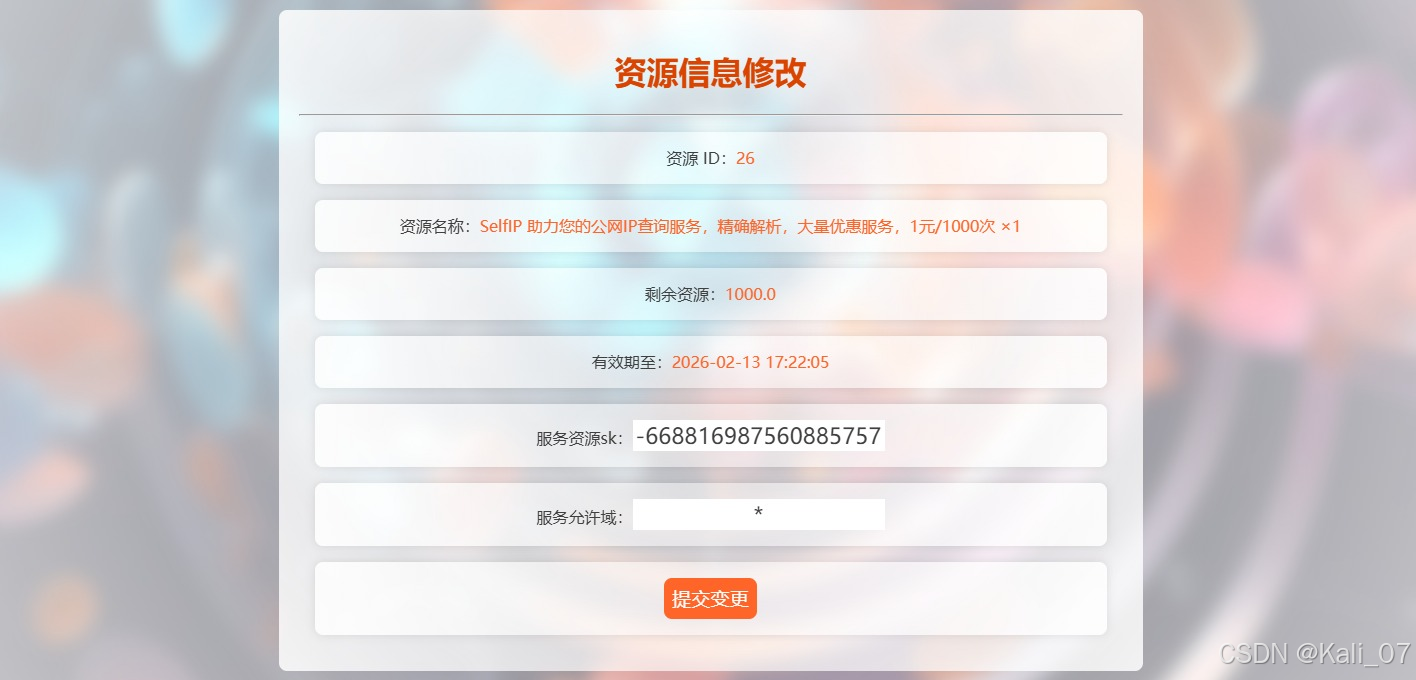
您无需担心此问题,可以前往您的商城资源页面将其中的服务允许域修改!
例如我将其修改为 *.lingyuzhao.top 就只有 lingyuzhao.top 的页面可以使用本服务,直接调用都是不可以访问的!





 扫一扫
扫一扫


 1443
1443

 被折叠的 条评论
为什么被折叠?
被折叠的 条评论
为什么被折叠?
 到【灌水乐园】发言





